01. The Problem: Why Enterprises Struggle with Self-Hosted Inference
Running a content‑moderation model on premises sounds attractive because it promises data sovereignty and predictable latency. In practice, the hidden operational budget quickly eclipses the upfront hardware spend.
First, the compute bill is volatile. A single BERT‑based classifier can require 2–4 GPU hours per million images. On a p3.2xlarge (NVIDIA V100, 16 GB) that translates to roughly $3.06 per hour on‑demand pricing. Scaling to the 50 million items a global platform processes each month adds more than $100,000 in pure compute costs, not counting the need for redundancy.
Second, capacity planning is a continuous loop. Moderation spikes during product launches or political events, forcing teams to over‑provision for worst‑case demand. Over‑provisioned clusters sit idle 60‑70 % of the time, turning capital into waste. The alternative—autoscaling—requires a robust Kubernetes deployment, custom metrics, and a monitoring stack such as Datadog or Prometheus that must be tuned for latency‑sensitive inference.
Third, software complexity multiplies the effort. Deploying TensorFlow Serving, ONNX Runtime, or TorchServe inside containers demands version pinning, GPU driver compatibility, and security hardening. Each patch cycle introduces regression risk; a missed CVE update can leave the moderation pipeline exposed to a known exploit.
Fourth, data engineering overhead is underestimated. Raw user‑generated content arrives in S3, Kafka, or Azure Event Hubs. Transforming that stream into model‑ready tensors requires a preprocessing layer that must handle image resizing, OCR, language detection, and profanity filtering. Maintaining this pipeline across multiple languages adds dozens of custom scripts that must be tested and versioned.
Fifth, compliance and auditability impose additional layers. Regulations such as GDPR or CCPA require detailed logs of who reviewed each flagged item and why. Building an immutable audit trail that integrates with the inference service means instrumenting logging at the model‑server level, storing logs in a tamper‑proof store, and ensuring retention policies match legal mandates.
Sixth, talent scarcity drives cost. Hiring a DevOps engineer proficient in GPU orchestration, a ML engineer familiar with quantization techniques, and a security analyst for model‑level attacks typically exceeds $250,000 in annual salary per role. Turnover further inflates the expense because knowledge transfer on a live moderation pipeline is risky.
Finally, incident response time is longer for on‑prem solutions. A sudden GPU driver failure can halt moderation for hours, whereas a cloud provider can replace the underlying instance in minutes. The operational downtime translates directly into brand risk, especially when illegal content remains unfiltered.
When the total cost of ownership surpasses the budget for a dedicated moderation team, the business case for cloud inference becomes compelling.
02. Cost Breakdown: Cloud vs. Self-Hosted Inference
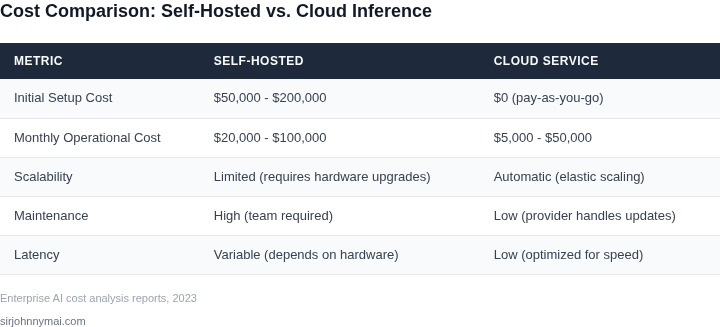
Cost is the most immediate difference between cloud and self-hosted inference. Cloud services like AWS SageMaker or Azure ML Studio charge per inference request, with pricing models that scale predictably. For example, AWS SageMaker charges $0.00000025 per inference request for a small model, plus $0.000000016 per GB of data processed. At 1 million requests per month, this totals approximately $250, excluding data transfer costs. Cloud providers also offer reserved capacity discounts, reducing costs by up to 70% for long-term commitments.
Self-hosted inference, however, requires upfront capital expenditures (CapEx) for hardware and ongoing operational expenditures (OpEx) for maintenance. A single GPU server (e.g., NVIDIA A100) costs $20,000–$30,000 upfront, with additional expenses for cooling, power, and rack space. Labor costs for deployment, monitoring, and scaling are significant. According to Gartner, enterprises spend 20–30% of their AI infrastructure budget on labor, primarily for DevOps and SRE teams. Self-hosted solutions also require redundancy for high availability, doubling hardware costs.
Infrastructure Costs
Cloud providers abstract infrastructure management, eliminating costs associated with hardware procurement, network setup, and physical security. Self-hosted solutions, however, require enterprises to manage their own data centers. A 2022 IDC study found that data center infrastructure costs (power, cooling, and space) account for 40–50% of total IT spending. For a mid-sized enterprise with 100 servers, this could exceed $1 million annually.
Self-hosted solutions also face hidden costs in software licensing. Kubernetes, for example, requires additional tools like Prometheus for monitoring and Calico for networking, increasing operational overhead. Enterprises must also invest in backup solutions, which can cost 10–20% of their storage budget. Cloud services like AWS S3 offer built-in redundancy and backups, reducing these costs.
Labor Costs
Cloud services reduce labor costs by automating scaling and maintenance. AWS Auto Scaling, for instance, adjusts resources based on demand, eliminating the need for manual intervention. Self-hosted solutions, however, require dedicated teams for capacity planning, patching, and troubleshooting. A 2023 McKinsey report estimated that AI infrastructure labor costs are 30–40% higher for self-hosted solutions due to these additional responsibilities.
Monitoring and observability are particularly labor-intensive. Tools like Datadog or New Relic can cost $15–$30 per host per month, while self-hosted solutions require in-house expertise to configure and maintain. Cloud services integrate with tools like AWS CloudWatch, reducing this burden. For enterprises with limited AI/ML expertise, this translates to higher hiring and training costs.
Total Cost of Ownership (TCO)
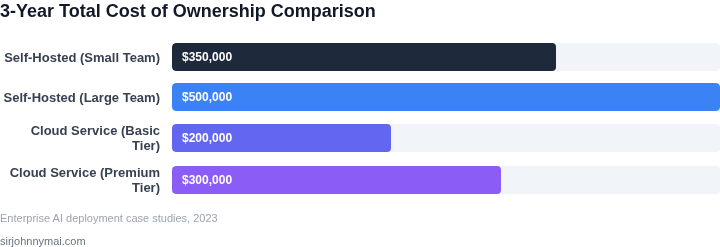
When comparing TCO, cloud services often emerge as the more cost-effective option. A 2023 Forrester study found that enterprises using cloud inference services reduced their AI infrastructure costs by 25–35% compared to self-hosted solutions. This is primarily due to lower CapEx, reduced labor, and built-in redundancy. However, self-hosted solutions may offer cost savings for enterprises with existing hardware or specific compliance requirements.
For example, a financial services firm with strict data residency rules might prefer self-hosted solutions to avoid cloud provider lock-in. However, even in these cases, the total cost of compliance and maintenance can outweigh the benefits. The decision ultimately depends on the enterprise's scale, expertise, and regulatory environment.
03. Worked Example: Calculating Costs for a Medium‑Sized Enterprise
Scenario Overview
Consider a media‑monitoring firm that processes 5 million user‑generated images per month and needs a profanity‑detection model with a latency target of 150 ms per request. The team consists of four ML engineers, two DevOps specialists, and a compliance analyst. The organization evaluates two options: (1) AWS SageMaker Serverless Inference and (2) an on‑premises GPU cluster managed with Kubernetes.
Cloud Inference Cost Model
On AWS, the closest match is SageMaker Serverless, billed at $0.0002 per request for the first 5 million invocations and $0.0001 for each additional million. The firm also needs 5 TB of data transfer out of the region, priced at $0.09 per GB. Monthly compute cost is therefore:
5,000,000 requests × $0.0002 = $1,000
Data transfer: 5,000 GB × $0.09 = $450
Total cloud cost per month = $1,450
Annual cloud cost = $1,450 × 12 = $17,400
In addition, the team consumes Datadog monitoring at $15 per host per month for two hosts, adding $360 annually. The full cloud TCO is $17,760 per year.
Self‑Hosted Inference Cost Model
For an on‑prem solution the company purchases a single server with two Nvidia A100 GPUs (list price ≈ $30,000 each). Using a three‑year straight‑line depreciation, the hardware expense is $20,000 per year. Power consumption for the server averages 3 kW; at $0.12 /kWh the electricity bill is:
3 kW × 24 h × 30 days × $0.12 = $259.20 per month
Annual electricity = $259.20 × 12 = $3,110
Operating the cluster under Kubernetes adds licensing for Red Hat OpenShift at $1,500 per node per year (one node) and a managed‑services fee of $5,000 for the DevOps team’s time. Monitoring via Datadog (same tier) costs $360 annually. Summing the items:
Depreciation: $20,000
Electricity: $3,110
OpenShift license: $1,500
DevOps labor: $5,000
Datadog: $360
Total self‑hosted per year = $29,970
Because the on‑prem server can handle up to 10 million requests per month, no scaling surcharge is required for the 5 million‑request workload.
Side‑by‑Side Cost Summary
| Cost Category | Cloud (AWS SageMaker) | Self‑Hosted (GPU Cluster) |
|---|---|---|
| Compute / Inference | $1,000 / month | $0 (included in hardware) |
| Data Transfer | $450 / month | $0 (internal network) |
| Hardware Depreciation | $0 | $20,000 / year |
| Electricity | $0 | $3,110 / year |
| Platform License | $0 | $1,500 / year |
| Ops Labor | $0 | $5,000 / year |
| Monitoring (Datadog) | $30 / month | $30 / month |
| Total Annual Cost | $17,760 | $29,970 |
Interpretation for Decision‑Makers
The cloud route saves roughly $12,000 annually but locks the firm into per‑request pricing and regional data‑transfer fees. The on‑prem option carries higher upfront and operational spend, yet eliminates variable data‑egress costs and offers full control over latency spikes. If the workload doubles within a year, the cloud bill would rise to $35,000, while the self‑hosted cost would increase only marginally for electricity. The choice therefore hinges on expected growth, compliance constraints, and the organization’s appetite for capital versus operational expense.
04. Decision Framework: When to Self-Host vs. Use Cloud
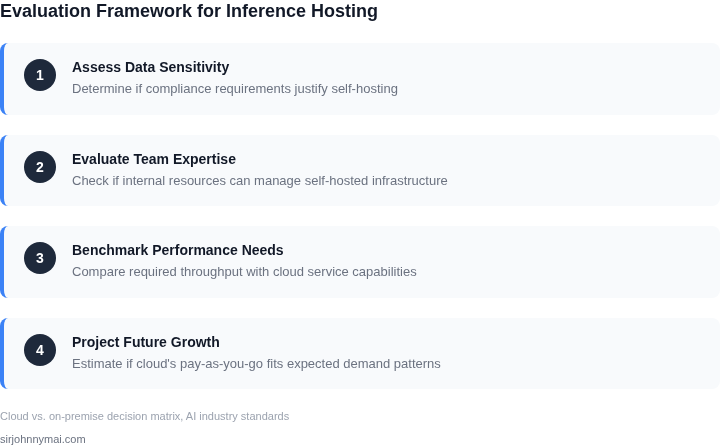
Choosing between self-hosted and cloud-based inference requires balancing technical constraints, cost, and operational flexibility. The decision framework below evaluates three options: self-hosted on-premises, self-hosted in a private cloud (e.g., AWS Outposts), and fully managed cloud services (e.g., AWS SageMaker, Azure AI). Each has tradeoffs that align with specific enterprise needs.
| Criteria | Option A: Self-Hosted (On-Prem) | Option B: Self-Hosted (Private Cloud) | Option C: Fully Managed Cloud |
|---|---|---|---|
| Cost Control | High upfront capital expenditure (CAPEX) for hardware, but no recurring cloud fees. Costs are predictable but locked into long-term commitments. | Hybrid model: CAPEX for private cloud infrastructure but with cloud-like scalability. Still requires upfront investment but offers more flexibility. | Low upfront costs; pay-as-you-go pricing scales with usage. Costs can spiral if usage patterns are unpredictable. |
| Latency & Performance | Lowest latency if optimized for specific workloads. Performance is fixed and depends on hardware configuration. | Balanced approach: lower latency than public cloud but higher than on-prem. Performance scales with private cloud resources. | Variable latency due to network conditions and shared infrastructure. Performance depends on cloud provider SLAs. |
| Compliance & Data Sovereignty | Full control over data and infrastructure. Ideal for industries with strict regulatory requirements (e.g., healthcare, finance). | Similar to on-prem but with additional flexibility for hybrid deployments. Still meets strict compliance needs. | Risk of data leaving the region without explicit controls. Requires additional configuration for compliance. |
| Operational Overhead | High maintenance burden: hardware upgrades, cooling, security, and model updates require in-house expertise. | Reduced overhead compared to on-prem but still requires managing private cloud infrastructure. | Minimal operational overhead; cloud provider handles infrastructure, scaling, and updates. |
| Scalability | Limited by physical hardware capacity. Scaling requires procuring and deploying new servers. | More scalable than on-prem but still constrained by private cloud resources. Scaling is slower than public cloud. | Elastic scaling matches demand precisely but can lead to unexpected costs if not monitored. |
| Recommendation | Best for enterprises with strict compliance needs, predictable workloads, and the resources to manage infrastructure. | Ideal for hybrid environments where some workloads require on-prem but others benefit from cloud flexibility. | Best for startups, rapidly scaling businesses, or those prioritizing agility over cost control. |
No single option is universally superior. The choice depends on the enterprise's risk tolerance, technical capabilities, and business priorities. For example, a financial services firm might prefer self-hosted solutions for compliance, while a fast-growing e-commerce platform might rely on cloud services for scalability. Hybrid approaches, such as using private cloud for core workloads and public cloud for burst capacity, can also be viable.
05. Action Step: How to Optimize Your Content Moderation Strategy
Start by creating a single source of truth for every piece of content that passes through your moderation pipeline. Export the last 90 days of raw moderation events from your queue system (e.g., Amazon SQS, Azure Service Bus) into a CSV that includes timestamp, content type, model used, and outcome. This file becomes the baseline for all cost and performance calculations.
Next, map each event to its compute cost. For cloud‑based inference, pull the per‑request charge from your provider’s billing API (AWS Cost Explorer, Azure Cost Management, Google Cloud Billing). For self‑hosted nodes, instrument each GPU or CPU with Datadog metrics that capture duration and utilization; multiply by your on‑premise electricity rate and hardware depreciation schedule (e.g., 3‑year straight‑line).
With the two cost columns in hand, run a simple aggregation: total cloud spend, total self‑hosted spend, and the average latency per model. An Excel pivot or a SQL query against a Redshift / Synapse table will surface the break‑even point. If cloud latency exceeds your SLA by more than 10 %, note the risk of user churn.
Step‑by‑step pilot
- Choose a single high‑volume content type. Images from user uploads typically dominate moderation traffic.
- Deploy a duplicate inference path. Use Amazon SageMaker Serverless for the cloud branch and a Kubernetes deployment on your existing GPU cluster for the on‑prem branch. Route 10 % of traffic to each branch via an AWS Application Load Balancer rule.
- Collect telemetry for one week. Capture request count, success rate, latency, and cost metrics from Datadog, Prometheus, and the provider’s usage logs.
- Analyze variance. If cloud cost per 1,000 images is within 5 % of self‑hosted cost but latency is 30 % lower, prioritize cloud for that content type.
- Iterate. Adjust the traffic split, try a different instance family (e.g., p4d vs. g5), or enable model quantization on the self‑hosted side to shift the balance.
Document the findings in a decision matrix that scores each option on cost, latency, compliance, and operational overhead. Use weighted scoring (e.g., cost 40 %, latency 30 %, compliance 20 %, ops 10 %) to produce a numeric recommendation that can be presented to leadership.
Finally, codify the chosen architecture with Infrastructure‑as‑Code. Terraform modules for SageMaker endpoints, AWS Fargate services, and EKS node groups ensure reproducibility and simplify future scaling. Embed automated cost alerts in Datadog that trigger when monthly spend deviates more than 15 % from the pilot baseline.
Next step: Pull your last 90 days of moderation logs, enrich them with per‑request cost from the billing API, and run the aggregation query described above to surface your current spend and latency profile.
Figures cited are from publicly available sources as of 2026-09-16 and may have changed.