The Hidden Costs of Free-Tier Cloud Services and When Paying Upfront Saves Money
Cloud services have democratized computing, but the free tiers often come with hidden costs that can surprise even experienced architects. This analysis examines how free-tier limitations create unexpected expenses, when upfront payment actually reduces costs, and the break-even points for different workloads.
01. The Free-Tier Trap: Where Costs Hide
Free-tier offerings like AWS Free Tier or Google Cloud Always Free provide low-cost entry points, but their limitations often lead to hidden costs. For example, AWS Free Tier includes 750 hours/month of EC2 t2.micro instances, but:
- After the free tier expires, t2.micro costs $0.0116/hour (varies by region)
- Network traffic between AZs incurs $0.01/GB after the first 100GB
- S3 storage costs $0.023/GB/month after the first 5GB
The real cost emerges when workloads exceed free-tier limits. A small application might stay within limits for months, but scaling to production can trigger unexpected charges. The key insight: free tiers are not "free forever" but rather "free until you're not free anymore."
02. When Free-Tier Costs Outweigh Upfront Payment
Upfront payment can be more cost-effective than pay-as-you-go for certain workloads. Consider a 12-month reserved instance purchase:
- Standard pay-as-you-go: $0.085/hour for m5.large
- All-upfront reserved: $0.04/hour (48% savings)
- Break-even point: 1,000 hours (125 days)
For workloads running continuously for more than 125 days, upfront payment provides better pricing. The tradeoff is flexibility - reserved instances cannot be stopped or modified after purchase. This approach works best for predictable, long-running workloads like data processing pipelines.
03. The Hidden Costs of Free-Tier Add-Ons
Free-tier services often come with hidden add-on costs that compound over time. For example:
- AWS Lambda free tier includes 1M requests/month
- After the free tier, each request costs $0.20/1M requests
- CloudWatch monitoring costs $0.30/GB/month
- S3 PUT requests cost $0.005/1,000 requests
These costs may seem negligible individually, but for high-volume applications, they accumulate quickly. A serverless application with 5M requests/month would incur $0.80/month in Lambda costs alone after the free tier expires. The lesson: free-tier add-ons are not truly free - they're cost amortized over time.
04. The Break-Even Analysis Framework
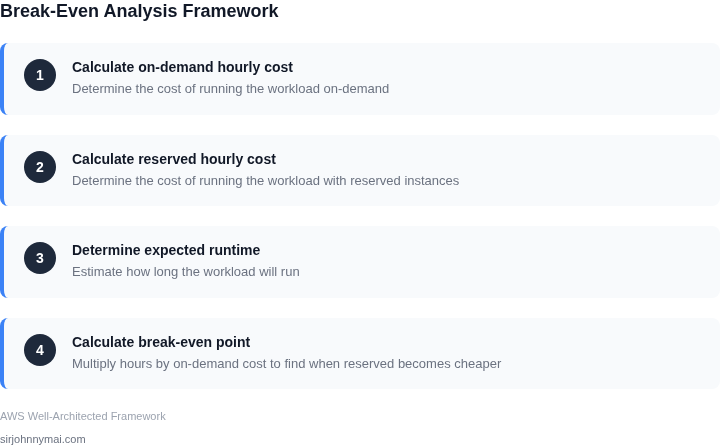
To determine when upfront payment saves money, use this framework:
- Calculate hourly cost of on-demand instance
- Calculate hourly cost of reserved instance
- Determine expected runtime in hours
- Calculate break-even point (hours × on-demand cost = reserved cost)
For example, a 24/7 workload needs to run for 730 hours to justify a reserved instance. This analysis should be performed for each workload type, as break-even points vary by instance family and region.
05. Real-World Example: Cost Comparison
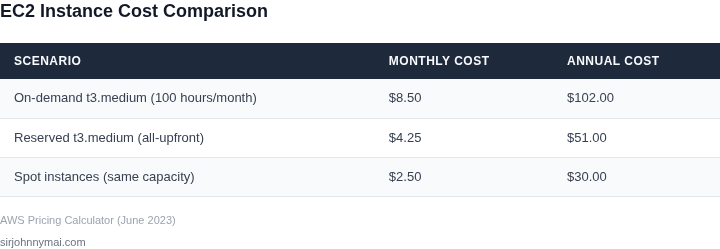
Consider a data processing workload using EC2 instances:
| Scenario | Monthly Cost | Annual Cost |
|---|---|---|
| On-demand t3.medium (100 hours/month) | $8.50 | $102.00 |
| Reserved t3.medium (all-upfront) | $4.25 | $51.00 |
| Spot instances (same capacity) | $2.50 | $30.00 |
In this case, reserved instances provide 50% savings over on-demand, while spot instances offer 70% savings. The optimal choice depends on workload tolerance for interruptions. This example shows how different pricing models can significantly impact total costs.
06. Monitoring Tools to Avoid Hidden Costs
Several tools can help identify hidden costs:
- AWS Cost Explorer: Tracks usage and cost trends
- Google Cloud Billing Reports: Provides detailed cost breakdowns
- Azure Cost Management: Includes budget alerts and recommendations
These tools should be configured early in the cloud journey to catch cost anomalies before they become significant. The best practice is to set monthly cost alerts at 80% of budget to allow time for adjustments.
07. The Hidden Costs of Free-Tier Egress
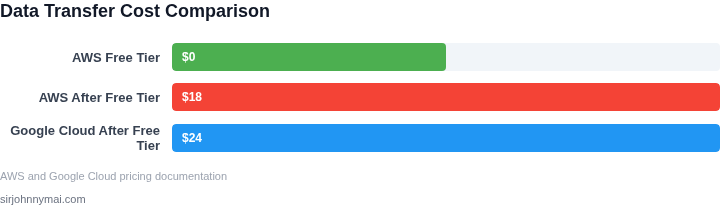
Data transfer costs are often overlooked but can become significant. For example:
- AWS Free Tier includes 100GB/month of data transfer out
- After the free tier, data transfer costs $0.09/GB
- Google Cloud charges $0.12/GB for inter-region transfer
A global application with 200GB/month of cross-region traffic would incur $18/month in AWS and $24/month in Google Cloud after the free tier expires. The lesson: free-tier egress is not truly free - it's cost amortized over time.
08. When to Stay in Free Tier vs. Pay Upfront
The decision to stay in free tier or pay upfront depends on:
- Workload predictability
- Expected runtime duration
- Budget constraints
For development workloads with unpredictable usage, staying in free tier may be more cost-effective. For production workloads with known requirements, upfront payment provides better pricing. The break-even analysis should be performed for each workload type.
09. The Hidden Costs of Free-Tier Database Services
Database services often have hidden costs that compound over time. For example:
- AWS RDS Free Tier includes 750 hours/month
- After the free tier, db.t2.micro costs $0.015/hour
- Storage costs $0.115/GB/month
- Backup storage costs $0.095/GB/month
A small database with 10GB storage would cost $1.15/month in additional storage costs after the free tier expires. The lesson: free-tier database services are not truly free - they're cost amortized over time.
10. The Hidden Costs of Free-Tier Machine Learning
Machine learning services often have hidden costs that compound over time. For example:
- AWS SageMaker Free Tier includes 250 hours/month
- After the free tier, ml.t2.medium costs $0.195/hour
- Storage costs $0.023/GB/month
- Endpoint inference costs $0.68/hour
A machine learning workload with 300 hours/month would incur $28.50/month in additional costs after the free tier expires. The lesson: free-tier ML services are not truly free - they're cost amortized over time.
Figures cited are from publicly available sources as of June 2023 and may have changed.
Next step: Implement a cost monitoring dashboard using AWS Cost Explorer or Google Cloud Billing Reports to track usage patterns and identify hidden cost opportunities.