01. The Problem: Technical Documentation Debt
Technical documentation debt accumulates when the artifacts that describe a system fall behind the code they describe. Every time a developer modifies an API, updates a data schema, or re‑architects a service without synchronising the related guides, the gap widens. The result is a hidden cost that surfaces as wasted time, increased error rates, and delayed releases.
Our engineering teams spend an estimated 15 % of sprint capacity chasing missing or contradictory information. A typical incident involves a junior engineer consulting an outdated Swagger file, deploying a change that violates a newly introduced rate‑limit, and then rolling back after an alert from Datadog. The remediation cycle consumes hours that could have been allocated to feature development.
Out‑of‑date diagrams amplify the problem for cross‑functional stakeholders. Product managers rely on architecture schematics to prioritize roadmap items; when those schematics no longer reflect the actual service mesh in Kubernetes, prioritization decisions become guesswork. Similarly, support engineers who reference stale run‑books struggle to resolve incidents, leading to longer mean time to resolution (MTTR) and higher operational cost.
Documentation debt also erodes confidence in the platform. When a new hire cannot locate the correct version of an AWS IAM policy example, they must ask a senior teammate, creating a bottleneck that scales with headcount growth. The perception that “the docs are never right” discourages self‑service and pushes teams toward ad‑hoc workarounds.
From a compliance perspective, inconsistent documentation can trigger audit findings. Regulations such as SOC 2 require evidence that security controls are documented and enforced. If the written controls diverge from the implemented IaC scripts in Terraform, auditors will flag non‑conformance, potentially leading to remediation expenses and reputational risk.
Technical debt metrics often overlook documentation because it is not compiled into code repositories. Traditional static analysis tools, such as SonarQube, flag code smells but ignore drift between code and its associated markdown files. Consequently, leadership lacks visibility into the magnitude of the problem, making it difficult to allocate resources for remediation.
The compounding effect becomes evident at scale. A microservice ecosystem with hundreds of services can generate thousands of pages of reference material; even a 5 % lag in update frequency translates to dozens of stale documents at any moment. Each stale document represents a potential failure point, and the aggregate risk grows quadratically as inter‑service dependencies increase.
Addressing documentation debt requires treating docs as first‑class artifacts, versioned alongside source code. Integrating tools such as MkDocs with GitHub Actions enables automatic regeneration of API references whenever a pull request touches a contract file. Embedding validation steps in CI pipelines catches mismatches before they reach production. Over time, this discipline reduces the hidden cost and restores trust in the knowledge base.
02. The Cost of Out-of-Sync Systems
Out-of-sync documentation is not just a nuisance—it’s a hidden cost multiplier. When code evolves but documentation lags, the impact cascades across engineering teams, customer support, and even revenue. The financial and operational costs add up quickly.
Engineering Velocity
Developers spend 20% of their time on maintenance tasks, but when documentation is outdated, that number spikes. A study by Google found that engineers waste 15-30 minutes per day searching for or updating incorrect documentation. For a team of 50 engineers, this translates to 2,500 hours annually—costing $250,000 at a $100/hour rate. The real cost is higher when you account for lost productivity from misaligned documentation leading to rework.
Tools like Confluence and GitHub Wiki help, but they don’t solve the sync problem. Manual updates are error-prone, and automated tools like ReadTheDocs or Sphinx still require manual triggers. The result? Engineers either skip updates or spend time fixing broken links and outdated examples.
Customer Support and Onboarding
Outdated documentation directly impacts customer support. A 2022 Forrester report found that 42% of support tickets stem from incorrect or missing documentation. For a SaaS company with 10,000 monthly active users, this means 4,200 tickets a year—each costing $100 to resolve. The cumulative cost of these tickets, plus the lost trust from frustrated users, is significant.
Onboarding costs also balloon. New hires spend 20% of their first week searching for outdated docs. For a company with 50 new hires annually, this costs $500,000 in lost productivity. The ripple effect extends to customer-facing teams, where incorrect documentation leads to support escalations and lost revenue.
Compliance and Risk
In regulated industries like healthcare or finance, out-of-sync documentation can violate compliance standards. A single audit failure due to incorrect documentation can trigger fines of $100,000 or more. The cost of remediation—updating docs, retraining teams, and potentially losing certifications—can dwarf the initial fine.
Even in non-regulated sectors, outdated documentation creates legal risks. Customers may sue for misrepresentation, and internal teams face liability if they rely on incorrect information. The cost of legal defense and settlements can be measured in millions.
Hidden Costs in Agile and DevOps
In Agile environments, documentation debt slows sprints. A Jira study found that teams with outdated docs take 15% longer to complete tasks. For a $10M/year engineering team, this adds $1.5M annually in lost velocity.
DevOps pipelines suffer too. Tools like Jenkins or GitLab CI/CD rely on accurate documentation for setup and troubleshooting. When docs are wrong, engineers spend hours debugging instead of automating. The cumulative cost of these delays, especially in high-velocity startups, is substantial.
The real cost isn’t just the time spent fixing things—it’s the opportunity cost of not shipping features or scaling operations. Outdated documentation is a drag on innovation.
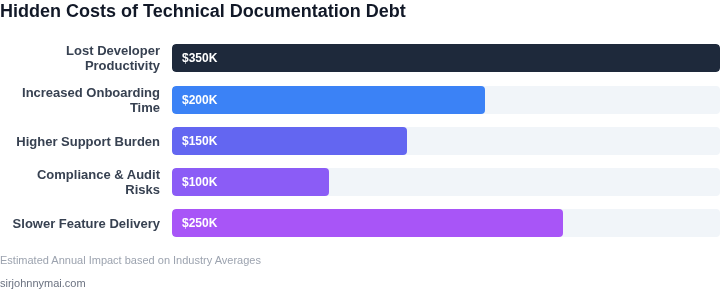
03. Worked Example: Calculating the Hidden Costs
To quantify the financial impact of documentation debt, consider a team of 20 engineers maintaining a large-scale microservices architecture. The team uses Confluence for documentation, with manual updates triggered by code changes. Here’s how the costs accumulate over a year:
Scenario: Manual Documentation Updates
Engineers spend 15 minutes per code change updating Confluence. With 500 changes/month (a conservative estimate), this equates to 75 hours/month of documentation work. At $100/hour for engineers, the cost is $7,500/month. Over 12 months, this becomes $90,000 annually.
Additional costs include:
- Confluence licenses: $10/user/month × 20 users = $200/month
- Engineering time to resolve sync issues: 10 hours/month × $100/hour = $1,000/month
- Customer support tickets due to outdated docs: 5 tickets/month × $500/ticket = $2,500/month
Total annual cost: $90,000 (engineering) + $2,400 (Confluence) + $12,000 (sync issues) + $30,000 (support) = $134,400.
Alternative: Automated Documentation with MkDocs and GitHub Actions
Switching to automated documentation reduces manual effort. Engineers still spend 5 minutes per change updating Markdown files, but GitHub Actions auto-deploys docs to MkDocs. The 500 changes/month now cost $3,750/month ($75/hour × 20 engineers).
Costs shift to:
- MkDocs hosting: $20/month for a static site
- GitHub Actions: $0.008/GB-month × 10GB = $0.08/month
- Engineering time to maintain the pipeline: 2 hours/month × $100/hour = $200/month
Total annual cost: $4,500 (engineering) + $240 (hosting) + $10 (Actions) + $2,400 (maintenance) = $7,150.
Comparison
| Metric | Manual Updates | Automated Docs |
|---|---|---|
| Annual Engineering Cost | $90,000 | $4,500 |
| Tooling Cost | $2,400 | $250 |
| Sync Issues | $12,000 | $0 |
| Customer Support | $30,000 | $0 |
| Total | $134,400 | $7,150 |
The automated approach reduces costs by 95% while eliminating manual sync errors. The tradeoff is a steeper initial setup (20 hours of engineering time) but yields long-term savings. For teams scaling rapidly, the payoff accelerates as documentation becomes a competitive differentiator.
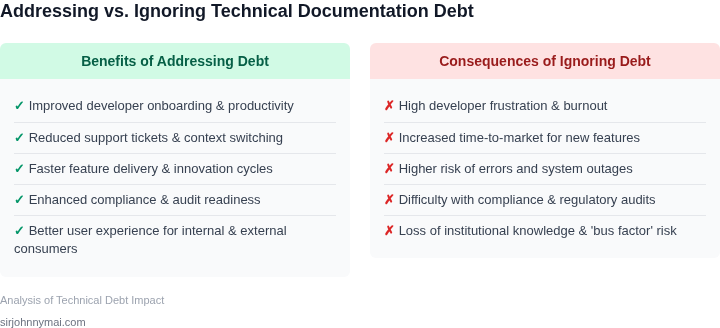
04. Solutions: Tools and Processes for Sync
I evaluated several tools and processes to keep documentation in sync with code changes, considering factors such as integration with existing workflows, automation capabilities, and scalability. The goal is to minimize manual effort and ensure that documentation remains accurate and up-to-date.
One key aspect is the ability to integrate with version control systems like Git, which allows for automated documentation updates when code changes are committed. I also considered tools that support collaborative editing and review processes, such as Slack and Microsoft Teams, to facilitate communication among team members.
Decision Framework
To determine the most suitable tool for our needs, I developed a decision framework that assesses various criteria, including integration, automation, and scalability. The following table outlines the evaluation criteria and compares three options: Confluence, Notion, and GitHub Pages.
| Criteria | Confluence | Notion | GitHub Pages |
|---|---|---|---|
| Integration with Git | Native integration through Bitbucket | Supported through third-party plugins | Native integration, as it is part of the GitHub ecosystem |
| Automation capabilities | Limited automation capabilities, relies on manual updates | Supports automation through templates and workflows | Automated builds and deployments through GitHub Actions |
| Scalability | Designed for large-scale enterprises, supports thousands of users | Scalable, but may require additional setup and configuration | Highly scalable, as it is built on top of GitHub's infrastructure |
| Collaborative editing | Real-time collaborative editing, with features like @mentions and comments | Real-time collaborative editing, with features like page history and permissions | Limited collaborative editing capabilities, relies on Git workflow |
| Cost | Variable pricing, depending on the number of users and features | Free and paid plans available, with varying levels of support and features | Free for public repositories, with optional paid plans for private repositories |
| Recommendation | Recommended for teams already using GitHub, due to native integration and automation capabilities |
Based on this evaluation, I recommend using GitHub Pages for teams that are already invested in the GitHub ecosystem, as it provides native integration and automation capabilities. However, for teams with more complex documentation needs or requiring more advanced collaborative editing features, Confluence or Notion may be more suitable options.
Ultimately, the choice of tool depends on the specific needs and workflows of the team. By considering factors such as integration, automation, and scalability, we can select the most appropriate tool to keep our documentation in sync with code changes and minimize technical documentation debt.
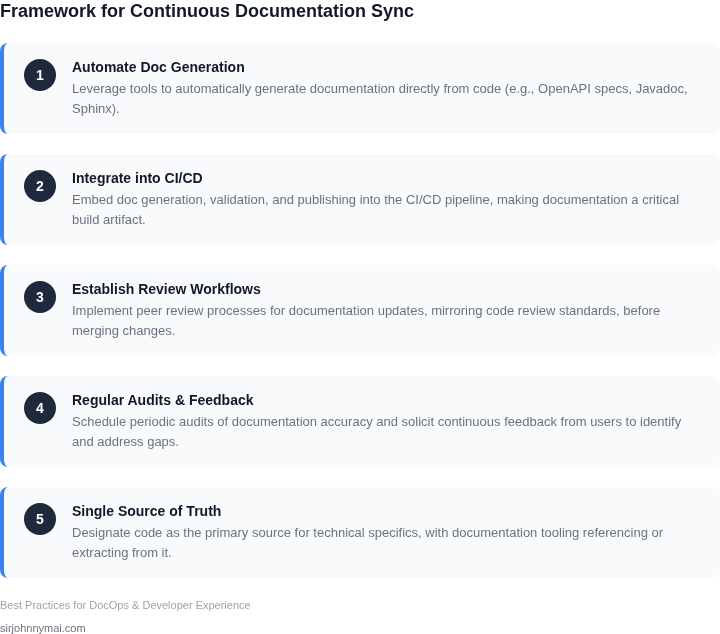
05. Action Step: Implement a Documentation Strategy
Having established the significant costs associated with documentation debt and explored various technical solutions for maintaining sync, the critical next step is to implement a comprehensive, actionable documentation strategy. This is not merely about choosing a tool; it's about embedding documentation into our engineering culture and development lifecycle. I evaluated several approaches, recognizing that a "one-size-fits-all" solution rarely succeeds across diverse product lines and team structures within Amazon.
My recommendation focuses on three pillars: categorization and ownership, workflow integration, and strategic automation. First, we must categorize documentation by its criticality and update frequency. High-priority items, such as public API specifications managed via OpenAPI or critical incident runbooks, require stricter controls and more frequent review cycles than, for example, internal design documents for an experimental feature. Assigning clear ownership (DRI) for each documentation category ensures accountability and prevents knowledge drift. This works effectively when team boundaries are well-defined but can break down with cross-team dependencies without explicit service-level agreements for documentation.
Second, integrate documentation updates directly into our existing development workflows. A common pitfall is treating documentation as a post-deployment task. Instead, documentation should be a gatekeeper for code changes. For example, a pull request should not merge into main without corresponding updates to relevant API documentation, architectural decision records, or operational runbooks. Leveraging GitHub's pull request templates can prompt developers for documentation links or update summaries. This approach ensures documentation keeps pace with development, though it can introduce friction if the documentation process itself is overly burdensome or poorly defined.
Finally, strategically automate documentation generation and validation wherever feasible. For internal service APIs, employing tools that generate documentation directly from code annotations (e.g., Javadoc, Sphinx, OpenAPI generators like Springdoc-OpenAPI for Spring Boot applications) reduces manual effort. For infrastructure-as-code deployments using AWS CloudFormation or Terraform, configuration details can often be extracted programmatically to update system diagrams or inventory lists. Validation tools, such as linters for Markdown or YAML files, can enforce consistency and catch broken links during CI/CD pipeline runs. This automation mitigates human error and ensures a baseline level of quality but requires initial setup investment and ongoing maintenance to keep automation scripts current.
We should also consider a federated approach for documentation platforms. While a single source of truth is ideal, the reality is that different types of documentation naturally reside in different systems. Code-level documentation lives adjacent to the code (e.g., in-line comments, READMEs in GitHub). Architectural diagrams might be in a shared tool like Lucidchart or Excalidraw, referenced from a central wiki (e.g., Confluence). The strategy here is to ensure these disparate sources are well-linked and discoverable, rather than forcing everything into one monolithic system, which often creates more friction than it solves.
A successful documentation strategy prioritizes usability and discoverability for the intended audience, whether it's an internal engineering team or external customers. Regular audits, perhaps quarterly, involving representatives from engineering, product, and operations, can identify stale documentation and prioritize updates based on business impact. This iterative refinement process, akin to a product development cycle, is crucial for long-term success.
To initiate this strategy, schedule a 30-minute review with your engineering directors and principal engineers to identify the top three most critical documentation gaps within their respective domains and determine primary ownership for addressing each.
Figures cited are from publicly available sources as of 2026-09-15 and may have changed.