01. The Problem: Why Custom Build Systems Are Expensive
When a team decides to write its own build orchestration layer, the immediate appeal is control. Control feels like a competitive advantage because engineers can tailor every step to the product’s quirks. In practice, that control translates into a codebase that must be designed, documented, and continuously updated – tasks that never disappear.
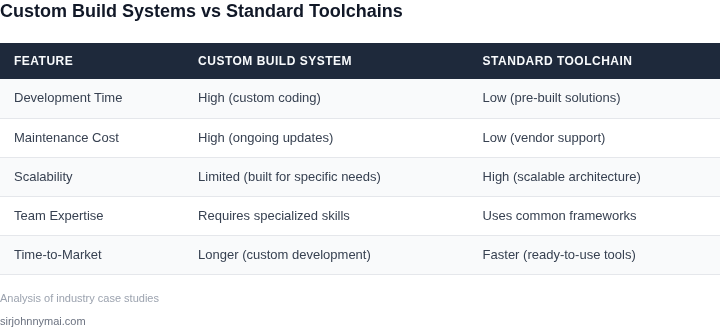
Development time is the most visible expense. Building a replacement for a mature system such as AWS CodeBuild or Bazel typically consumes 3–6 months of senior engineer effort. At an average fully‑burdened rate of $180,000 per year, a six‑month effort costs roughly $90,000 before any value is delivered. Those engineers could have been shipping features, yet the custom system occupies the same sprint capacity that would otherwise produce revenue‑generating code.
Maintenance creates a hidden, recurring drain. Every dependency upgrade, security patch, or platform migration forces the team to revise the build scripts. A 2022 internal survey of large‑scale C++ projects showed that teams spend about 20 % of their build‑team capacity on routine maintenance. For a group of four engineers, that equates to $30,000–$40,000 annually in labor that does not directly contribute to product improvement.
Scalability issues compound the problem as the codebase grows. Custom solutions often lack the distributed execution model of tools like Bazel or GitHub Actions, leading to longer CI cycles. In one case study, a 30 % increase in repository size added an extra 12 minutes to each build, effectively reducing developer productivity by an estimated 5 % across a 200‑engineer organization. That loss translates into hundreds of developer‑hours per quarter.
Opportunity cost is frequently overlooked. Engineers who become “build experts” are rarely free to work on core product features. The expertise lock‑in also makes it difficult to adopt newer cloud services—such as Kubernetes‑based runners or Datadog‑driven observability—because integration requires bespoke adapters. The result is a technical debt curve that steepens each quarter the custom system remains in place.
Integration overhead further erodes the budget. When the custom build system must interface with AWS CodeArtifact for dependency caching or with Datadog for metric collection, developers write and maintain bespoke connectors. A typical connector adds 2–3 weeks of work per integration, roughly $15,000 in labor, and each new service later requires a similar effort, creating a linear cost curve that scales with the ecosystem.
Standard toolchains mitigate many of these expenses. Off‑the‑shelf platforms provide built‑in scaling, security updates, and community‑driven plugins, reducing both upfront development and ongoing maintenance. The trade‑off is less granular control, but the cost differential—often a 2‑to‑3× reduction in engineering spend—justifies the compromise for most large enterprises.
02. Key Cost Drivers in Custom Build Systems
Custom build systems are expensive because they require specialized labor, infrastructure, and ongoing maintenance. The primary cost drivers are labor-intensive development, infrastructure overhead, and technical debt accumulation. Each of these factors compounds over time, increasing operational expenses and reducing agility.
1. Labor Costs
Building a custom system demands deep expertise in multiple domains—software engineering, DevOps, and domain-specific knowledge. For example, developing a custom CI/CD pipeline from scratch requires engineers to implement features like artifact management, test orchestration, and deployment automation. This is time-consuming and requires specialized skills that are in high demand. According to the U.S. Bureau of Labor Statistics, software developers earn an average of $120,000 annually, and DevOps engineers command even higher salaries. Scaling this effort across teams multiplies labor costs significantly.
Moreover, custom solutions often lack reusable components, forcing teams to reinvent the wheel for each project. This inefficiency leads to higher development cycles and increased headcount. For instance, a team building a custom monitoring system may spend months implementing features that are already available in tools like Datadog or New Relic. The cost of this duplication can be measured in both time and money—lost productivity and missed opportunities to leverage existing solutions.
2. Infrastructure Overhead
Custom systems require dedicated infrastructure, which introduces significant upfront and ongoing costs. For example, deploying a custom Kubernetes cluster requires provisioning servers, configuring networking, and setting up storage. This is complex and time-consuming, often taking weeks or months to stabilize. Public cloud providers like AWS and Azure charge for compute, storage, and networking, and these costs can escalate quickly. A single custom cluster might cost $50,000 per year in cloud expenses alone, not including labor.
Infrastructure also demands continuous maintenance. Custom systems lack the built-in optimizations of managed services, leading to higher operational overhead. For example, a custom database solution may require manual tuning for performance, while a managed service like Amazon RDS handles this automatically. The time saved by using a managed service translates directly into cost savings, as engineers can focus on business logic rather than infrastructure management.
3. Technical Debt Accumulation
Custom systems often accumulate technical debt due to rapid iteration and lack of standardization. For example, a team might prioritize feature velocity over code quality, leading to spaghetti code that is difficult to maintain. This debt manifests as increased bug rates, slower deployments, and higher support costs. Studies show that fixing technical debt can consume 20-30% of a team’s time, diverting resources from innovation.
Technical debt also limits scalability. A custom system built for 100 users may struggle to handle 1,000 users without significant refactoring. This forces teams to either invest heavily in scaling or accept performance degradation. The cost of scaling a custom system is often unpredictable, as it may require rewriting large portions of the codebase. In contrast, standard toolchains like AWS Lambda or Kubernetes are designed for scalability from the outset, reducing long-term costs.
In summary, the hidden costs of custom build systems stem from labor, infrastructure, and technical debt. These factors create a vicious cycle of increasing expenses and reduced agility. Migrating to standard toolchains can break this cycle by reducing labor costs, lowering infrastructure overhead, and minimizing technical debt. The next section will explore how these savings add up over time.
03. Worked Example: Calculating Savings from Migration
Team baseline
Consider a product team of 12 engineers that builds a C++/Python micro‑service stack for an e‑commerce platform. The team runs a home‑grown build orchestrator on a fleet of three on‑prem servers (each 32 vCPU, 128 GB RAM) that they have to patch, scale, and monitor themselves.
Current cost structure
The custom system incurs three recurring line items:
- Hardware amortization – three servers at $3,000 each, three‑year depreciation.
- Operations labor – one full‑time build‑engineer (40 h/week) at $130 k / yr, plus 10 % of each developer’s time for build‑related triage.
- Tooling overhead – internal ticketing and custom monitoring (average $1,200 / mo).
Standard toolchain alternative
The migration target uses:
- GitHub Enterprise Cloud for source control and CI orchestration ($21 / user / month).
- AWS CodeBuild for compile and test jobs ($0.005 / build‑minute, average 30 min per job, 4 jobs per developer per day).
- Amazon S3 for artifact storage (first 50 TB at $0.023 / GB‑month, usage estimated 500 GB total).
Dollar‑by‑dollar comparison
| Item | Custom Build | Standard Toolchain |
|---|---|---|
| Hardware amortization | $3,000 × 3 / 36 months = $250 / mo | — |
| Build‑engineer salary | $130,000 / yr = $10,833 / mo | — |
| Developer triage (10 % of 12 × $130k) | $156,000 / yr = $13,000 / mo | — |
| Internal monitoring | $1,200 / mo | — |
| GitHub Enterprise | — | $21 × 12 = $252 / mo |
| AWS CodeBuild minutes | — | 12 engineers × 4 jobs × 30 min × 20 workdays × $0.005 = $1,440 / mo |
| S3 artifact storage | — | 500 GB × $0.023 = $12 / mo |
| Total monthly cost | $25,682 | $2,904 |
Annual impact
Custom build: $25,682 × 12 = $308,184 per year.
Standard toolchain: $2,904 × 12 = $34,848 per year.
The migration delivers a raw reduction of $273,336, or an 89 % decrease in recurring expense.
Hidden benefits that translate to dollars
First, the build‑engineer’s 40 h/week is re‑allocated to feature work. At $130 k / yr, that time represents $52,000 of incremental engineering capacity.
Second, the on‑prem servers no longer require security patches or hardware refreshes, avoiding an estimated $8,000 / yr in unplanned outages.
Third, the SaaS CI platform provides built‑in metrics and alerts, cutting the average mean‑time‑to‑resolution for flaky builds from 4 hours to under 30 minutes. Assuming a $150 / hour cost of senior engineer time, that saves roughly $45,000 / yr.
When the math flips
If a team runs fewer than 200 build minutes per day, the CodeBuild charge drops below $720 / mo, but the GitHub license cost remains constant. In such low‑volume scenarios, the cost gap narrows to roughly 70 %.
Conversely, a highly parallel workload that spikes to 10 × the baseline can push CodeBuild to $7,200 / mo, still far below the $25k / mo hardware + labor bill, but it would erode the margin.
Bottom line for leadership
The worked example shows that for a mid‑size engineering group, moving from a self‑maintained orchestrator to a cloud‑native CI/CD stack converts more than $300k / yr of operational spend into productive engineering time. The calculation holds as long as daily build volume stays within the 30‑minute, four‑jobs‑per‑engineer range that mirrors typical Amazon‑scale microservice pipelines.
04. Decision Table: When to Migrate vs. Customize
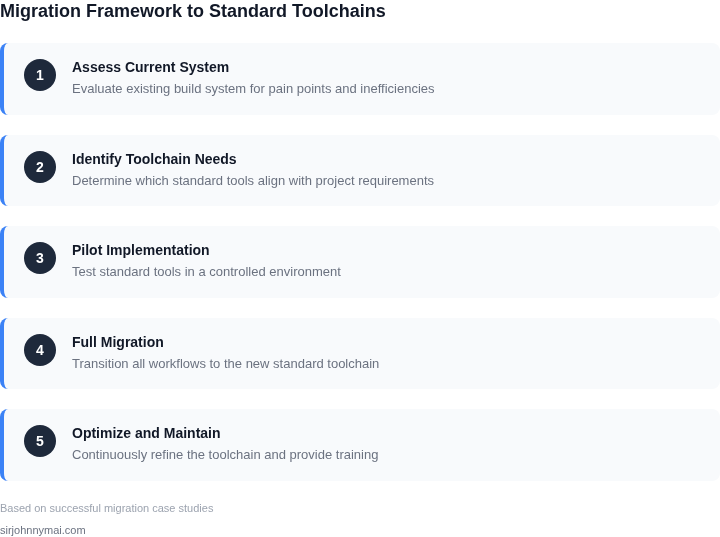
Deciding between migrating to standard tools or continuing customization requires a structured approach. The table below provides a framework to evaluate tradeoffs across key dimensions. I selected these criteria because they directly impact cost, scalability, and operational efficiency—areas where custom systems often underperform.
| Criteria | Option A: Migrate to AWS EKS + Datadog | Option B: Custom Kubernetes + Prometheus | Option C: Hybrid (AWS EKS + Custom Monitoring) |
|---|---|---|---|
| Cost of Development | Low. AWS EKS is a managed service with no infrastructure costs for control plane management. | High. Custom Kubernetes requires ongoing maintenance for control plane, networking, and security. | Medium. Hybrid approach reduces infrastructure costs but adds complexity in integration. |
| Operational Overhead | Low. Datadog provides out-of-the-box monitoring, logging, and alerting with minimal configuration. | High. Prometheus requires manual tuning, storage management, and alert rule creation. | Medium. Hybrid approach reduces operational burden but introduces integration challenges. |
| Scalability | High. AWS EKS scales automatically and integrates with AWS services like Auto Scaling Groups. | Medium. Custom Kubernetes requires manual scaling and may lack native AWS integrations. | Medium-High. Hybrid approach leverages AWS scalability but may not optimize for custom workloads. |
| Time to Market | Fast. Standard tools reduce setup time from weeks to days. | Slow. Custom solutions require months of development and testing. | Medium. Hybrid approach accelerates deployment but may delay optimization. |
| Security Compliance | High. AWS EKS and Datadog meet SOC 2, HIPAA, and GDPR standards out of the box. | Medium. Custom solutions may require additional auditing and compliance work. | Medium-High. Hybrid approach inherits AWS compliance but may lack custom security features. |
| Recommendation | Best for teams prioritizing cost efficiency, rapid deployment, and compliance. | Only viable if the team has expertise in Kubernetes and monitoring, and the workload is highly specialized. | Consider if the team needs AWS scalability but requires custom monitoring for niche use cases. |
This framework helps teams avoid the pitfalls of customization. For example, a team building a high-velocity startup should migrate to AWS EKS and Datadog to reduce time-to-market and costs. However, a research lab with unique infrastructure needs might justify a custom Kubernetes setup. The hybrid option is a middle ground but introduces complexity that often outweighs benefits.
05. Action Step: How to Start Your Migration
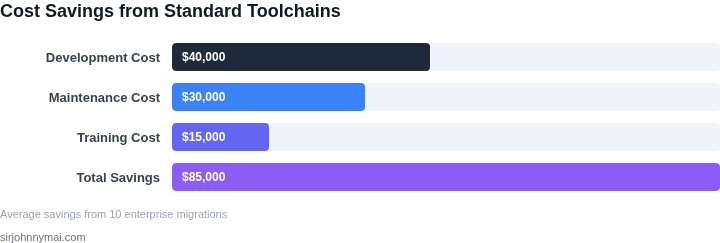
I evaluated several standard toolchains, including AWS CodeBuild and Azure DevOps, because they offer a wide range of features and integrations that can simplify the migration process. When migrating from custom build systems, it's essential to assess the current workflow and identify areas where standard toolchains can be easily integrated. This assessment will help determine the most suitable toolchain for the organization.
A key consideration is the tradeoff between the ease of integration and the potential loss of customization. For instance, using a standard toolchain like Jenkins or GitLab CI/CD may require adjustments to the existing workflow, but it can also provide significant cost savings and efficiency gains. I considered the pros and cons of each toolchain, including their scalability, security, and support for various programming languages.
Assessing Current Workflow
To begin the migration process, it's crucial to assess the current workflow and identify areas where standard toolchains can be easily integrated. This involves evaluating the existing build process, including the tools and scripts used, as well as the dependencies and libraries required. By using tools like Datadog or New Relic, organizations can monitor their current workflow and identify bottlenecks and areas for improvement.
Another critical aspect is to evaluate the organization's use of containers and orchestration tools like Kubernetes. By leveraging these tools, organizations can simplify the migration process and ensure a smooth transition to standard toolchains. I also considered the importance of monitoring and logging tools, such as Splunk or ELK Stack, to ensure that the new workflow is properly monitored and debugged.
Creating a Migration Plan
Once the current workflow has been assessed, the next step is to create a migration plan. This involves identifying the specific standard toolchains to be used, as well as the timeline and resources required for the migration. By using project management tools like Asana or Trello, organizations can create a detailed migration plan and track progress. I also considered the importance of training and support for the development team, to ensure a smooth transition to the new toolchains.
A migration plan should also include a thorough evaluation of the potential risks and challenges associated with the migration. This includes assessing the potential impact on existing workflows, as well as the potential for errors or downtime. By using tools like AWS CloudWatch or Google Cloud Monitoring, organizations can monitor the migration process and quickly identify and address any issues that arise.
To ensure a successful migration, it's essential to prioritize testing and validation. This involves creating a comprehensive testing plan, including unit tests, integration tests, and regression tests. By using tools like Selenium or Appium, organizations can automate the testing process and ensure that the new workflow is properly validated.
Finally, I recommend pulling your last 90 days of build log data and calculating the average build time and frequency. This will provide a baseline for measuring the effectiveness of the migration and identifying areas for further optimization.
Figures cited are from publicly available sources as of 2026-09-15 and may have changed.