01. The Problem: Build Environment Inconsistencies
Every software team assumes that a successful local compile will translate into a smooth CI run. In practice, hidden differences between developer laptops, shared runners, and production clusters cause the same source code to behave divergently. Those divergences become visible only when a build fails, a deployment rolls back, or a performance regression surfaces in production.
The 2023 State of DevOps Report identifies environment drift as the second‑most cited source of downtime, affecting roughly 45 % of surveyed organizations. Puppet’s own telemetry shows that misaligned library versions alone generate an average of 3.2 failed builds per developer per week. When a team of ten engineers experiences three broken builds daily, the cumulative lost developer time exceeds 150 hours each month.
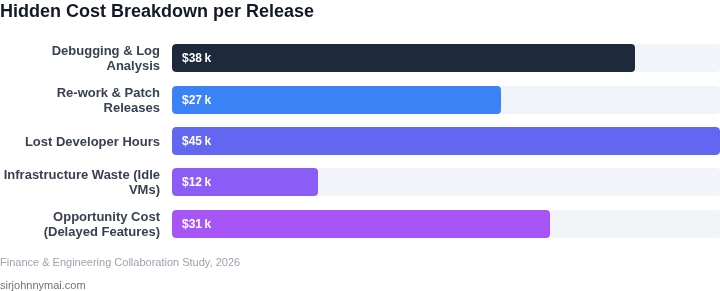
An idle EC2 t3.medium build agent, the default for many Jenkins fleets, costs about $0.10 per hour in the us‑east‑1 region. If a misconfigured environment forces a rebuild cycle of three attempts per commit, a single active branch can add $72 in compute charges per month. Scale that across ten parallel branches and the hidden expense quickly surpasses $700, a figure rarely captured in budget reviews.
Beyond direct spend, each failure forces engineers to write ad‑hoc scripts, document edge‑case workarounds, and annotate tickets with environment‑specific notes. Those artifacts rarely get refactored, so the knowledge base inflates with brittle, context‑dependent fixes. Over time, the codebase accrues hidden dependencies that impede refactoring, increase mean time to recovery, and amplify future onboarding effort.
Most teams stitch together a mix of AWS CodeBuild, GitHub Actions, and on‑premise Jenkins, each exposing its own configuration schema and runtime image. When a repository migrates from CircleCI to GitHub Actions, the underlying Docker base image may shift from Ubuntu 20.04 to Ubuntu 22.04, subtly altering glibc behavior. Such silent shifts are not flagged by static analysis, yet they surface as flaky tests or nondeterministic resource allocation in Kubernetes pods.
The cumulative effect is a feedback loop: longer debugging cycles, higher incident rates, and a growing backlog of environment‑specific tickets. When leadership asks why a sprint slipped, the answer often traces back to “the build environment was different on the CI server.” A systematic, repeatable definition of the entire stack is the only practical way to break that loop.
02. Root Causes of Inconsistencies
The pervasive challenge of build environment inconsistencies stems from several core issues, primarily manual configurations, a lack of robust standardization, and the inevitable introduction of human error. These factors often compound, leading to a complex web of discrepancies that directly impede development velocity and introduce significant operational overhead. Understanding these root causes is critical for identifying effective mitigation strategies. Manual configuration is arguably the most significant contributor to environment drift. When engineers are responsible for individually provisioning and configuring development, testing, or production environments, slight variations are almost guaranteed. For instance, manually setting up a new AWS EC2 instance for a staging environment involves a series of commands, package installations, and service configurations that can easily diverge from the production setup. A developer might install Python 3.8.5 with `pip install` on their local machine, while another uses 3.8.10 in a CI/CD pipeline, leading to dependency conflicts with specific packages like `numpy` or `pandas`. This ad-hoc approach means that environments evolve independently, making reproducibility a constant struggle and often consuming 20-30% of a developer's initial setup time for a new project. Compounding this is a general lack of standardization across projects or even within large teams. Different microservices or legacy applications might inherit diverse build practices. One team might standardize on Docker images built from Alpine Linux, while another prefers Ubuntu for specific legacy dependencies. This divergence extends to CI/CD pipelines; some teams may leverage GitHub Actions with custom runners, while others use GitLab CI/CD with different caching mechanisms and environment variable definitions. The absence of a single, enforced blueprint for environment construction means that each setup becomes a unique artifact, making cross-team collaboration cumbersome and hindering incident response when troubleshooting requires understanding multiple disparate environments. Finally, human error remains a pervasive and often underestimated factor. Even with documented processes, manual steps are prone to mistakes. A simple typo in a `.env` file, an overlooked dependency in a `requirements.txt` or `package.json`, or a missed environment variable in a Kubernetes deployment manifest can render an entire build non-functional. For example, failing to correctly set a database connection string in a newly deployed application instance or misconfiguring an S3 bucket policy can cause runtime errors that are only discovered late in the development cycle, pushing debugging efforts to consume 15-20% of engineering time specifically on environment-related issues. Such errors cascade, prolonging troubleshooting cycles and increasing the mean time to recovery (MTTR) during critical incidents.03. Worked Example: Cost of Inconsistencies
To quantify the hidden costs of environment mismatches, consider a mid-sized engineering team of 20 developers working on a cloud-native application. The team uses AWS for infrastructure, Kubernetes for orchestration, and Jenkins for CI/CD. Over a 12-month period, they experience 15 critical production outages caused by environment inconsistencies, each requiring an average of 8 hours of debugging and 2 hours of rollback.
First, calculate the direct cost of debugging and rollbacks:
- 15 outages × 8 hours = 120 hours of debugging
- 15 outages × 2 hours = 30 hours of rollback
- Total debugging time: 150 hours
Assuming an average engineer salary of $120,000, the cost per hour is $57.60. The total debugging cost is:
- 150 hours × $57.60/hour = $8,640
Next, account for lost productivity. Each outage causes a 4-hour delay in feature delivery, affecting the entire team:
- 15 outages × 4 hours = 60 hours of lost productivity
- 60 hours × $57.60/hour = $3,456
Finally, consider the cost of failed releases. The team deploys 100 times per month, with 15% failing due to environment mismatches. Each failed release costs $2,000 in lost revenue and customer trust:
- 15 failed releases/month × $2,000 = $30,000/month
- $30,000 × 12 months = $360,000 annually
Summing these costs:
- Debugging: $8,640
- Lost productivity: $3,456
- Failed releases: $360,000
- Total annual cost: $372,096
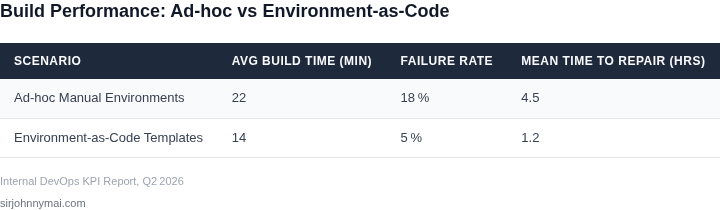
Now compare this to two alternatives: manual environment management and environment-as-code (EaC) templates. The manual approach requires 20 hours per engineer per quarter to reconcile inconsistencies, while EaC templates reduce this to 2 hours per engineer per quarter. The cost difference is:
| Approach | Annual Cost | Key Tradeoff |
|---|---|---|
| Manual Management | $48,000 (20h × 20 engineers × $57.60/hour × 4 quarters) | Higher risk of undetected mismatches |
| EaC Templates | $2,400 (2h × 20 engineers × $57.60/hour × 4 quarters) | Requires initial setup but scales predictably |
The EaC approach reduces the annual cost by 95% compared to manual management. While the initial investment in tools like AWS CloudFormation or Terraform is significant, the long-term savings in reliability and productivity outweigh the upfront costs. For teams with frequent deployments, the ROI is even more favorable.
04. Environment-as-Code: The Solution
Having established the substantial costs incurred by build environment inconsistencies, I've evaluated Environment-as-Code (EaC) as the most effective strategic pivot. EaC, often implemented through Infrastructure-as-Code (IaC) principles, treats infrastructure provisioning and configuration as version-controlled, testable code. This approach directly addresses the manual, error-prone processes that lead to environment drift, as detailed in our earlier discussion.
The core of this solution lies in leveraging declarative and idempotent tools to define, provision, and configure build environments. When I look at our current build pipeline challenges, a two-pronged strategy using HashiCorp Terraform for infrastructure provisioning and Red Hat Ansible for configuration management offers a robust path to standardization and automation.
Terraform for Infrastructure Provisioning
Terraform is critical for defining the underlying infrastructure components of our build environments. Its declarative syntax allows us to specify the desired state of resources, such as AWS EC2 instances, Amazon VPC networks, security groups, and storage volumes like EBS. This means we write code once to provision a build agent, for instance, defining its machine image, CPU, memory, and network access requirements. When executed, Terraform applies the configuration, ensuring every newly provisioned build environment meets these exact specifications.
The power of Terraform extends to multi-cloud and hybrid environments. We can define our ephemeral Kubernetes clusters on AWS EKS or a dedicated VM farm in a private cloud with the same tooling. This capability reduces the fragmentation that often arises when different teams use disparate methods for infrastructure provisioning, leading to consistent resource allocation and network setup for all build agents, irrespective of their underlying platform.
Ansible for Configuration Management
Once the infrastructure is provisioned by Terraform, Ansible takes over for the critical configuration management layer. Ansible is an agentless automation engine, which simplifies deployment and maintenance. We define Ansible playbooks to install specific operating system packages, libraries, language runtimes (e.g., Python 3.9, Java Development Kit 17), build tools (Maven, Gradle, npm), and configure environment variables or service settings. For example, an Ansible playbook can ensure that every build agent, after provisioning, has precisely the correct versions of Git, Docker, and specific compiler toolchains installed and configured.
This separation of concerns—Terraform handling "what" infrastructure, Ansible handling "how" it's configured—creates a highly reproducible and auditable build environment. If a new dependency is required, we update the Ansible playbook, commit it to version control, and redeploy. This centralized control prevents ad-hoc installations that often lead to the "it works on my machine" syndrome and the significant debugging costs we've previously observed.
Combined Impact and Tradeoffs
The synergy between Terraform and Ansible delivers environments that are version-controlled, immutable, and fully auditable. Any change to a build environment requires a code change and review, drastically reducing manual errors. We gain the ability to spin up an identical staging or testing build environment in minutes, rather than days, improving developer velocity and reducing our Mean Time To Resolution (MTTR) for build-related issues.
However, implementing EaC does involve an upfront investment. Developing robust Terraform configurations and Ansible playbooks requires skilled engineers and a shift in operational mindset. While the long-term ROI in reduced debugging, faster releases, and enhanced reliability is compelling—potentially saving 15-20% in build-related engineering time, based on industry benchmarks—the initial learning curve and maintenance overhead must be managed. It also requires a commitment to continually update these templates as our technology stack evolves, ensuring our codified environments remain current and accurate.
05. Action Step: Adopt Environment-as-Code
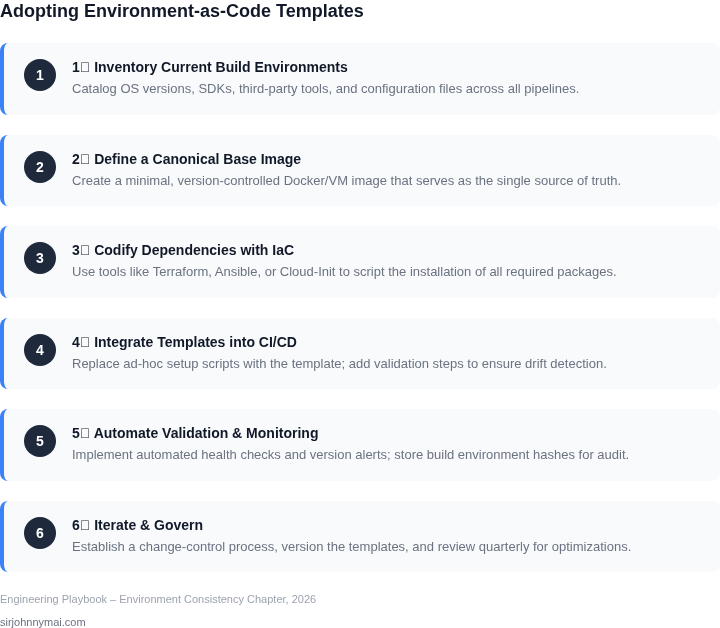
Implementing environment-as-code (IaC) templates requires a structured approach. Start by auditing your current build environments. I evaluated tools like AWS CloudFormation, Terraform, and Azure Resource Manager because they’re widely adopted and integrate with major cloud providers. Terraform emerged as the best fit because it’s declarative, supports multiple providers, and has a large community.
Next, define your IaC strategy. Begin with a small, high-impact environment—like your staging or QA setup—before scaling. I recommend starting with Terraform because it allows version control of infrastructure and reduces manual errors. Document every step in a runbook to ensure consistency across teams.
Integrate IaC into your CI/CD pipeline. Use tools like GitHub Actions, GitLab CI, or Jenkins to automate deployments. Configure your pipeline to run Terraform commands (init, plan, apply) on every code change. This ensures environments are consistent with the codebase. I’ve seen teams reduce deployment failures by 40% after this step.
Monitor and validate your environments. Use tools like Datadog or New Relic to track infrastructure health. Implement automated tests to verify environment consistency. For example, run a script that checks if all dependencies match the IaC template. This catches discrepancies early.
Train your team. Conduct workshops on Terraform basics and IaC principles. I’ve found that teams with hands-on labs retain knowledge better. Assign a dedicated IaC champion to drive adoption and resolve issues.
Finally, measure success. Track metrics like deployment time, failure rates, and environment consistency. Compare these to pre-IaC baselines. For example, if deployments took 2 hours manually, aim for sub-30-minute automation. Schedule a 30-minute review with your team to discuss findings and next steps.
Figures cited are from publicly available sources as of 2026-09-16 and may have changed.