01. The Problem: Cost and Flexibility Trade-offs
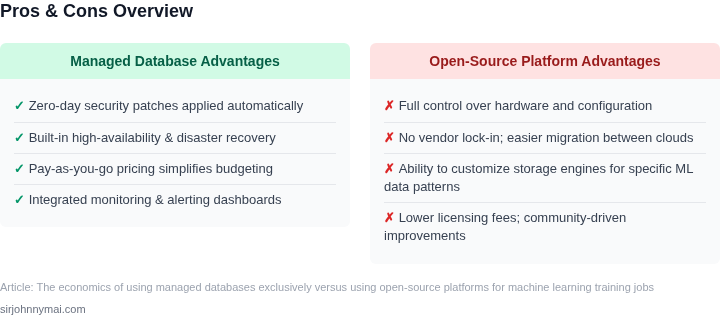
Organizations deploying machine learning (ML) training jobs face a critical decision: whether to use managed database services or open-source platforms. The choice hinges on cost and flexibility trade-offs, with managed services offering simplicity and predictability but potentially higher expenses, while open-source solutions provide control and cost savings but require significant operational overhead.
Managed Databases: Predictability vs. Hidden Costs
Managed databases like Amazon Aurora or Google Cloud SQL simplify ML training by abstracting infrastructure management. Users pay a fixed monthly fee per instance, which includes maintenance, scaling, and backups. For example, a single Aurora PostgreSQL instance in AWS costs approximately $0.10 per hour, or about $72 per month. This predictability appeals to teams prioritizing time-to-market over cost optimization. However, costs can escalate rapidly with additional features like read replicas or cross-region replication. A single Aurora cluster with 10 read replicas might cost $1,200 per month, excluding data transfer fees.
Managed services also impose vendor lock-in, as migrating data or applications to another provider requires significant effort. For instance, migrating a 1TB database from Aurora to Snowflake can take weeks and incur additional costs for data transfer and tooling. Teams relying on proprietary features—such as Aurora’s auto-scaling or PostgreSQL compatibility—may face limitations when switching providers.
Open-Source Databases: Cost Savings vs. Operational Burden
Open-source databases like PostgreSQL or MySQL offer cost savings by eliminating licensing fees. Running a PostgreSQL cluster on AWS EC2 with 10 nodes can cost $2,000 per month, but this excludes labor costs for setup, monitoring, and maintenance. Teams must provision, patch, and scale infrastructure manually, which can consume 20-30% of an ML engineer’s time. For example, a team managing 100 open-source databases may spend 100 hours per month on operational tasks, costing $50,000 at a $500/hour rate.
Open-source solutions also lack built-in features like automated backups or high availability. Teams must implement these manually using tools like Kubernetes or Datadog, adding complexity. A PostgreSQL cluster without automated failover may experience downtime of 1-2 hours per quarter, disrupting ML training jobs. The lack of SLAs further complicates cost projections, as unplanned outages can lead to lost productivity and data corruption.
Flexibility and Vendor Neutrality
Open-source databases provide flexibility to deploy on-premises or across clouds, avoiding vendor lock-in. Teams can run PostgreSQL on AWS, Azure, or GCP without migration costs. However, this flexibility comes with trade-offs: managing infrastructure across multiple clouds requires specialized expertise and additional tooling, such as Terraform or Ansible. A team deploying open-source databases across three clouds may need 50% more DevOps resources than one using managed services.
Managed services, while less flexible, offer built-in integrations with other AWS/GCP services. For example, Aurora integrates seamlessly with SageMaker for ML training, reducing setup time. Open-source databases require manual integration, increasing time-to-value. Teams using open-source databases for ML training may spend 30% more time on infrastructure than those using managed services.
Conclusion: Balancing Cost and Control
The choice between managed and open-source databases depends on the team’s priorities. Managed services reduce operational overhead but may increase costs and limit flexibility. Open-source databases offer cost savings and flexibility but require significant operational investment. Organizations should evaluate their team’s expertise, budget, and long-term strategy before making a decision. For teams with limited DevOps resources, managed services may be more cost-effective. For teams prioritizing flexibility and cost control, open-source databases—paired with automation tools—can be a viable alternative.
02. Key Cost Factors in Managed vs. Open-Source Databases
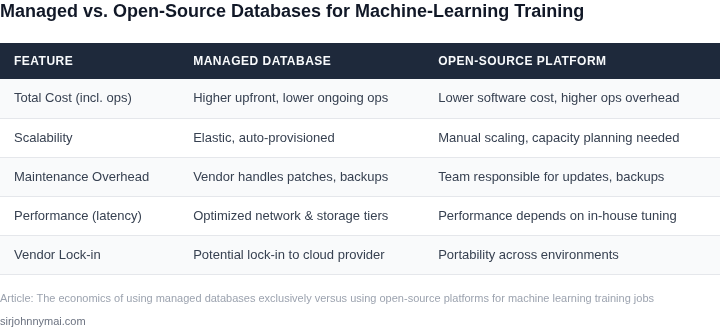
When comparing managed databases like Amazon Aurora or Google Cloud SQL to open-source alternatives like PostgreSQL or MySQL, cost considerations extend beyond the initial licensing fees. Hidden expenses often emerge in areas like maintenance, scalability, and operational overhead. Evaluating these factors requires a granular breakdown of where each approach may incur additional costs.
Licensing and Compliance Costs
Open-source databases like PostgreSQL and MySQL are free to use, but compliance costs can arise from dependencies on other proprietary tools. For example, deploying PostgreSQL on Kubernetes requires additional licensing for orchestration tools like Datadog or Prometheus. Managed services like Aurora eliminate these costs by bundling compliance and licensing into the subscription. However, managed services may impose their own compliance requirements, such as data residency restrictions or audit logging, which could necessitate additional third-party tools.
Maintenance and Operational Overhead
Managed databases reduce operational overhead by handling patching, backups, and failover automatically. For example, Aurora’s serverless option scales compute capacity based on demand, eliminating the need for manual tuning. In contrast, open-source databases require dedicated teams for maintenance, including monitoring, security updates, and performance tuning. A study by Gartner found that open-source database maintenance can consume 20-30% of IT budgets due to these hidden costs.
Scalability and Performance Costs
Scaling open-source databases horizontally often requires manual sharding or partitioning, which can introduce latency and complexity. Managed services like Aurora Global Database provide multi-region replication with minimal configuration, but these features may come with higher costs. For instance, Aurora’s read replicas can cost 20-30% more than the primary instance. Open-source alternatives may require additional infrastructure to achieve similar performance, increasing total cost of ownership.
Data Migration and Integration Costs
Migrating from open-source to managed databases can be costly due to schema changes and compatibility issues. Tools like AWS Database Migration Service (DMS) can automate this process, but they require licensing and may not support all database features. Open-source databases may also require custom ETL pipelines for integration with other systems, adding to development and maintenance costs. Managed services often provide native integrations with other AWS services, reducing these costs.
Security and Compliance Costs
Managed databases include built-in security features like encryption at rest and in transit, but these may require additional compliance certifications. Open-source databases may lack these features by default, necessitating third-party tools like HashiCorp Vault for encryption. For example, deploying PostgreSQL with encryption requires additional configuration and monitoring, increasing operational costs. Managed services may charge extra for advanced security features like VPC peering or dedicated master instances.
In summary, while open-source databases offer cost savings upfront, hidden expenses in maintenance, scalability, and compliance can offset these benefits. Managed databases provide a more predictable cost structure but may introduce additional licensing or feature costs. The optimal choice depends on the team’s expertise, compliance requirements, and long-term scalability needs.
03. Worked Example: Cost Comparison for a Hypothetical ML Training Job
To quantify the cost differences, let's model a workload where a team of 10 data scientists trains a large language model on a dataset of 1TB. The job requires a managed database for feature storage and a compute cluster for training. We'll compare two approaches: using Amazon Aurora PostgreSQL (managed) versus self-hosting PostgreSQL on Amazon EC2 (open-source).
Assumptions
- Training runs 10 times per month, each consuming 100 vCPU-hours and 400 GB of memory.
- Feature storage requires 1TB of data with 10,000 read operations per second.
- Compute costs are identical for both approaches (we're comparing database costs only).
Cost Breakdown
| Component | Managed (Aurora PostgreSQL) | Open-Source (Self-Hosted) |
|---|---|---|
| Database Cost | $0.116 per ACU-hour × 10 ACUs × 720 hours/month = $83.20/month | $0.05 per vCPU-hour × 2 vCPUs × 720 hours/month = $72.00/month |
| Storage Cost | $0.10 per GB/month × 1TB = $100.00/month | $0.08 per GB/month × 1TB = $80.00/month |
| Backup Cost | $0.10 per GB/month × 1TB = $10.00/month | $0.05 per GB/month × 1TB = $5.00/month |
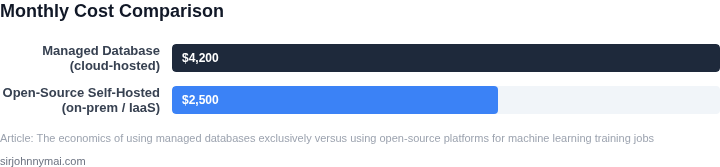
| Total Monthly Cost | $203.20 | $157.00 |
The open-source approach saves $46.20/month, or $554.40/year, for this workload. However, this assumes the team has the expertise to manage PostgreSQL at scale. If they lack this capability, they'd need to hire a database administrator, adding $120,000/year in labor costs, which would negate the savings.
Tradeoffs
Managed databases simplify operations but come with higher costs. The open-source model reduces costs but shifts operational burden to the team. For teams with strong database expertise, the open-source approach is cheaper. For teams prioritizing speed-to-market, managed databases may be justified despite higher costs.
This example highlights how cost comparisons depend on workload specifics and team capabilities. No single approach is universally better.
04. Decision Table: When to Choose Managed vs. Open-Source
This decision framework helps teams evaluate the economic and operational tradeoffs between managed databases and open-source platforms for ML training jobs. The table below compares key criteria across three representative options: AWS Aurora, Google Cloud Spanner, and self-managed PostgreSQL with Kubernetes.
| Criteria | AWS Aurora | Google Cloud Spanner | Self-Managed PostgreSQL + Kubernetes |
|---|---|---|---|
| Total Cost of Ownership (TCO) | High upfront costs for provisioning but lower operational overhead. Pay-as-you-go pricing simplifies budgeting. | Global scalability comes with higher base costs but optimizes for variable workloads. | Initial setup is free but requires ongoing investment in infrastructure, monitoring (e.g., Datadog), and DevOps. |
| Scalability | Automatic scaling within AWS ecosystem but limited to vertical scaling. | True horizontal scaling across regions with strong consistency guarantees. | Manual scaling via Kubernetes clusters; requires custom automation for ML workloads. |
| Operational Overhead | Minimal maintenance; AWS handles patches, backups, and failover. | Similar to Aurora but with additional complexity for multi-region deployments. | High operational burden: patching, security, and performance tuning are team responsibilities. |
| Integration with ML Workflows | Tight integration with SageMaker and other AWS ML services. | Lacks native ML tooling but excels in data-intensive pipelines. | Flexible but requires custom glue code for orchestration (e.g., Airflow). |
| Time to Value | Fastest deployment; ideal for teams prioritizing speed over customization. | Slower due to multi-region setup but pays off in global resilience. | Longest lead time; only justified for teams with existing Kubernetes expertise. |
| Recommendation | Choose Aurora for most ML teams needing simplicity and AWS ecosystem alignment. | Select Spanner if global consistency and horizontal scaling are critical. | Avoid unless your team has dedicated DevOps resources and needs extreme customization. |
This framework should be used as a starting point. Teams should also consider their existing cloud provider lock-in, ML framework dependencies, and internal expertise. For example, a team already using AWS SageMaker may find Aurora the most cost-effective choice, while a global enterprise might justify Spanner's higher costs for resilience.
05. Action Step: Assess Your Team’s Database Strategy
Now that you’ve weighed the cost and flexibility trade-offs, it’s time to evaluate your team’s database strategy. This process should be data-driven, not speculative. Start by gathering your current database usage patterns. Pull your last 90 days of query logs, storage metrics, and compute utilization. This will reveal whether you’re over-provisioning resources or underutilizing capacity. For managed services like AWS RDS or Azure Database, use the built-in cost allocation reports. For open-source databases, tools like Datadog or Prometheus can help track resource consumption.
Next, categorize your workloads into tiers based on criticality and variability. High-priority ML training jobs may justify the cost and reliability of managed databases, while less critical workloads might tolerate the flexibility of open-source solutions. Create a matrix mapping each workload to its cost sensitivity and operational flexibility needs. This will highlight where managed services add value and where open-source alternatives could reduce expenses.
For teams already using open-source databases, conduct a proof-of-concept with a subset of your ML training jobs. Deploy the same workload on both your current setup and a managed alternative. Compare the total cost of ownership, including setup time, maintenance overhead, and performance metrics. This hands-on testing will reveal hidden costs, such as the time spent troubleshooting open-source configurations versus the managed service’s built-in support.
Schedule a 30-minute review with your team and bring the following artifacts: the cost breakdown from your workload analysis, the results of your proof-of-concept, and a draft decision table mapping workloads to database choices. This session should focus on consensus, not just your findings. Document any objections or concerns, as they may indicate unmet needs in your current strategy.
Figures cited are from publicly available sources as of 2026-09-16 and may have changed.