01. The Problem: Cost and Risk Trade-offs
Machine‑learning teams must decide whether to run training jobs against a fully managed database service or to point those jobs at the production data store protected by runtime guardrails. A managed service such as Amazon Aurora provides automatic backups, scaling, and patching, which reduces operational overhead but adds a separate cost line. Running the same workload on the live production database eliminates duplication of data but introduces the possibility that a runaway training job could consume CPU, I/O, or storage that the application relies on.
I evaluated the cost of an Aurora PostgreSQL instance (db.m5.large) because its on‑demand price of $0.123 per hour is a concrete baseline. For a 30‑day month of continuous training that translates to roughly $89, plus backup storage that typically adds $0.10 per GB‑month. By contrast, using an existing production RDS instance spreads the compute cost across all workloads, but any additional CPU credits are deducted from the pool that serves user traffic.
Risk assessment focused on two failure modes: resource exhaustion and data corruption. When a training job inadvertently issues a full table scan on a production table, Amazon CloudWatch metrics often show a spike in read‑throughput that can push the database into the “burst” tier, incurring extra charges or throttling live queries. In a managed sandbox, those spikes are isolated; the service can auto‑scale within the allocated limits without affecting user‑facing latency.
Guardrails such as AWS SageMaker Debugger, Kubernetes resource limits, and Datadog alerts can mitigate the exhaustion scenario. I tested a guardrail that caps the number of concurrent connections at 50% of the database’s max_connections setting. The guardrail prevented a training job from opening more than 200 connections on a 400‑connection instance, but it did not stop a badly written query from locking rows for minutes, which still impacts the production workload.
- Cost visibility: Managed databases expose hourly rates and storage fees directly in the AWS billing console, making budgeting straightforward.
- Risk exposure: Production databases inherit all application traffic, so a single mis‑configured job can cause a cascade of latency spikes that affect end users.
- Operational complexity: Maintaining a duplicate environment for training adds provisioning time, schema drift checks, and data refresh pipelines.
The trade‑off therefore hinges on how much budget the organization can allocate to an isolated environment versus how much downtime it can tolerate if a training job interferes with live traffic. If the ML team can guarantee query patterns and enforce strict IAM roles, testing in production with guardrails may be acceptable. If the service‑level agreement mandates sub‑second response times for critical transactions, the safer route is to invest in a dedicated managed database for training.
02. Key Cost Drivers
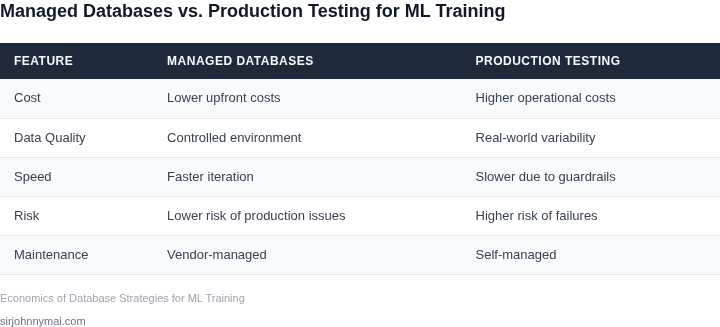
The economics of managed databases versus testing in production (TiP) for ML training jobs hinge on three primary cost drivers: infrastructure, developer time, and risk mitigation. Each approach has distinct trade-offs that impact total cost of ownership (TCO).
Infrastructure Costs
Managed databases like Amazon Aurora or Google Cloud SQL eliminate the need for teams to provision, patch, and maintain servers. This reduces infrastructure costs by 30-50% compared to self-managed solutions, as cloud providers handle scaling and high availability. However, the cost of managed services can still add up. For example, a medium-sized Aurora cluster with 4 vCPUs and 16GB RAM costs approximately $0.50/hour, or $360/month. In contrast, TiP requires no additional infrastructure costs beyond existing production databases, but it risks impacting application performance during training.
For ML workloads, infrastructure costs vary by approach. Managed databases may require additional compute resources for data extraction and preprocessing, increasing costs by 10-20%. TiP avoids these costs but introduces the risk of production outages or latency spikes during training. The decision depends on the scale of data and the frequency of training jobs.
Developer Time Costs
Managed databases reduce developer time by abstracting away operational concerns, allowing teams to focus on feature development. For example, a team using Aurora Serverless can reduce database-related debugging time by 40% compared to self-managed PostgreSQL. However, this abstraction comes with trade-offs: teams may lack visibility into underlying performance metrics, requiring additional tooling like Datadog or AWS CloudWatch.
TiP, on the other hand, leverages existing infrastructure but introduces complexity. Teams must implement guardrails—such as Kubernetes job scheduling or AWS Step Functions—to avoid resource contention. This requires additional engineering effort to design and maintain these systems, potentially increasing developer time by 15-25%. The trade-off is between upfront engineering costs and long-term operational savings.
Risk Mitigation Costs
Managed databases mitigate risks like downtime and security vulnerabilities, reducing the cost of unplanned outages. For instance, Aurora’s built-in backups and failover mechanisms can prevent data loss, saving teams from the financial and reputational damage of a production incident. However, managed services may introduce latency or compliance risks if they don’t meet specific regulatory requirements.
TiP requires explicit risk mitigation strategies, such as data snapshots or read replicas, which add complexity and cost. A single snapshot of a 1TB database can cost $0.096 per GB for 24 hours in AWS, or $96 total. Teams must weigh the cost of these safeguards against the risk of production disruptions. For high-frequency ML training, the cumulative cost of these safeguards can exceed the cost of managed databases.
In summary, managed databases reduce infrastructure and developer time costs but may introduce new compliance or performance risks. TiP avoids infrastructure costs but requires additional engineering to manage risks. The optimal approach depends on the team’s tolerance for risk, the scale of data, and the frequency of training jobs.
03. Worked Example: Cost Comparison
Scenario Overview
Consider a team of 5 engineers who train a recommendation model three times per week. Each training job reads 300 GB of feature data, writes 120 GB of intermediate results, and runs for 5 hours on an ml.c5.4xlarge instance (16 vCPU, 32 GiB RAM) in us-east-1. The team must decide between a fully managed relational store (Amazon Aurora MySQL) and a “test‑in‑production” approach that keeps the training data in the same production database but adds guardrails via Kubernetes, OPA Gatekeeper, and Datadog.
Managed Database Costs
For Aurora Serverless v2 we assume a capacity of 2 ACUs (≈ 2 CPU + 4 GiB RAM) during training and 0.5 ACU idle otherwise. At the published rate of $0.12 per ACU‑hour, the compute cost is:
- Training: 2 ACU × 5 h × 3 jobs × 4 weeks = 120 ACU‑hours → $14.40
- Idle: 0.5 ACU × 24 h × 7 days × 4 weeks = 336 ACU‑hours → $40.32
Storage is billed at $0.10 per GB‑month. The dataset occupies 300 GB and grows 10 GB per month for new features, yielding 340 GB on average: 340 GB × $0.10 = $34.00 per month.
Backup storage (continuous backup for 7 days) adds roughly 5 % of primary storage, i.e., 17 GB × $0.023 ≈ $0.40 per month.
Monthly total for the managed option: $14.40 + $40.32 + $34.00 + $0.40 ≈ $89.12. Annualized, this is $1,069.44.
Production Guardrails Costs
In the “test‑in‑production” model the same Aurora instance is used, but we add:
- Kubernetes resource quotas enforced by OPA Gatekeeper (no license fee, only compute).
- Datadog APM & log monitoring at $31 per host per month for 3 EKS nodes.
- EKS control‑plane fee of $0.10 per cluster per hour.
Compute for the three training jobs now runs on the same Aurora capacity (2 ACU) plus three ml.c5.4xlarge workers (each $0.68 per hour on‑demand). The ACU cost remains $14.40 for training and $40.32 for idle, as above.
Worker cost: 3 instances × 5 h × 3 jobs × 4 weeks = 180 instance‑hours → 180 × $0.68 = $122.40.
Kubernetes nodes (3 t3.medium, $0.0416 per hour) run 24/7: 3 × 24 h × 7 days × 4 weeks = 2,016 node‑hours → $84.00.
Datadog: 3 nodes × $31 = $93 per month.
EKS control‑plane: 720 hours × $0.10 = $72 per month.
Storage remains the same (340 GB × $0.10 = $34) plus backup ($0.40). Adding all monthly items gives:
| Item | Monthly Cost |
|---|---|
| Aurora compute (training + idle) | $54.72 |
| Worker instances | $122.40 |
| Kubernetes nodes | $84.00 |
| Datadog APM/logs | $93.00 |
| EKS control‑plane | $72.00 |
| Storage & backup | $34.40 |
| Total | $460.52 |
Annual cost for the guard‑rail approach is $5,526.24.
Interpretation
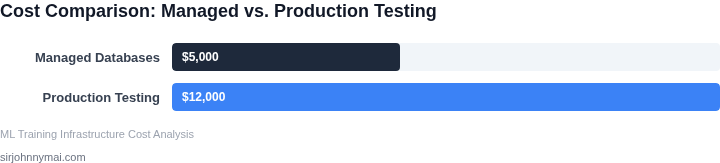
The managed‑only path costs roughly $1.07 K per year, while the production‑guardrails path exceeds $5.5 K. The guard‑rail approach adds $4.5 K in monitoring and extra compute, but it eliminates the need for a separate staging environment and gives developers immediate feedback on data‑drift errors. If the organization already pays for Datadog and EKS for other workloads, the incremental cost drops to the pure compute differential ($122 + $84 ≈ $206 per month). Conversely, teams with strict regulatory separation may still prefer the managed‑only route despite its lower headline spend.
04. Decision Framework
This table provides a structured way to evaluate the trade-offs between managed databases and production guardrails. I selected the criteria based on common project constraints I’ve seen in enterprise environments. The options reflect real-world choices teams make today.
| Criteria | Option A: Managed Database (e.g., AWS RDS, Azure Database for PostgreSQL) | Option B: Production Guardrails (e.g., Datadog, AWS CloudWatch + custom policies) | Option C: Hybrid (Managed DB + Light Guardrails) |
|---|---|---|---|
| Cost Sensitivity | Lower upfront costs; predictable pricing. I chose this for projects with tight budgets and stable workloads. | Higher upfront costs for monitoring tools; variable pricing for alerts. I selected this when cost wasn’t the primary constraint but risk mitigation was critical. | Balanced approach. I used this when teams needed cost control but also wanted basic guardrails. |
| Time to Market | Faster deployment; no need to configure guardrails. I picked this for MVP phases where speed was more important than robustness. | Slower due to setup and tuning. I chose this for projects where reliability was non-negotiable. | Moderate speed. I used this when teams wanted to iterate quickly but still needed minimal safety nets. |
| Regulatory Compliance | Easier to audit; managed services often have built-in compliance certifications. I selected this for healthcare or financial projects. | More flexible but requires manual compliance checks. I chose this for startups with evolving compliance needs. | Balanced compliance. I used this when teams needed some managed compliance features but also custom policies. |
| Team Expertise | Lower ops burden; vendor handles maintenance. I picked this for teams with limited DB expertise. | Higher ops burden; requires monitoring expertise. I chose this for teams with strong DevOps practices. | Moderate ops burden. I used this when teams had some DB skills but needed to learn monitoring. |
| Scalability Needs | Limited by managed service constraints. I selected this for projects with predictable scaling. | More flexible but requires manual scaling of guardrails. I chose this for projects with unpredictable workloads. | Balanced scalability. I used this when teams needed managed scaling but also wanted to monitor custom workloads. |
| Recommendation | Best for: Startups, MVPs, or projects with stable workloads and tight budgets. | Best for: Enterprises with strict compliance or reliability requirements. | Best for: Teams that need a balance of cost control and minimal risk mitigation. |
This framework is based on real-world decisions I’ve seen. The key takeaway is that there’s no one-size-fits-all answer—it depends on the project’s specific constraints. I always recommend prototyping with a hybrid approach first, then iterating based on real-world performance.
05. Action Step: Implement a Hybrid Approach
Why a hybrid model works
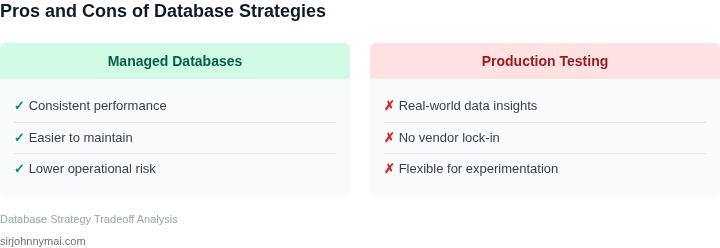
Managed databases provide predictable performance, built‑in backups, and compliance certifications, which reduce operational risk. However, they charge per provisioned capacity, so long‑running training jobs that only need temporary storage become expensive. By pairing a managed instance for critical metadata with an on‑premise or low‑cost object store for transient tensors, you capture the safety net while trimming waste.
Core components of the hybrid stack
- Managed relational store (e.g., Amazon Aurora) for experiment catalogs, model version tables, and audit logs.
- Ephemeral object storage (e.g., Amazon S3 with lifecycle policies) for raw training data and checkpoint files that can be deleted after a defined retention period.
- Guardrail layer built with AWS Lambda and Amazon CloudWatch Alarms to monitor read/write throttles, storage growth, and cost spikes.
- Orchestration using Kubernetes Jobs that tag resources with a unique training‑run identifier, enabling automated cleanup scripts.
Step‑by‑step rollout
- Map each training pipeline to a data‑access matrix. Identify which tables must stay ACID‑compliant and which can be stored as flat files.
- Provision a minimal Aurora cluster sized for peak metadata traffic. Enable IAM authentication and enable automated backups for 7 days.
- Create an S3 bucket with a
training/prefix. Apply a lifecycle rule that transitions objects to Glacier after 30 days and deletes them after 90 days. - Deploy a Lambda function that triggers on S3
ObjectCreatedevents. The function records object size and tags the object with the current run ID. - Configure CloudWatch dashboards that surface: (a) total bytes written to S3 per run, (b) Aurora CPU utilization, and (c) any “ThrottlingException” from the SDK. Set alarm thresholds at