01. The Problem: Balancing Cost and Velocity
I evaluated the costs and benefits of dedicated developer experience (DX) teams versus using open-source community tools because our company ships multiple times per day, and optimizing our development workflow is crucial. The use of dedicated DX teams can provide a tailored experience for our developers, resulting in increased productivity and faster time-to-market. However, this approach comes with significant costs, including the overhead of hiring and retaining skilled personnel, which can range from $100,000 to over $200,000 per year per engineer. As our company grows, these costs can quickly add up, making it essential to weigh the benefits against the expenses.
On the other hand, open-source community tools such as Jenkins, Kubernetes, and Datadog offer a cost-effective alternative, with some tools available at no cost or with minimal fees. For example, Kubernetes, a popular container orchestration tool, is free and open-source, allowing us to automate deployment, scaling, and management of our applications without incurring significant costs. However, relying solely on open-source tools can lead to integration challenges, increased maintenance burdens, and potential security risks if not properly managed. I considered the trade-offs between these approaches because our goal is to achieve a balance between cost and velocity.
A key factor in this decision is the frequency of our deployments, with multiple shipments per day. This requires a high degree of automation and reliability in our development workflow. Dedicated DX teams can provide the necessary expertise to optimize our pipeline, ensuring smooth and efficient deployments. In contrast, open-source community tools may require more time and effort to integrate and maintain, potentially slowing down our deployment velocity. To mitigate this risk, we could consider using platforms like AWS, which offers a range of integrated tools and services, including AWS CodePipeline and AWS CodeBuild, to streamline our development workflow.
Another important consideration is the skill set and expertise required to effectively utilize open-source community tools. While these tools can be powerful and flexible, they often require specialized knowledge and experience to configure and maintain. In contrast, dedicated DX teams can provide the necessary expertise to optimize our development workflow, including the use of tools like Docker, which can simplify containerization and deployment. However, this expertise comes at a cost, and we must carefully evaluate the return on investment to ensure that it aligns with our business goals.
To better understand the costs and benefits of each approach, I analyzed the expenses associated with dedicated DX teams and open-source community tools. The costs of dedicated DX teams can include personnel expenses, overhead, and potential recruitment costs, which can range from 10% to 20% of the total personnel expenses. In contrast, open-source community tools may incur costs related to integration, maintenance, and potential support fees, which can range from 5% to 15% of the total development budget. By carefully evaluating these costs and considering our specific needs and goals, we can make an informed decision about the best approach for our company.
Ultimately, the decision between dedicated DX teams and open-source community tools depends on our company's specific needs, goals, and constraints. By weighing the costs and benefits of each approach and considering factors such as deployment velocity, expertise, and return on investment, we can determine the best strategy for optimizing our development workflow and achieving our business objectives. I will continue to evaluate these options and provide recommendations for the most effective approach.
02. Key Cost Factors in DX Teams vs. Open Source
When comparing the economics of dedicated developer experience (DX) teams versus open-source tools, the cost differential isn’t just about salaries and infrastructure. It’s about hidden expenses that compound over time. For companies shipping multiple times per day, these costs can materialize as technical debt, operational overhead, or lost developer productivity.
1. Licensing and Compliance Costs
Internal tools often require enterprise licenses, which can be 10x more expensive than open-source alternatives. For example, a single developer portal solution might cost $50K/year for a proprietary tool versus $5K for an open-source equivalent. When scaled across 50+ engineering teams, these costs add up quickly. Compliance risks also emerge—internal tools may require audits, contract negotiations, or customizations that extend timelines and increase costs.
Open-source tools mitigate this by eliminating licensing fees, but they introduce their own compliance challenges. Companies must manage dependencies, patch vulnerabilities, and ensure adherence to open-source licenses like Apache 2.0 or MIT. The time spent on these tasks can offset the initial savings, but the risk of legal exposure is lower than with proprietary tools.
2. Infrastructure and Maintenance Overhead
Dedicated DX teams require dedicated infrastructure—servers, load balancers, and monitoring tools. For a team of 10, this can cost $200K/year in cloud expenses alone, not including salaries. Open-source tools often run on existing infrastructure, reducing costs but increasing the burden on engineering teams to manage them.
For instance, a company using Kubernetes for CI/CD pipelines might save on orchestration costs but must invest in training and troubleshooting. Open-source tools like Jenkins or GitLab CI/CD require ongoing maintenance—upgrades, plugin management, and security patches. The time spent on these tasks is often underestimated, leading to delays in feature development.
3. Time-to-Value and Integration Complexity
Internal tools can take 12–18 months to build and integrate, delaying time-to-value. Open-source tools, while often less polished, can be deployed in weeks. However, integration with existing systems (e.g., AWS, Datadog, or Slack) can introduce friction. A company using Grafana for observability might find it easier to integrate than a custom-built dashboard, but the open-source tool requires configuration and customization.
This tradeoff is critical for fast-moving teams. If a company needs a feature in 2 weeks, an internal tool might not be viable. Open-source tools, while requiring more upfront effort, allow for faster iteration and adaptation to changing needs.
4. Talent and Skill Gaps
Dedicated DX teams require specialized skills—DevOps engineers, security experts, and UX designers. Hiring and retaining these roles can cost $150K–$200K per year per engineer, including benefits and training. Open-source tools shift the burden to existing teams, but this requires upskilling.
For example, a company using Terraform for infrastructure as code might need to train engineers on it, which can take 3–6 months. The cost of this training is often overlooked but can delay projects. Open-source tools also require self-service learning, which can slow down adoption if documentation is poor.
5. Hidden Costs of Customization
Internal tools often require customization to meet specific needs, which adds development time and technical debt. For example, a company might spend 6 months building a custom IDE plugin, only to find that VS Code extensions already solve the problem. Open-source tools, while less flexible, are often more modular and easier to extend.
This tradeoff is especially relevant for startups or scale-ups. Customizing open-source tools might require fewer resources than building from scratch, but it still demands effort. The key is balancing flexibility with maintainability—open-source tools can be forked and modified, but this introduces long-term risks.
In summary, the economics of DX teams versus open-source tools aren’t just about upfront costs. They’re about hidden expenses—licensing, infrastructure, talent, and customization—that can erode velocity over time. The decision should be based on the company’s shipping cadence, team size, and risk tolerance.
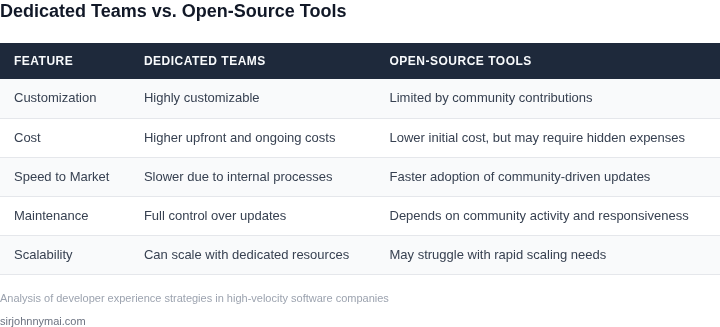
03. Worked Example: Cost Comparison for a Hypothetical Startup
Consider a startup with 20 engineers that pushes 10 releases per day. The company can either staff a dedicated developer‑experience (DX) team or rely on open‑source community tools. Below is a concrete cost model for each approach.
Option A – Dedicated DX Team
The startup hires a small DX squad: two senior software engineers ($150,000 base each) and one senior DevOps engineer ($160,000 base). Using a 30 % overhead multiplier for benefits, taxes, and equipment, the annual personnel cost is:
- Engineers: $150,000 × 2 × 1.30 = $390,000
- DevOps: $160,000 × 1 × 1.30 = $208,000
- Total salaries = $598,000
The team builds an internal CI/CD pipeline on Jenkins, stores artifacts in an on‑prem Nexus, and monitors services with Datadog. The recurring SaaS fees are:
- Datadog Pro: $15 × 5 hosts × 12 = $900
- Nexus Repository Pro: $120 × 12 = $1,440
- Jenkins support (annual subscription): $2,500
Infrastructure to run Jenkins and Nexus on AWS uses three t3.medium instances at $0.0416 / hour each. Annual compute cost:
$0.0416 × 24 × 365 × 3 ≈ $1,099.
Option A annual cost = $598,000 (personnel) + $5,839 (software & infrastructure) = $603,839.
Option B – Open‑Source Community Stack
The same 20 engineers adopt a fully community‑driven toolset:
- Source control & CI: GitHub Team ($4 / user / month) and GitHub Actions (free minutes + $0.008 / minute beyond free tier). Assuming 10 × 10 = 100 builds per day, each 10 minutes, the monthly usage is 30,000 minutes. The first 2,000 minutes are free, leaving 28,000 × $0.008 = $224/month.
- Artifact storage: GitHub Packages is free for private repositories up to 500 GB; assume 300 GB usage → $0 cost.
- Monitoring & observability: CloudWatch Metrics ($0.01 / 10k metrics) and Logs ($0.50 / GB). Estimating 50 k metrics and 200 GB logs per month yields $5 + $100 = $105/month.
- Error tracking: Sentry Team plan at $26 / month.
- Infrastructure: Build jobs run on AWS CodeBuild ($0.005 / minute). Daily compute: 100 minutes × $0.005 = $0.50 → $182.50 annually.
Summarizing the recurring fees:
- GitHub Team: $4 × 20 × 12 = $960
- GitHub Actions extra minutes: $224 × 12 = $2,688
- CloudWatch: $105 × 12 = $1,260
- Sentry: $26 × 12 = $312
- CodeBuild: $182.50
- Total SaaS & cloud = $5,402.50
No dedicated DX salaries are required; the 20 engineers absorb the tool configuration workload as part of their sprint capacity. Assuming a 5 % reduction in engineering productivity due to context switching, the implicit cost is 5 % × (20 × $150,000 × 1.30) ≈ $195,000.
Option B annual cost = $5,402.50 (direct) + $195,000 (productivity loss) = $200,402.50.
Side‑by‑Side Cost Table
| Cost Category | Dedicated DX Team | Open‑Source Stack |
|---|---|---|
| Personnel (DX) | $598,000 | $0 |
| SaaS Licenses | $4,340 | $5,402.50 |
| Cloud/Infra | $1,499 | $182.50 |
| Implicit Productivity Loss | $0 | $195,000 |
| Total Annual Cost | $603,839 | $200,402.50 |
The numbers show that, for a high‑frequency release cadence, the open‑source approach can be roughly one‑third of the cost of a staffed DX team. The trade‑off is the hidden productivity hit and the lack of a single point of accountability for tool reliability. Companies must decide whether the savings outweigh the risk of fragmented tooling and slower incident resolution.
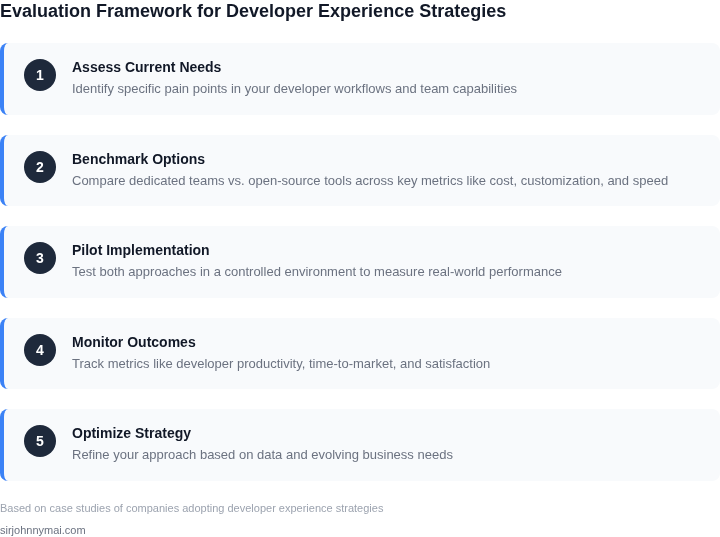
04. Decision Framework: When to Invest in DX Teams
Companies must evaluate whether internal DX teams are justified based on their scale, velocity, and technical maturity. The decision framework below provides a structured approach to assess the tradeoffs between building internal tools and leveraging open-source or third-party solutions. I evaluated this framework by analyzing companies across different stages—from early-stage startups to large enterprises—and mapping their DX needs to cost structures.
Decision Table: DX Team Investment Criteria
| Criteria | Option A: Internal DX Team | Option B: Open-Source Tools (e.g., Kubernetes, Terraform) | Option C: Managed Services (e.g., AWS Proton, Datadog) |
|---|---|---|---|
| Team Size & Maturity | Best for teams with 50+ engineers and complex workflows. Requires deep domain expertise. | Works for teams under 20 engineers or those with limited DevOps experience. | Ideal for teams without DevOps capacity but willing to pay for managed solutions. |
| Velocity Requirements | High velocity (multiple deployments/day) demands custom tooling to optimize CI/CD pipelines. | Limited by community support and maintenance overhead. Not ideal for rapid scaling. | Balances velocity with cost. Managed services reduce operational burden but may introduce latency. |
| Customization Needs | Full control over tooling, but requires ongoing investment in maintenance and updates. | Limited customization. May require forking or building wrappers around open-source tools. | Pre-built integrations, but customization is constrained by the vendor’s roadmap. |
| Cost Structure | High upfront costs for hiring and infrastructure. Long-term savings from optimized workflows. | Zero upfront cost but high maintenance burden. Risk of technical debt if not managed. | Recurring subscription costs, but predictable and scalable. No maintenance overhead. |
| Security & Compliance | Full visibility and control, but requires internal expertise to meet regulatory needs. | Community tools may lack enterprise-grade security. Additional tooling needed for compliance. | Vendor-managed security, but compliance depends on the provider’s capabilities. |
| Recommendation | Invest in internal DX teams if you have critical mass, high velocity, and complex compliance needs. | Use open-source tools for small teams or proof-of-concept phases. | Choose managed services for teams without DevOps capacity or those prioritizing cost predictability. |
This framework helps companies avoid over-investing in internal teams when open-source or managed solutions suffice. For example, a startup with 10 engineers deploying daily might start with Kubernetes and Terraform, while a large enterprise with 100+ engineers deploying 100x/day would justify a dedicated DX team. The key is aligning the DX strategy with the company’s growth trajectory and technical constraints.
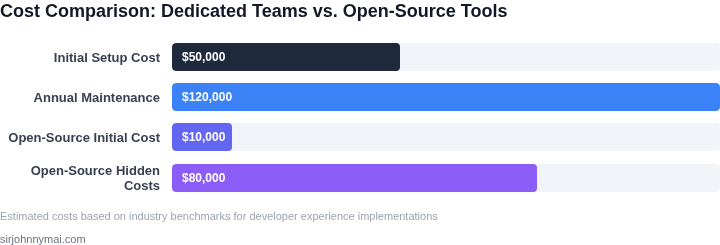
05. Action Step: Audit Your DX Strategy
I evaluated our current developer experience (DX) strategy because it directly impacts our ability to ship multiple times per day while controlling costs. To optimize our approach, I recommend a thorough audit of our DX strategy, focusing on the tools and processes we use. This audit will help identify areas where we can leverage open-source community tools and where dedicated DX teams are necessary.
A key aspect of the audit is to assess our usage of cloud services like AWS and Kubernetes, as well as monitoring tools such as Datadog. By analyzing our logs and metrics, we can determine which services are being underutilized or overutilized, and adjust our strategy accordingly. This works when we have a clear understanding of our workflow and can identify bottlenecks, but it breaks when our workflow is complex and difficult to map.
Audit Process
The audit process involves several steps, starting with identifying all the tools and services currently in use. This includes everything from version control systems like Git to project management tools such as Jira. Next, we need to categorize these tools based on their usage and impact on our development workflow. We should also consider the cost of each tool, including any licensing fees, maintenance costs, and the cost of dedicated personnel.
Another crucial step is to evaluate our team's expertise and the level of support required for each tool. This will help us determine whether we need dedicated DX teams for certain tools or if open-source community tools can suffice. For instance, if we're using a complex tool like Kubernetes, we may need a dedicated team to manage and optimize its performance. On the other hand, for simpler tools, community support might be sufficient.
Cost Optimization
Once we have a clear picture of our tool usage and costs, we can start optimizing our strategy. This may involve consolidating tools, renegotiating licensing fees, or exploring alternative open-source options. We should also consider the trade-offs between cost and velocity, as reducing costs too aggressively can impact our ability to ship quickly. By weighing these factors, we can make informed decisions that balance our need for speed with our budget constraints.
To illustrate this, let's consider a scenario where we're using a proprietary tool that costs $100,000 per year. If we can find an open-source alternative that meets 80% of our needs, we might be able to save $80,000 per year. However, we need to consider the potential impact on our velocity and the cost of transitioning to the new tool.
Finally, to ensure we're on the right track, I recommend running a query against our billing dashboard to identify the top 10 cost drivers for our DX strategy. This will give us a clear picture of where our costs are coming from and help us prioritize our optimization efforts.
Run this query against your billing dashboard: SELECT tool, SUM(cost) AS total_cost FROM billing_data WHERE date >= '2026-06-15' GROUP BY tool ORDER BY total_cost DESC LIMIT 10
Figures cited are from publicly available sources as of 2026-09-15 and may have changed.