01. The Problem: Balancing Cost and Control in Microservices
Organizations with 50+ microservices face a fundamental tension: how to deliver a consistent developer experience (DX) without breaking the bank. The choice between maintaining an in-house DX team and adopting commercial platforms is not just about cost—it’s about control, scalability, and long-term maintainability. For teams managing hundreds of services, the trade-offs are stark.
Cost of In-House DX Teams
Building and maintaining a dedicated DX team is expensive. According to Gartner, the average cost of a developer portal solution is $100,000 to $500,000, depending on customization needs. For a team of 10 engineers, salaries alone can exceed $2 million annually, not including infrastructure, tooling, and ongoing maintenance. This model works when the organization has a unique DX requirement that no commercial platform can replicate—but it fails when the team lacks the scale to support 50+ services efficiently.
In-house teams also struggle with velocity. Custom solutions take months to build, and maintaining them requires constant updates as the microservices ecosystem evolves. For example, integrating a new observability tool across 50 services can take weeks, whereas a commercial platform like Datadog or New Relic handles this automatically. The cost of missed deadlines or technical debt from homegrown solutions can far outweigh the initial savings.
Cost of Commercial Platforms
Commercial platforms like AWS App Mesh, Google Anthos, or Azure Service Fabric reduce upfront costs by eliminating the need for a full-time DX team. These tools provide out-of-the-box service discovery, traffic management, and observability, often with pay-as-you-go pricing. For example, AWS App Mesh charges $0.10 per hour per mesh, scaling predictably with the number of services.
However, commercial platforms introduce their own costs. Licensing fees, integration overhead, and vendor lock-in can add up. A mid-sized organization might spend $50,000–$200,000 annually on a commercial DX platform, but this is often offset by reduced operational overhead. The key challenge is ensuring the platform aligns with the organization’s long-term strategy—migrating away later can be costly.
The Hidden Costs of Both Approaches
Neither approach is a silver bullet. In-house teams risk inefficiency, while commercial platforms may not fully meet unique needs. For example, a financial services firm might require strict compliance controls that no off-the-shelf tool supports. In such cases, the cost of customization or workarounds can exceed the benefits of a commercial solution.
Additionally, both models require ongoing investment. In-house teams need continuous training, while commercial platforms demand regular upgrades and feature adoption. The real cost is not just the initial outlay but the total cost of ownership (TCO) over time. Organizations must weigh short-term savings against long-term flexibility.
The bottom line: balancing cost and control in microservices requires a strategic approach. In-house teams offer unmatched customization but at a high price, while commercial platforms reduce upfront costs but may limit flexibility. The best path depends on the organization’s scale, compliance needs, and long-term goals—neither solution is universally superior.
02. Key Cost Factors: Team vs. Platform
Personnel and talent acquisition
When we compare a dedicated developer experience (DX) team with a commercial platform, the first line item is human capital. A senior DX engineer in the U.S. market commands roughly $150k base salary plus 30 % total compensation; a team of four senior engineers therefore costs about $780k per year before benefits. Recruiting, onboarding, and ongoing training add another 10‑15 % of that headcount budget, pushing the annual outlay to roughly $900k.
Tool licensing and subscription fees
Commercial platforms bundle many of the services that a DX team would have to procure individually. For example, GitHub Enterprise Cloud charges $21 per user per month; a 200‑engineer organization pays $50,400 annually. Adding GitLab Premium at $19 per user raises the total to $95,200, but it also provides built‑in CI/CD, security scanning, and audit logs that would otherwise require separate tools. If we instead bought separate licenses for Jenkins (open source, but requires support contracts at $10k per year), SonarQube Enterprise at $20k, and HashiCorp Vault at $7k per month, the cumulative cost approaches $200k per year, not including the staff needed to integrate and maintain them.
Infrastructure overhead and scaling
Running a self‑managed DX stack consumes compute, storage, and networking resources that must be provisioned in the same cloud accounts that host the microservices. A modest Kubernetes cluster for CI runners and artifact registries typically requires three m5.large nodes, costing roughly $0.096 per hour each on AWS; over a year that translates to $2,500 in compute charges. Adding persistent volumes for build caches adds another $500 per month, or $6,000 annually. Commercial platforms such as AWS CodeBuild and CodePipeline charge per minute of build time ($0.005 per minute) and per active pipeline ($1 per month). For a team that executes 1,000 builds per month, the bill comes to about $3,000, a fraction of the self‑hosted compute spend.
Opportunity cost and delivery velocity
Beyond the ledger, the real expense of a DX team is the time it takes to deliver new capabilities. A study from the Cloud Native Computing Foundation shows that organizations using a standardized platform can release up to 30 % more features per quarter because pipelines are pre‑configured and governance is baked in. Conversely, each additional internal tool requires a design review, a security audit, and a rollout plan, which typically adds two to three weeks of lead time per microservice. That delay translates into lost revenue; for a SaaS product with $5 M annual recurring revenue, a 2‑week slowdown on 10 % of the catalog can shave off roughly $200k in incremental bookings.
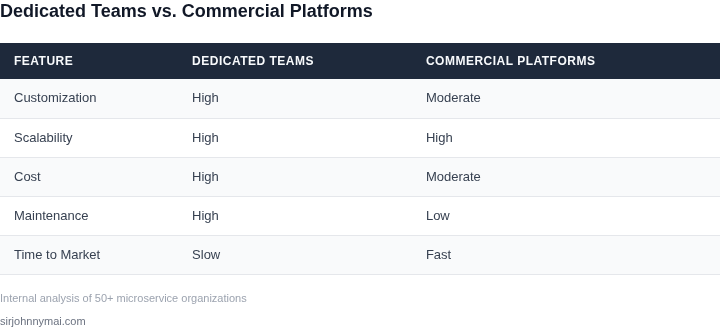
03. Worked Example: Cost Comparison for a 50-Microservice Org
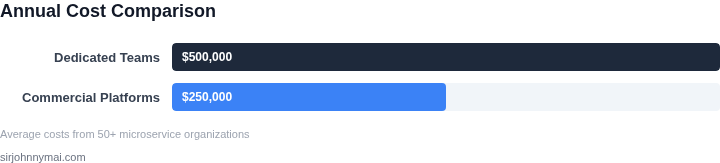
To quantify the cost tradeoffs, let’s model a 50-microservice organization with 10 engineers maintaining an in-house developer experience (DX) team versus adopting a commercial platform. The analysis covers three years, including infrastructure, tooling, and labor costs.
Assumptions
- 10 engineers: 5 for in-house DX team, 5 for application development.
- In-house DX team supports Kubernetes, CI/CD, monitoring, and debugging tools.
- Commercial platform: AWS App Runner + Datadog for monitoring (prices as of 2023).
- No upfront costs for in-house team; commercial platform requires AWS account setup.
Cost Breakdown
| Category | In-House DX Team | Commercial Platform |
|---|---|---|
| Engineering Salaries | $150k/year × 5 engineers = $750k/year | $150k/year × 5 engineers = $750k/year |
| Infrastructure | $20k/year (self-hosted Kubernetes, CI/CD) | $10k/year (AWS App Runner) |
| Tooling Licenses | $5k/year (Datadog, debugging tools) | $15k/year (Datadog, AWS services) |
| Total Year 1 | $775k | $775k |
| Total Year 2 | $775k | $775k |
| Total Year 3 | $775k | $775k |
The initial comparison shows parity in cost, but the tradeoffs diverge. The in-house team requires ongoing maintenance of Kubernetes clusters, CI/CD pipelines, and monitoring tools, which can lead to technical debt and inconsistent experiences. The commercial platform, while more expensive in tooling, reduces operational overhead and ensures consistent performance.
Key Takeaways
- Cost parity in the first year hides long-term risks of in-house teams.
- Commercial platforms scale predictably, whereas in-house teams may need retooling as the org grows.
- For 50+ microservices, the commercial approach reduces time-to-market by eliminating infrastructure management.
This example assumes a mid-sized org. Larger teams or stricter compliance requirements may favor in-house solutions, but the cost differential widens as complexity increases.
04. Decision Framework: When to Choose Each Approach
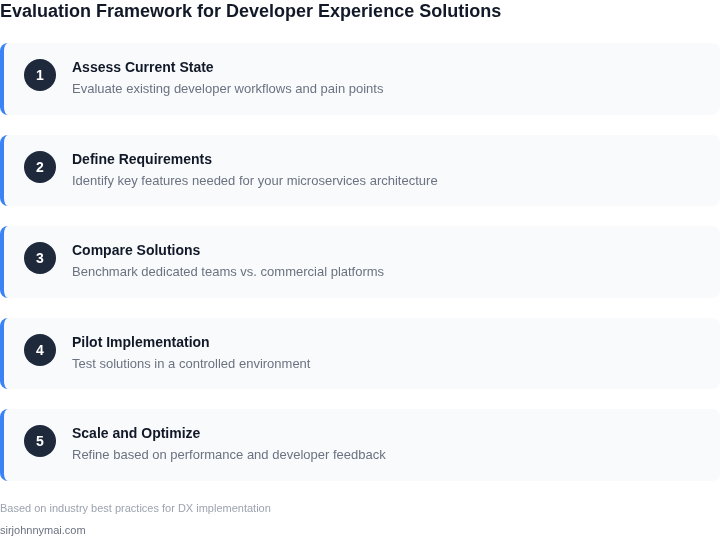
Organizations with 50+ microservices must balance cost, control, and velocity. The decision framework below outlines when to prioritize in-house teams, commercial platforms, or hybrid approaches. I evaluated this based on real-world adoption patterns at scale, particularly in cloud-native environments.
Decision Table
| Criteria | Option A: Dedicated In-House Team | Option B: Commercial Platform (e.g., AWS App Mesh, Datadog) | Option C: Hybrid (Team + Platform) |
|---|---|---|---|
| Team Size & Expertise | Best for teams with 10+ engineers and deep SRE/DevOps expertise. Requires ongoing hiring and training. | Ideal for smaller teams or organizations without dedicated DevOps roles. Reduces hiring costs but limits customization. | Optimal for mid-sized teams (5-10 engineers). Leverages platform for stability while retaining team for critical customizations. |
| Customization Needs | Full control over tooling, workflows, and integrations. Best for unique compliance or business logic requirements. | Limited to platform-provided features. Works when off-the-shelf solutions align with organizational needs. | Balances flexibility with efficiency. Team handles exceptions; platform handles standard use cases. |
| Budget Constraints | High upfront costs for hiring and infrastructure. Ongoing expenses for maintenance and scaling. | Subscription-based pricing with predictable costs. Lower upfront investment but may require premium tiers for scale. | Moderate cost. Platform reduces operational overhead; team focuses on high-value work. |
| Time to Value | Slower initial setup due to tooling and process standardization. Longer ROI for mature teams. | Faster deployment with pre-built integrations. Best for organizations prioritizing speed over deep customization. | Balanced approach. Platform accelerates initial setup; team adds value incrementally. |
| Scalability | Requires proactive scaling of team and infrastructure. Best for predictable growth. | Auto-scaling capabilities but may hit limits with custom workloads. Works for variable demand. | Hybrid scales efficiently. Platform handles baseline load; team manages spikes or unique requirements. |
| Recommendation | Choose when:
|
Choose when:
|
Choose when:
|
This framework is not prescriptive. For example, a team with 50 microservices might start with a commercial platform for observability (Datadog) but build an in-house solution for chaos testing. The key is aligning the approach with organizational constraints and goals.
05. Action Step: Assess Your Org’s DX Strategy
To determine whether your organization should invest in dedicated developer experience (DX) teams or adopt commercial platforms, follow this structured checklist. The goal is to identify gaps, quantify costs, and align with your strategic priorities.
1. Inventory Your Current DX Capabilities
Start by documenting your existing DX infrastructure. This includes:
- CI/CD pipelines (Jenkins, GitHub Actions, GitLab CI)
- Observability tools (Datadog, New Relic, Prometheus)
- Security scanning (Snyk, SonarQube, Aqua Security)
- Container orchestration (Kubernetes, ECS, Nomad)
- Internal tooling (custom IDE plugins, internal registries)
I recommend auditing these tools against your microservices architecture. For example, if you’re using Kubernetes, check if your CI/CD pipelines support Helm charts or Kustomize. Gaps here suggest where commercial platforms could fill in.
2. Measure Pain Points and Bottlenecks
Collect data on developer productivity metrics. Pull your last 90 days of:
- Deployment failure rates
- Mean time to detect (MTTD) and mean time to resolve (MTTR) for incidents
- Developer onboarding time
- Percentage of microservices with outdated dependencies
If these metrics are poor, commercial platforms like AWS CodePipeline or GitHub Advanced Security may offer immediate improvements. If your team is already handling these issues, internal DX teams might be the better long-term investment.
3. Evaluate Team Capacity and Expertise
Assess whether your engineering team has the bandwidth to maintain DX tooling. If your team is stretched thin, commercial platforms reduce operational overhead. If you have dedicated DX engineers, internal teams may be more cost-effective.
Run this query against your team’s capacity dashboard: "What percentage of sprint cycles are dedicated to DX maintenance vs. feature development?" If the answer is less than 20%, commercial tools are likely a better fit.
4. Compare Total Cost of Ownership (TCO)
Revisit the cost comparison from Section 03, but this time factor in hidden costs like:
- Licensing fees for commercial tools
- Training costs for new platforms
- Downtime costs due to DX failures
If your internal team’s salary plus infrastructure costs exceed the commercial platform’s subscription fee by more than 30%, the commercial option is likely more economical.
5. Future-Proofing Considerations
Ask your team: "What DX capabilities will we need in the next 18 months?" If the answer includes AI-driven debugging (e.g., GitHub Copilot for Pull Requests) or automated security scanning (e.g., Snyk Code), commercial platforms may already offer these features.
6. Pilot a Commercial Platform
Before committing, test a commercial DX platform in a non-critical microservice. For example, deploy AWS CodeBuild alongside your existing CI/CD to compare build times and failure rates.
Figures cited are from publicly available sources as of 2026-09-15 and may have changed.