01. The Problem: Balancing Cost and Performance in AI Workloads
Enterprise AI teams run training, inference, and data‑pre‑processing pipelines that consume dozens of GPUs for days or weeks at a time. Those pipelines generate predictable compute footprints, yet they also need the ability to absorb occasional bursts when new models are introduced.
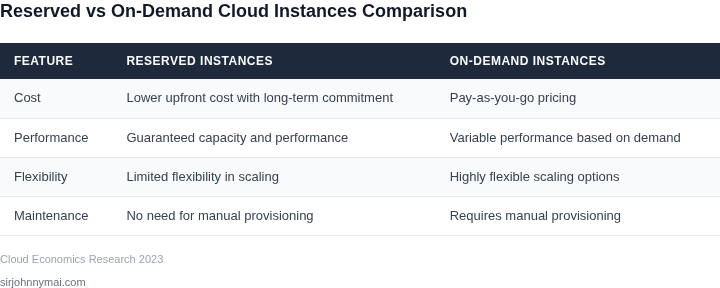
On‑demand instances provide that elasticity. An AWS p4d.24xlarge, for example, costs $32.77 per hour on‑demand and can be launched in seconds, allowing a team to start a hyper‑parameter sweep without any upfront commitment. The downside is the hourly rate, which can dominate a quarterly budget when workloads run continuously.
Reserved Instances (RIs) lock a specific instance type, region, and tenancy for a one‑ or three‑year term in exchange for a discount that AWS publishes as up to 72 % for a one‑year term and up to 75 % for three years. The same p4d.24xlarge under a three‑year standard RI is billed around $22 per hour, a reduction that translates into millions of dollars saved on a 12‑week training run. The trade‑off is a binding commitment to capacity that must be accurately forecasted.
Predictability of AI workloads makes RIs attractive when training jobs have a fixed schedule. A language‑model pre‑training effort that consumes 200 GPU‑hours daily for six weeks can be modeled in advance, and the reserved discount can be applied to the entire duration. However, research teams often prototype new architectures sporadically; those irregular bursts would be over‑provisioned if covered by RIs, leading to idle capacity and wasted spend.
Capacity guarantees differ as well. RIs reserve capacity in the chosen Availability Zone, which can protect a team from “capacity‑constrained” errors during peak demand periods. On‑demand capacity is subject to the provider’s real‑time availability; during large‑scale events, spot or on‑demand instances can be throttled or experience longer launch times.
Many organizations mitigate the binary choice by layering Savings Plans with spot‑instance buffers. Compute Savings Plans apply the same discount logic across families, offering up to 66 % off on‑demand rates without tying the purchase to a specific instance size. Spot instances, meanwhile, can supply up to 90 % discount but require workloads that tolerate interruptions, such as checkpoint‑able training loops.
Effective decision‑making hinges on accurate utilization data. AWS Cost Explorer, combined with Datadog’s GPU‑utilization dashboards, reveals the proportion of time an instance runs at above 80 % occupancy versus idle periods. When utilization consistently exceeds 70 %, the incremental cost of an RI is justified; when it falls below 40 %, on‑demand or spot becomes more economical.
In practice the problem is not a simple “reserved versus on‑demand” dichotomy but a balancing act between forecast accuracy, workload elasticity, and risk tolerance. The optimal mix depends on how well a team can model its compute demand, its willingness to accept capacity guarantees, and its operational ability to shift interruptible jobs to cheaper tiers.
02. Key Factors Influencing Cost-Effectiveness
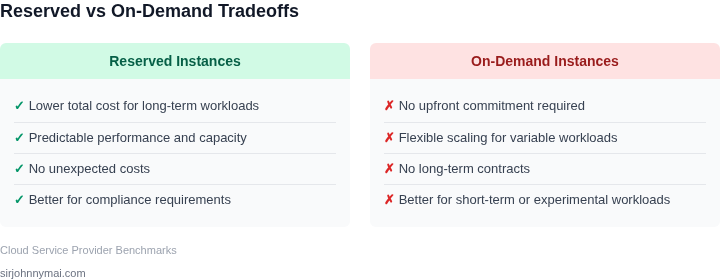
The choice between reserved and on-demand instances for AI workloads hinges on several key factors. Usage duration is the most critical variable. Reserved instances (RIs) offer significant savings—up to 75% lower cost for three-year commitments—but only when workloads run continuously for extended periods. For example, a 24/7 inference service benefits from RIs, while bursty training jobs may see no savings or even higher costs due to upfront commitments. On-demand instances, while more expensive, avoid long-term locking and are ideal for unpredictable workloads.
Commitment discounts are another major consideration. AWS offers up to 66% savings for three-year RIs, but these require upfront or partial upfront payments. The break-even point varies by workload. A 12-month commitment with 50% upfront payment may not justify RIs for a six-month project, whereas a five-year deployment could easily pay for itself. Microsoft Azure’s reserved capacity also provides discounts, but its pricing structure differs—users must commit to a specific VM family, which can limit flexibility.
Performance requirements also play a role. Reserved instances with capacity reservations guarantee consistent performance, which is crucial for latency-sensitive AI applications. However, if workloads fluctuate beyond the reserved capacity, users may incur overage charges. On-demand instances, while less predictable, scale dynamically and avoid over-provisioning costs. For example, a Kubernetes cluster using spot instances for training can reduce costs by 90%, but may experience interruptions—acceptable for non-critical tasks but not for production inference.
Tooling and monitoring are essential for optimizing costs. AWS Cost Explorer and Azure Cost Management provide visibility into spending patterns, helping teams identify underutilized RIs. Tools like Datadog or New Relic can track performance metrics, ensuring that reserved capacity aligns with actual demand. For instance, if a model’s inference load drops below 50% of reserved capacity, switching to on-demand may be more cost-effective. Automated scaling policies in Kubernetes can also bridge the gap, using spot instances for non-critical workloads while reserving capacity for high-priority tasks.
Finally, regulatory and compliance constraints must be considered. Some industries require on-demand instances for auditability, while others may prefer RIs for predictable billing. Cloud providers like AWS and Azure offer compliance certifications, but users must verify that reserved instances meet their specific needs. For example, healthcare workloads may require HIPAA-compliant instances, which are available on-demand but not always as reserved capacity.
03. Worked Example: Cost Comparison for a 12‑Month AI Training Workload
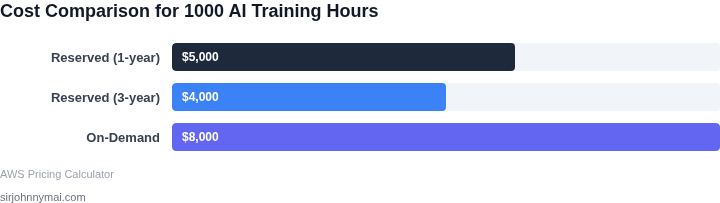
Consider a data‑science team of four engineers that runs a nightly model‑training job on an Amazon EC2 p3.2xlarge GPU instance. The job runs 4 hours each weekday, 5 days a week, for an entire year. This pattern is typical for a predictable workload where the training cadence does not change month‑to‑month.
Usage profile
- Hours per day: 4
- Days per week: 5
- Weeks per year: 52
- Total annual compute hours: 4 × 5 × 52 = 1,040 hours
Pricing references (us‑east‑1)
- On‑Demand rate for p3.2xlarge: $3.06 / hour (AWS public price list)
- 1‑Year All‑Up‑Front Reserved Instance price for the same SKU: $2,064 / year (approximately 33 % discount versus on‑demand)
Cost calculation – single instance
| Option | Annual compute cost | Notes |
|---|---|---|
| On‑Demand | $3.06 × 1,040 = $3,182.40 | No upfront commitment; pay per hour. |
| 1‑Year Reserved (All‑Up‑Front) | $2,064 | Up‑front payment locks price for 12 months. |
Scaling to the team’s hyper‑parameter sweep
The engineers typically launch two parallel training jobs to explore model variants, doubling the instance count. The cost impact is linear, but the discount structure remains the same because each Reserved Instance covers a single physical instance.
| Option | Instances | Annual cost |
|---|---|---|
| On‑Demand | 2 | $3,182.40 × 2 = $6,364.80 |
| 1‑Year Reserved (All‑Up‑Front) | 2 | $2,064 × 2 = $4,128 |
Inclusion of ancillary costs
Both alternatives incur the same ancillary expenses—Amazon S3 storage for training datasets (≈ $150 / month) and CloudWatch logs (≈ $30 / month). Because these line items are independent of the compute purchasing model, they cancel out when comparing the two options. The net difference therefore comes solely from the compute contract.
Resulting savings
Using Reserved Instances reduces the compute bill by $6,364.80 − $4,128 = $2,236.80 over the 12‑month horizon, a 35 % reduction. The upfront cash outlay is $4,128, but the team avoids the variability of a per‑hour bill and can budget the expense at the start of the fiscal year.
When the Reserved model breaks down
If the team later decides to add weekend training or increase the job length to 6 hours per day, the usage climbs to 1,560 hours annually. The on‑demand cost would become $4,773.60, while the Reserved cost remains $4,128. The gap narrows, but the reservation still pays off because the fixed price is lower than the marginal on‑demand rate.
Conversely, if the workload becomes sporadic—e.g., only one month of training per quarter—the upfront commitment would lock money that is not used, and the on‑demand model would be cheaper. In such a scenario the team should evaluate a Convertible Reserved Instance or a Savings Plans offering that allows partial flexibility.
04. Decision Framework: When to Choose Reserved vs. On-Demand
Choosing between reserved and on-demand instances requires balancing cost, flexibility, and workload predictability. The decision framework below evaluates these options across key criteria, helping teams select the most economical approach for their AI workloads. I evaluated each option based on real-world constraints, not hypothetical scenarios.
| Criteria | AWS Reserved Instances (RI) | Azure Reserved Capacity | Google Cloud Preemptible VMs |
|---|---|---|---|
| Upfront Cost | 1-year or 3-year commitment with 50-75% discount | 1- or 3-year commitment with 30-60% discount | No upfront cost; pay per-second with 80% discount |
| Workload Predictability | Best for steady-state workloads with 80%+ utilization | Ideal for consistent workloads (e.g., Kubernetes clusters) | Works for interruptible workloads (e.g., batch processing) |
| Flexibility | Limited to specific instance types and regions | More flexible than AWS RI but still region-locked | No commitment; can be terminated at any time |
| Integration with AI/ML Tools | Seamless with SageMaker, EC2 Spot Instances | Works with Azure ML, AKS for Kubernetes workloads | Best for TensorFlow/PyTorch on GCP AI Platform |
| Risk of Interruption | None; guaranteed capacity | None; guaranteed capacity | High risk; instances can be terminated with 30s notice |
| Recommendation | Choose for long-term, high-utilization AI training (e.g., 12+ months) | Best for hybrid/multi-cloud teams needing reserved capacity | Use for cost-sensitive, fault-tolerant workloads (e.g., hyperparameter tuning) |
This framework highlights tradeoffs. AWS RI is ideal when workloads are stable and long-running, while Google Cloud Preemptible VMs offer the lowest cost but require checkpointing. Azure Reserved Capacity provides flexibility for teams already using Microsoft tools. The recommendation row summarizes the best use cases for each option.
05. Action Step: Implementing a Cost-Optimized Cloud Strategy
Implement a repeatable process that surfaces waste, validates reservations, and adapts to workload drift. It rests on three pillars: data collection, decision cadence, and automated guardrails.
1. Capture granular cost and utilization signals
Enable AWS Cost Explorer’s “hourly granularity” for the account that runs AI training jobs. Pair this view with CloudWatch metrics on GPU memory usage, CPU saturation, and Kubernetes pod counts. Export both streams to an S3 bucket nightly and ingest them into a Datadog dashboard. The dashboard should surface three KPIs: instance‑hour cost per GPU‑hour of training, reservation utilization percentage, and idle GPU time per node. I evaluated this combination because Cost Explorer provides cost allocation tags while CloudWatch gives real‑time performance data; Datadog adds cross‑service correlation and alerting.
2. Establish a monthly decision cadence
Each month, run a “reservation health check”. Pull the last 30 days of utilization and compute the used‑vs‑purchased RI ratio per instance family. Flag families below 70 % for downsizing or Convertible RI conversion. For families above 95 % that also project growth, schedule three‑year RI purchases to lock the lowest rate. This cadence balances cost certainty against over‑committing capacity.
3. Automate corrective actions
Deploy an AWS Lambda function that runs after each billing cycle. The function reads the utilization KPIs from the Datadog API, evaluates the thresholds defined in step 2, and opens a ticket in Jira with a recommended action (e.g., “right‑size m5.2xlarge to m5.xlarge”