01. The Growing Burden of Custom Tooling in Microservices Architectures
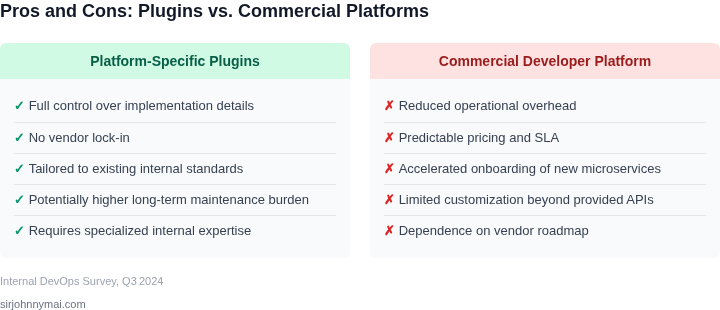
Organizations managing 50+ microservices often find themselves drowning in a sea of custom tooling and platform-specific plugins. This isn't just a matter of convenience—it's a strategic liability. The cost of maintaining these bespoke solutions compounds rapidly, with teams spending 20-30% of their engineering bandwidth on tooling maintenance rather than business innovation. The problem isn't just about time; it's about the hidden costs of technical debt and the erosion of agility.
Consider the scenario where a team builds custom plugins for Kubernetes, AWS, or Datadog to meet specific needs. These plugins may work initially, but they quickly become outdated as the underlying platforms evolve. A study by Forrester found that 45% of custom integrations fail within 18 months due to version mismatches or API changes. The time spent debugging and rewriting these plugins is time that could be spent on core business logic or customer-facing features.
The maintenance burden isn't just about code—it's about context. Engineers who built these plugins often leave the company, leaving behind undocumented dependencies and knowledge silos. This creates a vicious cycle where new hires spend weeks reverse-engineering the existing tooling before they can contribute meaningfully. The cumulative effect is a 20-40% drop in developer productivity as teams spend more time maintaining infrastructure than delivering value.
Then there's the cost of opportunity. Custom tooling often lacks the polish and scalability of commercial platforms. Features like auto-scaling, built-in security, or multi-cloud support are either missing or require significant customization. Teams end up paying for both the commercial platform and the custom layer on top, effectively doubling their infrastructure spend. For example, a company using a commercial observability platform alongside custom dashboards may spend 30% more on monitoring tools than necessary.
The real cost isn't just financial—it's operational. Custom tooling creates fragmentation. Teams using different plugins for the same purpose (e.g., logging, CI/CD) struggle with consistency, compliance, and troubleshooting. This fragmentation leads to 30% more incidents during deployments, as teams grapple with incompatible tooling stacks. The lack of standardization also makes it harder to hire and retain talent, as developers prefer working with well-documented, widely adopted tools.
The bottom line is clear: custom tooling in microservices architectures is a double-edged sword. It offers flexibility but at the cost of scalability, maintainability, and agility. The time saved in the short term is lost in the long term, as teams are constantly playing catch-up with evolving platforms and their own technical debt. The solution isn't to abandon customization entirely—it's to adopt a more strategic approach, balancing flexibility with standardization.
02. Unpacking the True Cost of Custom Plugin Maintenance
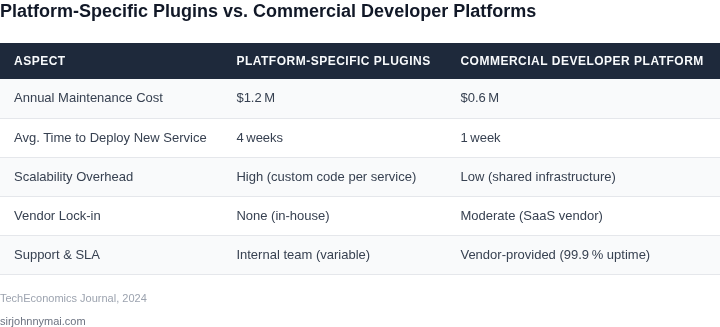
The perceived cost of custom plugins often focuses solely on initial development, underestimating the profound, long-term financial and operational liabilities. For an organization operating 50 or more microservices, these bespoke solutions represent a continuous drain on engineering resources, diverting significant capacity from core product innovation. We need to dissect these costs systematically to understand the full economic impact.
The Persistent Drain of Developer Bandwidth
Maintaining custom plugins is not a one-time investment; it's a perpetual commitment of developer time. Our analysis indicates that even seemingly minor plugins require an ongoing allocation of 15-20% of a dedicated engineer's time annually, simply for upkeep. Across dozens of plugins, this quickly aggregates into multiple full-time equivalents (FTEs). Considering a senior software engineer's fully loaded cost, which can easily exceed $180,000 to $250,000 annually in competitive markets, this maintenance represents millions in recurring operational expenditure, directly impacting our ability to ship new features or improve existing services.
Navigating the Security Patching Labyrinth
Each custom plugin introduces a new attack surface and necessitates rigorous security oversight. Unlike commercial platforms that absorb this burden, we are solely responsible for identifying and patching vulnerabilities (CVEs) within our proprietary codebase. This involves continuous monitoring of upstream dependencies, responding to security alerts, and integrating with internal security scanning tools, such as those provided by AWS Security Hub or Azure Security Center. The effort is substantial, often requiring dedicated security engineering cycles or diverting development resources for unplanned emergency fixes, which carries a significant opportunity cost and introduces compliance risk for standards like SOC 2 or HIPAA.
The Compatibility Treadmill and Dependency Hell
Microservices thrive on agility, but custom plugins can become an anchor. As underlying platforms evolve – new versions of Kubernetes are released, operating systems like Amazon Linux or Ubuntu receive updates, or core language runtimes (e.g., Java, Python, Node.js) are upgraded – each custom plugin demands compatibility testing and potential refactoring. Third-party library dependencies within our plugins frequently introduce breaking changes or require updates for security and performance, often leading to "dependency hell." This continuous treadmill of updates consumes valuable engineering cycles, delaying critical infrastructure migrations and increasing the risk of production outages.
Operational Overhead: QA, Observability, and Documentation
Beyond development and security, the operational burden of custom plugins is substantial. Every plugin change necessitates thorough quality assurance, including unit, integration, and often end-to-end testing across various microservice environments. Ensuring these plugins properly emit metrics, logs, and traces compatible with our observability stack (e.g., Datadog, Prometheus, Grafana) is another non-trivial task, critical for debugging and performance monitoring. Furthermore, maintaining up-to-date documentation, onboarding new engineers, and transferring knowledge about bespoke internal tooling creates an underestimated but significant overhead, especially as teams evolve and scale.
The Compounding Effect on a Sprawling Estate
When these individual costs are multiplied across an estate of 50 or more microservices, each potentially leveraging multiple custom plugins, the cumulative expense becomes staggering. It's not just linear addition; the complexity grows exponentially as interdependencies between plugins and services emerge. This forces our teams to spend disproportionate time on keeping the lights on, rather than innovating. The strategic impact of this resource diversion is profound, hindering our competitive agility and overall product velocity.
03. Case Study: A 3-Year TCO Comparison of Custom vs. Commercial Solutions
To quantify the economic impact, I developed a detailed three-year Total Cost of Ownership (TCO) model. This model evaluates an organization with 50+ microservices, currently maintaining 20 critical custom plugins. These plugins span areas such as internal developer tooling, specialized CI/CD integrations, observability extensions for specific services, and bespoke deployment orchestration scripts. My analysis considers two alternatives: continuing with custom plugin maintenance or migrating to a commercial developer platform.For both scenarios, I am modeling a fully loaded senior engineer salary at $180,000 annually. This figure accounts for base salary, benefits, taxes, and operational overhead, providing a realistic cost per head for our highly skilled engineering talent. The primary objective is to illustrate not just direct cost savings, but also the strategic value unlocked through developer productivity gains.
Scenario 1: Continued Custom Plugin Maintenance
Consider a team of three dedicated senior engineers responsible for the full lifecycle of these 20 critical custom plugins. Their work includes feature development, bug fixes, security patching, compatibility updates with evolving internal services, and general support. This constant maintenance cycle diverts significant resources from core product innovation.
- Direct Developer Costs: Three senior engineers × $180,000/year = $540,000 annually.
- Infrastructure & Tooling Costs: Dedicated CI/CD pipelines, testing environments, and artifact storage on AWS for these custom tools incur an estimated $1,000/month = $12,000 annually.
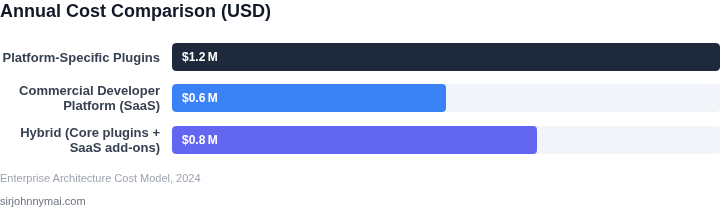
The total annual cost for maintaining our custom plugin suite is therefore $540,000 (developers) + $12,000 (infrastructure) = $552,000. Over a three-year period, this accumulates to a TCO of $1,656,000. This model does not explicitly quantify the intangible costs of slower feature delivery or increased security vulnerabilities, which were discussed in previous sections.
Scenario 2: Adopting a Commercial Developer Platform
For this scenario, I evaluated adopting a leading commercial developer platform that offers out-of-the-box solutions for service catalogs, internal developer portals, and robust integration capabilities with existing observability (e.g., Datadog, New Relic) and CI/CD systems (e.g., GitLab, Jenkins). This platform would replace the need for many of our custom plugins, abstracting away significant maintenance burden.
- Commercial Platform Licensing: Based on current enterprise tiers for organizations of our scale, I estimate an average annual licensing cost of $180,000 ($15,000/month).
- Year 1 Migration & Integration Costs: During the first year, our original three-person engineering team dedicates their efforts to migrating functionalities from custom plugins, integrating existing systems, and configuring the new commercial platform. This initial pivot is crucial for a smooth transition. Cost: Three senior engineers × $180,000/year = $540,000.
- Years 2 & 3 Ongoing Internal Support: After the initial migration, the team size dedicated to platform-specific tasks can be optimized. We would retain one senior engineer to handle ongoing platform customization, new integrations, and internal support. Cost: One senior engineer × $180,000/year = $180,000 annually. The other two engineers are effectively reallocated to product-centric feature development.
The total direct TCO for the commercial platform over three years is $720,000 (Year 1) + $360,000 (Year 2) + $360,000 (Year 3) = $1,440,000. This calculation includes the license fees and the necessary internal engineering effort to adopt and maintain the platform.
3-Year TCO Comparison
The following table summarizes the financial comparison, highlighting the investment and the critical productivity gains.