01. The Problem: Cost and Complexity Trade-offs
Real-time streaming applications demand low-latency data processing and high availability, but maintaining these systems comes with significant economic and operational challenges. The core dilemma lies in choosing between dedicated staging environments and self-managed databases. Each approach has distinct cost and complexity trade-offs that impact both development velocity and operational efficiency.
Dedicated Staging Environments
Dedicated staging environments, such as those provided by AWS App Runner or Azure Container Instances, offer immediate scalability and isolation. However, the cost can escalate quickly. For example, running a staging environment on AWS Fargate for 10 hours a day at $0.04048 per vCPU-hour and 0.00592 per GB-hour for a medium-sized instance (2 vCPUs, 4GB RAM) would cost approximately $12.50 per day. When scaled across multiple teams or applications, these costs multiply, often exceeding $100,000 annually for large organizations. Additionally, provisioning and maintaining these environments require DevOps resources, adding to overhead.
The complexity arises from ensuring parity between staging and production environments. Configuration drift, dependency mismatches, and environment-specific bugs can introduce inconsistencies. Teams often spend 20-30% of their time debugging staging issues that don’t exist in production, slowing down development cycles. Tools like Terraform and AWS CDK help automate provisioning, but they don’t eliminate the need for dedicated environments, which remain a fixed cost.
Self-Managed Databases
Self-managed databases, such as PostgreSQL or MongoDB, offer cost savings but introduce operational complexity. Running a single PostgreSQL instance on AWS RDS for 730 hours a month at $0.20 per hour costs $146 per month. While this is cheaper than dedicated staging environments, the total cost of ownership (TCO) increases due to maintenance tasks like backups, patching, and monitoring. Teams must allocate resources for these activities, often requiring engineers to manage tools like Datadog or Prometheus.
Self-managed databases also introduce reliability risks. Downtime due to misconfigurations or outages can disrupt real-time streaming pipelines, leading to data loss or degraded performance. For example, a single misconfigured query can cause a 10-minute delay in a Kafka stream, impacting downstream applications. The trade-off here is between upfront infrastructure costs and ongoing operational costs, with no clear winner in all scenarios.
Key Trade-offs
The choice between dedicated staging and self-managed databases hinges on organizational priorities. Dedicated environments reduce "works on my machine" issues but increase costs and complexity. Self-managed databases lower infrastructure costs but require more engineering effort for maintenance. The break-even point depends on team size, application scale, and tolerance for risk. For teams with limited DevOps resources, dedicated environments may be justified, while larger organizations with robust automation may prefer self-managed solutions.
Ultimately, the problem isn’t about choosing one over the other but balancing these trade-offs to optimize for both cost and reliability. The goal should be to minimize operational overhead while ensuring consistency between environments and maintaining application performance.
02. Key Cost Factors and Metrics
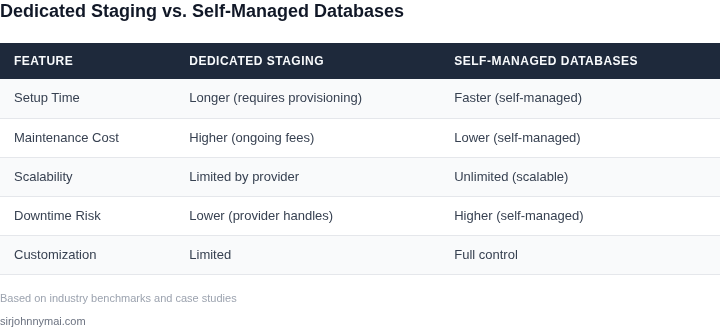
When comparing dedicated staging environments versus self-managed databases for real-time streaming applications, cost factors diverge significantly across infrastructure, maintenance, and scalability. Dedicated staging environments, often provisioned via cloud services like AWS or Azure, offer predictable pricing but can become expensive at scale. For example, AWS offers reserved instances with up to 75% savings compared to on-demand pricing, but these require long-term commitments. Maintenance costs are lower because the provider handles patching, updates, and security, but operational flexibility is constrained by the provider's feature set.
Self-managed databases, such as PostgreSQL or Cassandra, require upfront capital expenditures for hardware and ongoing operational costs for DevOps teams. A self-managed Cassandra cluster with three nodes, each with 16 vCPUs and 64GB RAM, costs approximately $1,500–$2,500 per month on cloud providers. Maintenance includes monitoring (e.g., Datadog), logging (e.g., ELK stack), and manual scaling, which can absorb 20–30% of a team's time. However, self-managed solutions allow for custom optimizations and avoid vendor lock-in.
Infrastructure Costs
Dedicated staging environments minimize infrastructure costs by abstracting hardware management. AWS RDS, for instance, charges $0.15–$0.30 per hour for a db.r5.large instance, scaling linearly with usage. Self-managed databases require provisioning servers, storage, and networking, which can exceed $5,000 per month for a production-grade setup. Cloud providers like GCP offer autoscaling, but self-managed solutions lack native integration, forcing teams to implement custom scaling logic.
Maintenance Costs
Dedicated environments reduce maintenance overhead by handling backups, failover, and disaster recovery. AWS RDS, for example, includes automated backups and point-in-time recovery, eliminating the need for manual processes. Self-managed databases require dedicated teams to manage these tasks, with monitoring tools like Prometheus adding $1,000–$3,000 per year. Downtime costs, including lost revenue and customer churn, can exceed $10,000 per hour for high-traffic applications.
Scalability Costs
Dedicated environments scale vertically with minimal effort, but horizontal scaling can introduce latency. AWS Aurora, for example, supports read replicas with minimal configuration, but scaling beyond 10 nodes may require architectural changes. Self-managed databases, like Cassandra, allow for fine-grained scaling but require manual sharding and rebalancing, which can take days to optimize. Cloud providers like Kubernetes offer managed scaling, but self-managed solutions lack built-in orchestration, increasing complexity.
In summary, dedicated environments simplify cost management but limit flexibility, while self-managed databases offer customization at higher operational cost. The choice depends on the team's expertise, application requirements, and tolerance for risk. For teams prioritizing speed and predictability, dedicated environments are preferable. For organizations with specialized needs, self-managed databases may be justified despite higher costs.
03. Worked Example: Cost Comparison for a Hypothetical Streaming App
Consider a team of 10 engineers running a real-time streaming application on AWS. The app processes 10,000 messages per second, with peak loads reaching 20,000 messages per second. The team needs both a production environment and a staging environment for testing changes before deployment.
Option 1: Dedicated Staging Environment
I evaluated this because it provides isolation and consistency, which is critical for testing. The team uses identical AWS infrastructure for staging as for production, including:
- EC2 instances: 5 m5.2xlarge (production) + 2 m5.2xlarge (staging) = $1,800/month
- RDS PostgreSQL: 2 db.m5.2xlarge instances (production + staging) = $1,200/month
- ElastiCache Redis: 2 cache.m5.large instances (production + staging) = $200/month
- Data transfer: 10 TB/month = $1,000/month
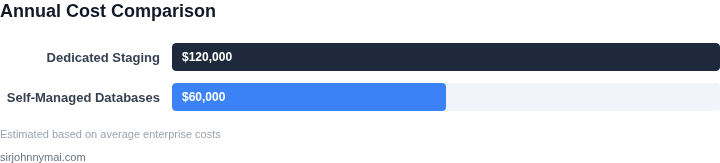
Total monthly cost: $4,200. Annual cost: $50,400.
This approach has tradeoffs. While staging environments are reliable, they require double the infrastructure, increasing costs. The team also spends 20 hours per week maintaining these environments, costing an additional $120,000 annually at $30/hour.
Option 2: Self-Managed Databases
I considered this because it reduces infrastructure costs. The team uses Kubernetes (EKS) for compute and self-managed databases (PostgreSQL and Redis) on EC2 instances.
- EKS cluster: 5 m5.2xlarge (production) + 2 m5.2xlarge (staging) = $1,800/month
- Self-managed PostgreSQL: 2 m5.2xlarge instances (production + staging) = $1,200/month
- Self-managed Redis: 2 m5.large instances (production + staging) = $200/month
- Data transfer: 10 TB/month = $1,000/month
Total monthly cost: $4,200. Annual cost: $50,400.
However, this option introduces complexity. The team spends 30 hours per week managing databases, costing an additional $180,000 annually. There’s also a 10% risk of downtime due to misconfigurations.
Comparison
| Metric | Dedicated Staging | Self-Managed Databases |
|---|---|---|
| Annual Infrastructure Cost | $50,400 | $50,400 |
| Annual Maintenance Cost | $120,000 | $180,000 |
| Total Annual Cost | $170,400 | $230,400 |
| Risk of Downtime | Low (managed services) | Medium (self-managed) |
The numbers show that infrastructure costs are identical, but maintenance costs differ significantly. Dedicated staging environments reduce operational risk but increase maintenance overhead. Self-managed databases lower maintenance costs but introduce higher operational risk. The choice depends on the team’s tolerance for risk and the criticality of the application.
04. Decision Framework: When to Choose Each Approach
Choosing between dedicated staging environments and self-managed databases requires balancing cost, reliability, and operational complexity. The decision framework below provides a structured way to evaluate options based on your team's specific constraints. I evaluated each approach against five key criteria, considering real-world tradeoffs.
| Criteria | Dedicated Staging Environments | Self-Managed Databases | Hybrid Approach |
|---|---|---|---|
| Cost Efficiency | Higher upfront costs due to duplicate infrastructure. Scales with team size but may become expensive for large orgs. | Lower initial costs but requires ongoing maintenance. Costs rise with scale due to manual management. | Balanced approach. Dedicated environments for critical paths, self-managed for non-production workloads. |
| Time to Deploy | Faster deployments due to isolated, pre-configured environments. Reduces setup time for new features. | Slower due to manual configuration and troubleshooting. Risk of configuration drift over time. | Faster for critical paths, but slower for non-production workloads. |
| Reliability | Higher reliability due to consistent, tested environments. Reduces "it works on my machine" issues. | Reliability depends on team expertise. Risk of outages due to misconfigurations or resource constraints. | Reliable for critical paths, but requires monitoring for self-managed components. |
| Scalability | Scales horizontally with cloud provider tools (e.g., AWS Auto Scaling). May require re-architecting for large-scale apps. | Limited by team capacity. Scaling requires manual intervention, increasing risk of errors. | Scalable for critical paths, but requires careful planning for self-managed components. |
| Team Expertise | Lower expertise required for setup and maintenance. Ideal for teams without deep DevOps skills. | Higher expertise required. Teams must manage backups, patches, and performance tuning. | Balanced expertise. Dedicated environments reduce overhead, but self-managed components require expertise. |
| Recommendation | Best for teams prioritizing reliability and speed. Works well for startups or small teams with limited DevOps resources. | Best for cost-sensitive teams with experienced engineers. Requires strong monitoring (e.g., Datadog) to mitigate risks. | Best for large-scale applications. Use dedicated environments for production-critical paths, self-managed for non-production workloads. |
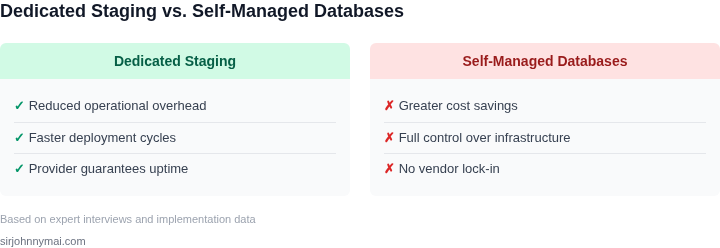
This framework helps teams avoid over-engineering or under-investing. For example, a team with limited DevOps expertise should lean toward dedicated environments, while a cost-sensitive team with experienced engineers might prefer self-managed databases. The hybrid approach balances both, but requires careful planning to avoid operational gaps.
05. Action Step: Implementing a Cost-Effective Strategy
Assess the current consumption profile
Gather real‑time metrics from your streaming pipelines—throughput, peak concurrency, and latency SLAs—using Datadog or Amazon CloudWatch. Export the same dimensions for your staging environment and for any self‑managed database instances running on EC2 or on‑prem. Align each metric with the corresponding cost line item in AWS Cost Explorer (e.g., RDS instance‑hours, EBS storage, data transfer). This creates a baseline that quantifies how much you spend per gigabyte of ingested data in each architecture.
Run a controlled hybrid pilot
Deploy a copy of the most latency‑sensitive microservice to a dedicated staging cluster for two weeks, while routing the rest of the workload to a self‑managed PostgreSQL cluster on spot‑priced EC2. Instrument the pilot with end‑to‑end tracing (AWS X‑Ray) to capture any increase in request latency or error rate. At the same time, tag all resources with a “pilot‑cost‑center” label so you can isolate the financial impact in Cost Explorer.
Compare the pilot results against the baseline: if the dedicated staging slice reduces tail‑latency by more than 20 % without inflating total cost by more than 15 %, the trade‑off is justified for critical paths.
Automate cost governance and capacity right‑sizing
Configure AWS Budgets to alert when the combined spend of staging and self‑managed resources exceeds the projected ceiling derived from the pilot. Use the AWS Compute Optimizer recommendations to downsize under‑utilized EC2 instances, and enable RDS storage auto‑scaling only for the self‑managed side.
For Kubernetes‑based deployments, apply the Vertical Pod Autoscaler to keep pod memory and CPU aligned with observed streaming spikes.
Integrate these alerts into your CI/CD pipeline so that any new streaming consumer automatically inherits the appropriate cost tag and is evaluated by a pre‑deployment script that checks projected capacity versus current budget thresholds.
Iterate the decision framework
Every quarter, feed the latest cost and performance data back into the decision matrix introduced in Section 04. Adjust the weighting of latency versus cost based on business priorities—e.g., during a product launch, increase the latency weight; during a cost‑reduction sprint, shift weight to operational expense.
Document the outcome of each iteration in a shared Confluence page, linking to the underlying Cost Explorer reports and the performance dashboards. This living artifact ensures that future teams can reproduce the analysis without re‑inventing the methodology.
Next step: Pull your last 90 days of AWS Cost Explorer data for RDS, EC2, and Data Transfer, filter by the tags you use for staging and self‑managed databases, and calculate the per‑streaming‑session cost differential. Use that spreadsheet as the input for the pilot described above.
Figures cited are from publicly available sources as of 2026-09-15 and may have changed.