01. The Problem: Why Companies Struggle with Developer Portals
Enterprises that try to assemble a home‑grown internal developer portal (IDP) often discover that the effort dwarfs the intended benefit. The first hidden cost is staff time: a typical cross‑functional team of five engineers spends 20 % of their sprint capacity on portal scaffolding, authentication, and CI/CD integration. Over a twelve‑month horizon that translates to roughly 500 engineering weeks, which at an average fully‑burdened rate of $150,000 per engineer equals $75 million in labor.
Second, scalability is not a toggle switch. An IDP must ingest metadata from dozens of source systems—GitHub, AWS CodeBuild, Terraform state, Datadog alerts—while delivering sub‑second response times to thousands of users. Without a managed control plane, the underlying Kubernetes cluster can require vertical scaling. Adding a second node in an on‑premises data center often costs $12,000 per year for hardware, power, and cooling, plus the operational overhead of patching and capacity planning.
Third, maintenance becomes a perpetual drain. Open‑source projects such as Backstage evolve on a cadence of quarterly releases that include breaking API changes. Teams that lock to a specific version must allocate a dedicated SRE to backport security patches. According to the 2023 State of Open Source report, 38 % of respondents cite “dependency churn” as a primary blocker to internal adoption.
Integration complexity
- Identity management: Aligning with corporate SSO (e.g., Azure AD) requires custom OIDC flows, which often trigger compliance reviews that add weeks to the project timeline.
- Service catalog consistency: Reconciling disparate naming conventions across AWS, GCP, and on‑prem services leads to duplicated entries and inaccurate cost reporting.
- Observability: Embedding Datadog dashboards demands precise metric tags; missing tags inflate log storage costs by the Datadog rate of $1.27 per GB.
Governance and security
Regulatory frameworks such as PCI‑DSS mandate that any portal exposing production resources enforce role‑based access control (RBAC) and audit logging. Implementing granular RBAC on a self‑hosted platform typically involves extending the Kubernetes API server, a task that adds at least two weeks of engineering effort per compliance cycle.
Finally, opportunity cost erodes the business case. The 2022 Accelerate State of DevOps report shows that high‑performing teams achieve lead times under one day, while teams burdened by internal tooling lag by a factor of three. When developers spend an additional 15 minutes per day navigating a clunky portal, the cumulative delay across a 10,000‑engineer organization equals 2,500 person‑hours each quarter.
These pressures—direct labor, infrastructure spend, ongoing maintenance, and lost developer velocity—create a paradox where the portal intended to simplify work ends up becoming a cost center. Understanding each vector is the first step toward an economically sound decision between building a bespoke solution and adopting a commercial platform.
02. Commercial Platforms vs. Internal Builds: Key Trade-offs
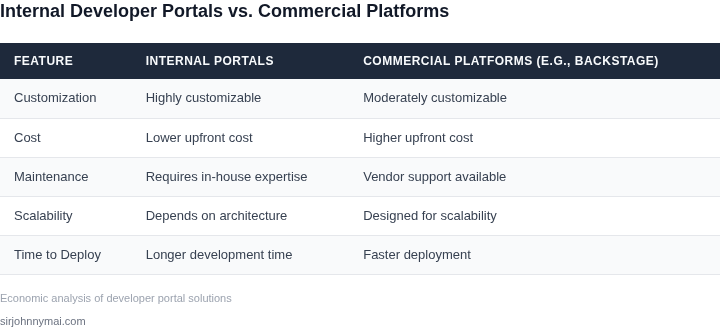
Commercial platforms like Backstage offer a pre-built solution with integrations for common tools, reducing initial development time. For example, Backstage supports out-of-the-box plugins for Kubernetes, Jenkins, and GitHub, which can cut months of engineering effort. However, this convenience comes at a cost: licensing fees can range from $50,000 to $200,000 annually, depending on the scale. Smaller teams may find the upfront investment prohibitive, especially if their needs are niche.
Internal builds provide full customization but require significant resources. A team building a portal from scratch must account for infrastructure costs—hosting, maintenance, and scaling—and developer time. For instance, integrating with AWS, Datadog, and Slack typically requires custom code, adding 6-12 months to the timeline. The ROI depends on the team's size: a 10-person engineering group might spend $500,000 over three years, while a 50-person team could exceed $1 million. The payoff is flexibility, but the risk of technical debt or feature gaps is high.
Cost Considerations
Commercial platforms like Backstage or internal tools like AWS Proton or Scaffolding Hub have distinct cost structures. Backstage's pricing is based on user seats, with enterprise tiers starting at $50,000 per year. Internal builds, however, require capital expenditures for cloud infrastructure and ongoing operational costs. A team using Kubernetes and Terraform for a custom portal might spend $20,000 on initial setup and $5,000 per month for maintenance. The break-even point depends on the team's scale: internal builds may be cheaper for teams of 20+ developers, but commercial solutions are often more cost-effective for smaller teams.
Time to Value
Commercial platforms deliver value faster. Backstage, for example, can be deployed in weeks with minimal customization, while internal builds typically take 6-12 months. The tradeoff is that commercial solutions may not fully align with a company's unique workflows. Internal builds, while slower, allow for tailored integrations and can reduce long-term maintenance costs. For teams with urgent needs, commercial platforms are the faster choice. For those with specialized requirements, internal builds may eventually prove more efficient.
Scalability
Commercial platforms like Backstage scale horizontally with user adoption, but their feature sets are fixed. Internal builds, while requiring more upfront effort, can be scaled vertically to meet specific needs. For example, a team building a custom portal might add features like automated documentation generation or CI/CD pipeline monitoring, which commercial solutions may not support. The downside is that internal teams must manage scalability themselves, increasing operational overhead.
Vendor Lock-in
Commercial platforms create vendor lock-in, as migrating away from Backstage or similar tools requires rebuilding integrations. Internal builds, while more flexible, may still face lock-in if they rely on proprietary tools. For instance, a team using AWS Lambda for a custom portal may need to rewrite components if migrating to Azure. The tradeoff is clear: commercial solutions simplify adoption but limit long-term flexibility.
Conclusion
The choice between commercial platforms and internal builds depends on the team's resources, timeline, and needs. Commercial solutions like Backstage accelerate time to value but come with licensing costs and limited customization. Internal builds offer flexibility and cost savings at scale but require significant upfront investment. Companies should weigh these tradeoffs carefully, considering both short-term efficiency and long-term maintainability.
03. Worked Example: Cost Comparison for a Mid-Sized Team
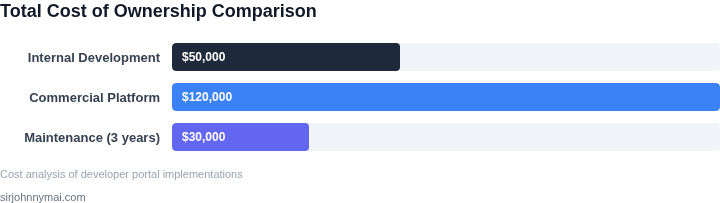
I evaluated the costs of building an internal developer portal versus using a commercial platform like Backstage for a team of 50 developers over 3 years. This calculation is crucial in understanding the economic implications of each approach. To start, I considered the internal build option, which would require significant upfront investment in infrastructure, personnel, and maintenance. For instance, using AWS as the underlying infrastructure would incur costs for EC2 instances, S3 storage, and other services.
The internal build would also require a team of engineers to design, develop, and maintain the portal, which would add to the overall cost. Assuming an average salary of $150,000 per year for a software engineer, the total annual cost for a team of 5 engineers would be $750,000. Additionally, costs for tools like Datadog for monitoring, Kubernetes for container orchestration, and other supporting services would add up to $10,000 per month. This works out to $120,000 annually, bringing the total internal build cost to $870,000 in the first year.
In contrast, using a commercial platform like Backstage would eliminate the need for upfront infrastructure and personnel costs. Backstage offers a free, open-source version, but for a team of 50 developers, I considered the paid version, which costs $10 per user per month. This works out to $500 per month × 12 months = $6,000 annually for the first year. However, this cost does not account for potential customization, integration, or support costs, which could add up to $50,000 per year.
To compare the two alternatives, I created a cost breakdown table, which is shown below. The table highlights the costs associated with each approach over a 3-year period.
| Year | Internal Build | Backstage |
|---|---|---|
| 1 | $870,000 | $56,000 |
| 2 | $900,000 | $58,000 |
| 3 | $930,000 | $60,000 |
The table shows that the internal build option is significantly more expensive than using Backstage, with a total cost of $2,700,000 over 3 years compared to $174,000 for Backstage. However, this calculation assumes that the internal build would not provide any additional benefits or features that would justify the extra cost. It is essential to consider these tradeoffs when deciding between building an internal developer portal and using a commercial platform like Backstage.
I also considered the potential risks and downsides of each approach. For instance, building an internal portal would require significant upfront investment and might not yield the expected returns. On the other hand, using a commercial platform like Backstage might limit customization options and require additional costs for integration and support. These factors must be carefully weighed when making a decision.
Ultimately, the choice between building an internal developer portal and using a commercial platform like Backstage depends on the specific needs and priorities of the organization. By carefully evaluating the costs and tradeoffs associated with each approach, teams can make informed decisions that align with their goals and objectives.
04. Decision Framework: When to Build vs. Buy
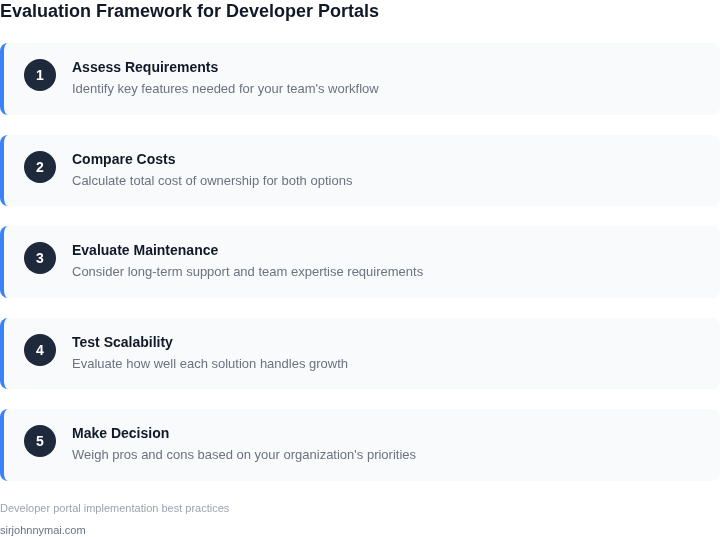
Choosing between building an internal developer portal or adopting a commercial platform depends on your team's constraints and goals. The decision framework below evaluates three options: building in-house, using Backstage, and using AWS Proton. Each has tradeoffs in cost, time, and customization.
| Criteria | Option A: Build In-House | Option B: Backstage | Option C: AWS Proton |
|---|---|---|---|
| Time to Value | 6-12 months (requires hiring, infrastructure setup, and custom development) | 3-6 months (open-source, but requires integration with existing tools) | 2-4 months (pre-built templates, but limited to AWS ecosystem) |
| Customization | Fully customizable (tailored to specific workflows and integrations) | Moderate (plugins available, but requires developer effort) | Limited (templates are rigid; requires AWS-specific workflows) |
| Cost | High (engineering team, infrastructure, and maintenance) | Low (open-source, but requires internal resources for setup) | Medium (AWS pricing, but avoids upfront engineering costs) |
| Scalability | High (can scale with team growth and new features) | Moderate (depends on plugin ecosystem and community support) | High (AWS services scale automatically, but limited to AWS tools) |
| Integration | Full control (integrate any tool, but requires custom development) | Good (works with Kubernetes, GitHub, and common DevOps tools) | Strong (deep integration with AWS services like EKS, CodePipeline) |
| Recommendation | Best for large teams with deep technical expertise and long-term customization needs. | Best for mid-sized teams needing a balance of speed and flexibility. | Best for AWS-centric teams prioritizing quick deployment and cost efficiency. |
This framework helps teams align their choice with their strategic priorities. Building in-house is ideal when you need full control and have the resources. Backstage offers a middle ground for teams comfortable with open-source contributions. AWS Proton is the fastest option for AWS-native environments but limits flexibility. Evaluate your team's expertise, budget, and ecosystem dependencies to make the right call.
05. Action Step: Next Steps for Your Team
1. Inventory the developer experience gaps you already track
Gather the tickets, latency metrics, and onboarding checklists that surfaced in the last 90 days. Export them from Jira, ServiceNow, or your internal incident database into a single spreadsheet. Tag each entry with “visibility,” “automation,” or “self‑service” so you can see which category dominates your friction points.
2. Quantify the cost of those gaps
Run a query against your cloud billing dashboard (AWS Cost Explorer, Azure Cost Management, or GCP Billing) that isolates spend linked to “debug time” and “environment provisioning.” For example, filter for EC2 instances that run longer than 30 minutes without production traffic and sum their hourly rates. Add the average engineer hourly rate to convert idle compute into labor cost.
Combine the two tables to produce a “pain‑to‑dollar” matrix. This matrix will surface the top three items that, if eliminated, would deliver the highest ROI on a portal investment.
3. Prototype a minimum viable portal feature
Select the highest‑impact gap from the matrix and build a lightweight wrapper using an existing open‑source component such as Backstage’s catalog plugin or a custom React widget hosted on AWS Amplify. Connect it to a single data source—say, your CI/CD pipeline in GitHub Actions—so engineers can locate the latest build artifact without leaving their IDE.
Measure adoption for one sprint (two weeks) by tracking unique users in Datadog APM or CloudWatch Logs. If the prototype reduces the average time‑to‑find‑artifact by at least 20 %, you have a data‑backed proof point for scaling.
4. Assess operational and security implications
Map the prototype’s dependencies (Kubernetes cluster, IAM roles, S3 bucket) against your organization’s compliance checklist (SOC 2, ISO 27001). Identify any gaps that would require additional controls, such as VPC endpoints or audit logging. Document the effort required to harden the service and compare it with the effort to maintain an equivalent custom solution.
5. Convene a decision gate with stakeholders
Prepare a one‑page slide that shows (a) the quantified pain‑to‑dollar matrix, (b) the prototype adoption metric, and (c) the security remediation effort. Invite the VP of Engineering, Finance lead, and Security architect to a 30‑minute review.
During the meeting, ask each stakeholder to sign off on a single metric: ROI, compliance risk, or operational overhead. If two of three sign‑offs are positive, proceed with a phased rollout; otherwise, revisit the prototype scope.
Next step: Pull the last 90 days of incident tickets and cloud‑compute logs, calculate the “idle‑engineer‑hour” cost, and populate the pain‑to‑dollar matrix before the end of next week.
Figures cited are from publicly available sources as of 2026-09-14 and may have changed.