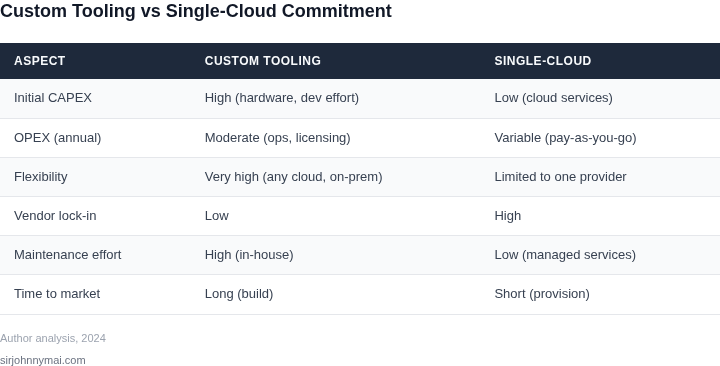
01. The Problem: Cost and Flexibility Trade-offs
Organizations building batch analytics pipelines face a fundamental dilemma: custom infrastructure tooling offers flexibility but often at higher costs, while single-cloud commitments reduce flexibility but may lower costs. This trade-off is particularly acute in environments where workloads are unpredictable or require rapid scaling. For example, a startup might need to iterate quickly on analytics pipelines, while an enterprise may prioritize cost efficiency over agility.
Custom infrastructure tooling, such as self-managed Kubernetes clusters or bespoke data processing frameworks, provides granular control over compute resources. However, this control comes with operational overhead. Maintaining a Kubernetes cluster requires expertise in orchestration, networking, and security, which can divert resources from core analytics work. Additionally, custom tooling may require specialized hardware or software licenses, increasing total cost of ownership (TCO). A study by Forrester found that managing custom infrastructure can add 20-30% to operational expenses due to labor and maintenance costs.
Single-cloud commitments, such as AWS Batch or Google Cloud Dataflow, simplify operations by abstracting infrastructure management. These services handle scaling, patching, and failover automatically, reducing the need for in-house expertise. However, they often lock organizations into a single vendor, limiting portability and increasing dependency risk. Migrating workloads between clouds can incur significant costs, as data transfer fees and service-specific optimizations may not translate seamlessly. According to Gartner, cloud migration projects can take 12-18 months and require 30-50% of the original project budget.
The choice between custom tooling and single-cloud commitments also depends on data residency requirements. Some industries, such as healthcare or finance, must comply with strict regulations that restrict data movement across cloud providers. In these cases, custom infrastructure may be the only viable option, as it allows for on-premises or hybrid deployments. Conversely, organizations with flexible compliance standards may prefer single-cloud services to avoid the complexity of multi-cloud governance.
Finally, the economics of batch analytics pipelines are further complicated by the need for real-time monitoring and optimization. Tools like Datadog or Prometheus can help track performance, but integrating them with custom infrastructure requires additional setup. Single-cloud services often include built-in monitoring, but these may lack the granularity needed for advanced analytics. The decision to build or buy must therefore balance immediate cost savings with long-term flexibility and scalability.
02. Key Cost Drivers in Batch Analytics
When comparing custom infrastructure tooling versus single-cloud commitment for batch analytics pipelines, three primary cost drivers emerge: compute, storage, and operational overhead. Each factor behaves differently across architectures, requiring careful evaluation.
Compute Costs
Compute expenses vary significantly between custom and cloud-native solutions. Custom infrastructure, built on Kubernetes or bare-metal clusters, incurs upfront capital expenditures (CapEx) for hardware and ongoing operational costs for maintenance. For example, a 100-node Kubernetes cluster with 64-core servers costs approximately $100,000 upfront, plus $50,000 annually for power, cooling, and labor. Cloud providers like AWS or Azure charge for compute on a pay-as-you-go basis, with costs scaling linearly with usage. A single AWS EC2 instance (e.g., r5.2xlarge) costs $0.50/hour, or $3,600/month for continuous operation. Cloud costs can exceed custom infrastructure if workloads are underutilized, but they eliminate CapEx and reduce risk of over-provisioning.
Spot instances offer cost savings but introduce volatility. A 100-node spot cluster might reduce costs by 70%, but interruptions can delay batch jobs. Preemptible VMs in GCP offer similar discounts but require fault-tolerant job design. Custom infrastructure avoids these risks but requires capacity planning to match workload peaks.
Storage Costs
Storage costs differ based on access patterns and durability requirements. Cloud storage services like AWS S3 or Azure Blob Storage charge per GB/month, with additional fees for requests and data transfer. A 1TB dataset stored in S3 costs $23/month, while 10,000 GET requests add $0.40. Custom storage, such as HDFS or Ceph, requires hardware and maintenance but avoids egress fees. For example, a 100TB HDFS cluster costs $50,000 upfront, plus $10,000 annually for storage and labor. Cloud storage is more expensive for high-throughput workloads but eliminates hardware costs.
Cold storage tiers (e.g., S3 Glacier) reduce costs by 90% but increase retrieval latency. Custom solutions can leverage archival storage (e.g., tape) but require manual management. Cloud-native solutions integrate with analytics tools like AWS Glue or Databricks, reducing integration costs but increasing vendor lock-in.
Operational Overhead
Operational overhead includes labor, tooling, and monitoring. Custom infrastructure requires dedicated teams for maintenance, security, and performance tuning. A 10-node cluster might need one full-time engineer for operations, costing $120,000 annually. Cloud-native solutions shift these costs to the provider but introduce complexity in managing permissions, quotas, and service limits. For example, AWS IAM policies and VPC configurations require specialized knowledge.
Monitoring tools like Datadog or Prometheus add costs but improve visibility. Custom infrastructure can leverage open-source tools (e.g., Grafana), while cloud-native solutions integrate with AWS CloudWatch or Azure Monitor. The tradeoff is between reduced operational burden and increased cloud spend.
In summary, compute costs favor cloud for variable workloads but require careful cost modeling. Storage costs are higher in the cloud for active data but lower for cold storage. Operational overhead shifts from CapEx to ongoing cloud fees, with tradeoffs in flexibility and control. The optimal choice depends on workload predictability, data sensitivity, and team expertise.
03. Worked Example: Cost Comparison for a 1TB Batch Job
Scenario definition
Imagine a data‑science team that must transform 1 TB of raw logs each night into a parquet dataset for downstream reporting. The transformation runs as a single batch job lasting roughly five hours. The team can either provision a custom Kubernetes cluster on AWS EC2 or rely on AWS Glue, a fully managed ETL service.
Assumptions – custom infrastructure
We model a self‑managed cluster composed of four m5.xlarge instances (4 vCPU, 16 GB RAM) that run the Spark executor containers. Each instance is billed at the on‑demand rate of $0.192 / hour. The job needs five hours of wall‑clock time, so the compute charge is:
- 4 instances × 5 hours × $0.192 = $3.84
Persistent storage for the 1 TB input and output resides on Amazon EBS gp3 volumes at $0.08 / GB‑month. For a single‑run snapshot we allocate 2 TB (input + output) for half a month, yielding:
- 2 TB × $0.08 / GB‑month × 0.5 = $80
Network egress between the instances and S3 is modest (≈10 GB); at $0.09 / GB the cost is $0.90.
Operational overhead
Running a production‑grade cluster requires continuous monitoring, security patching, and capacity planning. We allocate two platform engineers, each with an effective cost of $12,500 / month (salary + benefits). Their monthly contribution is:
- 2 engineers × $12,500 = $25,000
Additionally, the data‑engineering team spends roughly 20 % of a senior engineer’s time (≈$10,000 / month) on job‑specific tuning and CI/CD pipeline upkeep.
Total monthly cost – custom stack
Summing the line items gives:
- Compute: $3.84
- Storage (EBS): $80
- Network: $0.90
- Platform engineering: $25,000
- Data‑engineering effort: $10,000
Monthly total ≈ $35,084.
Assumptions – single‑cloud (AWS Glue)
AWS Glue charges per Data Processing Unit‑Hour (DPU‑Hour) at $0.44. A typical Spark job of this size runs on 10 DPUs for five hours, so compute cost is:
- 10 DPUs × 5 hours × $0.44 = $22
Glue reads and writes directly from Amazon S3, so we retain the same storage cost of $23 / month (1 TB × $0.023 / GB). Monitoring uses CloudWatch Logs at $0.50 / GB; assuming 10 GB of logs, the charge is $5.
Total monthly cost – AWS Glue
- Compute (Glue DPUs): $22
- Storage (S3): $23
- Monitoring (CloudWatch): $5
Monthly total ≈ $50.
Side‑by‑side cost view
| Cost Item | Custom Kubernetes (AWS EC2) | AWS Glue (Managed) |
|---|---|---|
| Compute | $3.84 | $22 |
| Storage | $80 | $23 |
| Network | $0.90 | $0 (included) |
| Engineering overhead | $35,000 | $0 |
| Monitoring | $0 (assumed covered by ops budget) | $5 |
| Total (monthly) | $35,084 | $50 |
Interpretation
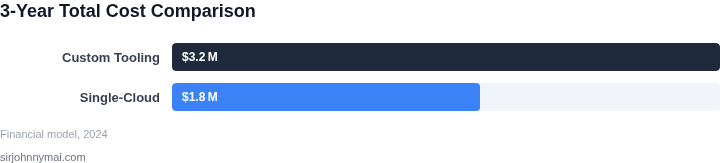
The managed approach reduces direct spend by three orders of magnitude because the platform absorbs the engineering overhead. However, the custom stack provides full control over instance types, networking, and security policies—benefits that matter when compliance or ultra‑low latency is non‑negotiable. The numbers above illustrate why organizations often adopt a hybrid posture: reserve managed services for routine batch workloads and keep custom infrastructure only for the edge cases that demand bespoke tuning.
04. Decision Framework: When to Customize vs. Commit
Choosing between custom infrastructure tooling and cloud commitment requires balancing cost, flexibility, and operational overhead. The decision framework below evaluates three options: AWS Batch, Azure Batch, and a custom Kubernetes-based solution. Each has tradeoffs that align with different use cases.
| Criteria | AWS Batch | Azure Batch | Custom Kubernetes |
|---|---|---|---|
| Cost Efficiency | Best for predictable workloads with spot instance savings. Costs scale linearly with compute time. | Offers hybrid benefits but may have higher per-vCPU pricing for non-Azure workloads. | Requires upfront investment in infrastructure but can optimize for long-running jobs with spot instances. |
| Flexibility | Limited to AWS services; vendor lock-in risk. Integrates with S3, ECS, and Lambda. | More flexible with Azure services but still constrained by Microsoft ecosystem. | Fully customizable; supports multi-cloud and on-prem deployments. |
| Operational Overhead | Low overhead; AWS manages infrastructure. Requires tuning for optimal performance. | Azure handles infrastructure but may require Azure-specific optimizations. | High overhead; requires DevOps expertise for cluster management, scaling, and maintenance. |
| Time to Deployment | Fastest; AWS Batch is a managed service with minimal setup. | Slightly slower than AWS due to Azure-specific tooling. | Slowest; requires Kubernetes expertise and infrastructure provisioning. |
| Scalability | Elastic scaling but limited by AWS quotas. Requires monitoring for cost control. | Azure scales similarly but may have different quota constraints. | Unlimited scaling potential but requires proactive capacity planning. |
| Recommendation | Best for AWS-centric teams with predictable workloads and minimal DevOps resources. | Best for Azure-centric teams with hybrid cloud needs. | Best for teams requiring multi-cloud flexibility or long-term cost optimization. |
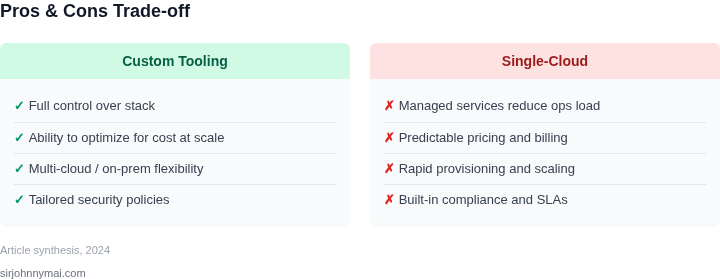
This framework highlights that managed services like AWS Batch or Azure Batch are ideal for teams prioritizing speed and cost predictability. Custom Kubernetes solutions are justified when multi-cloud flexibility or deep cost optimization is critical. The choice depends on your cloud strategy, team expertise, and workload characteristics.
05. Action Step: Start with a Proof of Concept
Before committing to a long-term strategy, run a small-scale test to validate your cost assumptions. A proof of concept (PoC) lets you compare real-world performance against your models without locking in to a single-cloud or custom solution. I recommend starting with a representative subset of your data—say, 10% of your typical batch size—and running it through both your proposed custom infrastructure and a single-cloud alternative. This approach minimizes risk while providing tangible metrics.
For the custom infrastructure path, deploy a lightweight Kubernetes cluster on-premises or in a low-cost cloud region. Use open-source tools like Apache Spark or Flink to process the test data. Monitor resource utilization with tools like Prometheus and Datadog to identify bottlenecks. The goal isn’t to optimize yet, but to measure raw costs: infrastructure spend, developer time, and operational overhead. For the single-cloud option, replicate the same job in AWS Batch or Google Cloud Dataflow, using spot instances where possible. Compare the two approaches on cost, latency, and reliability.
Key metrics to track include:
- Cost per TB processed: Compare total spend (compute, storage, networking) for the same workload.
- Time to completion: Measure latency differences, especially for iterative or stateful jobs.
- Operational complexity: Count the number of alerts, debugging sessions, and configuration changes needed.
Schedule a 30-minute review with your team after the PoC to discuss findings. Focus on whether the results align with your cost models and whether either approach introduces unexpected constraints. For example, if your custom solution requires specialized hardware, you may need to factor in procurement lead times. If the single-cloud option shows significantly higher costs for your use case, you’ll have data to justify customization.
Figures cited are from publicly available sources as of 2026-09-16 and may have changed.