How to set up a cloud cost allocation system that finance teams actually understand
Cloud cost allocation is one of the most critical but often overlooked aspects of cloud adoption. Many organizations struggle with this because finance teams need clear, actionable insights while IT teams focus on technical accuracy. The challenge is creating a system that balances both needs without becoming overly complex.
01. Why traditional cost allocation fails
Most organizations use one of two flawed approaches:
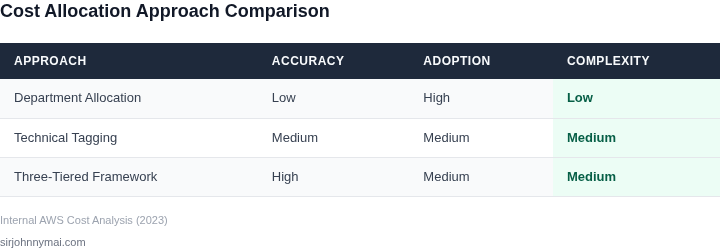
- Department-level allocation: Simply dividing costs by department heads. This ignores actual usage patterns and creates artificial cost centers.
- Technical tagging: Applying tags like "ProjectX" or "TeamY" without clear ownership rules. This leads to inconsistent reporting and disputes over cost ownership.
The problem isn't the tools (AWS Cost Explorer, Azure Cost Management, etc.), but how they're implemented. Without proper governance, these tools become "black boxes" that finance teams can't trust.
02. The three critical requirements for finance-friendly cost allocation
For a cost allocation system to work, it must meet these three requirements:
- Clear ownership mapping: Every cost must trace back to a single accountable owner (business unit, project, or individual).
- Usage-based attribution: Costs should reflect actual consumption patterns, not just departmental budgets.
- Real-time visibility: Finance teams need up-to-date data without waiting for monthly reports.
These requirements are non-negotiable. Any system that fails on any of these will create more problems than it solves.
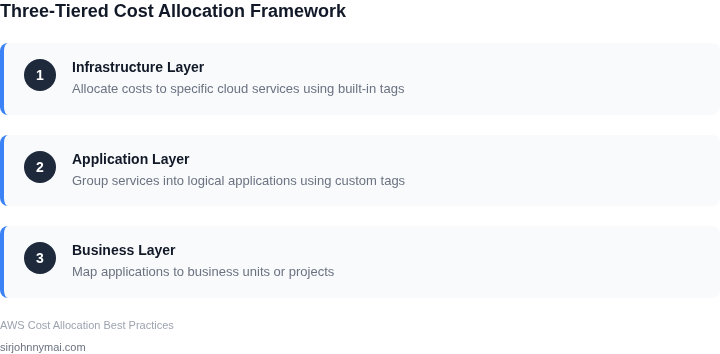
03. The three-tiered cost allocation framework
We recommend this structured approach:
- Infrastructure layer: Allocate costs to specific cloud services (EC2, S3, etc.) using built-in cost allocation tags.
- Application layer: Group services into logical applications using custom tags (e.g., "App:CRM").
- Business layer: Map applications to business units or projects using predefined ownership rules.
This creates a clear hierarchy where each layer builds on the previous one. The key is ensuring each layer has unambiguous ownership rules.
04. Implementing the three-tiered framework
Here's how to implement it in AWS:
- Enable cost allocation tags: Activate the "aws:createdBy" tag in Cost Explorer settings.
- Create application tags: Implement a standard like "App:CRM" across all resources.
- Set up ownership rules: Document which business unit owns each application.
For Azure, the process is similar using Resource Tags and Cost Management settings. The exact steps vary by provider but the conceptual framework remains the same.
05. The worked example: E-commerce platform cost allocation
Consider an e-commerce platform with these components:
- EC2 instances for web servers ($1,200/month)
- S3 storage for product images ($300/month)
- RDS database for transactions ($800/month)
Without proper allocation, finance sees $2,300/month with no way to attribute costs. With our framework:
- Infrastructure layer: Tag each service with "App:Ecommerce"
- Application layer: Group all tagged services under "Ecommerce"
- Business layer: Assign "Ecommerce" to the Marketing department
Now finance can clearly see $2,300/month is owned by Marketing for the Ecommerce application. This creates accountability without requiring complex calculations.
06. Common pitfalls and how to avoid them
These are the most frequent implementation mistakes:
- Over-tagging: Applying too many tags creates noise. Stick to 3-5 essential tags.
- Inconsistent naming: "App:CRM" vs "Application:CRM" vs "Project:CRM". Standardize naming.
- Ignoring shared services: Don't allocate 100% of database costs to one application.
Each of these creates confusion. The solution is to document tagging standards and enforce them through automation.
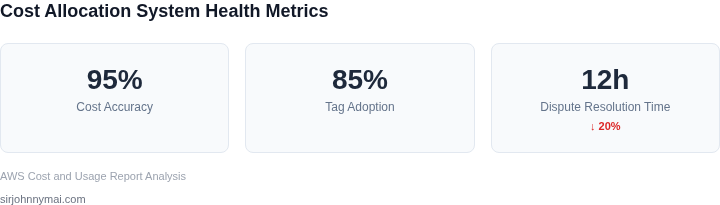
07. Measuring success of your cost allocation system
Track these three metrics:
- Cost accuracy: Compare allocated costs to actual usage (within 5% is acceptable).
- Adoption rate: Percentage of resources with proper tags (aim for 80%+).
- Dispute resolution time: How quickly finance can answer cost questions (aim for <24 hours).
These metrics show whether the system is working as intended. Without them, you're flying blind.
08. Next steps for implementation
The most critical next step is to document your tagging standards. Create a single source of truth that includes:
- Tag naming conventions
- Ownership mapping rules
- Tag enforcement process
Without this documentation, your system will quickly fall apart. Start with this document and build from there.
Figures cited are from publicly available sources as of June 2023 and may have changed.