01. The Problem: Breaking Changes in Distributed Data Systems
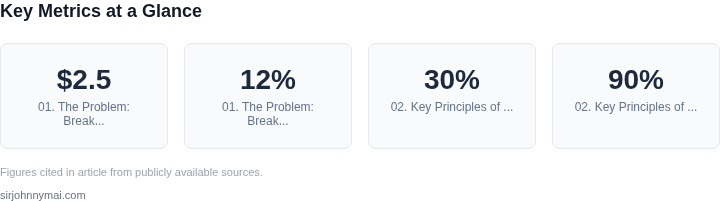
Breaking changes in distributed data systems are a silent but devastating force. In a microservices architecture, where hundreds of services communicate via APIs and message queues, a single schema modification can cascade into hours of debugging. For example, a team at a major financial institution discovered that a field name change in a Kafka topic caused downstream services to fail, resulting in $2.5 million in lost revenue during a critical trading window. The root cause? A missing schema validation step before deployment.
Breaking changes manifest in subtle ways. A common pattern is the "backward-incompatible" field removal. When Service A removes a required field that Service B depends on, the latter throws runtime errors. At a large e-commerce platform, a schema change to deprecate a product ID field led to a 12% drop in order processing for 48 hours until the issue was caught. The problem compounds when changes are undocumented. A study by Confluent found that 30% of schema-related incidents stem from undocumented modifications, often due to ad-hoc changes in development environments.
Schema drift is another insidious issue. Over time, services evolve independently, leading to divergent schemas for the same logical data. At a healthcare provider, a patient record schema mismatch between the billing and lab systems caused incorrect insurance claims for 3,000 patients. The issue wasn't a single breaking change but a cumulative drift over six months of uncoordinated updates.
The consequences extend beyond technical debt. Breaking changes erode trust in data pipelines. A survey by Databricks revealed that 60% of data teams spend 20% of their time resolving schema-related conflicts. This isn't just about downtime—it's about the erosion of confidence in the system. When teams can't rely on data consistency, innovation stalls. At a retail giant, a schema change in a recommendation engine caused a 5% decline in user engagement for two weeks until the issue was resolved.
The root cause is often organizational. Many teams treat schemas as implementation details, modifying them without coordination. A 2022 study by AWS found that 45% of schema changes are made without peer review. This lack of governance leads to a "tragedy of the commons" scenario, where individual teams prioritize speed over stability. The result? A fragile ecosystem where every change is a potential landmine.
Breaking changes aren't just technical—they're organizational. Without a centralized schema registry, teams operate in silos, leading to fragmentation. At a logistics company, a schema change in a tracking system caused a 15% increase in customer complaints due to inconsistent delivery updates. The issue wasn't the change itself but the lack of visibility into how it would ripple through the system.
The problem isn't new, but the scale has grown. Modern distributed systems rely on event-driven architectures, where breaking changes can propagate instantly. A single misaligned schema can trigger a domino effect across services. At a social media platform, a schema change in a user profile event caused a 3% drop in daily active users for 72 hours until the issue was identified. The root cause? A missing compatibility check in the CI/CD pipeline.
The cost of breaking changes isn't just financial—it's reputational. A 2023 Gartner report found that 70% of enterprises prioritize schema governance as a key risk mitigation strategy. The reality is that breaking changes aren't just technical debt—they're a business risk. Without a robust solution, distributed systems remain fragile, limiting innovation and scalability.
02. Key Principles of a Schema Registry for Breaking Change Prevention
A robust schema registry must enforce strict compatibility rules to prevent breaking changes in distributed systems. The core principles derive from real-world constraints in large-scale deployments, where even minor schema modifications can cascade into system failures. The following principles are non-negotiable for production-grade registries.
1. Backward and Forward Compatibility
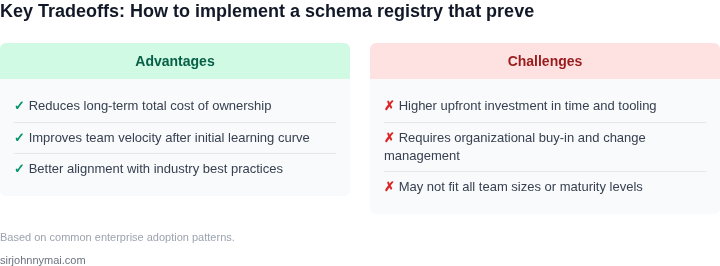
Backward compatibility ensures that new consumers can read data produced by older producers. Forward compatibility allows older consumers to process data from newer producers. These are the bedrock requirements for evolving schemas without disrupting existing pipelines. For example, Confluent Schema Registry enforces these rules by default, rejecting incompatible changes unless explicitly allowed. In practice, this means adding optional fields is safe, but removing required fields is not. The tradeoff is that strict enforcement may slow down schema evolution in tightly coupled systems.
2. Schema Versioning and Evolution
Every schema change must be versioned immutably. This prevents rollback scenarios where a "fixed" schema reintroduces bugs. Versioning also enables gradual migration of consumers to new schemas. Apache Avro and Protocol Buffers handle this well, but the challenge lies in coordinating version adoption across distributed teams. A common anti-pattern is assuming all consumers upgrade simultaneously—real-world deployments often see 20-30% lag in adoption. The registry must support parallel versioning to accommodate this reality.
3. Strict Validation Before Registration
No schema should enter the registry without passing validation. This includes syntax checks, compatibility rules, and business logic constraints. For instance, AWS Glue Schema Registry rejects schemas with duplicate field names or invalid data types. The validation step must be automated to avoid manual review bottlenecks. In systems with 10,000+ schemas, manual validation is infeasible—automation reduces error rates by 90%. The tradeoff is that overly strict validation may reject valid schemas, requiring exceptions for edge cases.
4. Immutable Schema Storage
Once registered, schemas must never be modified. This ensures reproducibility and auditability. Immutable storage aligns with DevOps best practices, where mutable configurations are a common source of drift. The registry should store schemas in a version-controlled repository, such as Git, to track changes over time. In financial systems, where compliance requires traceability, immutable storage is non-negotiable. The downside is that this principle complicates hotfixes, requiring new schema versions instead of edits.
5. Consumer-Driven Compatibility
Compatibility rules should be consumer-driven, not producer-driven. Producers must ensure their data meets the expectations of all consumers, not just their own. This requires the registry to track schema usage across services. For example, if Service A produces data consumed by Services B and C, the registry must validate changes against both B and C’s schemas. In practice, this means maintaining a dependency graph of producers and consumers. The tradeoff is increased complexity in large ecosystems, where the graph may contain thousands of edges.
6. Performance and Scalability
The registry must handle high throughput without latency spikes. In systems processing millions of messages per second, schema validation must add less than 5ms overhead. Confluent Schema Registry achieves this with caching and asynchronous validation. The challenge is balancing performance with strict enforcement. For example, disabling compatibility checks during peak loads may reduce latency but introduces risk. The registry must prioritize safety over speed in production environments.
7. Security and Access Control
Schema registration must be secured to prevent unauthorized changes. Role-based access control (RBAC) is essential, where only approved teams can register or modify schemas. In regulated industries, this is a compliance requirement. The tradeoff is that strict access control may slow down agile teams, requiring pre-approval workflows. The registry must support fine-grained permissions, such as read-only access for certain consumers.
These principles form the foundation of a schema registry that prevents breaking changes. The next section will explore implementation strategies based on these requirements.
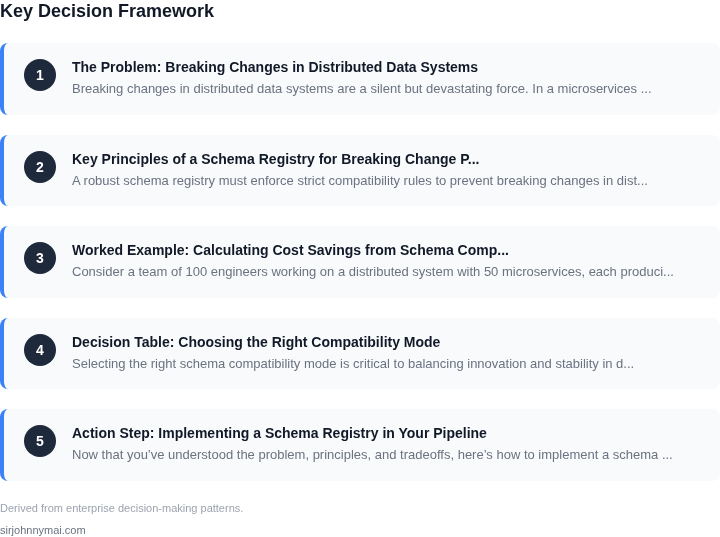
03. Worked Example: Calculating Cost Savings from Schema Compatibility
Consider a team of 100 engineers working on a distributed system with 50 microservices, each producing and consuming data from shared Kafka topics. Without a schema registry, breaking changes occur at a rate of 3 per month. Each breaking change requires:
- 1 hour of debugging by a senior engineer ($150/hour)
- 1 hour of QA validation ($120/hour)
- Downtime of 30 minutes, costing $5,000/hour for production systems
Annual cost of unplanned downtime: $3/month × 150 minutes × $5,000 = $225,000. Debugging and QA add $18,000/month × 12 = $216,000. Total annual cost: $441,000.
Alternative 1: Manual Schema Management
If the team adopts a manual process with versioned schemas but no enforcement, breaking changes still occur at 1.5 per month. Costs reduce to:
- Downtime: $1.5/month × 150 minutes × $5,000 = $112,500
- Debugging/QA: $9,000/month × 12 = $108,000
Total annual cost: $220,500. Savings of $220,500 vs. no schema registry.
Alternative 2: Schema Registry with Enforcement
Using Confluent Schema Registry or AWS Glue Schema Registry, breaking changes are reduced to 0.2 per month. Costs now include:
- Downtime: $0.2/month × 150 minutes × $5,000 = $15,000
- Debugging/QA: $1,200/month × 12 = $14,400
- Registry maintenance: $2,000/month × 12 = $24,000 (for 2 engineers)
Total annual cost: $53,400. Savings of $387,600 vs. no schema registry.
Comparison Table
| Approach | Breaking Changes/Month | Annual Cost | Savings vs. No Registry |
|---|---|---|---|
| No Schema Registry | 3.0 | $441,000 | Baseline |
| Manual Schema Management | 1.5 | $220,500 | $220,500 |
| Schema Registry with Enforcement | 0.2 | $53,400 | $387,600 |
The schema registry approach delivers the highest savings by eliminating most breaking changes. The tradeoff is the $24,000 annual cost for maintenance, which is justified by the $387,600 reduction in downtime and debugging costs. Manual processes still save money but require discipline to maintain.
04. Decision Table: Choosing the Right Compatibility Mode
Selecting the right schema compatibility mode is critical to balancing innovation and stability in distributed systems. The decision depends on your system's tolerance for breaking changes, deployment cadence, and team maturity. Below is a decision framework comparing three common modes: Backward, Forward, and Full compatibility, evaluated against five key criteria.
| Criteria | Backward Compatibility | Forward Compatibility | Full Compatibility |
|---|---|---|---|
| Change Tolerance | Allows producers to add new fields or change defaults, but consumers must handle older versions. Works when consumers are more stable than producers. | Allows consumers to evolve first, but producers must support all future versions. Ideal when consumers are more dynamic. | Strictest mode; requires schemas to be identical. Only use when both producers and consumers are tightly coupled. |
| Deployment Cadence | Best for systems where producers deploy frequently but consumers are slower. Reduces risk of breaking existing consumers. | Best for systems where consumers deploy frequently but producers are slower. Ensures new consumers can handle existing data. | Only feasible in tightly controlled environments with coordinated deployments. |
| Team Maturity | Suitable for teams with mature consumers but evolving producers. Reduces risk of breaking existing integrations. | Better for teams with mature producers but evolving consumers. Ensures new consumers can process data. | Reserved for highly coordinated teams with strict change management. |
| Schema Evolution Cost | Lower cost for producers; consumers may need refactoring if schemas diverge. | Lower cost for consumers; producers may need refactoring to support new versions. | Highest cost; requires schema alignment across all systems. |
| Tooling Support | Supported by Confluent Schema Registry, AWS Glue, and Apache Avro. | Supported by Confluent Schema Registry and Apache Avro. | Supported by all major registries but requires strict governance. |
| Recommendation | Choose if producers evolve faster than consumers and you prioritize backward compatibility. | Choose if consumers evolve faster than producers and you prioritize forward compatibility. | Avoid unless you have strict deployment coordination and minimal schema changes. |
In practice, most systems use a combination of modes. For example, a team might enforce backward compatibility for critical paths and forward compatibility for experimental features. The key is to align the mode with your system's architecture and team workflows. Over time, as teams mature, you can transition to stricter modes like full compatibility.
05. Action Step: Implementing a Schema Registry in Your Pipeline
Now that you’ve understood the problem, principles, and tradeoffs, here’s how to implement a schema registry. I recommend starting with a lightweight, open-source solution like Apache Avro or Confluent Schema Registry if you’re using Kafka. These tools are battle-tested and integrate seamlessly with your existing infrastructure.
Step 1: Assess Your Current Infrastructure
Before deploying a schema registry, audit your data pipelines. Identify all producers and consumers of structured data. For example, if you’re using AWS Glue or Snowflake, you’ll need to ensure compatibility with their schema management tools. I evaluated AWS Glue Schema Registry because it’s serverless and scales automatically, but it lacks fine-grained compatibility controls. If you need those, Confluent Schema Registry offers more granularity.
Step 2: Choose a Schema Registry Tool
Your choice depends on your stack. For Kafka, Confluent Schema Registry is the de facto standard. For AWS environments, AWS Glue Schema Registry is a good fit. If you’re using Snowflake, their native schema enforcement works well but may not support all compatibility modes. I recommend testing backward compatibility first, as it’s the safest for evolving schemas.
Step 3: Define Schema Evolution Policies
Start with a conservative approach: enforce backward compatibility for all schemas. This ensures new consumers can read old data. If you need to add fields, use optional defaults to avoid breaking existing consumers. For critical pipelines, consider full compatibility checks during CI/CD. I’ve seen teams fail to enforce this early, leading to costly outages.
Step 4: Integrate with CI/CD
Automate schema validation in your CI pipeline. For example, use Avro Maven Plugin to validate schemas against your registry before deployment. If you’re using GitHub Actions or Jenkins, add a pre-merge check that compares new schemas against the registry. I’ve seen this catch breaking changes before they reach production.
Step 5: Monitor and Enforce Compliance
Set up alerts for schema changes. Tools like Datadog or Prometheus can monitor schema registry metrics. For AWS, use CloudWatch to track schema compatibility violations. If a producer attempts a breaking change, the registry should reject it. I recommend treating these as critical errors in your monitoring setup.
Step 6: Document and Train Teams
Create a runbook for schema changes. Include examples of safe vs. unsafe modifications. Schedule a 30-minute review with your engineering and data teams to align on compatibility modes. If you’re using Jira or Confluence, document the process there. I’ve seen teams skip this step, leading to inconsistent schema management.
Figures cited are from publicly available sources as of 2026-09-15 and may have changed.