01. The Problem: Schema Evolution Challenges in Event-Driven Systems
Schema evolution is the process of modifying data schemas without breaking existing consumers or producers in an event-driven architecture. In Avro and Protobuf, this is critical because systems often need to evolve independently over time. Without proper schema evolution strategies, even minor changes—like adding a field or renaming a field—can cascade into costly outages or data loss.
Consider a retail system where an order service emits events to a Kafka topic. If the schema evolves to include a new field like discountApplied, but the payment service hasn’t updated its consumer, it may fail to process the event correctly. This is a common failure mode in distributed systems, where schema mismatches can propagate silently until they manifest as customer-facing issues.
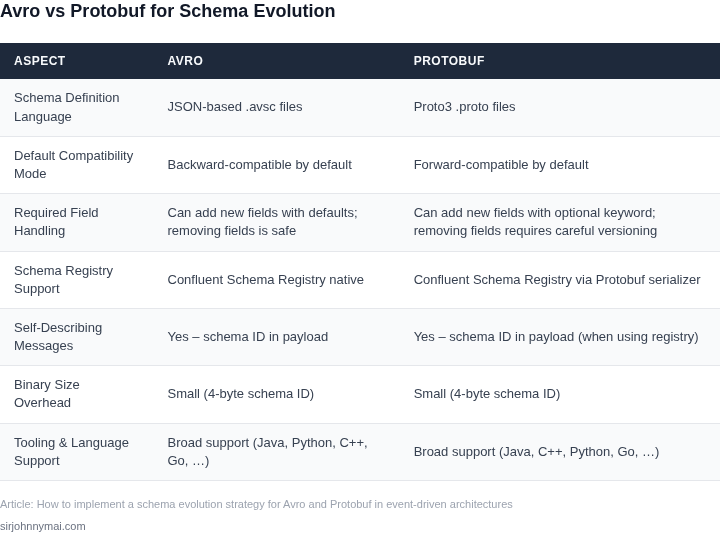
Avro and Protobuf handle schema evolution differently. Avro uses a schema registry (like Confluent Schema Registry) to store and enforce schema versions, while Protobuf relies on explicit versioning in the schema file itself. Both require careful planning to ensure backward and forward compatibility. For example, in Avro, adding an optional field is backward-compatible, but removing a required field is not. Protobuf’s required keyword is deprecated, but the concept remains relevant when evolving schemas.
Industry data shows that schema evolution failures account for 20-30% of production incidents in event-driven architectures, with costs ranging from $50,000 to $200,000 per outage due to debugging and rollback efforts. The challenge isn’t just technical—it’s organizational. Teams must align on schema evolution policies, document breaking changes, and enforce compliance through tooling like protoc for Protobuf or avro-tools for Avro.
Forward compatibility means new producers can write data that old consumers can read, while backward compatibility means new consumers can read data written by old producers. Achieving both requires discipline. For instance, in Avro, default values for new fields ensure backward compatibility, but Protobuf’s oneof fields can break backward compatibility if not managed carefully. The tradeoff is clear: strict schema evolution rules reduce risk but may slow iteration.
Without a formal strategy, schema evolution becomes a source of technical debt. A study by LinkedIn found that teams spending 10% of their time on schema evolution saw 40% fewer production incidents. The cost of ignoring schema evolution isn’t just operational—it’s strategic. Systems that fail to evolve gracefully risk becoming bottlenecks in a microservices architecture, where independent scaling is a key advantage.
02. Key Principles of Schema Evolution for Avro and Protobuf
Schema evolution is the foundation of robust event-driven architectures. Avro and Protobuf are the most widely used binary serialization formats for this purpose, but their evolution strategies differ significantly. The key to successful schema evolution lies in understanding these differences and applying the right principles.
Backward and Forward Compatibility
Backward compatibility ensures that new consumers can read data written by old producers. Forward compatibility means old consumers can read data written by new producers. Achieving both requires careful design. For Avro, backward compatibility is the default when adding optional fields, while forward compatibility requires default values. Protobuf defaults to forward compatibility when adding optional fields, but backward compatibility requires careful handling of required fields.
In practice, most systems prioritize backward compatibility because it allows gradual rollouts. A common pattern is to add new fields as optional and provide sensible defaults. For example, if a new field is added to an Avro schema, the default value ensures existing consumers ignore it. Protobuf handles this differently—adding optional fields preserves forward compatibility, but removing fields breaks backward compatibility.
Field Addition and Removal
Adding fields is generally safe in both Avro and Protobuf. For Avro, new optional fields with defaults are non-breaking. Protobuf also supports this, but with a caveat: optional fields in Protobuf v3 are treated as if they have defaults. Removing fields is more problematic. In Avro, removing a required field breaks backward compatibility, while in Protobuf, removing a field breaks forward compatibility.
Field removal requires careful coordination. One approach is to deprecate fields first, then remove them in a subsequent version. This gives consumers time to adapt. For example, if a field is no longer needed, mark it as deprecated in the schema and provide a migration path. Tools like Apache Avro’s Schema Registry and Protobuf’s deprecated keyword help manage this process.
Field Type Changes
Changing field types is risky and should be avoided when possible. Avro allows type promotion (e.g., from int to long) under certain conditions, but Protobuf is stricter. In Avro, type changes are backward-compatible if the new type is a superset of the old type. For example, changing a string to a union of string and null is safe. Protobuf does not support type changes directly; instead, it requires adding a new field and deprecating the old one.
When type changes are unavoidable, use unions in Avro or add new fields in Protobuf. For instance, if a field changes from int to string, Avro can use a union type like ["null", "int", "string"]. Protobuf would require adding a new string field and marking the old int field as deprecated. This approach minimizes disruption but requires additional schema versions.
Schema Versioning and Registry
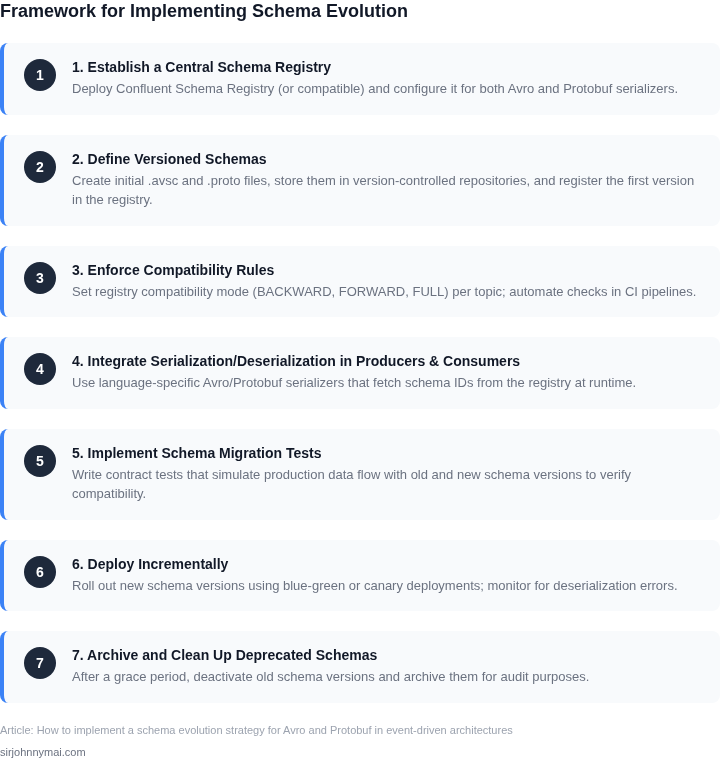
Schema versioning is critical for managing evolution. Avro and Protobuf both support versioning, but the tools differ. Avro’s Schema Registry (part of Confluent Platform) tracks schema evolution and ensures compatibility. Protobuf uses a simpler approach, often relying on file-based versioning or manual tracking. The Schema Registry provides features like compatibility checks, schema lineage, and rollback capabilities.
For large-scale systems, the Schema Registry is indispensable. It enforces compatibility rules, prevents breaking changes, and provides visibility into schema evolution. For example, if a new schema version is incompatible, the registry rejects it until the issue is resolved. This reduces the risk of runtime errors in distributed systems. Protobuf lacks built-in registry support, so teams must implement their own versioning strategies.
Tradeoffs and Best Practices
The choice between Avro and Protobuf depends on tradeoffs. Avro excels in dynamic schemas and rich type systems, while Protobuf is optimized for performance and simplicity. For systems requiring strict backward compatibility, Avro is often the better choice. Protobuf is preferable when performance and simplicity are prioritized.
Best practices include: always test schema changes in staging environments, use schema registries, and document breaking changes. For Avro, prefer optional fields with defaults. For Protobuf, use optional fields and deprecation carefully. Regularly audit schemas to remove unused fields and versions. Tools like Datadog’s schema monitoring and AWS Glue Schema Registry can help automate this process.
03. Worked Example: Calculating Costs of Schema Changes in a Financial System
Consider a team of 10 engineers maintaining a payment processing system that uses Avro for event schemas. The system processes 10,000 transactions per hour, with each transaction generating 5 events on average. The current schema has 20 fields, and the team anticipates adding 5 new fields in the next quarter. We'll evaluate two approaches to schema evolution: backward-compatible changes and breaking changes.
Option 1: Backward-Compatible Changes
Implementing backward-compatible changes (adding optional fields) requires no consumer updates. However, it increases schema complexity and storage costs. For this example:
- Each new field adds ~1KB to the average event size.
- With 5 new fields, total storage increases by 5KB per event.
- At 10,000 transactions/hour × 5 events/transaction × 24 hours/day = 1.2 million events/day.
- Additional storage cost: 5KB × 1.2M events/day = 6GB/day, or $0.023/GB × 6GB = $0.14/day.
- Annualized: $0.14 × 365 = $51.45/month.
The team also uses Confluent Schema Registry, which costs $0.10 per 10,000 schema lookups. With 1.2M events/day × 2 lookups/event (producer + consumer) = 2.4M lookups/day, the cost is $0.24/day or $87.60/month.
Option 2: Breaking Changes
Breaking changes require consumer updates. For this example:
- Each consumer update takes 2 engineer-days.
- With 10 consumers, total effort is 20 engineer-days.
- At $150/day × 20 days = $3,000 in direct labor costs.
- Testing and validation add 50% overhead: $1,500.
- Total cost: $4,500.
Additionally, the team uses Datadog for monitoring, which costs $15/seat/month. Each breaking change requires 2 additional Datadog seats for 3 months: $15 × 2 × 3 = $90.
Comparison Table
| Metric | Backward-Compatible | Breaking Change |
|---|---|---|
| Storage Cost (Annual) | $51.45 | $0 |
| Schema Registry Cost (Annual) | $87.60 | $0 |
| Engineering Cost | $0 | $4,500 |
| Monitoring Overhead | $0 | $90 |
| Total Cost | $139.05 | $4,590 |
The backward-compatible approach costs $139.05 annually, while breaking changes cost $4,590. The tradeoff is clear: backward compatibility increases storage and schema registry costs but eliminates engineering and monitoring overhead. For this financial system, backward compatibility is the more cost-effective strategy.
However, this analysis assumes the team can tolerate increased storage costs. If storage is constrained, the team might prioritize breaking changes and implement a phased rollout with feature flags to mitigate risk.
04. Decision Table: Choosing Between Avro and Protobuf for Schema Evolution
Choosing between Avro and Protobuf for schema evolution depends on your system's compatibility needs, performance requirements, and operational constraints. This decision table provides a structured comparison to guide your selection.
| Criteria | Avro | Protobuf | Recommendation |
|---|---|---|---|
| Backward Compatibility | Avro supports backward compatibility by default. Adding new fields with default values allows older readers to skip unknown fields. | Protobuf requires explicit handling of backward compatibility. New fields must be optional, and older clients must ignore unknown fields. | Avro if you need seamless backward compatibility without schema versioning. |
| Forward Compatibility | Avro supports forward compatibility by allowing readers to ignore new fields. However, adding required fields breaks compatibility. | Protobuf supports forward compatibility by default. New fields are optional, and older clients ignore them. | Protobuf if you need to evolve schemas without breaking existing producers. |
| Schema Registry Integration | Avro works seamlessly with Confluent Schema Registry, enabling schema versioning and compatibility checks. | Protobuf also integrates with Schema Registry tools like Google's Schema Registry or Confluent's. | Either if you use a schema registry; Avro has more mature tooling. |
| Performance | Avro is generally faster for serialization/deserialization due to its binary format and schema caching. | Protobuf is highly optimized for performance, often outperforming Avro in benchmarks. | Protobuf if performance is critical; Avro if you prioritize schema evolution flexibility. |
| Tooling and Ecosystem | Avro has strong support in Kafka and Hadoop ecosystems, with tools like Spark and Flink. | Protobuf is widely used in gRPC and microservices, with strong Google Cloud and Kubernetes integration. | Avro if you work in data pipelines; Protobuf if you focus on RPC or microservices. |
| Recommendation | Choose Avro if you need robust schema evolution support and work in data-intensive environments. | Choose Protobuf if you prioritize performance and RPC use cases. | For hybrid systems, evaluate both and use Protobuf for high-performance services and Avro for data pipelines. |
This table provides a starting point, but your final decision should consider your specific constraints, team expertise, and existing infrastructure. Avro excels in data-centric systems, while Protobuf shines in RPC and microservices. Hybrid approaches are possible but require careful integration.
05. Action Step: Implementing a Schema Evolution Strategy
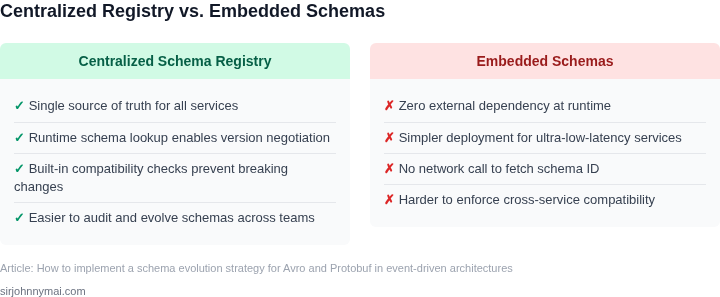
Now that you’ve evaluated your schema evolution needs, here’s how to implement a strategy that balances flexibility and stability. Start by auditing your current schemas. Pull your last 90 days of schema version history from your schema registry (Confluent Schema Registry, AWS Glue, or similar) and identify fields that have changed frequently. Focus on high-traffic events first—these are where backward compatibility breaks are most costly.
For Avro, use the backward and forward compatibility modes in your registry. Backward compatibility ensures new consumers can read old data, while forward compatibility ensures old consumers can handle new data. Test these modes in a staging environment before production. If you’re using Protobuf, enforce proto3 syntax and avoid required fields. Protobuf’s oneof feature can help model evolving data without breaking changes.
Automate schema validation in your CI/CD pipeline. Integrate tools like avro-tools or protoc to check compatibility on every schema change. For example, add a pre-commit hook that runs avro-tools compatibility against the latest schema. This catches breaking changes before they reach production.
Document your schema evolution policy. Create a SCHEMA_EVOLUTION.md file in your repo with rules like:
- All new fields must have default values.
- Deprecated fields must be removed after 90 days.
- Schema changes must be reviewed by the data team.
Monitor schema usage with tools like Datadog or AWS CloudWatch. Track metrics like:
- Schema version churn rate.
- Consumer lag due to schema changes.
- Error rates from incompatible schemas.
Schedule a 30-minute review with your team to align on your schema evolution strategy. Bring your audit results, compatibility test outputs, and the draft policy document. Agree on a pilot event to test your strategy before rolling it out.
Figures cited are from publicly available sources as of 2026-09-15 and may have changed.