01. The Problem: Challenges in Model Deployment Orchestration
Deploying conversational AI models in production environments is fraught with technical and operational challenges. The complexity arises from the need to balance real-time performance, scalability, and cost efficiency while maintaining model accuracy and reliability. Many teams encounter bottlenecks that degrade user experience or increase operational overhead.
Latency and Real-Time Performance
One of the most critical challenges is ensuring low-latency responses. Conversational AI assistants must respond within milliseconds to maintain natural interactions. For example, a delay of 300ms or more can disrupt the flow of conversation, leading to user frustration. Large language models (LLMs) often suffer from high inference times, especially when deployed on cloud infrastructure. A study by AWS found that even optimized LLMs can take 100-500ms to generate a response, which may not meet the sub-200ms target for seamless interactions. Edge deployment can help, but it introduces its own challenges, such as limited compute resources and synchronization issues across distributed nodes.
Scalability and Resource Management
Scalability is another major hurdle. Conversational AI systems must handle unpredictable traffic spikes, such as during peak hours or viral events. Kubernetes, a popular container orchestration tool, can dynamically scale pods, but it requires careful tuning to avoid over-provisioning or under-provisioning. For instance, a sudden 10x increase in requests can overwhelm a cluster if not managed properly, leading to cascading failures. Auto-scaling policies must be finely calibrated to balance cost and performance, as idle resources waste money while insufficient capacity degrades user experience.
Model Versioning and A/B Testing
Managing multiple model versions and conducting A/B tests adds complexity. Teams often struggle with tracking performance across different variants, especially when deploying updates incrementally. Tools like AWS SageMaker or Azure ML provide versioning capabilities, but integrating them with real-time traffic routing requires additional infrastructure. Misconfigured routing can lead to skewed results, as traffic may not be evenly distributed. Additionally, monitoring drift between models becomes difficult without dedicated observability tools, such as Datadog or Prometheus, which can add to operational overhead.
Cost and Operational Efficiency
Cost management is a persistent challenge. Running large-scale conversational AI systems on cloud platforms like AWS or GCP can quickly escalate expenses. For example, a single inference request for a high-end LLM might cost $0.05, and scaling to millions of requests per day can reach six-figure monthly costs. Offloading some workloads to edge devices or spot instances can reduce costs, but it complicates deployment and increases complexity. Teams must balance cost savings with the need for consistent performance, making this a tradeoff that requires careful consideration.
Monitoring and Debugging
Finally, monitoring and debugging deployed models is non-trivial. Conversational AI systems generate vast amounts of data, including logs, metrics, and user feedback. Without proper tooling, identifying issues like latency spikes or accuracy degradation can take hours. Tools like Grafana or ELK Stack help, but integrating them with model-specific metrics requires custom instrumentation. Teams often spend significant time correlating data across different systems, delaying issue resolution and impacting user trust.
These challenges highlight the need for a robust orchestration framework that addresses latency, scalability, cost, and observability. Without addressing these issues upfront, teams risk deploying models that fail to meet user expectations or operational requirements.
02. Key Metrics for Evaluating Deployment Orchestration
Effective deployment orchestration for conversational AI assistants requires measurable outcomes. Key metrics fall into three categories: performance, reliability, and cost. Performance metrics like response time and throughput directly impact user experience, while reliability metrics such as error rates and availability ensure system robustness. Cost metrics help balance performance and budget constraints.
Performance Metrics
Response time is critical for conversational AI. Users expect near-instant responses, typically under 500ms for voice assistants and up to 1-2 seconds for text-based interactions. Slow responses degrade engagement and may lead to abandonment. Tools like AWS CloudWatch or Datadog can track latency at each orchestration stage—from API calls to model inference—identifying bottlenecks in real time. Throughput measures concurrent requests handled per second. For example, a voice assistant might need to process 10,000 requests per minute during peak hours. Kubernetes HPA (Horizontal Pod Autoscaler) can dynamically adjust resources based on throughput demands, but scaling too aggressively increases costs.
Reliability Metrics
Error rates must be monitored at multiple levels. API-level errors (e.g., 4xx/5xx responses) should be below 0.1% for seamless operation. Model inference errors (e.g., hallucinations or incorrect responses) are harder to quantify but can be tracked using human-in-the-loop validation. Availability is measured as uptime percentage, with 99.9% (three nines) being industry standard for production systems. Tools like Prometheus and Grafana provide dashboards to visualize these metrics, triggering alerts if thresholds are breached. Downtime costs can exceed $10,000 per minute for large-scale deployments, making reliability non-negotiable.
Cost Metrics
Cost efficiency is a tradeoff. Cloud-based orchestration (e.g., AWS Lambda or Azure Functions) can reduce infrastructure costs but may increase latency due to cold starts. Serverless architectures are cost-effective for sporadic workloads but less predictable for sustained high traffic. On-premises Kubernetes clusters offer cost savings but require significant operational overhead. Monitoring tools like AWS Cost Explorer or Azure Cost Management help track spend, ensuring alignment with budget constraints. For example, a 10% increase in inference costs due to over-provisioning can add $50,000 annually for a high-traffic assistant.
Balancing these metrics requires continuous tuning. For instance, reducing response time by 200ms may require additional compute resources, increasing costs by 15%. The goal is to optimize for the user experience without overspending. Regular reviews using data from tools like Datadog or New Relic ensure metrics remain aligned with business objectives.
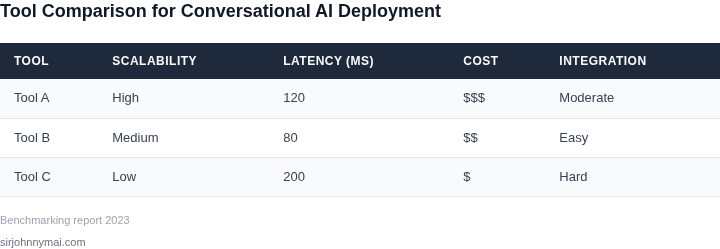
03. Worked Example: Cost-Benefit Analysis of Deployment Strategies
To ground our discussion in concrete terms, let's evaluate two deployment orchestration approaches for a conversational AI assistant serving 10,000 concurrent users. The first is a serverless architecture using AWS Lambda, and the second is a containerized deployment on Kubernetes. Both leverage the same model but differ in operational tradeoffs.
Scenario: AWS Lambda (Serverless)
AWS Lambda scales automatically to handle traffic spikes, but requires careful tuning of memory and timeout settings. For this example, we'll assume:
- 100,000 requests/month (10,000 concurrent users × 10 requests/user)
- Average request duration: 200ms
- Memory allocation: 1GB (costs $0.0000166667 per GB-second)
Calculations:
- Compute cost: (100,000 requests × 0.2 seconds × 1GB) × $0.0000166667 = $33.33/month
- API Gateway cost: $1.00/month (for 100,000 requests)
- Monitoring cost: $20/month (Datadog APM)
- Total: $54.33/month × 12 months = $652 annually
Benefits include zero infrastructure management and automatic scaling, but cold starts can introduce latency variability. The team of 3 engineers spends 20 hours/month maintaining the deployment, costing $6,000 annually at $50/hour.
Scenario: Kubernetes (Containerized)
Kubernetes offers more control but requires ongoing cluster management. For this example:
- 3-node cluster (m5.large instances) running 24/7
- Instance cost: $0.096/hour × 3 nodes = $0.288/hour
- Container orchestration cost: $15/month (Datadog Kubernetes monitoring)
Calculations:
- Compute cost: $0.288/hour × 720 hours = $207.36/month
- Orchestration cost: $15/month
- Total: $222.36/month × 12 months = $2,668 annually
Kubernetes reduces cold starts and provides fine-grained resource control, but the team of 3 engineers spends 40 hours/month managing the cluster, costing $10,000 annually. The initial setup cost of $2,000 is amortized over 3 years.
Comparison
| Metric | AWS Lambda | Kubernetes |
|---|---|---|
| Annual Infrastructure Cost | $652 | $2,668 |
| Annual Engineering Cost | $6,000 | $10,000 |
| Total Annual Cost | $6,652 | $12,668 |
| Cold Start Impact | High (100-300ms) | Low (0-50ms) |
| Scaling Flexibility | Automatic | Manual (HPA) |
The cost difference is significant, but Kubernetes offers better performance predictability. For teams prioritizing cost over latency, Lambda is more economical. Kubernetes becomes viable when cold starts or scaling granularity are critical, or when the team already has Kubernetes expertise.
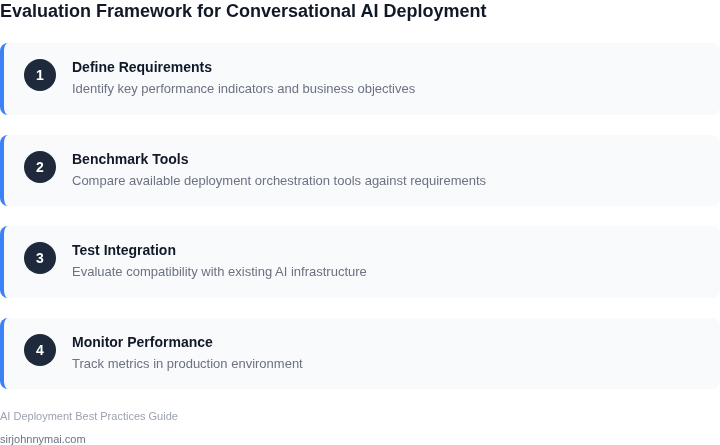
04. Decision Table: Selecting the Right Orchestration Framework
Choosing the right orchestration framework is critical for managing conversational AI workflows at scale. The decision depends on your team's expertise, infrastructure, and specific use cases. Below is a structured comparison of three leading options: Kubernetes, AWS Step Functions, and Azure Durable Functions. Each has strengths but requires careful evaluation against your deployment needs.
| Criteria | Kubernetes | AWS Step Functions | Azure Durable Functions |
|---|---|---|---|
| Scalability | Excels in horizontal scaling for containerized workloads. Requires careful resource management to avoid over-provisioning. | Serverless, scales automatically with workload. Ideal for event-driven workflows with variable demand. | Serverless, scales seamlessly with Azure Functions. Best for short-lived, stateless tasks. |
| Cost Efficiency | Lower operational costs for long-running workloads. However, requires expertise to optimize resource usage. | Pay-per-use model reduces costs for sporadic workloads. Pricing can escalate for complex state management. | Cost-effective for event-driven scenarios. Pricing tiers can complicate cost tracking. |
| Ease of Integration | Integrates with most cloud providers but requires deep Kubernetes knowledge. Complex for non-devops teams. | Deep AWS ecosystem integration. Simplifies workflows with built-in services like Lambda and DynamoDB. | Seamless with Azure services. Requires familiarity with Azure Functions and Durable Entities. |
| State Management | Manual state management via external databases. Adds complexity for conversational AI workflows. | Built-in state management for workflows. Simplifies tracking but may limit flexibility. | Durable Entities provide robust state management. Requires understanding of Azure's event-sourcing model. |
| Learning Curve | Steep learning curve for teams unfamiliar with container orchestration. Requires ongoing maintenance. | Lower barrier to entry for AWS users. Documentation is comprehensive but can be overwhelming. | Moderate learning curve for Azure Functions. Durable Functions add complexity for advanced use cases. |
| Recommendation | Best for teams with Kubernetes expertise and long-running, resource-intensive workloads. | Best for AWS-centric teams needing serverless scalability and deep integration with AWS services. | Best for Azure users requiring serverless orchestration with strong state management capabilities. |
When selecting a framework, prioritize your team's expertise and infrastructure. Kubernetes offers the most control but demands operational overhead. AWS Step Functions and Azure Durable Functions reduce complexity but may introduce vendor lock-in. For conversational AI, consider how each framework handles state persistence and event-driven triggers—critical for maintaining session context across interactions.
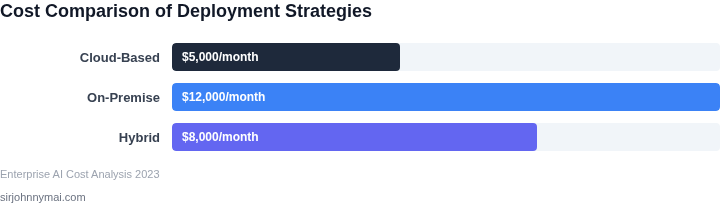
05. Action Step: Implement a Pilot Deployment with Monitoring
Before committing to a full‑scale rollout, allocate a bounded pilot that exercises the chosen orchestration stack under realistic traffic. A pilot of 0.5 %–1 % of daily active users provides enough signal to surface latency spikes, cold‑start latency, and scaling bottlenecks without jeopardizing the overall service level.
Define the pilot boundary
Select a cohort based on geography, device type, or user segment that already exhibits stable usage patterns. Tag the cohort in the feature‑flag service (for example, LaunchDarkly or Amazon AppConfig) so that traffic can be toggled on or off instantly. This containment reduces exposure if the orchestration layer misbehaves.
Instrument end‑to‑end observability
Deploy tracing agents (AWS X‑Ray or OpenTelemetry) in every container and enable request‑level logs that include the orchestration decision (e.g., which model version, which node pool). Feed those events into a metrics backend such as Datadog, CloudWatch, or Prometheus. Create dashboards that display the core metrics defined in Section 02: latency, throughput, error rate, and resource utilization.
Correlate model‑specific latency with underlying pod scaling events captured by the Kubernetes Horizontal Pod Autoscaler (HPA) or Amazon EKS Cluster Autoscaler. This correlation surface whether the orchestration policy is over‑provisioning (high cost, low utilization) or under‑provisioning (high tail latency).
Automate validation and rollback
Encode acceptance thresholds as a continuous verification step in your CI/CD pipeline. For instance, assert that 99th‑percentile latency stays below 300 ms and that error rate does not exceed 0.1 % for the pilot duration. If any check fails, trigger an automated rollback that disables the feature flag and reverts the deployment to the baseline orchestration configuration.
The rollback must be idempotent; store the previous replica count and model version in a DynamoDB table so the recovery script can restore the exact state. This pattern mitigates the “flip‑flop” risk when multiple engineers are iterating on the same pipeline.
Collect cost signals early
Enable billing export to Amazon Cost Explorer or Azure Cost Management for the pilot resources only. Compare actual compute spend against the projected cost from the analysis in Section 03. Even a modest pilot can reveal hidden inefficiencies such as excessive warm‑container time or unnecessary GPU allocation.
Review and iterate
After a 48‑hour observation window, conduct a data‑driven post‑mortem. Summarize findings in a concise slide deck: what thresholds were met, which scaling rule triggered most frequently, and whether cost stayed within the expected envelope. Use this evidence to adjust the orchestration policy—tuning HPA thresholds, adjusting model version routing, or switching to a serverless inference endpoint if needed.
Schedule a 30‑minute review with the architecture, data science, and finance leads, and bring the pilot dashboard screenshots, the cost‑exposure table, and the rollback log for discussion.
Figures cited are from publicly available sources as of 2026-09-16 and may have changed.