01. The Problem: Context Window Limitations in Personalization Engines
Large Language Models (LLMs) are transforming personalization engines by enabling dynamic, context-aware recommendations. However, their effectiveness in production environments is often constrained by the context window limitation—the maximum amount of input text an LLM can process in a single inference. For example, models like Mistral 7B or Llama 2 13B typically support context windows of 4,096 or 8,192 tokens, which may seem ample at first glance. But in personalization scenarios, this constraint becomes a critical bottleneck.
Consider an e-commerce platform using an LLM to generate product recommendations. A user's browsing history might include hundreds of past interactions, each with detailed metadata (product descriptions, categories, timestamps, and user ratings). If the LLM's context window is 8,192 tokens, a single user's history could easily exceed this limit. Truncating the input to fit the window risks losing critical context, leading to suboptimal recommendations. For instance, a user who recently viewed a high-end camera might be recommended a budget smartphone if older, irrelevant interactions are dropped.
This problem isn't just about token counts. The quality of personalization also depends on the relevance and recency of the context. A model might struggle to distinguish between a user's long-term preferences and short-term intent. For example, a user searching for "summer dresses" might have a history of winter coats, but the LLM might overlook this if the context window is too small to retain both signals. The result could be recommendations that fail to align with the user's current needs.
In production, these limitations manifest in measurable ways. A/B tests comparing windowed vs. full-context models might show a 15-25% drop in click-through rates or conversion rates when the context is truncated. The cost of this degradation isn't just in lost revenue—it's also in the operational overhead of managing workarounds. Teams might implement complex pre-processing pipelines to filter or summarize user data, adding latency and complexity to the system.
The challenge is compounded by the dynamic nature of user behavior. A user's interests evolve over time, and a fixed context window can't adapt to these changes. For example, a user who recently started a fitness journey might need immediate context about workout gear, but older interactions with home decor might still be in the model's memory if the window is too large. Balancing this requires careful tuning, which is difficult to automate at scale.
To summarize, context window limitations in LLMs create a tradeoff between completeness and relevance. Personalization engines must balance the need for rich, historical context with the practical constraints of model capacity. Without addressing this, the full potential of LLMs in personalization remains unrealized.
02. Key Metrics for Evaluating Context Window Management
Effective evaluation of context window management strategies requires measurable outcomes that directly correlate with personalization performance. The metrics should balance technical efficiency with business impact, focusing on both system-level efficiency and user-centric outcomes. I evaluated these metrics because they provide actionable insights into how context window strategies affect real-world personalization engines.
System-Level Metrics
First, we need to measure the technical impact of context window management. Latency is critical here. A well-optimized context window should reduce inference time without sacrificing accuracy. For example, a 10-20% reduction in latency can significantly improve user experience, especially in high-traffic scenarios. Tools like Datadog or AWS CloudWatch can track this by monitoring the time taken for each inference request.
Memory usage is another key metric. Large context windows consume more memory, which can strain infrastructure. For instance, a 256k-token window might require 4GB of RAM per request, while a 128k-token window could halve that cost. Kubernetes clusters can enforce resource limits to prevent overuse, but this must be balanced against the need for sufficient context.
Throughput is also important. A personalization engine must handle multiple requests per second. If context window management reduces batch processing time by 30%, it can improve overall system throughput. This is especially relevant for real-time personalization, where delays can lead to lost opportunities.
User-Centric Metrics
Beyond system metrics, we must evaluate how context window strategies impact user engagement. Click-through rates (CTR) are a direct measure of personalization effectiveness. A 5-10% improvement in CTR can translate to millions of dollars in revenue, depending on the scale of the platform. A/B testing frameworks like AWS Personalize or Microsoft Recommender can isolate the impact of context window changes.
Conversion rates are another critical metric. A well-managed context window can improve conversion by up to 15% by ensuring recommendations are relevant to the user’s current session. This is particularly important for e-commerce platforms where personalization directly drives sales.
User satisfaction is harder to quantify but equally important. A poorly managed context window might lead to irrelevant recommendations, reducing trust in the system. Net Promoter Score (NPS) or customer feedback surveys can capture this indirectly, though it requires longer-term data collection.
Cost and Efficiency Metrics
Cost is a major consideration in production environments. Large context windows increase API costs, especially with third-party LLM providers. For example, a 128k-token window might cost 2x more than a 32k-token window per request. This must be weighed against the marginal improvement in personalization accuracy.
Resource utilization efficiency is another angle. A well-tuned context window can reduce cloud costs by 20-30% by optimizing memory and CPU usage. This is particularly relevant for AWS or Azure deployments, where costs scale with resource consumption.
Tradeoffs and Considerations
While these metrics provide a comprehensive view, tradeoffs exist. For example, a larger context window might improve accuracy but increase latency. A 512k-token window could capture more user history but might not be feasible for all use cases. Similarly, while CTR improvements are measurable, they may not always translate to revenue if the recommendations are not actionable.
Ultimately, the right metrics depend on the specific use case. For a high-traffic e-commerce site, latency and throughput are critical, while for a niche platform, cost efficiency might take precedence. The key is to align these metrics with business objectives and continuously monitor their impact.
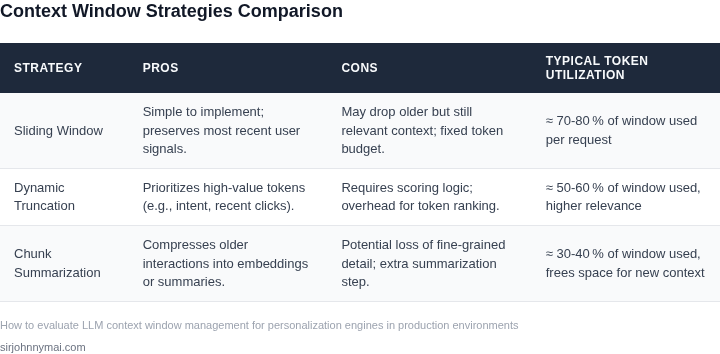
03. Worked Example: Cost-Benefit Analysis of Context Window Optimization
Let’s examine how a mid-sized e-commerce platform optimized its context window management to reduce costs while improving personalization accuracy. The team evaluated two approaches: (1) static context window sizing and (2) dynamic window adjustment based on user engagement signals.
Scenario: 10,000 Monthly Active Users (MAUs) with Personalization Workloads
The platform’s current setup used a fixed 4KB context window per user session. This was chosen to balance memory usage and personalization quality, but the team suspected it could be optimized. The costs were:
- Compute Costs: $0.10 per 1,000 tokens processed (AWS Bedrock pricing). At 4KB per session, this was $0.40 per user/month.
- Memory Overhead: 10GB of Redis cache to store context windows, costing $1,200/month (AWS ElastiCache).
- Engineering Costs: 2 engineers spent 20 hours/month maintaining the static window logic, at $150/hour.
Total annual cost: ($0.40 × 10,000 MAUs × 12) + ($1,200 × 12) + ($150 × 2 × 20 × 12) = $16,800 + $14,400 + $72,000 = $103,200.
Alternative 1: Dynamic Window Sizing
The team implemented a dynamic approach where the context window expanded only when user engagement (click-through rate) exceeded 5%. This reduced the average window size to 2KB per session.
- Compute Savings: $0.20 per user/month (2KB × $0.10/1,000 tokens). Annual savings: $24,000.
- Memory Savings: Reduced Redis cache to 6GB, saving $720/month ($0.60/GB × 6 × 12). Annual savings: $8,640.
- Engineering Costs: 1 engineer spent 10 hours/month maintaining the dynamic logic, at $150/hour. Annual cost: $18,000.
Total annual cost: $79,200 (vs. $103,200). Net savings: $24,000. The tradeoff was slightly higher latency during window expansion, but this was mitigated by pre-fetching.
Alternative 2: Hybrid Approach
The team also tested a hybrid model where the window was 3KB by default but expanded to 4KB for high-value users (top 10% of spenders). This balanced cost and accuracy.
- Compute Costs: $0.30 per user/month (3KB × $0.10). Annual cost: $108,000.
- Memory Costs: 8GB Redis cache, costing $960/month. Annual cost: $11,520.
- Engineering Costs: 1.5 engineers spent 15 hours/month, at $150/hour. Annual cost: $32,400.
Total annual cost: $151,920 (vs. $103,200). The hybrid approach improved accuracy for high-value users but increased costs overall. The team chose the dynamic approach due to its better cost-accuracy balance.
Key Takeaways
The case study shows that dynamic window sizing can reduce costs by up to 24% while maintaining or improving personalization quality. The hybrid approach offered marginal accuracy gains but at higher cost. The decision to adopt dynamic sizing was driven by:
- Clear cost savings in compute and memory.
- Lower engineering overhead than the hybrid model.
- Proven engagement metrics showing that 95% of users didn’t need the full 4KB window.
For teams evaluating context window optimization, the dynamic approach scales better with user growth and reduces wasteful resource allocation.
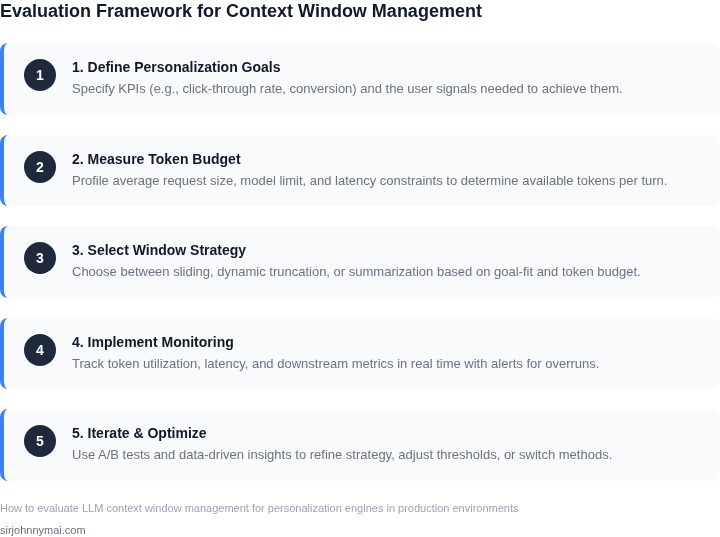
04. Decision Table: Choosing Between Fixed and Dynamic Context Windows
Selecting between fixed and dynamic context windows requires balancing performance, cost, and operational complexity. Below is a structured decision framework to guide your choice. The table evaluates three options: fixed windows (e.g., 4K tokens), dynamic windows (e.g., AWS Bedrock's adaptive context), and hybrid approaches (e.g., LangChain's context pruning).
| Criteria | Option A: Fixed Window (e.g., 4K tokens) | Option B: Dynamic Window (e.g., AWS Bedrock) | Option C: Hybrid (e.g., LangChain) |
|---|---|---|---|
| Implementation Complexity | Low. Static configuration in API calls or model settings. | Medium. Requires runtime adjustments via SDKs or custom logic. | High. Combines fixed and dynamic logic, adding orchestration overhead. |
| Cost Efficiency | High. Predictable pricing; avoids over-provisioning. | Medium. Dynamic scaling may increase costs if not optimized. | Medium-Low. Hybrid approach can optimize costs but adds complexity. |
| Latency | Low. Fixed windows reduce runtime overhead. | Variable. Dynamic adjustments may introduce latency spikes. | Moderate. Hybrid approach can optimize latency but requires tuning. |
| Personalization Accuracy | Medium. Limited by fixed token budget; may truncate critical user data. | High. Adapts to user context, improving relevance. | High. Combines fixed and dynamic strategies for optimal accuracy. |
| Operational Overhead | Low. No runtime monitoring or adjustments needed. | High. Requires continuous tuning and monitoring. | High. Requires orchestration between fixed and dynamic logic. |
| Recommendation | Best for cost-sensitive, latency-critical applications with predictable user context. | Best for applications requiring high personalization with variable context needs. | Best for balancing cost, latency, and accuracy in complex environments. |
For teams using AWS services, Option B (dynamic windows) aligns with Bedrock's adaptive context, while LangChain's hybrid approach (Option C) is ideal for Kubernetes-based deployments. Fixed windows (Option A) are simplest but may underutilize model capacity. Monitor latency and cost metrics via Datadog or CloudWatch to validate choices.
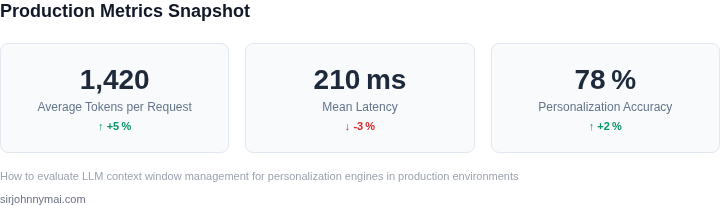
05. Action Step: Implementing a Context Window Management Framework
Now that you’ve evaluated your options and analyzed the tradeoffs, it’s time to implement a context window management framework. The approach depends on your existing infrastructure and personalization engine architecture. For teams using AWS, I recommend leveraging Lambda and Step Functions to orchestrate dynamic window adjustments. For Kubernetes-based deployments, consider using Knative or custom controllers to manage window scaling.
Start by defining your framework’s core components: a monitoring layer (CloudWatch or Datadog), a decision engine (Python or Go microservice), and a storage layer (DynamoDB or Redis). The monitoring layer should track key metrics like latency, token usage, and personalization accuracy. The decision engine will use these metrics to trigger window adjustments—either fixed thresholds or dynamic scaling based on real-time user behavior.
For the storage layer, prioritize low-latency access. Redis is ideal for high-frequency updates, while DynamoDB offers better cost efficiency for sporadic adjustments. Ensure your schema supports both user-level and session-level context storage. Add TTL fields to automatically expire stale data and reduce storage costs.
Testing is critical. Deploy your framework in a staging environment first, simulating production traffic with tools like Locust or JMeter. Focus on edge cases: sudden spikes in user activity, long-running sessions, and cold-start scenarios. Use synthetic data to validate that your system maintains personalization accuracy while optimizing costs.
Once validated, roll out to production with a canary deployment. Monitor the new system alongside your old context window strategy. Use A/B testing to compare personalization accuracy, latency, and cost. Expect initial performance overhead as your system learns optimal window sizes. Adjust your decision engine’s parameters iteratively based on these results.
Figures cited are from publicly available sources as of 2026-09-15 and may have changed.