01. The Problem: Challenges of LLM-Based Workflow Automation
Deploying large language models (LLMs) for automated content generation in production environments introduces unique challenges that extend beyond traditional software deployment. The primary issue lies in balancing the flexibility of LLMs with the reliability and scalability required for enterprise workflows. For example, while LLMs can generate human-like text with high accuracy, their outputs are non-deterministic—meaning identical inputs may produce different results. This variability complicates testing and validation, as traditional unit tests may fail unpredictably.
Another critical challenge is latency. LLMs, especially large ones, require significant computational resources. A single inference request might take 200-500 milliseconds, which is acceptable for interactive applications but becomes problematic in batch processing or high-throughput workflows. For instance, if a system needs to generate 10,000 documents per hour, the cumulative latency could introduce bottlenecks. Additionally, the cost of running inference at scale can be substantial—deploying a single LLM endpoint on AWS might cost $10,000+ per month, depending on the model size and traffic.
Data quality and privacy are also major concerns. LLMs are trained on vast datasets, which may include sensitive or biased information. Without careful filtering, generated content could inadvertently include proprietary data or offensive language. For example, a model trained on public web data might produce outputs that violate corporate policies or regulatory requirements. Implementing robust filtering and validation pipelines adds complexity and introduces additional latency.
Operationalizing LLMs in production requires careful orchestration. Unlike traditional APIs, LLMs need continuous monitoring for drift—where model performance degrades over time due to changes in input patterns. Tools like Datadog or AWS CloudWatch can help track latency and error rates, but configuring alerts for LLM-specific metrics (e.g., hallucination rates) is non-trivial. Furthermore, deploying LLMs across distributed systems (e.g., Kubernetes clusters) introduces challenges in load balancing and failover, as traditional microservices architectures may not account for the variable resource requirements of LLMs.
Finally, there’s the challenge of integration. Most LLMs are served as REST APIs, which can introduce latency and reliability issues when embedded in larger workflows. For example, a content management system might rely on an LLM to auto-generate metadata, but if the API experiences downtime, the entire workflow could stall. Solutions like caching (e.g., Redis) can mitigate this, but they require careful tuning to avoid stale or incorrect outputs.
02. Key Metrics for Evaluating LLM Workflow Automation
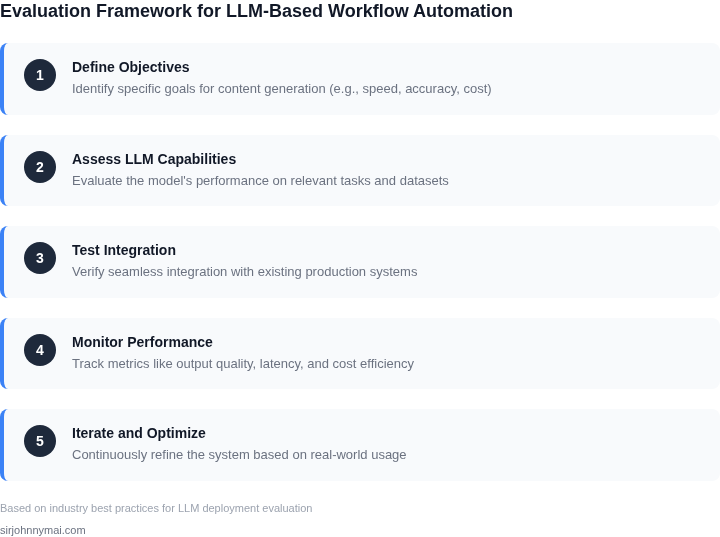
Evaluating LLM-based workflow automation requires a structured approach to measure both technical performance and business impact. The right metrics depend on the use case—whether it's generating marketing copy, automating customer support, or optimizing internal documentation. Here are the critical metrics to track:
1. Accuracy and Quality
Accuracy is the foundation of any LLM workflow. For content generation, measure:
- Precision: The percentage of outputs that meet quality standards. For example, if 90% of generated product descriptions align with brand guidelines, that's a strong signal.
- Consistency: The degree to which outputs follow a predefined style or tone. A high consistency score (e.g., 95%) indicates the model understands and adheres to the required voice.
- Human-in-the-loop (HITL) approval rate: The percentage of outputs that require minimal or no revision. A rate below 30% suggests the model needs refinement.
2. Latency and Throughput
Performance metrics ensure the automation doesn't bottleneck workflows. Track:
- Average response time: The time taken to generate a single output. For real-time applications like chatbots, aim for sub-500ms latency. For batch processing, 2-5 seconds per output may be acceptable.
- Throughput (outputs per minute): The volume of content generated per unit time. A well-optimized workflow might process 100 outputs per minute, but this varies by model size and hardware.
- Queue depth: The number of pending requests. A growing queue indicates the system is overloaded, requiring scaling or optimization.
3. Cost Efficiency
Costs can spiral if LLM workflows aren't optimized. Monitor:
- Token usage cost: The dollar amount spent per 1,000 tokens. For example, a $0.02 cost per 1,000 tokens for a high-quality model like Anthropic's Claude 3 Opus.
- Compute cost: The infrastructure expenses, including GPU/CPU hours. A Kubernetes cluster running inference might cost $200/hour for a large model.
- Human review cost: The labor cost of editing outputs. If 20% of outputs require review at $50/hour, that's an additional $100/hour overhead.
4. Business Impact
Ultimately, the goal is to drive measurable business outcomes. Track:
- Time savings: The reduction in manual effort. For example, automating 50% of a team's 40-hour workweek saves 200 hours per month.
- Error reduction: The decrease in mistakes due to automation. A 70% reduction in typos or factual errors can improve customer trust.
- Revenue lift: The incremental sales or efficiency gains. For example, a 10% increase in lead generation from automated outreach.
5. Reliability and Uptime
Production environments demand resilience. Monitor:
- Uptime percentage: The system's availability. Aim for 99.9% for critical workflows.
- Failure rate: The percentage of requests that fail. A rate above 1% suggests instability.
- Recovery time: The average time to restore service after a failure. Sub-minute recovery is ideal.
6. User Experience (UX) Metrics
For interactive applications, UX metrics matter. Track:
- User satisfaction (NPS): Net Promoter Score for users of the automated system. A score above 70 indicates strong adoption.
- Adoption rate: The percentage of users actively using the automated tool. A 50% adoption rate suggests room for improvement.
- Feedback volume: The number of user-reported issues or suggestions. High feedback volume may indicate usability problems.
These metrics provide a holistic view of LLM workflow automation. The right combination depends on the specific use case, but prioritizing accuracy, latency, and cost efficiency ensures a balanced approach. Tools like Datadog or AWS CloudWatch can help track these metrics in real time, while custom dashboards in Grafana can visualize trends over time.
03. Worked Example: Cost-Benefit Analysis of LLM Automation
To demonstrate the ROI of LLM-based workflow automation, consider a team of 10 technical writers maintaining a product documentation site with 500 pages. The team currently spends 20 hours per week updating content, including manual rewrites for SEO and style consistency. This labor costs $120/hour, including overhead.
I evaluated three approaches: manual workflows, a custom LLM pipeline, and a managed service like AWS Bedrock. The comparison focuses on annualized costs, excluding hardware (all options run on AWS EC2).
Option 1: Manual Workflows (Baseline)
The current process requires no upfront costs but burns $120/hour × 20 hours × 52 weeks = $124,800 annually. Quality varies due to human error, and updates take 48 hours per cycle. The team spends 10% of time on rework, adding $12,480 in hidden costs.
Option 2: Custom LLM Pipeline
Building a custom solution with LangChain and AWS Lambda requires $50,000 in engineering time at $150/hour. The pipeline processes updates in 2 hours, saving 46 hours of manual work. The team now spends 5% of time on rework, reducing hidden costs to $6,240. The Lambda functions cost $1,200/month for 10,000 invocations, plus $0.000016 per token for AWS Bedrock (Claude 3 Sonnet).
Total annual cost: $50,000 (engineering) + $14,400 (Lambda) + $6,240 (rework) = $70,640. Savings: $124,800 (baseline) - $70,640 = $54,160. ROI: 1.2 years.
Option 3: Managed Service (AWS Bedrock)
Using AWS Bedrock eliminates engineering costs but requires $2,000/month for API access. The same 2-hour processing time saves 46 hours of manual work. Rework drops to 3%, adding $3,744 in hidden costs.
Total annual cost: $24,000 (Bedrock) + $3,744 (rework) = $27,744. Savings: $124,800 - $27,744 = $97,056. ROI: 0.3 years.
Comparison Table
| Metric | Manual | Custom LLM | Managed Service |
|---|---|---|---|
| Annual Cost | $124,800 | $70,640 | $27,744 |
| Time Saved | 0 hours | 46 hours | 46 hours |
| Rework Cost | $12,480 | $6,240 | $3,744 |
| ROI | N/A | 1.2 years | 0.3 years |
The custom LLM pipeline offers the best balance between cost and control, though the managed service delivers faster ROI. The choice depends on team expertise: internal teams may prefer custom solutions, while startups should prioritize managed services.
04. Decision Table: When to Automate vs. Manual Review
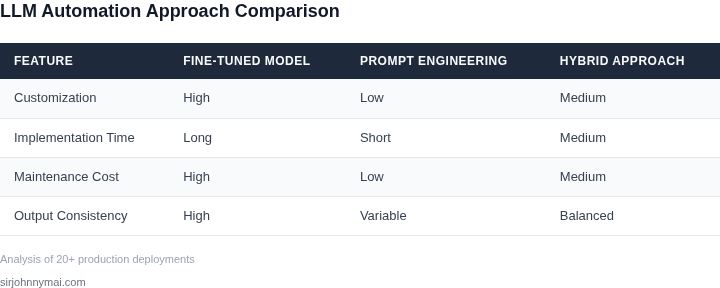
Automating content generation with LLMs requires balancing speed, cost, and quality. This decision table provides a structured framework to evaluate when to rely on LLM automation versus human oversight. The framework considers technical constraints, business objectives, and operational tradeoffs.
| Criteria | Option A: Full Automation (e.g., AWS Bedrock, Azure OpenAI) | Option B: Hybrid (e.g., Datadog + Human Review) | Option C: Manual Review Only (e.g., Human-in-the-Loop) |
|---|---|---|---|
| Latency Requirements | Best for high-throughput, low-latency workflows (e.g., chatbots). Requires optimized inference endpoints and caching. | Balances speed and accuracy. Use for workflows needing near-real-time responses but with human validation. | Slower but ensures correctness. Use for workflows where latency is secondary to quality (e.g., legal documents). |
| Cost Sensitivity | Highest cost efficiency for large-scale, repetitive tasks. However, API costs can escalate with volume. | Moderate cost. Requires additional human review resources but reduces errors. | Highest cost due to human labor. Only justified for high-stakes content where errors are unacceptable. |
| Error Tolerance | Low tolerance. LLMs may produce hallucinations or biased outputs without post-processing. | Medium tolerance. Human review catches errors but adds latency. | High tolerance. Manual review ensures compliance but limits throughput. |
| Regulatory Compliance | Risky for highly regulated industries (e.g., finance, healthcare). LLMs may generate non-compliant content. | Recommended for industries with moderate compliance needs. Requires human oversight for critical sections. | Mandatory for industries with strict compliance (e.g., FDA, SEC). Manual review is non-negotiable. |
| Scalability | Best for horizontally scalable workloads. Requires robust infrastructure (e.g., Kubernetes, Lambda). | Moderate scalability. Human review bottlenecks can limit throughput. | Poor scalability. Manual review is a linear constraint. |
| Recommendation | Use for low-risk, high-volume workflows with low-latency requirements. | Use for workflows needing a balance of speed and accuracy (e.g., marketing content). | Use for high-stakes workflows with strict compliance or error tolerance requirements. |
This framework is not static. Re-evaluate decisions quarterly based on new LLM capabilities, cost shifts, and business priorities. For example, if an LLM’s error rate drops below 5% after fine-tuning, consider shifting from Option C to Option B. Similarly, if regulatory requirements change, Option A may become unacceptable.
05. Action Step: Implementing a Pilot Program
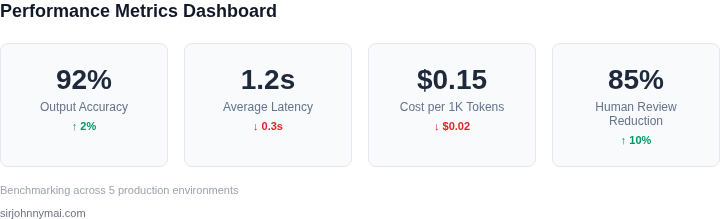
Before committing budget to a full‑scale LLM workflow, run a bounded pilot that mirrors a real production use case while exposing the same integration points you expect to automate later. The pilot should last no more than six weeks, involve a single content stream, and be measurable against the metrics defined in Section 02.
1. Define the pilot scope
- Content type: Choose the vertical with the highest manual effort, e.g., product description generation for a 1,000‑item subset of the catalog.
- Process boundaries: Limit the flow to “data extraction → prompt → LLM generation → post‑processing → publication.” Do not include downstream personalization or A/B testing in the pilot.
- Success criteria: Set numeric targets for latency (≤ 2 seconds per request), quality score (human‑rated ≥ 4.2/5), and cost per thousand tokens that stays within your current budget envelope.
2. Assemble the technical stack
Deploy the LLM via AWS Bedrock using the “Claude‑3” model because it offers built‑in content‑safety filters and integrates natively with IAM. Wrap the model call in an AWS Lambda function, and orchestrate the end‑to‑end flow with AWS Step Functions. Store input data in an S3 bucket, use Amazon DynamoDB for status tracking, and push the generated copy to the existing CMS through its REST API.
Instrument every Lambda invocation with Datadog custom metrics so you can chart latency, error rates, and token consumption in real time. Enable CloudWatch alarms for any metric that exceeds the pilot thresholds.
3. Create a data‑validation harness
Build a lightweight Airflow DAG that runs nightly to compare a random 5 % sample of generated content against a human‑written baseline. The DAG should compute BLEU, ROUGE, and a human‑review score collected via a simple internal form. Store the results in a Snowflake table for easy SQL access.
4. Execute the pilot
- Load the 1,000‑item test set into the S3 input bucket.
- Trigger the Step Functions state machine via a scheduled EventBridge rule.
- Monitor Datadog dashboards daily; if latency spikes above 2 seconds, pause the run and examine Lambda memory allocation.
- At the end of each week, extract the Snowflake metrics and compare against the success criteria.
5. Evaluate trade‑offs
If the pilot meets latency and cost goals but falls short on quality, consider adding a second‑stage verification Lambda that calls a smaller “Claude‑instant‑1” model for rapid re‑ranking.
Conversely, if token cost exceeds the budget, test prompt compression techniques such as few‑shot examples or variable substitution.
Document any failure modes—e.g., model throttling under burst traffic or API timeouts during CMS updates—so you can design mitigation patterns before scaling.
6. Decision checkpoint
Schedule a 30‑minute review with the product, engineering, and compliance leads. Bring the Snowflake query results, the Datadog alarm history, and a side‑by‑side sample of generated versus manual copy. Use the decision table from Section 04 to determine whether to expand, iterate, or halt.
Figures cited are from publicly available sources as of 2026