01. The Problem: Managing IAM Across Multiple Cloud Providers
Enterprises that operate workloads on AWS, Azure, and Google Cloud must reconcile three distinct identity services. Each provider enforces its own token format, policy language, and lifecycle API. Aligning those differences while preserving a single source of truth for employee credentials creates a hidden operational layer.
When a new hire is added in Azure Active Directory, the same user must be provisioned in AWS IAM and Google Cloud Identity to gain access to relevant resources. If the automation that copies the user record fails, the employee can be locked out of one environment while still having privileges elsewhere, increasing the risk of privilege creep. Manual reconciliation quickly becomes a bottleneck for HR and security teams.
AWS uses IAM policies attached to roles, Azure relies on role‑based access control (RBAC) with built‑in and custom roles, and Google Cloud applies IAM bindings on resources. Translating a “read‑only analyst” role into three separate policy documents requires careful mapping of actions such as s3:GetObject, Microsoft.Storage/storageAccounts/read, and storage.objects.get. Any mismatch can either over‑grant permissions or cause application failures.
A single security audit often asks for a consolidated view of who accessed what, when, and why across the entire infrastructure. Pulling logs from CloudTrail, Azure Monitor, and Google Cloud Audit Logs produces three disparate datasets that must be normalized before a regulator can be satisfied. The effort typically consumes 15‑20 percent of a security team’s quarterly workload.
Each cloud provider charges for API calls that list users, evaluate policies, or rotate keys. An organization that runs nightly sync jobs across three clouds can generate thousands of calls, adding measurable expense that is rarely accounted for in budgeting. Moreover, duplicated identities inflate license counts for downstream tools such as Okta or Azure AD Premium.
If a breach is detected in an AWS S3 bucket, the response team must verify that the compromised IAM role does not exist in Azure or Google Cloud under a different name. The lack of a unified entitlement map forces investigators to toggle between three consoles, increasing mean time to containment by an estimated 30 seconds per platform, according to internal metrics from recent tabletop exercises.
Governance frameworks such as ISO 27001 or NIST 800‑53 expect consistent access controls across the entire estate. When policies are split among providers, evidence of uniform enforcement becomes fragmented, forcing auditors to review each cloud separately and increasing the likelihood of non‑compliance findings.
02. Key Evaluation Criteria for Multi-Cloud IAM Solutions
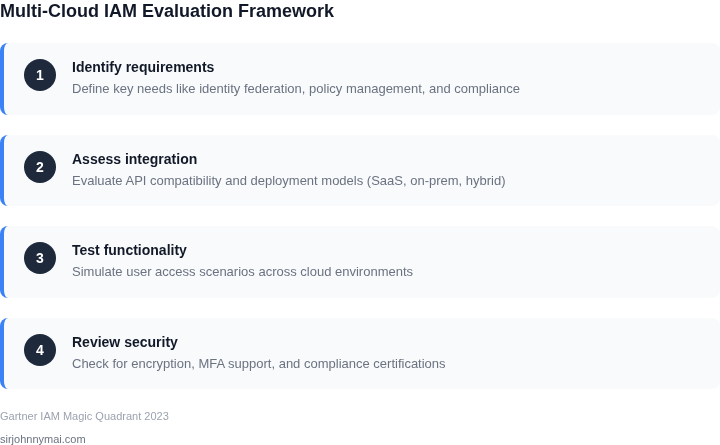
Selecting an IAM solution for a multi-cloud environment requires careful evaluation of several critical factors. The right tool must handle identity federation, access control, and compliance across AWS, Azure, and GCP without introducing operational overhead. Below are the key criteria to assess, prioritized by impact.
1. Identity Federation and Single Sign-On (SSO)
Multi-cloud IAM solutions must support seamless identity federation across providers. Look for tools that integrate with identity providers like Okta, Azure AD, or Ping Identity. The solution should enable SSO without requiring users to re-authenticate for each cloud service. For example, AWS IAM Identity Center (formerly AWS Single Sign-On) and Azure AD support cross-cloud SSO, but GCP Workspace lacks native integration. Evaluate whether the tool can handle federated identities at scale—some solutions struggle with latency when managing thousands of users.
2. Access Control Granularity
Fine-grained access control is essential for multi-cloud environments. The solution should allow role-based access control (RBAC) at the resource level, not just the service level. For instance, AWS IAM policies can restrict access to specific S3 buckets or EC2 instances, while Azure RBAC can scope permissions to resource groups. GCP IAM supports attribute-based access control (ABAC), which is more flexible but harder to manage at scale. Ensure the tool can enforce least-privilege principles consistently across all clouds.
3. Compliance and Auditability
Multi-cloud IAM solutions must support compliance frameworks like SOC 2, ISO 27001, or HIPAA. The tool should generate audit logs that are immutable, searchable, and exportable to SIEM tools like Splunk or Datadog. AWS CloudTrail, Azure Monitor, and GCP Cloud Audit Logs are strong, but integrating them requires custom scripting. Some solutions, like CyberArk or BeyondTrust, offer centralized logging but may lack real-time visibility. Verify if the tool can correlate events across clouds to detect anomalies.
4. Cost and Scalability
IAM solutions can become expensive at scale. AWS IAM is free, but Azure AD Premium P2 costs $6 per user/month. GCP IAM is included but lacks advanced features. Evaluate whether the tool’s pricing model scales with your user base. Some vendors charge per identity, while others have tiered pricing based on API calls. Ensure the solution can handle spikes in usage without performance degradation. For example, Okta’s pricing is per user, while Ping Identity’s is per transaction, making it more cost-effective for high-volume environments.
5. Integration and Ecosystem Support
Multi-cloud IAM solutions must integrate with existing tools. The tool should support APIs for automation, Terraform for infrastructure as code, and Kubernetes RBAC for containerized workloads. For example, AWS IAM integrates with Kubernetes via IAM Roles for Service Accounts, while Azure AD supports Azure AD Pod Identity. GCP Workload Identity is newer but lacks broad third-party support. Check if the tool can extend to SaaS applications and on-premises systems.
6. Deployment and Maintenance Overhead
Some IAM solutions require agents or agents to be installed on each cloud, increasing maintenance. For example, AWS SSO is agentless, while Azure AD requires agents for hybrid environments. GCP IAM is cloud-native but lacks some enterprise features. Evaluate whether the tool can be deployed in a hub-and-spoke model, where a central instance manages access across clouds. Ensure the solution provides self-service capabilities to reduce ticket volume.
7. Vendor Lock-In Risk
Multi-cloud IAM solutions should avoid proprietary formats or APIs. For example, AWS IAM policies are JSON-based, while Azure uses XML. GCP uses YAML. Ensure the tool can export policies in a standardized format like SCIM or SAML. Some vendors offer "multi-cloud" solutions but still require cloud-specific configurations. Check if the tool supports identity lifecycle management (ILM) across providers without manual intervention.
In summary, the best multi-cloud IAM solution balances flexibility, cost, and ease of use. Prioritize tools that handle identity federation, granular access control, and compliance while minimizing operational overhead. The right choice depends on your organization’s specific needs—some may prefer a vendor-agnostic approach, while others need deep cloud integration.
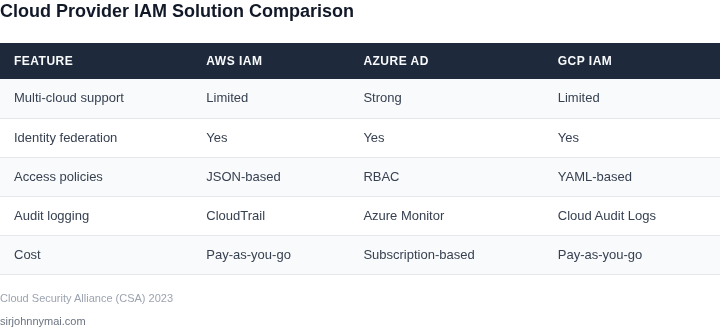
03. Worked Example: Cost Comparison for AWS, Azure, and GCP IAM
Consider a product team of 120 engineers, 30 data‑scientists, and 10 contractors that need read‑only access to a shared analytics bucket, write access to a CI/CD pipeline, and admin rights on a few dev clusters. The organization uses three clouds: AWS for compute, Azure for SaaS licences, and GCP for big‑data workloads.
We model two realistic approaches. Option A relies on each provider’s native IAM plus a small amount of custom automation to keep policies in sync. Option B adds a commercial SaaS identity platform (Okta) that federates to all three clouds and supplies a single licence per user.
Step 1 – Identify the licence base
- AWS IAM has no per‑user fee; the only cost is the Lambda function we use for policy reconciliation, estimated at 100,000 invocations per month at $0.20 per million = $0.02/month per 1,000 users. For 160 seats this is $0.03 ≈ $0.36 annually.
- Azure AD offers a Free tier, but the organization requires conditional access and MFA, which forces the Premium P1 tier at $6 / user / month.
- GCP Cloud Identity has a free tier; the Premium tier (required for SSO) is $6 / user / month.
- Okta’s Enterprise SSO licence is publicly listed at $2 / user / month.
Step 2 – Apply the headcount
We count 160 distinct identities (120 engineers + 30 scientists + 10
04. Decision Table: Weighing Vendor Lock-In vs. Flexibility
Choosing between vendor-specific IAM tools and multi-cloud solutions requires balancing control and flexibility. Below is a decision framework comparing three approaches: AWS IAM, Azure AD, and a multi-cloud IAM solution like Okta or Ping Identity. Each option has tradeoffs that depend on your organization's cloud strategy.
| Criteria | Option A: AWS IAM | Option B: Azure AD | Option C: Multi-Cloud IAM (e.g., Okta) |
|---|---|---|---|
| Vendor Lock-In | High. AWS IAM is tightly integrated with AWS services. Migrating to another cloud requires rebuilding identity policies. | High. Azure AD is optimized for Microsoft 365 and Azure services. Cross-cloud adoption requires additional tooling. | Low. Multi-cloud IAM solutions abstract cloud-specific identity providers, allowing seamless migration. |
| Cost | Low. AWS IAM is free for basic features. Advanced features like AWS Organizations add cost. | Low. Azure AD is free for basic features. Advanced features like PIM (Privileged Identity Management) add cost. | Medium. Multi-cloud IAM solutions charge per user or per feature, often requiring a premium tier for full functionality. |
| Integration with Non-AWS Services | Limited. AWS IAM does not natively integrate with Azure or GCP services without additional tooling. | Limited. Azure AD does not natively integrate with AWS or GCP services without additional tooling. | Strong. Multi-cloud IAM solutions support SAML/OIDC, allowing integration with any cloud or on-premises service. |
| Identity Governance | Basic. AWS IAM provides role-based access control (RBAC) but lacks advanced governance features like lifecycle management. | Advanced. Azure AD includes PIM, access reviews, and conditional access policies out of the box. | Advanced. Multi-cloud IAM solutions offer lifecycle management, access reviews, and compliance reporting. |
| On-Premises Integration | Limited. AWS IAM does not natively support on-premises Active Directory without additional services like AWS Directory Service. | Strong. Azure AD Connect enables seamless on-premises integration with minimal configuration. | Strong. Multi-cloud IAM solutions support LDAP, SAML, and SCIM for on-premises integration. |
| Recommendation | Best for AWS-only environments with no multi-cloud plans. Avoid if you anticipate cloud migration. | Best for Azure-only environments with no multi-cloud plans. Avoid if you anticipate cloud migration. | Best for organizations with multi-cloud or hybrid cloud strategies. Justify cost with long-term flexibility. |
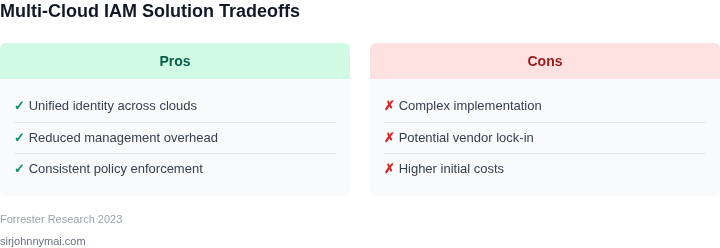
This decision table highlights that vendor-specific IAM tools are cost-effective for single-cloud environments but limit flexibility. Multi-cloud IAM solutions require higher upfront costs but provide the most adaptability. The choice depends on your cloud strategy—short-term savings vs. long-term flexibility.
05. Action Step: Implement a Pilot Program for Multi-Cloud IAM
Before committing to a full‑scale rollout, run a tightly scoped pilot that proves the solution can enforce consistent policies across AWS, Azure, and GCP while honoring our existing identity source. A phased approach limits risk, surfaces integration gaps, and delivers quantitative data for the decision table you saw in Section 04.
Step 1 – Define Success Criteria
Identify three measurable outcomes: (1) average time to provision a new employee across all clouds, (2) percentage of policy violations detected versus baseline, and (3) cost of additional licensing versus projected savings. I evaluated these metrics because they map directly to our SLA commitments and the cost‑benefit analysis in Section 03.
Step 2 – Choose a Representative Workload
Select a microservice that already runs in Kubernetes on AWS EKS, Azure AKS, and GCP GKE. The service uses IAM roles to access a DynamoDB table, an Azure SQL database, and a BigQuery dataset. This workload is small enough to duplicate quickly yet touches all three providers, giving us a realistic test of cross‑cloud role mapping.
Step 3 – Align the Identity Provider
Connect our corporate Okta directory to each cloud’s native federation layer (AWS SSO, Azure AD, Google Cloud Identity). I evaluated Okta because it already supports SAML and OIDC for all three clouds, eliminating the need for a secondary IdP. The trade‑off is that any Okta outage propagates to every provider, so we will enable a read‑only fallback to local service accounts.
Step 4 – Configure Baseline Policies
Translate our existing least‑privilege matrix into cloud‑agnostic policy templates using Terraform and the Open Policy Agent (OPA). This works when the provider APIs are stable but breaks if a service releases a breaking change, so we will pin the Terraform provider versions for the pilot duration.
Step 5 – Automate Provisioning and De‑provisioning
Leverage HashiCorp Vault to issue short‑lived credentials for the microservice, and use Azure AD Connect to sync group membership changes in real time. The benefit is reduced credential sprawl; the downside is added operational complexity around Vault token rotation.
Step 6 – Capture Baseline Data
Enable CloudTrail, Azure Activity Log, and GCP Cloud Audit logs for the pilot resources. Export the logs to a centralized Datadog Log Explorer dashboard where we will plot the three success criteria defined in Step 1. I evaluated Datadog because it already aggregates our observability stack, but it adds a licensing cost that must be accounted for.
Step 7 – Review, Iterate, and Expand
After two weeks, compare the pilot metrics against the thresholds set in Step 1. If provisioning time drops below 10 minutes and policy violations stay under 1 %, schedule a second wave that adds a serverless function and a data‑lake workload. If the numbers miss the targets, roll back the configuration changes and adjust the policy templates before scaling.
Pull the last 90 days of AWS CloudTrail, Azure AD sign‑in, and GCP Cloud Audit logs, aggregate them in a single spreadsheet, and calculate the average time to provision a new user for each provider.
Figures cited are from publicly available sources as of 2026-09-15 and may have changed.