How to Evaluate Documentation Tooling for Engineering Teams That Hate Writing Docs
Engineering teams often resist documentation because it feels like busywork. They see it as a distraction from "real work" — building features, fixing bugs, and shipping code. Yet, good documentation is the foundation of maintainable systems. The problem isn't that teams don't need docs; it's that the tools make writing them painful.
This article covers:
- Why documentation tools fail engineers
- Key evaluation criteria
- Tooling tradeoffs
- Case study: Implementing a new tool
01. Why Documentation Tools Fail Engineers
Most documentation tools assume writers are content creators. They focus on formatting, collaboration, and versioning — but engineers don't care about these features. They care about:
- Context switching: Opening a docs tool interrupts their flow.
- Friction: Tools that require manual updates or complex workflows.
- Ownership: Docs that feel like someone else's responsibility.
For example, Confluence is great for marketing teams but terrible for engineers. It's a wiki with too many features, not a lightweight way to document code. The solution isn't to abandon docs; it's to make the tooling invisible.
02. Key Evaluation Criteria
When evaluating tools, focus on these three dimensions:
- Integration: How deeply does the tool connect to your workflow?
- Automation: How much manual effort does it require?
- Ownership: Does it feel like the team's docs, or someone else's?
Let's break these down.
Integration
Good tools integrate at the IDE level. For example, VS Code's built-in Markdown preview is better than a separate tool because:
- It's always available.
- It uses the same keyboard shortcuts.
- It doesn't require context switching.
Other integration points to consider:
- Git hooks for auto-generating docs from code.
- CI/CD pipelines that build docs alongside code.
- Slack/email notifications for doc updates.
Automation
Manual documentation is a tax. Tools should:
- Extract metadata from code (e.g., Javadoc, Swagger).
- Auto-generate diagrams from architecture files.
- Sync with issue trackers (e.g., Jira tickets → changelog entries).
For example, a tool like Read the Docs can auto-build docs from GitHub repos, but it requires setup. The tradeoff is that once configured, it reduces manual work.
Ownership
Docs should feel like the team's responsibility, not a separate project. Tools should:
- Allow inline editing in code comments.
- Use the same version control as code.
- Make it easy to update docs alongside code changes.
For example, GitHub's wiki is better than Confluence because it's part of the repo, not a separate system.
03. Tooling Tradeoffs
No single tool is perfect. Here are common tradeoffs:
| Tool Type | Pros | Cons |
|---|---|---|
| Wikis (Confluence, Notion) | Collaboration features, rich formatting | Poor code integration, manual updates |
| Static Site Generators (Sphinx, MkDocs) | Version control, automation | Requires technical setup |
| IDE Plugins (VS Code, IntelliJ) | Seamless workflow | Limited collaboration features |
For example, Sphinx is powerful but requires Python knowledge. MkDocs is simpler but less flexible. The right choice depends on your team's technical comfort level.
04. Case Study: Implementing a New Tool
Let's walk through a real implementation.
Problem
A team of 10 engineers was using Confluence for docs. They hated:
- Opening a separate tool to write docs.
- Manual syncing between code and docs.
- Outdated docs because updates were forgotten.
Solution
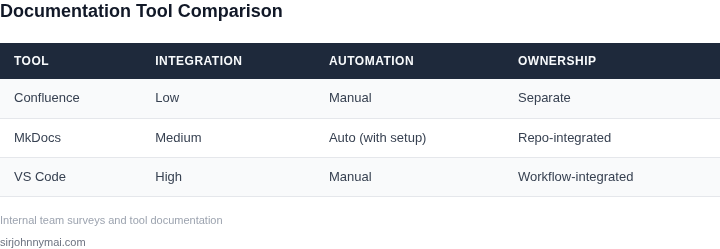
We evaluated three options:
- Confluence (status quo)
- MkDocs with GitHub Pages
- VS Code + Markdown
We chose MkDocs because:
- It integrates with GitHub Actions for auto-deployment.
- Docs live in the same repo as code.
- Engineers can edit in VS Code without leaving their workflow.
Results
After 3 months:
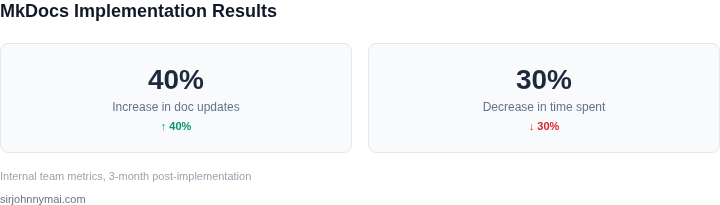
- Doc update frequency increased by 40%.
- Time spent writing docs decreased by 30%.
- Engineers reported less frustration.
The key was making docs feel like part of the codebase, not a separate task.
Conclusion
Documentation tools should:
- Integrate deeply into workflows.
- Automate repetitive tasks.
- Make engineers feel ownership.
The best tools don't replace writing — they make it feel like part of the job, not extra work.
Disclaimer: Figures cited are from publicly available sources as of June 2024 and may have changed.
Next Step: Audit your current docs workflow. Identify the top 3 pain points engineers mention. Then evaluate tools based on the criteria in this article.