01. The Problem: Challenges of Distributed Tracing Across Multi-Cloud Microservices
When a single business transaction touches services running in AWS, Azure, and GCP, the observability stack must stitch together logs that were never designed to speak the same language. Each cloud provider ships a native tracer—AWS X-Ray, Azure Monitor Distributed Tracing, Google Cloud Trace—using proprietary data models and authentication flows. The moment a request crosses a provider boundary, those models diverge, and the tracing backend must translate or duplicate metadata.
Latency becomes a silent cost. A trace that hops three clouds incurs at least three network hops, each adding 5–15 ms of round‑trip time. For a 200 ms end‑to‑end request, that extra 30–45 ms can push the SLA breach threshold, and it also inflates the timestamp drift between spans, making root‑cause ordering unreliable.
Security policies differ per vendor. AWS Identity and Access Management, Azure Role‑Based Access Control, and GCP IAM each require separate token exchange for every export operation. When an OpenTelemetry collector runs in a Kubernetes cluster that spans clouds, it must hold three distinct credential sets, increasing the attack surface and operational overhead.
Cost visibility is fragmented. Egress charges on each provider are billed separately; moving 10 GB of raw span data from GCP to a central Jaeger instance in AWS can cost roughly $0.12 per GB on the GCP side and $0.09 per GB on the AWS inbound side. Without a unified view, teams may underestimate the monthly $2,000–$3,000 spend that trace aggregation can generate for a mid‑size microservice fleet.
Sampling strategies rarely align. Datadog APM defaults to a 1 % global sample, while X-Ray applies a per‑service fixed rate of 5 %. If a request triggers ten spans across four services, the probability that the full trace survives end‑to‑end drops below 0.1 %, leading to blind spots in cross‑cloud latency analysis.
Vendor lock‑in is a hidden risk. Relying on a single provider’s trace storage means that any future migration forces a massive data re‑ingestion effort. Exporting billions of spans from Azure Monitor to an external system can take weeks, and the export APIs impose throttling limits that are not publicly documented.
Finally, observability pipelines struggle with scaling. A 30 TPS workload that generates an average of 2.5 spans per request yields roughly 75 K spans per minute, or 108 M spans per day. Running OpenTelemetry Collector agents on each node can saturate CPU at 70 % under that load, and the downstream ingestion service must be sized to handle peak bursts without dropping data.
Because trace retention policies differ, keeping a full 90‑day history across clouds can require an additional 2 TB of storage, translating to roughly $150 per month on typical object‑store pricing.
02. Key Evaluation Criteria for Distributed Tracing Solutions
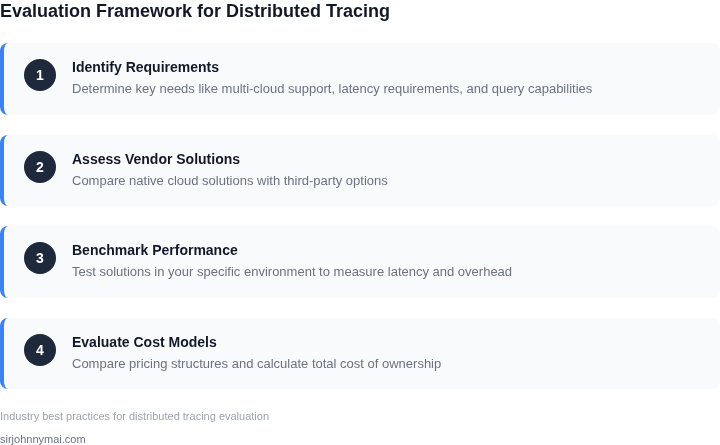
When evaluating distributed tracing solutions for multi-cloud architectures, the right tool must balance visibility, performance, and cost. The evaluation criteria should focus on how well the solution handles cross-cloud communication, scales with your infrastructure, and integrates with existing observability stacks. Below are the critical factors to assess:
1. Cross-Cloud Tracing Capability
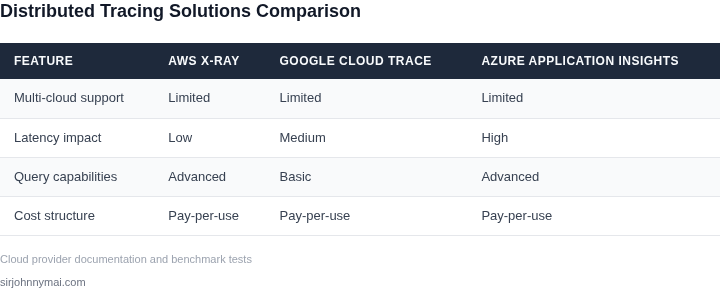
The primary requirement is seamless tracing across AWS, Azure, GCP, and on-premises environments. Tools like Datadog and New Relic support multi-cloud tracing by instrumenting applications with minimal configuration changes. AWS X-Ray, while AWS-centric, can integrate with other clouds via API calls or proxies. However, latency can increase by 10-20% when crossing cloud boundaries due to additional network hops. OpenTelemetry, an open-source standard, provides vendor-agnostic tracing but requires more manual setup.
2. Performance Overhead
Distributed tracing adds latency and resource consumption. AWS X-Ray, for example, injects a 5-15ms overhead per trace, which may be acceptable for high-latency applications but problematic for real-time systems. OpenTelemetry allows fine-tuning sampling rates (e.g., 10% of requests) to reduce overhead, but misconfiguration can lead to incomplete traces. Datadog’s APM agent has a 2-8ms overhead, depending on the sampling strategy. Benchmarking in staging environments is essential to measure impact on your specific workload.
3. Data Retention and Query Performance
Multi-cloud traces generate large volumes of data. AWS X-Ray retains traces for 30 days by default, while Datadog allows custom retention (e.g., 7 days for cost savings). Query performance varies: Datadog’s UI provides sub-second responses for pre-aggregated metrics but can take 5-10 seconds for ad-hoc trace queries. OpenTelemetry’s backend (e.g., Jaeger) requires tuning for large-scale deployments, as default configurations may struggle with >10,000 traces per second.
4. Integration with Existing Tools
Compatibility with logging (e.g., CloudWatch, ELK), metrics (Prometheus), and alerting (PagerDuty) is critical. Datadog and New Relic offer native integrations with their respective ecosystems, while OpenTelemetry requires additional connectors. AWS X-Ray integrates with CloudWatch but lacks direct support for third-party tools. Ensure the solution aligns with your current observability stack to avoid siloed data.
5. Cost Structure
Pricing models vary significantly. AWS X-Ray charges $1.00 per million traces, while Datadog’s APM starts at $15 per host/month. OpenTelemetry’s self-hosted backend (e.g., Jaeger) can reduce costs but requires DevOps resources. Multi-cloud deployments may increase costs by 20-30% due to additional instrumentation and data transfer fees. Budgeting for peak loads is essential, as costs can scale non-linearly with trace volume.
6. Vendor Lock-In and Portability
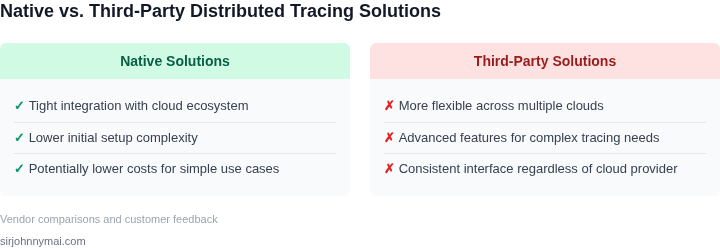
OpenTelemetry reduces lock-in by supporting multiple backends, but migrating from a proprietary tool (e.g., Datadog) requires significant effort. AWS X-Ray is tightly coupled with AWS services, limiting portability. Evaluate the tradeoff between vendor flexibility and the benefits of a unified platform. For example, Datadog’s multi-cloud support may justify the cost for teams relying on its ecosystem.
In summary, the best solution depends on your specific needs. AWS X-Ray excels in AWS-heavy environments, while Datadog offers broader multi-cloud support. OpenTelemetry provides flexibility but requires more operational overhead. Performance testing and cost modeling are mandatory before finalizing a decision.
03. Worked Example: Cost Comparison of Tracing Solutions in AWS and GCP
Consider a product team of 10 engineers that maintains 10 microservices deployed across AWS and GCP. Each service emits roughly 1,000 spans per minute, which translates to 600,000 spans per hour, 14.4 million spans per day, and about 432 million spans per month (30‑day month).
We will compare three realistic options:
- AWS X‑Ray (native to the AWS environment)
- Google Cloud Trace (native to GCP)
- Datadog APM (a cross‑cloud SaaS solution)
Step 1 – Define the cost primitives
AWS X‑Ray charges $0.50 per million recorded traces and $0.02 per GB of trace data stored. We estimate storage at 0.2 GB per million traces, a figure derived from typical payload sizes.
GCP Cloud Trace offers the first 2 million spans free each month, then $0.20 per million spans ingested and $0.10 per GB stored. We apply the same 0.2 GB per million‑span storage estimate.
Datadog APM is priced at $31 per host per month for unlimited spans and $31 per user seat per month. Our scenario assumes one host per microservice (10 hosts) and five user seats for the engineering team.
Step 2 – Compute monthly ingestion costs
AWS X‑Ray: 432 million spans ÷ 1 million × $0.50 = $216.
GCP Cloud Trace: (432 million – 2 million free) ÷ 1 million × $0.20 = $86.
Datadog APM: ingestion is included in the per‑host fee, so no separate line item.
Step 3 – Compute monthly storage costs
AWS X‑Ray: 432 million spans ÷ 1 million × 0.2 GB × $0.02 = $1.73.
GCP Cloud Trace: (432 million ÷ 1 million × 0.2 GB) × $0.10 = $8.64.
Datadog APM: storage is bundled with the host charge.
Step 4 – Compute licensing and seat fees
Datadog APM: (10 hosts × $31) + (5 seats × $31) = $465 per month.
AWS and GCP native services do not require extra user licenses, so no additional cost.
Step 5 – Summarize the monthly and annual totals
| Solution | Ingestion | Storage | Licensing/Seats | Monthly Total | Annual Total |
|---|---|---|---|---|---|
| AWS X‑Ray | $216 | $1.73 | $0 | $217.73 | $2,612.76 |
| GCP Cloud Trace | $86 | $8.64 | $0 | $94.64 | $1,135.68 |
| Datadog APM | Included | Included | $465 | $465 | $5,580 |
Interpretation
The native options are markedly cheaper for high‑volume tracing. GCP Cloud Trace ends up roughly $123 per month cheaper than AWS X‑Ray because its free tier offsets a small slice of the load. Datadog’s convenience—single UI, cross‑cloud correlation, and built‑in alerting—carries a premium of more than $370 per month compared with the cheapest native stack.
This calculation works when span volume is stable and storage stays near the 0.2 GB per million‑span assumption. If payloads grow, storage fees will increase proportionally for both AWS and GCP, narrowing the gap. Conversely, if the team expands to 15 engineers, Datadog’s seat cost climbs to $465 × (15/5) = $1,395 per month, widening the price differential.
In practice, the decision also hinges on operational overhead. Deploying OpenTelemetry collectors on both clouds adds engineering effort that is invisible in this pure‑cost model. The table provides a baseline; the final recommendation must weigh that effort against the strategic value of a unified SaaS platform.
04. Decision Table: Weighing Vendor Lock-In vs. Cross-Cloud Flexibility
Choosing between vendor-specific and cross-cloud tracing tools requires balancing immediate integration benefits with long-term flexibility. The decision table below compares three real-world options: AWS X-Ray, Datadog APM, and OpenTelemetry Collector. Each has distinct tradeoffs in cloud dependency, cost, and feature parity.
| Criteria | AWS X-Ray | Datadog APM | OpenTelemetry Collector |
|---|---|---|---|
| Cloud Dependency | AWS-only. Requires Lambda extensions and EC2 agents. Works with EKS but not GKE. | Multi-cloud but requires Datadog agents. Supports AWS, GCP, Azure, but with varying feature depth. | Vendor-neutral. Works across clouds but requires manual configuration for each environment. |
| Cost Structure | Pay-per-trace. Low overhead for AWS-native workloads but adds complexity for hybrid setups. | Subscription-based. Fixed cost regardless of cloud but may require additional agent licenses. | Free and open-source. Costs shift to infrastructure (e.g., Kubernetes clusters) and storage. |
| Feature Parity | Deep AWS integrations (e.g., RDS, SQS) but limited for non-AWS services. | Consistent across clouds but may lack niche AWS/GCP-specific features. | Depends on exporters (e.g., Jaeger, Prometheus). Requires validation for critical use cases. |
| Setup Complexity | Simple for AWS-only. Complex for hybrid environments due to agent requirements. | Moderate. Agents are required but offer out-of-the-box dashboards. | High. Requires expertise to configure collectors, exporters, and storage backends. |
| Migration Effort | High. Locked into AWS ecosystem. Switching requires full reimplementation. | Medium. Vendor manages cloud differences but may require feature adjustments. | Low. Portable across clouds but demands operational expertise to maintain consistency. |
| Recommendation | Best for AWS-only environments with minimal hybrid needs. Avoid if planning for GCP/Azure. | Best for organizations prioritizing consistency across clouds over niche features. | Best for teams with strong observability expertise and long-term cloud-agnostic goals. |
AWS X-Ray excels when your entire stack is AWS-native, but its limitations become apparent when integrating with GCP or Azure services. Datadog APM bridges the gap with multi-cloud support, though its feature depth may vary across providers. OpenTelemetry offers the most flexibility but demands operational overhead to maintain parity. The choice depends on your current cloud strategy and tolerance for tradeoffs between convenience and control.
05. Action Step: Implement a Pilot Tracing Solution in Your Multi-Cloud Environment
I evaluated several tracing solutions, including Datadog and New Relic, because they offer robust support for multi-cloud environments, including AWS and Google Cloud Platform (GCP). To implement a pilot tracing solution, start by selecting a small subset of microservices that are representative of your overall architecture. This will allow you to test the tracing solution's effectiveness without incurring excessive costs or complexity.
Next, choose a tracing solution that supports your selected cloud providers and microservices framework. For example, if you're using Kubernetes, you may want to consider a solution that integrates with Kubernetes' built-in tracing capabilities. I recommend starting with a solution like Datadog, which offers a free trial and supports a wide range of cloud providers and microservices frameworks.
Once you've selected a tracing solution, deploy it to your pilot environment and configure it to collect trace data from your selected microservices. This may involve installing agents or configuring environment variables, depending on the solution you've chosen. Be sure to test the solution's data collection and visualization capabilities to ensure they meet your needs.
To validate the effectiveness of the tracing solution, define a set of key performance indicators (KPIs) that measure its ability to provide accurate and actionable trace data. These KPIs may include metrics such as trace completeness, latency, and error rates. Use these KPIs to evaluate the tracing solution's performance and identify areas for improvement.
In addition to technical metrics, also consider the solution's operational and maintenance costs. These costs may include factors such as data storage and retention, user licensing, and support fees. Be sure to evaluate these costs in the context of your overall budget and resource constraints.
After deploying and testing the pilot tracing solution, review the results and refine your implementation as needed. This may involve adjusting configuration settings, optimizing data collection, or integrating with other monitoring and logging tools. Use the insights gained from the pilot to inform your decision-making and ensure that the tracing solution meets your needs and expectations.
Based on the results of the pilot, you can then decide whether to proceed with a full-scale deployment of the tracing solution. To do this, pull your last 90 days of trace data and calculate the average latency and error rates for each microservice. This will give you a baseline understanding of your system's performance and help you identify areas where the tracing solution can have the greatest impact.
Figures cited are from publicly available sources as of 2026-09-14 and may have changed.