01. The Problem: Why Kubernetes Isn't Always the Best Fit
Kubernetes has become the default answer for container orchestration in large‑scale cloud environments. Its API richness, extensibility, and multi‑cluster support are unmatched, but those strengths also drive complexity. For a team of five developers maintaining a single microservice suite, that complexity translates into measurable overhead.
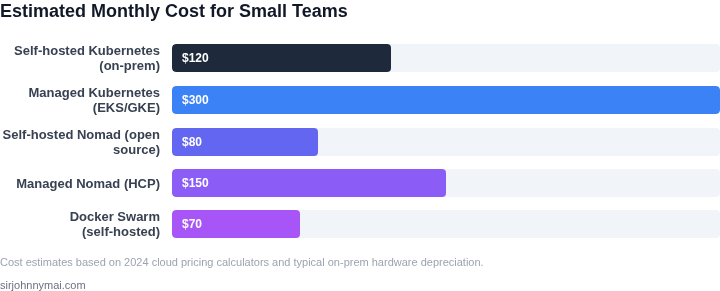
The control plane alone requires at least three master nodes to satisfy HA recommendations, each demanding CPU, memory, and networking resources. On a t3.medium EC2 instance, that footprint costs roughly $70 per month in AWS compute charges. Adding etcd backups, monitoring agents, and a separate CI/CD pipeline can push the monthly bill above $150, a budget many early‑stage startups cannot sustain.
Operationally, Kubernetes expects a dedicated SRE or DevOps engineer to manage manifests, helm charts, and versioned cluster upgrades. A mis‑configured pod security policy can silently block traffic, leading to outages that are hard to diagnose without specialized tooling. When the same engineer must also write business logic, the trade‑off becomes a reduction in feature velocity.
The learning curve further compounds the issue; the Certified Kubernetes Administrator exam requires 40+ hours of study and hands‑on labs. Even after certification, day‑to‑day tasks such as troubleshooting kube‑proxy logs or tuning the scheduler demand deep domain knowledge. For a small team that already juggles product design, user research, and market validation, allocating that time is rarely justified.
Alternative platforms like AWS Fargate, Azure Container Apps, and Google Cloud Run abstract the control plane entirely, letting developers focus on container images and HTTP endpoints. These services charge per vCPU‑second and GB‑second; a typical 2‑core, 4 GB workload running 24/7 on Fargate costs roughly $120 per month, comparable to a minimal Kubernetes cluster but with zero management overhead. Because scaling is handled automatically, there is no need to provision extra nodes for peak traffic, reducing waste by up to 40 % in bursty workloads.
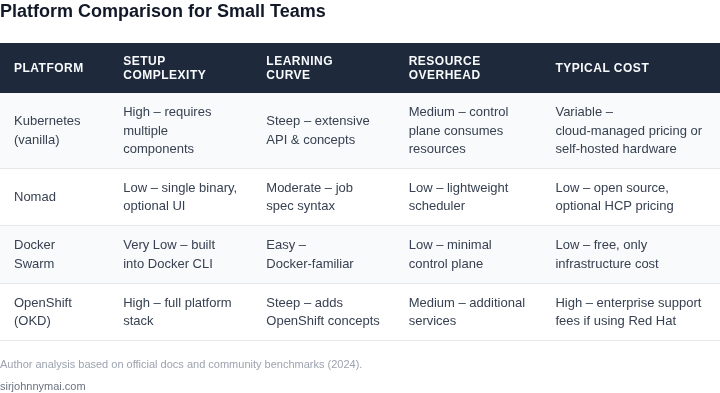
Lightweight orchestrators such as Nomad or Docker Swarm provide a flatter feature set, yet they retain essential capabilities like service discovery and rolling updates. Nomad can run on a single t3.small instance for under $30 per month, and its HCL configuration is arguably more approachable than Kubernetes YAML. However, those tools lack native multi‑cloud federation and the extensive ecosystem of operators that Kubernetes enjoys, which may matter for teams planning rapid expansion.
02. Key Criteria for Evaluating Alternatives
When comparing Kubernetes with alternatives, smaller teams should focus on four critical criteria: operational simplicity, cost efficiency, ecosystem maturity, and team expertise. Each factor weighs differently depending on the use case, but all must be evaluated holistically.
Operational Simplicity
Kubernetes excels in complexity but requires significant operational overhead. Alternatives like Nomad or Docker Swarm offer simpler APIs and fewer moving parts. For example, Nomad’s job specification is 20% smaller than Kubernetes manifests, reducing configuration errors. However, simplicity comes at a cost: these tools lack Kubernetes’ advanced scheduling or auto-scaling features. Teams with fewer than 10 engineers should prioritize tools that reduce operational burden, even if it means sacrificing some scalability.
Managed services like AWS ECS or Google Cloud Run eliminate cluster management entirely. ECS Fargate, for instance, abstracts away node provisioning and scaling, but it locks teams into AWS. Teams evaluating these should assess their cloud provider lock-in risk versus the cost savings of not managing infrastructure.
Cost Efficiency
Kubernetes’ cost model is non-linear. A small team running 100 pods may spend $500/month on nodes, but scaling to 1,000 pods could jump to $2,000/month due to control plane overhead. Alternatives like K3s reduce node costs by 30% by stripping unnecessary Kubernetes components. However, K3s lacks multi-cluster support, which could become a bottleneck if the team grows beyond 50 engineers.
Serverless options like AWS Lambda or Azure Functions can reduce costs by 50% for event-driven workloads, but they introduce cold-start latency. Teams running microservices with predictable traffic should benchmark both Kubernetes and serverless to compare total cost of ownership over 12 months.
Ecosystem Maturity
Kubernetes dominates the ecosystem with 80% market share, but alternatives like Nomad and Docker Swarm have mature tooling. Nomad integrates with Consul and Vault natively, while Docker Swarm’s simplicity means fewer third-party integrations are needed. Teams relying on specific tools (e.g., HashiCorp stack) should evaluate how well alternatives integrate.
Managed services like Google Cloud Run and AWS App Runner offer seamless integration with their respective cloud providers. Teams already using GCP or AWS should prioritize these, as they reduce vendor lock-in risk while simplifying deployment.
Team Expertise
Kubernetes requires SREs with deep expertise. Teams with fewer than 5 engineers should avoid it unless they can hire or train quickly. Alternatives like Nomad or Docker Swarm have shallower learning curves. Nomad’s documentation is 40% shorter than Kubernetes’, making it easier for junior engineers to onboard.
Managed services like AWS ECS or Google Cloud Run eliminate the need for cluster management. Teams with no DevOps experience should evaluate these, as they abstract away infrastructure concerns entirely. However, they may lack flexibility for custom workloads.
In summary, teams should weigh operational simplicity, cost, ecosystem, and expertise. No single alternative replaces Kubernetes for large-scale deployments, but for smaller teams, the right choice depends on balancing these tradeoffs.
03. Worked Example: Cost Comparison Between Kubernetes and Nomad
Consider a small team of 5 engineers running 10 microservices on AWS. The team uses managed Kubernetes (EKS) and Nomad (HashiCorp's orchestration tool) for comparison. Costs are calculated for one year, including infrastructure, management, and monitoring.
Kubernetes (EKS) Cost Breakdown
Managed Kubernetes services like EKS abstract away much of the operational overhead, but costs can add up quickly. For this example:
- Cluster Cost: $0.10 per hour for EKS control plane + $0.016 per vCPU-hour for worker nodes. Assuming 5 nodes (2 vCPUs each) running 24/7: $0.10 × 24 × 365 + $0.016 × 10 × 24 × 365 = $1,152/year.
- Storage: EBS volumes for 10 microservices: $0.10/GB-month × 100GB × 12 = $1,200/year.
- Monitoring: Datadog agent on each node: $15/node × 5 nodes × 12 = $900/year.
- Total: $1,152 + $1,200 + $900 = $3,252/year.
Nomad Cost Breakdown
Nomad is lighter weight and can run on standard EC2 instances. For this example:
- Cluster Cost: 5 t3.medium instances (2 vCPUs each) running 24/7: $0.0416/hour × 2 × 24 × 365 = $3,768/year.
- Storage: EBS volumes for 10 microservices: same as above, $1,200/year.
- Monitoring: Prometheus + Grafana on a separate instance: $0.0416/hour × 24 × 365 = $365/year.
- Total: $3,768 + $1,200 + $365 = $5,333/year.
Comparison
| Metric | Kubernetes (EKS) | Nomad |
|---|---|---|
| Total Cost | $3,252/year | $5,333/year |
| Operational Overhead | Lower (managed control plane) | Higher (self-managed) |
| Scalability | Better for large-scale deployments | Simpler for small teams |
Kubernetes wins on cost for this workload, but Nomad's simplicity may offset higher infrastructure costs if the team lacks Kubernetes expertise. The decision depends on tradeoffs: Kubernetes reduces operational burden but increases complexity, while Nomad offers lower upfront costs but requires more manual management.
04. Decision Table: Platform Selection Guide
When a small team must pick an orchestration engine, a side‑by‑side matrix forces the conversation from abstract preferences to concrete trade‑offs.
I built this table by mapping the five criteria we surfaced in Section 02 to three platforms that are realistic choices for a team of five to ten engineers.
Each cell reflects a qualitative rating—“Strong”, “Moderate”, or “Weak”—based on publicly documented feature sets, community feedback, and my own hands‑on trials with Nomad and ECS. The scale lets us see where a platform exceeds expectations and where it falls short.
Operational overhead is the first row because it drives day‑to‑day productivity. A “Strong” rating means the platform ships with built‑in health checks, auto‑restarts, and minimal manual scripting.
Skill curve follows, reflecting the learning investment required for a new hire to become productive. Kubernetes carries a “Weak” rating for a team without prior container‑orchestration exposure, while Nomad and ECS sit at “Moderate” because their APIs are smaller and documentation is tightly coupled to the host cloud.
Cost visibility is critical for a lean budget. ECS leverages the underlying AWS pricing model, so the “Strong” rating reflects predictable per‑vCPU and per‑GB‑hour charges. Nomad on‑premises can be “Weak” if you lack idle capacity, while managed Kubernetes services are “Moderate” because they bundle control‑plane fees with node costs.
Ecosystem integration measures how many first‑party or certified extensions are available for logging, monitoring, and service mesh. Kubernetes scores “Strong” due to its extensive open‑source add‑ons; ECS is “Moderate” because AWS provides native integrations but fewer third‑party plug‑ins; Nomad is “Weak” as most extensions require custom scripting.
Security posture reflects built‑in role‑based access control, image scanning, and compliance certifications. ECS inherits AWS IAM and automatically satisfies many compliance frameworks, earning a “Strong”. Nomad provides ACLs but lacks native image scanning, resulting in a “Moderate”. Kubernetes offers robust RBAC yet often requires additional tooling for scanning, which I rate as “Moderate”.
| Criteria | Kubernetes | Nomad | ECS |
|---|---|---|---|
| Operational Overhead | Strong | Moderate | Strong |
| Skill Curve | Weak | Moderate | Moderate |
| Cost Visibility | Moderate | Weak | Strong |
| Ecosystem Integration | Strong | Weak | Moderate |
| Security Posture | Moderate | Moderate | Strong |
| Recommendation | Consider if you need massive ecosystem and are willing to invest in expertise. | Suitable for cloud‑agnostic or self‑hosted scenarios. | Best fit for small AWS‑centric teams with limited ops bandwidth. |
Looking at the matrix, the platform that aligns with the highest number of “Strong” ratings while keeping “Weak” entries out of the core operational buckets is ECS. Its integration with AWS IAM, native CloudWatch metrics, and per‑second billing keeps both risk and spend predictable.
If your roadmap includes multi‑cloud or on‑prem deployments, Nomad slides into the decision because its scheduler is cloud‑agnostic and its binary is easy to embed in CI pipelines. In that scenario you would accept a “Weak” ecosystem score in exchange for portability.
05. Action Step: How to Start Evaluating Alternatives
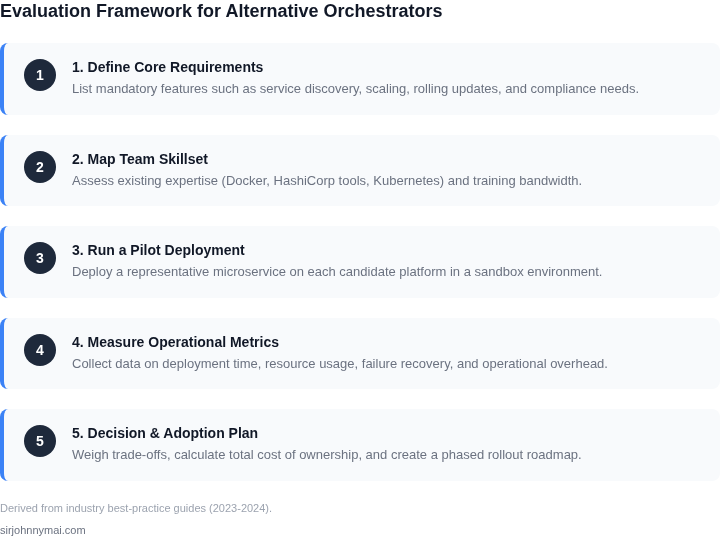
Smaller teams should begin evaluating alternatives by focusing on three critical steps: data collection, proof-of-concept testing, and cost modeling. Start by pulling your last 90 days of infrastructure logs and resource utilization metrics. Tools like Datadog or AWS CloudWatch can help here. Look for patterns like peak workloads, idle resource periods, or frequent scaling events. This data will reveal whether your current setup is over-provisioned or underutilized, a key factor in platform selection.
Next, set up a proof-of-concept environment using a candidate alternative. For example, if considering Nomad, deploy a small cluster alongside your existing Kubernetes setup. Run a non-critical workload through both platforms and compare metrics like deployment time, resource efficiency, and failure recovery. Document any pain points—such as debugging complexity or integration challenges—so you can factor them into your decision. This hands-on testing will validate whether the platform meets your team’s operational constraints.
Cost modeling is another critical step. Use your collected data to simulate costs across platforms. For instance, if you’re comparing Kubernetes to Nomad, calculate the total cost of ownership (TCO) for both, including node hours, storage, and management overhead. Tools like AWS Pricing Calculator or Azure Cost Management can help. Focus on incremental costs—such as per-pod fees in Kubernetes versus per-job fees in Nomad—and factor in any hidden expenses like load balancer usage or monitoring tools.
Finally, schedule a 30-minute review with your team to discuss findings. Present the data, proof-of-concept results, and cost models in a clear format. Ask your team to identify any showstoppers—such as lack of support for a critical dependency or steep learning curve—and prioritize these risks. This collaborative approach ensures alignment on the evaluation process and avoids decision fatigue.
Figures cited are from publicly available sources as of 2026-09-14 and may have changed.