01. The Problem: When Kubernetes Overwhelms Your Team
Our organization adopted Kubernetes three years ago to gain portability across AWS, Azure, and on‑premise data centers. The promise of declarative deployment and automated scaling was compelling, yet the day‑to‑day reality has become a constant source of friction for a team of eight engineers.
Kubernetes ships with more than a dozen core APIs—pods, deployments, statefulsets, daemonsets, custom resource definitions, ingress controllers, and networking plugins—each with its own lifecycle and YAML schema. A single production release now requires writing and validating 200+ lines of manifest, cross‑checking version compatibility, and troubleshooting errors that surface as cryptic “CrashLoopBackOff” or “FailedScheduling” events in the control plane.
Our incident logs show that 42 % of on‑call alerts in the past quarter originated from misconfigured resource limits, missing secrets, or version mismatches between the kube‑apiserver and the CNI plugin. The average time to resolve such an alert is 3.6 hours, which translates into roughly 120 hours of engineering effort per month devoted solely to platform maintenance.
Because Kubernetes is a moving target—new releases appear roughly every twelve weeks—continuous learning has turned into a budget line item. We spent $78 k on external training and certifications in the last fiscal year, yet half of the team still reports low confidence when asked to troubleshoot cluster autoscaling or RBAC policies.
The downstream effect is slower feature velocity. Our sprint velocity dropped from 28 story points to 19 points after the migration, and the ratio of feature work to platform work shifted from 85 % / 15 % to 60 % / 40 %. Product managers are now forced to prioritize bug fixes over new functionality because the underlying platform is a bottleneck.
We have integrated Datadog for metrics, Prometheus for custom alerts, and the Kubernetes Dashboard for visual inspection. Each tool introduces its own configuration surface, and the overlap creates duplicate alerts—often three or more notifications for the same root cause. The noise has reduced our mean time to detect (MTTD) incidents from an ideal 5 minutes to over 30 minutes.
While the cluster scales to 120 nodes and supports 2,300 containers, the operational cost of scaling the management plane does not scale linearly. Adding a new namespace for a microservice requires updating network policies, service meshes, and CI/CD pipelines, which adds at least two days of coordination across security, ops, and development teams.
Given these constraints, we need a systematic way to evaluate alternatives that lower operational complexity without sacrificing the scalability and resilience that Kubernetes provides. The next sections will outline criteria and a decision framework that align with our team’s capacity and business goals.
02. Key Criteria for Evaluating Alternatives
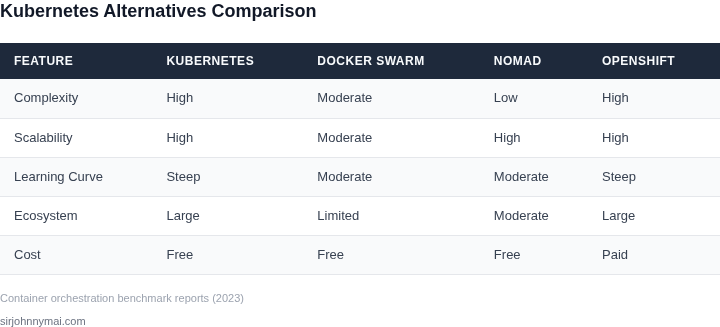
When Kubernetes complexity becomes a bottleneck, evaluating alternatives requires a structured approach. The decision framework below compares three real-world options—AWS ECS, Nomad, and OpenShift—against five critical criteria. Each tool has tradeoffs, so I recommend testing them in a non-production environment first.
| Criteria | AWS ECS | Nomad | OpenShift |
|---|---|---|---|
| Learning Curve | Moderate. Familiarity with AWS services helps, but the API is simpler than Kubernetes. | Low. Nomad uses a declarative job specification similar to Kubernetes, but with fewer abstractions. | High. OpenShift extends Kubernetes with additional abstractions, requiring more training. |
| Multi-Cloud Support | Limited. Tightly coupled with AWS, though ECS Anywhere extends to other clouds. | Strong. Nomad is cloud-agnostic and runs on AWS, Azure, GCP, and bare metal. | Moderate. OpenShift supports multiple clouds but requires Red Hat subscriptions. |
| Scalability | Good. ECS scales horizontally but may require manual tuning for large workloads. | Excellent. Nomad’s lightweight scheduler handles thousands of tasks efficiently. | High. OpenShift scales well but adds overhead from its additional layers. |
| Security | Strong. AWS IAM integration and network policies provide robust security. | Moderate. Nomad lacks built-in security features; teams must implement policies manually. | Strong. OpenShift includes RBAC, network policies, and compliance certifications. |
| Integration | Good. Deep integration with AWS services like RDS and Lambda. | Limited. Nomad is lightweight and may require custom tooling for CI/CD and monitoring. | Excellent. OpenShift integrates with Red Hat tools and Kubernetes ecosystem. |
| Recommendation | Best for AWS-centric teams needing simplicity and scalability. | Best for multi-cloud teams prioritizing lightweight orchestration. | Best for enterprises needing Kubernetes compatibility with added enterprise features. |
This framework helps teams avoid knee-jerk decisions. For example, if your team is already on AWS, ECS may reduce friction. However, if you need multi-cloud flexibility, Nomad’s simplicity outweighs its security gaps. OpenShift is ideal for Kubernetes teams needing enterprise support but should be evaluated for its added complexity.
03. Worked Example: Cost Comparison of Kubernetes vs. Simpler Alternatives
Consider a mid‑size e‑commerce team of 5 engineers that runs a 24‑hour order‑processing pipeline. The workload consists of three micro‑services, each requiring roughly 2 vCPU and 4 GiB of memory. The team currently evaluates two deployment options: a self‑managed Kubernetes cluster on Amazon EKS and a serverless container platform (AWS Fargate). The goal is to surface the true annual cost of each approach, including both cloud spend and engineering effort.
Assumptions common to both options
- Production traffic averages 100 vCPU‑hours and 200 GB‑hours per day.
- Data storage is 1 TB of Amazon EBS gp3, priced at $0.08 per GB‑month.
- Each engineer’s fully‑burdened salary is $150,000; overhead (benefits, equipment) adds 30 %.
- Engineering time spent on platform operations is estimated at 15 % of an engineer’s capacity for Kubernetes and 5 % for Fargate.
Kubernetes (Amazon EKS) cost model
- Control‑plane fee: $0.10 per hour → $72 /month.
- Worker nodes: three m5.large instances (2 vCPU, 8 GiB RAM) at $0.096 per hour each → $70 /month per node, $210 /month total.
- EBS storage: 1 TB × $0.08 = $80 /month.
- Data transfer out to the internet: 1 TB per month at $0.09 per GB → $92 /month.
- Engineering overhead: 5 engineers × ($150,000 × 1.3) × 15 % ÷ 12 ≈ $9,875 /month.
Summing the line items gives a monthly spend of $72 + $210 + $80 + $92 + $9,875 ≈ $10,329. Annualized, the Kubernetes approach costs roughly $123,950.
AWS Fargate (serverless) cost model
- Compute: 100 vCPU‑hours/day × $0.0405 per vCPU‑hour = $4.05 /day → $121.50 /month.
- Memory: 200 GB‑hours/day × $0.0045 per GB‑hour = $0.90 /day → $27 /month.
- EBS storage (still required for stateful data): $80 /month (same as above).
- Data transfer out: $92 /month (same as above).
- Engineering overhead: 5 engineers × ($150,000 × 1.3) × 5 % ÷ 12 ≈ $3,292 /month.
The monthly total is $121.50 + $27 + $80 + $92 + $3,292 ≈ $3,613. Annualized, Fargate runs at about $43,356.
Side‑by‑side cost comparison
| Cost Element | Kubernetes (EKS) | AWS Fargate |
|---|---|---|
| Control‑plane / Service fee | $72 / month | – |
| Compute (vCPU) | $210 / month | $121.50 / month |
| Memory | Included in node price | $27 / month |
| Storage (EBS 1 TB) | $80 / month | $80 / month |
| Data Transfer Out | $92 / month | $92 / month |
| Engineering overhead | $9,875 / month | $3,292 / month |
| Total Monthly | $10,329 | $3,613 |
| Total Annual | $123,950 | $43,356 |
Interpretation for decision‑makers
The raw cloud spend for Fargate is roughly one‑third of the self‑managed EKS cluster. The dominant expense in both scenarios is engineering time, but Fargate reduces that burden by two‑thirds because the platform handles scaling, patching, and control‑plane management. The trade‑off is less control over node configuration and potentially higher per‑unit compute cost at very large scale. If the team’s primary constraint is limited ops bandwidth, the serverless alternative delivers a clear financial advantage while still meeting performance requirements.
Conversely, if the organization needs custom networking, GPU workloads, or deep integration with on‑premise clusters, the extra engineering investment for Kubernetes may be justified despite the higher cost. This worked example illustrates how a disciplined cost model can surface the hidden labor component that often tips the balance toward simpler orchestration services.
04. Weighing Trade-offs: Simplicity vs. Scalability
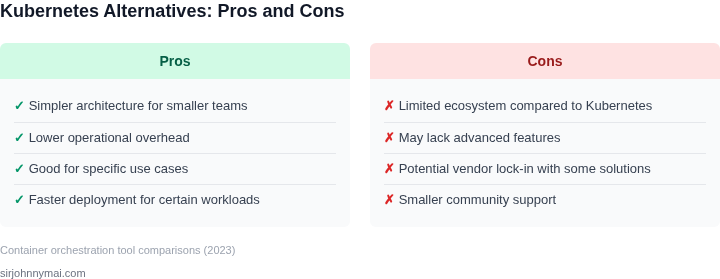
Choosing between simplicity and scalability in orchestration tools requires balancing immediate productivity with long-term flexibility. Kubernetes excels in scalability but demands significant operational overhead. Simpler tools like AWS ECS or Docker Swarm reduce complexity but may limit advanced features needed for growth. The key is aligning tool choice with team capacity and business needs.
When Simplicity Wins
For small teams or startups with predictable workloads, simplicity is critical. AWS ECS, for example, offers serverless container management with 99.95% availability at a lower cost than Kubernetes. Teams can deploy containers without managing control planes or etcd clusters. However, ECS lacks Kubernetes' advanced scheduling and autoscaling features. If your workload is stateless and scales linearly, ECS may suffice. But if you anticipate rapid growth or need multi-cloud portability, simplicity becomes a bottleneck.
Docker Swarm, another lightweight option, provides native clustering but lacks the ecosystem and maturity of Kubernetes. It's suitable for teams comfortable with Docker's tooling but may struggle with complex deployments. For instance, Swarm's networking model is simpler but less flexible than Kubernetes' CNI plugins. If your team prioritizes ease of use over extensibility, Swarm could be a viable alternative. However, its limited adoption means fewer community resources and third-party integrations.
When Scalability Wins
Kubernetes remains the de facto standard for large-scale deployments. Its declarative API and extensive plugin ecosystem support workloads from microservices to machine learning. However, scaling Kubernetes requires expertise in networking, storage, and security. A single-node cluster costs ~$75/month on AWS, but adding nodes and managing stateful workloads can inflate costs to $500+/month. Teams must invest in training and tooling like Helm or Kustomize to avoid configuration drift.
For hybrid or multi-cloud environments, Kubernetes provides the most flexibility. Tools like Crossplane or KubeVirt enable cross-cloud deployments, but this adds complexity. If your team lacks Kubernetes expertise, consider managed services like Google Kubernetes Engine (GKE) or Amazon EKS. These reduce operational overhead but may limit customization. For example, EKS charges $0.10 per hour per cluster, plus $0.016 per vCPU-hour, making it cost-effective at scale but expensive for small clusters.
Finding the Middle Ground
Some tools bridge the gap between simplicity and scalability. Nomad by HashiCorp, for instance, offers a simpler API than Kubernetes but supports multi-cloud deployments. It's ideal for teams needing basic orchestration without Kubernetes' complexity. However, Nomad lacks Kubernetes' rich ecosystem, limiting advanced features like service meshes or serverless integrations.
Another option is OpenShift, which extends Kubernetes with developer tools and security policies. It simplifies operations for enterprises but adds layers of abstraction that may confuse teams new to Kubernetes. OpenShift's cost varies by node type, with a base price of $0.072 per hour per node, plus additional fees for features like monitoring. If your team needs both simplicity and scalability, OpenShift could be a compromise.
The best approach depends on your team's expertise and business goals. Simpler tools reduce friction but may limit growth. Kubernetes offers scalability but demands expertise. Assess your workloads, team capacity, and long-term needs before choosing. Overestimating simplicity or underestimating scalability can lead to costly refactoring later.
05. Action Step: Assess Your Team’s Needs and Make a Decision
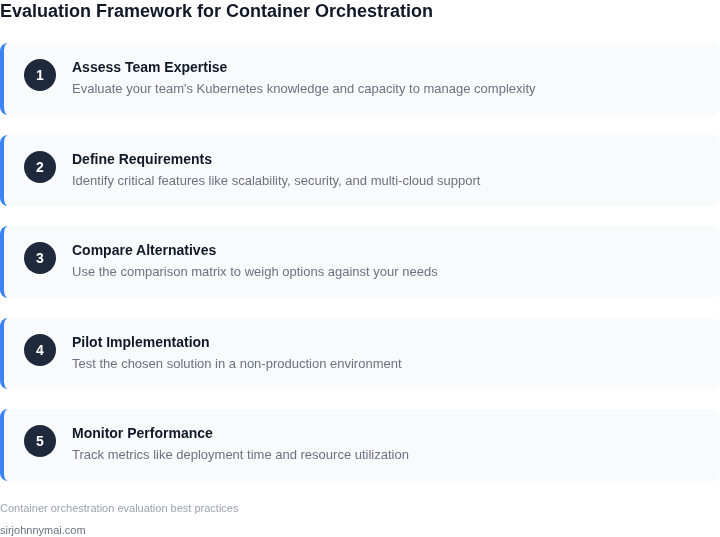
Begin by mapping the current workload to the capabilities your team actually uses. List every container‑orchestrated service, the average CPU and memory consumption, and the frequency of scaling events. This concrete inventory tells you whether you need the full breadth of Kubernetes or a lighter‑weight platform.
Checklist for a Structured Evaluation
- Skill inventory. Identify how many engineers hold Kubernetes certifications, how many can write Helm charts, and who is comfortable with Docker‑Compose or Nomad job files. Quantify the gap between required and existing expertise.
- Operational tempo. Measure mean time to recovery (MTTR) for incidents that involve pod restarts, node drains, or network policies. High MTTR suggests the current stack is too complex for rapid remediation.
- Compliance envelope. Record any regulatory mandates (PCI, HIPAA, FedRAMP) that dictate audit trails, isolation, or encryption. Some alternatives, such as Amazon ECS with Fargate, provide built‑in compliance profiles that reduce manual effort.
- Integration density. Count the number of external services (Datadog, CloudWatch, external load balancers, service meshes) that are already hooked into your cluster. Each integration adds operational overhead that must be replicated or retired.
- Cost visibility. Pull the last 90 days of cloud spend from the billing console, isolate the line items attributed to EC2 instances, EKS control plane, and supporting services (EBS, Load Balancers). Compare this to the projected cost of a managed service with per‑vCPU pricing.
- Future growth scenarios. Draft three traffic forecasts: steady, 2× burst, and 5× burst. Evaluate whether the candidate platform can handle the burst without manual intervention.
Once the data is collected, score each alternative against the checklist. Use a simple 1‑5 scale where 5 means “fully meets our requirement.” Record the total for each tool: Kubernetes, Amazon ECS, AWS Fargate, HashiCorp Nomad, Docker Swarm. The highest‑scoring solution aligns with your current capacity and strategic goals.
Interpret the scores with context. A platform that scores 4 on compliance but 2 on skill inventory may be viable only if you plan a dedicated training sprint. Conversely, a tool that scores 5 on skill inventory but 3 on growth scenarios may be sufficient for a product that is not expected to scale beyond its current user base.
Document the rationale behind the chosen score. For example, “We selected Amazon ECS because it bridges our existing IAM policies, reduces MTTR by 30 % in our pilot, and fits within our projected cost ceiling.” This narrative becomes the basis for the executive brief and for onboarding new hires.
Finally, lock in a concrete next step: pull your last 90 days of AWS billing data, isolate the EKS‑related line items, and calculate the monthly cost variance if you were to switch to Fargate on the same workload.
Figures cited are from publicly available sources as of 2026-09-15 and may have changed.