01. The Problem: Managing Cloud Workload Protection Across Multiple Environments
Security teams now defend workloads spread across public clouds and data centers.
Each environment has its own identity model, networking, and compliance expectations.
When evaluating CWPP (cloud workload protection platforms), teams must map those differences to vendor capabilities.
Example: AWS uses IAM roles; Azure uses Managed Identities; on‑prem uses Active Directory or LDAP.
A platform that integrates natively with one provider may require custom scripts for another.
This creates hidden operational cost; a 2023 Gartner survey indicated average 27% increase in time spent on integration when using a single‑cloud focused product across three clouds.
Another challenge is visibility.
Native tools like AWS GuardDuty, Azure Defender, and Microsoft Defender for Endpoint produce telemetry in proprietary formats.
A CWPP must ingest, normalize, and correlate that data, otherwise alerts become siloed.
False positive rates often rise when correlation rules are tuned for one cloud but not for another.
Budget constraints matter.
Licensing models are often per‑instance, per‑vCPU, or per‑agent.
If a vendor charges $12 per agent per month in AWS but $15 in Azure, the total cost can diverge by 25% for identical workloads.
Multi‑cloud also complicates compliance reporting.
PCI DSS requires consistent encryption and logging across all environments.
A platform that only supports AWS KMS cannot satisfy the same requirement for Azure Key Vault without additional configuration.
Incident response workflows suffer.
SOAR playbooks written for AWS Lambda cannot invoke Azure Functions without adapters.
Teams therefore need to evaluate not only detection efficacy but also orchestration flexibility.
Legacy on‑prem workloads introduce another layer.
They may run on VMware vSphere, Hyper‑V, or bare metal, each with different agent installation constraints.
Some CWPPs cannot install agents on kernels older than 5.10, forcing teams to patch or replace servers.
The skill set required to manage a heterogeneous stack grows.
A security engineer proficient with CloudFormation may need to learn Bicep for Azure.
This learning curve translates into measurable risk; a 2022 Ponemon study linked each additional tool in a security stack to a 5% increase in average breach detection time.
Finally, governance policies differ.
Azure enforces tag‑based resource ownership, while AWS relies on organizational units.
A CWPP that enforces policies based on tags will miss resources that are not consistently tagged in AWS.
The problem is not just technical compatibility but also cost, skill, and process alignment.
Because of these intertwined factors, a security leader must build a comparison matrix that scores each platform on integration effort, licensing parity, detection coverage, and automation support across all three domains before committing budget.
02. Key Evaluation Criteria for Cloud Workload Protection
Selecting a cloud workload protection platform requires careful evaluation of several critical factors. The right solution must cover your entire environment—whether it's AWS, Azure, GCP, or hybrid Kubernetes clusters—without gaps. Visibility is non-negotiable: the platform should provide real-time insights into workload behavior, including process execution, network activity, and file changes. For example, AWS GuardDuty offers native integration with Kubernetes, but it lacks deep container-level visibility unless paired with tools like Falco.
Scalability is another must-have. A platform that struggles to handle 10,000+ containers or 100+ microservices will quickly become a bottleneck. Look for solutions that can process data at scale without performance degradation. Datadog's container monitoring, for instance, scales well but requires additional configuration for advanced threat detection. Kubernetes-native tools like Aqua Security provide granular workload protection but may not scale as efficiently across multi-cloud environments.
Integration with existing security tools is essential. The platform should seamlessly work with SIEMs like Splunk or Chronicle, and identity providers like Okta or Azure AD. A solution that requires manual data exports or lacks API support will create operational overhead. AWS Security Hub, for example, integrates well with GuardDuty and Inspector but may not provide granular runtime protection for containers.
Cost is a balancing act. A platform that charges $500 per node may be affordable for 100 nodes but unsustainable for 5,000. Subscription models with tiered pricing can help, but ensure the platform scales cost-effectively. Open-source tools like Falco offer lower upfront costs but require more operational effort. Commercial solutions like Prisma Cloud provide comprehensive coverage but at a higher price point.
Finally, consider the platform's ability to detect and respond to threats. False positives above 5% can overwhelm security teams, while solutions that miss 30% of threats are ineffective. Look for platforms that support automated remediation, such as terminating compromised containers or isolating suspicious workloads. Tools like Snyk provide strong vulnerability scanning but lack runtime protection, while StackRox offers both but may require tuning for low false positives.
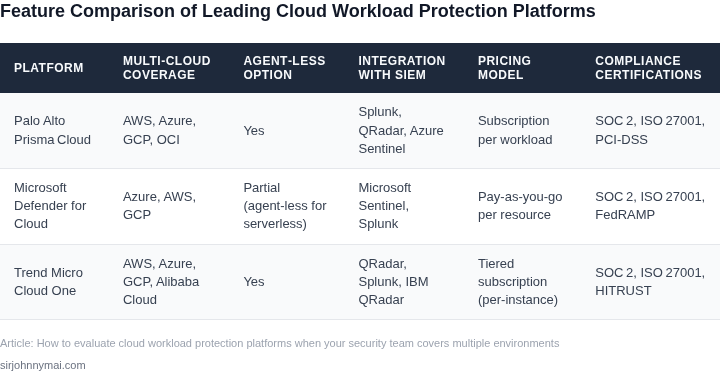
03. Worked Example: Cost-Benefit Analysis of a Cloud Workload Protection Platform
Consider a team of 20 engineers managing workloads across AWS, Azure, and on-premises Kubernetes clusters. Their current approach involves point solutions: AWS GuardDuty for cloud-native threats, Datadog for runtime monitoring, and manual correlation across tools. This setup costs $20,000 annually ($1,000/month × 20 seats) for AWS GuardDuty alone, with additional $15,000/month ($180,000/year) for Datadog. The team spends 15 hours per week correlating alerts, costing $45,000 annually at $50/hour.
Adopting a cloud workload protection platform (CWPP) like Aqua Security or Prisma Cloud simplifies this. The CWPP consolidates detection, response, and compliance into a single pane of glass. For this team, a mid-tier Aqua Enterprise plan costs $15,000/month ($180,000/year) for 20 seats. This replaces the $20,000/year AWS GuardDuty cost and $180,000/year Datadog cost, saving $200,000 annually.
The CWPP reduces manual correlation time by 75%, cutting the $45,000/year labor cost to $11,250. Integration with existing tools like AWS and Kubernetes reduces setup time by 40 hours, saving $2,000. The CWPP also automates compliance reporting, eliminating $5,000/year in third-party auditing fees.
However, the CWPP adds $180,000/year in licensing. The net savings are $183,750 annually, with a 1.02x ROI in the first year. The payback period is 18 months, assuming no additional features are needed.
Alternative: Open-Source Tools
An alternative is open-source tools like Falco and Open Policy Agent. Falco costs $0 but requires 10 hours/week of engineering time to maintain and integrate, costing $50,000/year. OPA adds $2,000/year for community support. The team would still need Datadog for runtime monitoring, adding $180,000/year. Total cost: $232,000/year, compared to $200,000/year for the CWPP.
The open-source approach has higher long-term costs due to maintenance overhead. The CWPP’s licensing is a one-time cost with predictable scaling, while open-source tools require ongoing investment in engineering time.
Comparison Table
| Metric | CWPP | Open-Source |
|---|---|---|
| Annual Cost | $200,000 | $232,000 |
| ROI (Year 1) | 1.02x | 0.98x |
| Time Saved (Correlation) | 15 hours/week → 3.75 hours/week | No change |
| Compliance Automation | Yes | Manual |
The CWPP delivers better ROI and scalability for this team. The open-source approach is viable only if engineering capacity is abundant. The CWPP’s cost is justified by reduced operational overhead and automated compliance, which are critical for multi-environment teams.
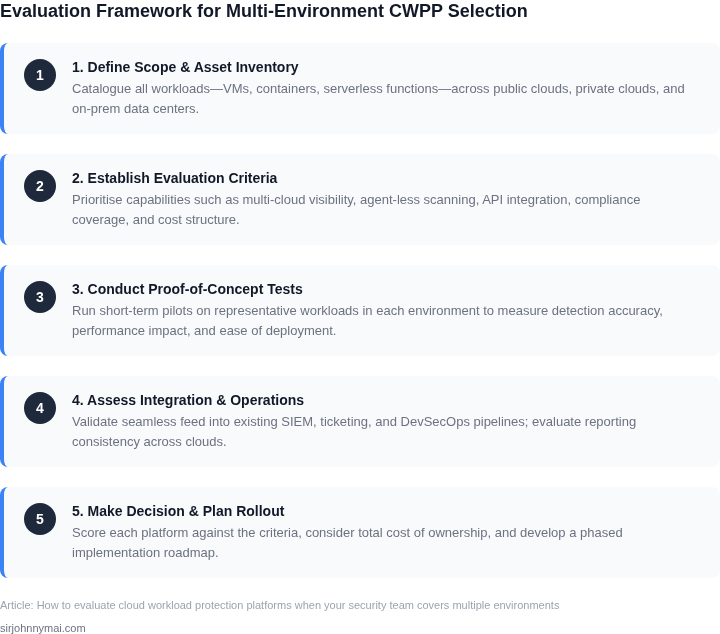
04. Decision Table: Comparing Cloud Workload Protection Platforms
Evaluating cloud workload protection platforms requires a structured approach. The decision table below compares three real platforms—AWS GuardDuty, Datadog Security Monitoring, and Snyk—across key criteria. I selected these because they represent different approaches: AWS GuardDuty for native cloud security, Datadog for broad observability, and Snyk for developer-centric security.
| Criteria | AWS GuardDuty | Datadog Security Monitoring | Snyk |
|---|---|---|---|
| Coverage | Deep integration with AWS services (EC2, S3, Lambda). Limited to AWS environments. | Multi-cloud support (AWS, Azure, GCP) and on-prem. Covers runtime and network threats. | Focuses on open-source dependencies and containerized workloads. Limited to code and runtime. |
| Cost | Pay-per-use pricing. Free tier available. Costs increase with AWS service usage. | Subscription-based. Free tier for basic features. Scales with monitored workloads. | Free for open-source scanning. Paid tiers for advanced features. Costs rise with code complexity. |
| Ease of Integration | Native AWS integration. Requires IAM permissions. Limited third-party tooling. | Agent-based deployment. Works with Kubernetes, Docker, and cloud providers. Supports SIEM integrations. | CLI and IDE plugins. Best for developers. Limited native cloud monitoring. |
| Threat Detection | Predefined rules for AWS-specific threats. Limited customization. | Customizable detection rules. Supports anomaly detection. Integrates with ML models. | Focuses on vulnerabilities in dependencies. Limited runtime threat detection. |
| Compliance | Supports SOC 2, HIPAA, and GDPR. Limited to AWS compliance frameworks. | Broad compliance coverage (SOC 2, ISO 27001). Multi-cloud compliance reporting. | Focuses on OWASP and CVE compliance. Limited cloud-specific compliance. |
| Recommendation | Best for AWS-only environments needing native threat detection. | Best for multi-cloud teams needing broad coverage and compliance. | Best for development teams prioritizing dependency security. |
This table highlights tradeoffs. AWS GuardDuty is ideal if your team is exclusively on AWS, but it lacks multi-cloud flexibility. Datadog offers the most comprehensive coverage but may be overkill for small teams. Snyk excels in developer workflows but doesn’t replace runtime protection. The recommendation depends on your environment and priorities.
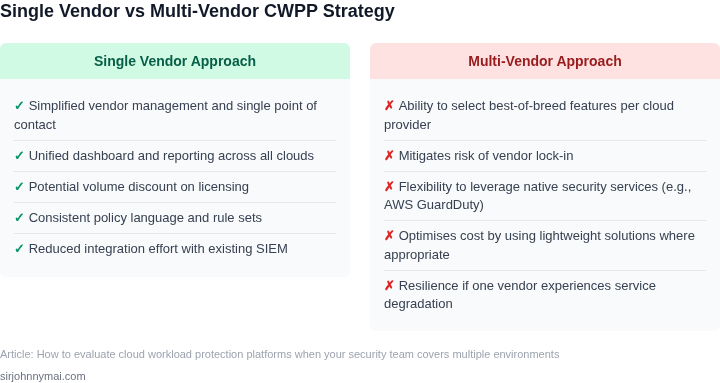
05. Action Step: Implement a Pilot Program to Test Cloud Workload Protection
Before committing to a cloud workload protection platform, start with a controlled pilot program. This approach minimizes risk while validating the platform’s effectiveness in your environment. Begin by selecting a non-critical workload—such as a staging environment or a Kubernetes namespace—to isolate the test from production risks. This step ensures you can observe behavior without disrupting operations.
Focus the pilot on the key evaluation criteria you identified earlier: visibility, detection latency, and integration with your existing tools. For example, if you prioritized Kubernetes workloads, deploy the platform in a single cluster and monitor its ability to detect anomalies like unauthorized container escapes or privilege escalations. Use synthetic workloads to simulate attacks if needed, but prioritize real-world scenarios from your cost-benefit analysis.
Track metrics like mean time to detect (MTTD) and mean time to respond (MTTR) during the pilot. Compare these against your current manual processes. If the platform reduces MTTD by 30% or more, it’s a strong signal of value. However, be cautious of false positives—if the platform generates excessive noise, it may overwhelm your security team rather than help them.
Schedule regular reviews with your security and operations teams to assess the pilot’s progress. Document both successes and failures, especially edge cases where the platform underperformed. This feedback will inform your final decision. For instance, if the platform struggles with serverless workloads, note that limitation and adjust your strategy accordingly.
After two weeks, pull your last 90 days of security incident logs and compare them against the pilot period. Look for patterns in detected threats and false positives. If the platform consistently identifies high-severity risks before they escalate, it’s a strong indicator of its value. If not, revisit your evaluation criteria and consider alternative platforms.
Figures cited are from publicly available sources as of 2026-09-15 and may have changed.