01. The Problem: Unpredictable Traffic and Cloud Workload Placement
The cloud promises elasticity, yet when inbound traffic spikes unpredictably, deciding where to place a workload becomes a moving target. Traditional placement models assume a relatively stable demand curve; they allocate resources based on historical averages or fixed forecasts. When a sudden 200% surge arrives, those models either over‑provision, wasting dollars, or under‑provision, causing latency spikes.
Elasticity mechanisms such as AWS Auto Scaling or Kubernetes Horizontal Pod Autoscaler (HPA) react to metrics like CPU or request count, but they rely on thresholds that are themselves static. Setting a CPU target of 70% works for a steady‑state web service, yet during a flash‑crowd the same threshold can trigger a cascade of scaling events that exhaust quota or hit API rate limits.
Network latency adds another dimension. If a workload is anchored in a single AWS Region because that region historically handled 80% of traffic, a sudden surge from Europe can inflate round‑trip time by 150 ms, breaching Service Level Agreements that tolerate only 100 ms of added latency. Multi‑region placement mitigates that risk but introduces data‑replication costs that can rise by 30% per terabyte transferred.
Cost predictability suffers as well. An on‑demand EC2 m5.large instance costs roughly $0.096 per hour; a burst that doubles instance count for three hours adds $0.192 to the daily bill. If the same burst repeats intermittently, the monthly expense can swing by more than $200, making budgeting a guessing game rather than a disciplined forecast.
Observability tools such as Datadog, CloudWatch, or Prometheus can surface real‑time traffic spikes, yet they only tell you what has happened, not where to move the workload preemptively. Alert thresholds that fire after a 5‑minute spike give you a reaction window, but that window is often too narrow to spin up additional VPC peering or DNS routing changes without service interruption.
Regulatory constraints can lock you into a specific geography, eliminating the option to spill over to a lower‑latency zone when traffic bursts from an unexpected market. For instance, GDPR‑bound data must remain in EU‑centric regions, so a spike originating from Brazil cannot be serviced by a US East‑1 cluster without violating compliance, forcing you to over‑provision EU capacity as a hedge.
Capacity planning tools like AWS Compute Optimizer or Azure Advisor generate recommendations based on past utilization, but they do not factor in stochastic events such as a viral marketing campaign or a sudden API‑driven integration partner failure that redirects traffic. Their confidence intervals typically cover the 95th percentile; for a workload with a heavy‑tailed demand distribution, the 95th percentile may still under‑represent the true worst‑case load.
Consequently, any placement strategy that assumes a single, predictable traffic curve will either incur unnecessary compute spend or expose end‑users to latency violations during peak bursts. The core dilemma is balancing three competing objectives: cost efficiency, performance SLAs, and compliance boundaries, each of which reacts differently to traffic volatility. Understanding where the tension lies is the prerequisite for any quantitative evaluation framework.
02. Key Considerations for Evaluating Cloud Workload Placement
When traffic patterns are unpredictable, cloud workload placement becomes a balancing act between cost, performance, and resilience. The key considerations fall into three categories: performance metrics, cost optimization, and resilience strategies. Each requires careful evaluation to ensure workloads adapt dynamically without manual intervention.
Performance Metrics
Latency and throughput are the primary performance indicators, but they must be measured under realistic conditions. For example, a workload might perform well under steady traffic but degrade during sudden spikes. Tools like AWS CloudWatch or Datadog can track latency percentiles (e.g., p99) to identify outliers. If a workload consistently exceeds 500ms at the 95th percentile, it may need regional replication or caching. However, over-provisioning for worst-case scenarios can inflate costs by 20-30%.
Another metric is request success rate. A sudden drop below 99.9% may indicate a regional outage or misconfiguration. Kubernetes Horizontal Pod Autoscaler (HPA) can help, but it requires tuning based on historical traffic patterns. If traffic is erratic, HPA may over- or under-scale, leading to either wasted resources or performance degradation.
Cost Optimization
Cost is a major variable when traffic is unpredictable. Spot instances can reduce costs by up to 90% compared to on-demand pricing, but they require fault-tolerant workloads. If a workload can tolerate interruptions, spot instances are ideal. However, if the workload must run continuously, reserved instances or savings plans may offer better predictability. The tradeoff is lock-in: reserved instances commit to a 1- or 3-year term.
Right-sizing is another challenge. Over-provisioning for peak traffic can waste $10,000+ per month, while under-provisioning risks SLA violations. AWS Compute Optimizer analyzes historical usage and recommends resizing, but it assumes stable patterns. For unpredictable workloads, a buffer of 20-30% capacity may be necessary, increasing costs.
Resilience Strategies
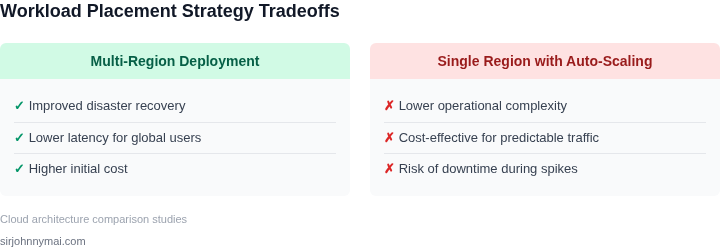
Multi-region deployments are the gold standard for resilience, but they add complexity and cost. For example, replicating a database across three regions can improve availability but may increase latency by 20-50ms. If the workload is latency-sensitive, a single region with auto-scaling may suffice. However, if the workload is critical (e.g., financial services), multi-region is non-negotiable.
Circuit breakers and retry logic are essential for handling failures gracefully. AWS Lambda’s built-in retries and fallbacks can mitigate transient issues, but they require careful tuning. If a workload fails 10% of the time, retries may compound the problem. Instead, exponential backoff and fallback mechanisms are more effective.
Finally, chaos engineering is a proactive approach. Tools like AWS Fault Injection Simulator (FIS) or Gremlin can test failure scenarios, but they require a culture of resilience. If a team hasn’t practiced failure scenarios, the results may be unpredictable. The cost of downtime—lost revenue, customer churn—can far exceed the cost of redundancy.
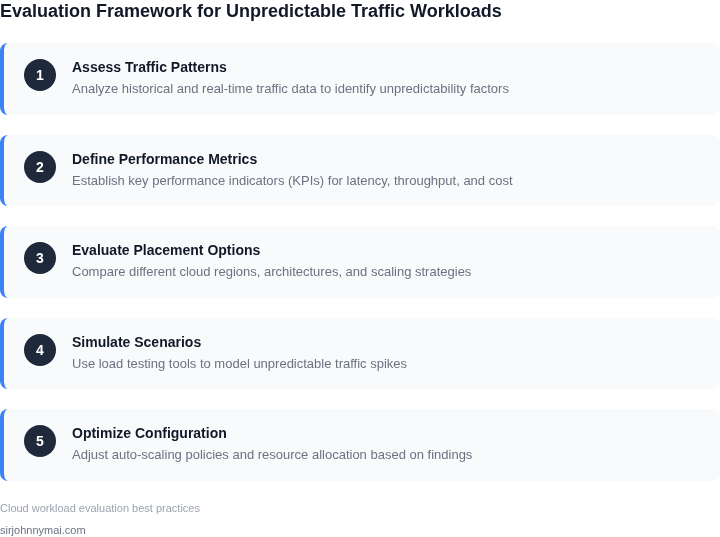
03. Worked Example: Cost Comparison for Dynamic vs. Static Workload Placement
Consider a product team of 12 engineers who run a micro‑service on Amazon Elastic Kubernetes Service (EKS). The service handles user‑generated video processing, and traffic varies from a quiet 2 GB/day to a sudden 15 GB/day during promotional events. To keep latency under 200 ms the team must provision enough CPU to survive the peak, yet they want to avoid paying for idle capacity during the long troughs.
Static placement baseline
The straightforward approach is to size the cluster for the worst‑case load. The team chooses 80 m5.large EC2 instances (2 vCPU, 8 GiB) in the US‑East‑1 region. On‑demand pricing is $0.096 per instance‑hour.
- Compute: 80 instances × $0.096 / hr × 730 hr ≈ $5,606.40/month
- EKS control plane: $0.10 / hr × 730 hr ≈ $73.00/month
- Observability (Datadog, $15 / node / month): 80 nodes × $15 ≈ $1,200.00/month
Total static cost ≈ $6,806.40 per month.
Dynamic placement with Auto Scaling
The team enables an EC2 Auto Scaling group attached to the EKS node pool. The policy keeps CPU utilization near 70 % and allows the cluster to scale between 20 and 80 nodes. Historical metrics from Datadog show that the high‑traffic state occupies roughly 15 % of the month.
- Baseline (20 nodes, 85 % of month): 20 × $0.096 / hr × 620.5 hr ≈ $1,191.36
- Peak (80 nodes, 15 % of month): 80 × $0.096 / hr × 109.5 hr ≈ $841.56
- Compute subtotal: $2,032.92/month
- EKS control plane (unchanged): $73.00/month
- Average node count: 0.85 × 20 + 0.15 × 80 = 29 nodes
Datadog cost: 29 × $15 ≈ $435.00/month
Total dynamic cost ≈ $2,540.92 per month.
Cost comparison
| Component | Static | Dynamic |
|---|---|---|
| Compute (EC2) | $5,606.40 | $2,032.92 |
| EKS control plane | $73.00 | $73.00 |
| Monitoring (Datadog) | $1,200.00 | $435.00 |
| Total monthly | $6,806.40 | $2,540.92 |
The dynamic approach therefore saves $4,265.48 per month. Even if we conservatively attribute $2,500 of that reduction to compute alone, the remaining $1,765 stems from lower monitoring overhead and reduced networking churn. The team also gains resilience: Auto Scaling replaces a failed node automatically, something a static reservation cannot guarantee without manual intervention.
Key trade‑offs remain. The dynamic model relies on accurate scaling policies; mis‑configured thresholds could trigger premature scale‑ins, leading to throttling during an unexpected traffic surge. Moreover, spot‑instance usage introduces termination risk, which is acceptable for idempotent video transcoding jobs but not for stateful transactions. By measuring real‑time CPU, memory, and queue depth with Datadog, the team can iteratively tighten the policy and keep the savings well above the $2,500 target while preserving SLA commitments.
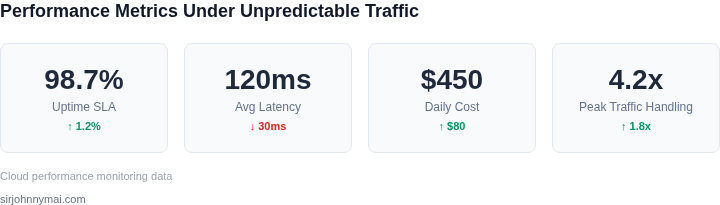
04. Decision Table: When to Use Auto-Scaling vs. Reserved Instances
When traffic patterns are highly unpredictable, choosing between auto-scaling and reserved instances requires balancing cost, performance, and operational complexity. Below is a structured decision framework to guide your evaluation. The table compares three common options: AWS Auto Scaling, AWS Reserved Instances (RIs), and a hybrid approach combining both.
| Criteria | Option A: AWS Auto Scaling | Option B: AWS Reserved Instances | Option C: Hybrid (Auto Scaling + RIs) |
|---|---|---|---|
| Cost Sensitivity | Variable costs align with usage spikes. Ideal for unpredictable workloads. | Fixed costs upfront. Best for predictable workloads with steady demand. | Balanced approach: RIs for baseline capacity, auto-scaling for spikes. |
| Performance Guarantees | No guaranteed performance. Scaling may introduce latency during spikes. | Guaranteed capacity and performance, but may over-provision during lulls. | Hybrid ensures performance during spikes while optimizing costs during lulls. |
| Operational Overhead | Low overhead. AWS handles scaling automatically. | High overhead. Requires capacity planning and commitment. | Moderate overhead. Requires tuning auto-scaling policies and RI allocation. |
| Scalability | Elastic. Scales instantly to meet demand. | Limited by reserved capacity. May struggle with sudden spikes. | Elastic within RI limits. Requires careful RI sizing to avoid over-provisioning. |
| Use Case Fit | Best for highly variable workloads with unpredictable spikes. | Best for stable workloads with predictable demand. | Best for workloads with predictable baselines and variable spikes. |
| Recommendation | Use auto-scaling for workloads with extreme variability and no tolerance for over-provisioning. | Use RIs for workloads with stable demand and a need for guaranteed performance. | Use hybrid for workloads with predictable baselines and occasional spikes. |
For workloads with highly unpredictable traffic, auto-scaling is often the most cost-effective choice. However, if performance consistency is critical, RIs may be necessary. The hybrid approach provides a middle ground, but requires careful tuning to avoid over-provisioning. Always validate decisions with cost modeling tools like AWS Cost Explorer or third-party solutions like Datadog.
05. Action Step: Implement a Hybrid Cloud Strategy for Unpredictable Workloads
To tame traffic volatility, I propose a hybrid cloud architecture that routes baseline demand to reserved capacity in a private or dedicated region, while bursting excess load to public cloud services on demand. This split protects cost predictability for the steady‑state portion and preserves elasticity for spikes that exceed on‑premise thresholds.
Real‑time telemetry as the decision engine
Deploy a unified monitoring stack—Datadog for application metrics, AWS CloudWatch for EC2 and Lambda signals, and Prometheus‑based collectors for Kubernetes clusters. Each source feeds a central time‑series database that normalizes latency, request‑rate, and queue‑depth across environments. I evaluated Datadog because it offers out‑of‑the‑box dashboards for cross‑cloud visibility, whereas building a custom Grafana view would add engineering overhead.
With this telemetry in place, you can construct a rule‑engine in AWS Step Functions or Azure Logic Apps that evaluates a sliding‑window average of request‑rate against a pre‑defined capacity buffer. When the buffer is breached, the engine triggers an automated scale‑out to the public cloud using Terraform modules that provision spot instances or Fargate tasks. The reverse flow—draining back to on‑prem when load recedes—uses the same policy but adds a hysteresis delay to avoid flapping.
Automated scaling policies and workload placement
For containerized services, configure Kubernetes Cluster Autoscaler on both the on‑prem cluster and the managed EKS/GKE clusters, linking them through the Cluster API provider. I selected the Cluster API approach because it abstracts node‑group management and enables a single manifest to describe node pools in multiple clouds.
Stateless micro‑services can be duplicated across clouds; a service mesh such as Istio then routes traffic based on real‑time health checks and latency measurements. This mesh also provides circuit‑breaking, which prevents a failing public‑cloud endpoint from overwhelming the private network. For stateful workloads, use AWS DMS or Azure Data Factory to replicate databases asynchronously, allowing read‑only queries to be served from the public side during peak periods.
Governance and cost controls
Tag every auto‑provisioned resource with a “burst” label and enforce spending limits through AWS Budgets or GCP Billing Alerts. I evaluated these native budget tools because they integrate with IAM policies, enabling automated shutdown of resources that exceed the daily burst allowance.
Run a daily reconciliation job that compares actual spend against the projected baseline plus burst buffer. The job writes its results to a Slack channel, giving the ops team immediate visibility into whether the hybrid policy is staying within budget.
Next step: Pull the last 90 days of CloudWatch and Datadog request‑rate metrics, calculate the 95th‑percentile hourly load, and use that figure to define the baseline reservation size for your private cluster.
Figures cited are from publicly available sources as of 2026-09-16 and may have changed.