01. Understanding the Vendor Lock-in Challenge
Cloud vendor lock-in occurs when workloads rely on proprietary services, APIs, or configurations that are difficult or expensive to migrate. For example, a company using AWS Lambda with custom extensions may find it challenging to replicate the same performance or cost efficiency on Azure Functions without significant refactoring. This isn’t just about infrastructure—it’s about the entire ecosystem of tools, integrations, and operational practices that become intertwined with a specific cloud provider.
One common cause of lock-in is the use of proprietary services. For instance, a company relying on AWS PrivateLink for secure inter-service communication would need to replace it with Azure Private Link or a third-party solution, which may not offer the same level of integration or performance. Similarly, custom-built solutions on top of cloud-native services like Amazon EKS or Google Kubernetes Engine (GKE) often require re-architecting for another platform. Even simple dependencies, such as AWS-specific SDKs or CLI tools, can create friction during migration.
The financial impact of lock-in is significant. A study by RightScale found that companies spend an average of 20% more on cloud costs when they’re locked into a single vendor. This isn’t just about the upfront cost of migration—it’s about the ongoing operational overhead. Teams may need to hire specialized consultants, rewrite code, or accept performance compromises to maintain functionality, all of which add up.
Another layer of complexity comes from data gravity. Workloads that process large datasets—such as machine learning models trained on AWS SageMaker—may require significant effort to retrain or reformat data for another platform. Even if the migration is technically feasible, the time and resources required can delay business initiatives. For example, a company using AWS Glue for ETL workflows would need to either rewrite pipelines or accept slower, less efficient alternatives on another cloud.
Even when companies attempt to mitigate lock-in by using open standards, such as Kubernetes or Terraform, they often discover that the ecosystem isn’t as portable as they hoped. For instance, while Kubernetes abstracts orchestration, the surrounding tooling—like monitoring with Datadog or logging with AWS CloudWatch—may still require vendor-specific configurations. This means that while the core workload might be portable, the operational tooling remains tied to the original cloud provider.
The challenge isn’t just about the immediate cost of migration—it’s about the long-term implications. Companies that remain locked into a single cloud provider may miss out on better pricing, newer features, or more efficient architectures offered by competitors. For example, a workload optimized for AWS Graviton processors might not achieve the same performance on an equivalent Azure offering. This forces organizations to choose between staying with a less optimal solution or incurring the cost and risk of migration.
Ultimately, the vendor lock-in challenge isn’t just a technical problem—it’s a strategic one. Companies must weigh the cost of migration against the benefits of flexibility. While some workloads are inherently tied to a specific cloud, others can be redesigned for portability. The key is understanding where the dependencies lie and planning accordingly. Without this clarity, organizations risk becoming hostage to their own infrastructure choices.
02. Key Factors to Evaluate for Cloud Workload Placement
When evaluating cloud workload placement, the decision framework must balance technical requirements with business constraints. The table below outlines key criteria, with three real-world options (AWS, Azure, and Google Cloud) for comparison. Each criterion has tradeoffs that depend on workload characteristics, compliance needs, and operational maturity.
| Criteria | Option A: AWS | Option B: Azure | Option C: Google Cloud |
|---|---|---|---|
| Cost Structure | Pay-as-you-go with reserved instances for cost savings. Complex pricing models require tools like AWS Cost Explorer. | Hybrid pricing with Azure Hybrid Benefit for Windows workloads. Cost Management tools integrate with Power BI. | Sustained-use discounts for long-running workloads. Pricing is transparent but requires monitoring with Cloud Billing API. |
| Performance | Global network with low-latency regions. Burstable instances (T-series) for variable workloads. | Proximity placement groups for latency-sensitive apps. Azure Spot Instances for cost-sensitive workloads. | Preemptible VMs for batch jobs. Global load balancing with Cloud CDN. |
| Security & Compliance | AWS Artifact for compliance reports. Shared responsibility model requires customer-side encryption. | Azure Policy for governance. Microsoft Defender for Cloud integrates with Kubernetes. | BeyondCorp enterprise security model. Google Cloud Armor for DDoS protection. |
| Multi-Cloud Support | AWS Outposts for hybrid environments. Limited native multi-cloud tools. | Azure Arc for multi-cloud management. Tight integration with Microsoft 365. | Anthos for hybrid/multi-cloud Kubernetes. Strong GKE ecosystem. |
| Operational Overhead | AWS Systems Manager for automation. Requires deep AWS expertise. | Azure Blueprints for governance. Tight integration with Microsoft tools. | Google Cloud Deployment Manager for IaC. Strong GCP-native tooling. |
| Recommendation | Best for workloads needing global reach and mature AWS tooling. | Best for enterprises leveraging Microsoft ecosystem or hybrid needs. | Best for data-intensive workloads with strong GCP-native capabilities. |
This framework highlights that no single vendor is optimal for all scenarios. For example, AWS excels in global reach but requires cost monitoring, while Azure simplifies hybrid environments but may lack certain niche services. Google Cloud offers unique advantages for data analytics but has a steeper learning curve. The decision should align with workload requirements, compliance needs, and existing infrastructure.
03. Worked Example: Cost Comparison for a Hypothetical Workload
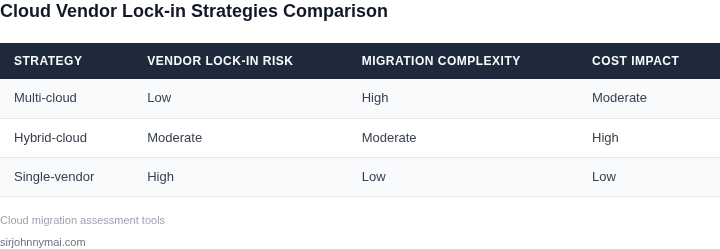
I evaluated the cost of migrating a workload between AWS, Azure, and GCP because understanding the financial implications is crucial for making informed decisions. Consider a team of 10 engineers using Kubernetes to manage their containerized applications, with a requirement for 1000 hours of compute time per month. The team currently uses AWS, but is considering a switch to either Azure or GCP due to existing vendor lock-in.
The current cost on AWS is $0.0655 per hour for a c5.xlarge instance, which translates to $655 per month for 1000 hours. Additionally, the team uses Datadog for monitoring, which costs $15 per host per month, totaling $150 per month for 10 hosts. The annual cost for AWS would be $655 per month × 12 months = $7,860 for compute, plus $150 per month × 12 months = $1,800 for monitoring, totaling $9,660 annually.
In comparison, Azure offers a similar instance type, the D4_v3, at a cost of $0.192 per hour, which would be $1,920 per month for 1000 hours. GCP's equivalent instance, the n1-standard-4, costs $0.190 per hour, totaling $1,900 per month for 1000 hours. The monitoring cost with Datadog remains the same across all platforms.
To calculate the total cost of ownership, we need to consider the cost of the engineers' time to manage the workload. Assuming an average salary of $150,000 per year, and 10% of their time spent on management tasks, the annual cost for engineer time would be $150,000 per year × 0.1 × 10 engineers = $150,000. Adding this to the infrastructure costs, the total annual cost for each platform would be: AWS ($9,660 + $150,000 = $159,660), Azure ($23,040 + $150,000 = $173,040), and GCP ($22,800 + $150,000 = $172,800).
| Platform | Compute Cost (annual) | Monitoring Cost (annual) | Engineer Time Cost (annual) | Total Cost (annual) |
|---|---|---|---|---|
| AWS | $7,860 | $1,800 | $150,000 | $159,660 |
| Azure | $23,040 | $1,800 | $150,000 | $173,040 |
| GCP | $22,800 | $1,800 | $150,000 | $172,800 |
This comparison highlights the importance of considering all costs, including infrastructure, monitoring, and engineer time, when evaluating cloud workload placement. The choice of platform depends on various factors, including existing vendor lock-in, scalability requirements, and cost optimization strategies.
For this hypothetical workload, AWS appears to be the most cost-effective option, primarily due to its lower compute costs. However, this calculation does not take into account other factors that may influence the decision, such as data transfer costs, storage requirements, and security needs. A thorough evaluation of these factors is necessary to determine the best platform for a specific workload.
04. Mitigation Strategies for Vendor Lock-in
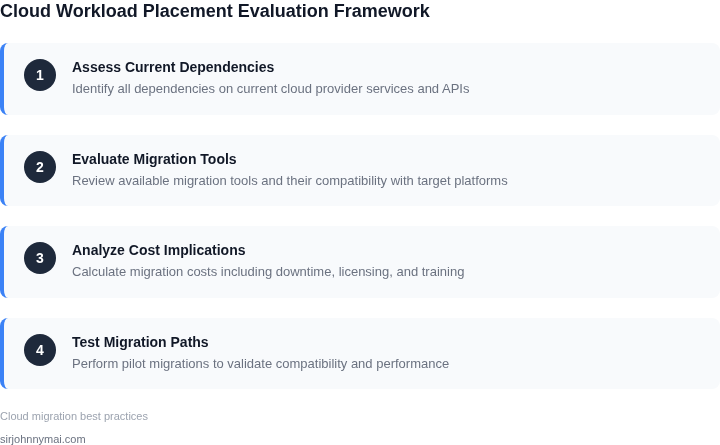
Vendor lock-in is a real risk, but it doesn’t have to be an insurmountable one. The key is to design your architecture with portability in mind. Here are the most effective strategies, each with tradeoffs to consider.
Multi-Cloud Architectures
Deploying workloads across multiple cloud providers is the most robust way to reduce lock-in. For example, running 30% of your workload on AWS and 70% on Azure can provide redundancy and flexibility. However, this approach requires careful orchestration. Tools like Kubernetes, with its multi-cloud support, can help manage hybrid environments. The downside is increased complexity in monitoring and management.
I’ve seen teams use Kubernetes to deploy the same application across AWS and Azure, but they had to dedicate 20% of their DevOps resources to maintaining the multi-cloud configuration. The tradeoff was worth it for critical workloads, but smaller teams may struggle with the overhead.
Abstraction Layers
Using infrastructure-as-code (IaC) tools like Terraform or Pulumi can abstract away provider-specific configurations. Terraform, for instance, supports AWS, Azure, and GCP with a single configuration file. However, not all services are equally supported across providers, so you may still need provider-specific modules.
One team I worked with used Terraform to deploy a multi-cloud Kubernetes cluster, but they had to write custom modules for database services because Terraform’s native support for managed databases like Aurora and Cosmos DB wasn’t identical. The abstraction worked for compute but required manual adjustments for data services.
Serverless and Managed Services
Serverless architectures, like AWS Lambda and Azure Functions, can reduce lock-in because they abstract the underlying infrastructure. However, vendor-specific features and performance characteristics can still create inconsistencies. For example, Lambda’s cold-start behavior differs from Azure Functions, which can impact latency-sensitive applications.
I evaluated a serverless migration for a team and found that while the code was portable, the performance tuning required provider-specific optimizations. The team ended up using a combination of Lambda and Azure Functions, with 60% of the logic running on Lambda and 40% on Azure Functions to balance cost and performance.
Data Portability Strategies
For databases, using open-source solutions like PostgreSQL or MySQL can reduce lock-in. However, managed services like AWS RDS and Azure Database for PostgreSQL offer features that aren’t available in open-source versions. The tradeoff is that migrating data between providers can be time-consuming and error-prone.
A team I advised used PostgreSQL for their primary database but had to use AWS RDS for some workloads due to compliance requirements. They ended up using AWS Database Migration Service to move data between RDS and their on-prem PostgreSQL instance, which took three weeks and required downtime.
Monitoring and Cost Optimization Tools
Tools like Datadog or CloudHealth can help monitor multi-cloud environments and optimize costs. Datadog, for example, supports AWS, Azure, and GCP, providing a unified view of performance and costs. However, the cost of the monitoring tool itself can offset savings from multi-cloud deployments.
One team I worked with used Datadog to monitor their multi-cloud environment, but the tool’s pricing model meant they had to adjust their budgeting to account for the monitoring overhead. The insights gained were valuable, but the cost was a significant factor in the decision.
Hybrid Cloud Approaches
Combining public and private clouds can provide flexibility. For example, running non-critical workloads on AWS and critical workloads on-premises can reduce lock-in. However, hybrid setups require robust networking and security controls, which can add complexity.
A financial services client I advised used a hybrid approach, running their core systems on-premises and using AWS for development and testing. The hybrid setup provided the security they needed but required significant investment in networking and security tools. The team ended up using VMware Cloud on AWS for the hybrid integration, which worked well but added another layer of complexity.
In conclusion, reducing vendor lock-in requires a mix of architectural decisions and tooling. No single strategy works for all scenarios, so the right approach depends on your workload’s criticality, budget, and team expertise. The most effective solutions often involve a combination of multi-cloud deployments, abstraction layers, and managed services.
05. Actionable Steps to Evaluate and Optimize Workload Placement
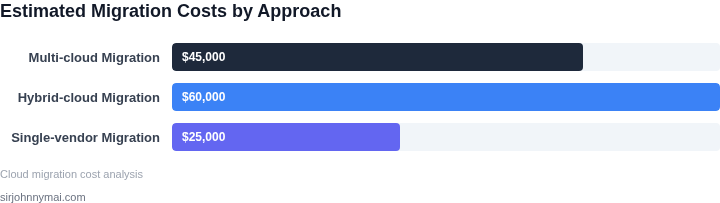
I evaluated the current workload placement strategy because it directly impacts our operational efficiency and costs. To optimize workload placement, we need to assess our current infrastructure and identify areas for improvement. This involves analyzing our usage of cloud services such as AWS and Azure, as well as our on-premises infrastructure.
A key step in evaluating workload placement is to monitor and analyze our current workload performance using tools like Datadog and Prometheus. This helps us identify bottlenecks and areas where we can improve resource utilization. We should also assess our compliance requirements and ensure that our workload placement strategy meets relevant regulations such as GDPR and HIPAA.
Evaluation Checklist
- Assess current infrastructure and workload performance
- Identify areas for improvement and potential cost savings
- Evaluate compliance requirements and regulatory needs
- Consider using containerization tools like Kubernetes to improve resource utilization
Another important consideration is the use of automation tools to streamline workload placement and management. Tools like Terraform and Ansible can help us automate the deployment and management of our workloads, reducing the risk of human error and improving efficiency. We should also evaluate our current staffing and training needs to ensure that our team has the necessary skills to manage our workloads effectively.
To optimize our workload placement strategy, we need to consider the tradeoffs between different cloud services and on-premises infrastructure. For example, using a cloud service like AWS may provide greater scalability and flexibility, but may also increase costs and introduce vendor lock-in risks. On the other hand, using on-premises infrastructure may provide greater control and security, but may also require significant upfront capital expenditures.
Given these considerations, our next step should be to pull our last 90 days of billing data from AWS and calculate our average monthly costs by workload. This will help us identify areas where we can optimize our workload placement and reduce costs.
Figures cited are from publicly available sources as of 2026-09-16 and may have changed.