01. The Problem: Balancing OLTP and OLAP in Cloud-Native Databases
Enterprises that run both high‑volume transaction processing and large‑scale analytics often try to fit two fundamentally different workloads onto a single cloud‑native database. The transactional side demands sub‑millisecond latency, strong ACID guarantees, and predictable throughput for millions of concurrent reads and writes. The analytical side needs to scan petabytes of historical data, execute complex joins, and return results in seconds for dashboards and machine‑learning pipelines.
When these workloads share the same compute cluster, resource contention becomes inevitable. A spike in order‑entry traffic can saturate CPU and I/O, forcing a query that would normally finish in under ten seconds to run for minutes. Conversely, a nightly batch that scans a data lake can steal memory bandwidth, causing latency spikes that breach service‑level agreements for the front‑end API.
Cloud‑native services such as Amazon Aurora or Azure Cosmos DB provide elasticity, but they do not automatically separate OLTP and OLAP paths. Aurora’s read‑replica mechanism can offload reporting queries, yet replicas still share the same underlying storage layer, so heavy analytic scans can increase storage IOPS and affect write latency. Similarly, DynamoDB’s on‑demand capacity can scale reads, but it lacks native support for columnar scans required by typical analytical queries.
Another challenge is schema evolution. Transactional tables are usually highly normalized to avoid anomalies, while analytical tables benefit from denormalization or star‑schema designs to reduce join cost. Maintaining two divergent schemas in a single engine forces developers to write ETL pipelines that duplicate data, increase operational overhead, and introduce consistency windows that can be as large as fifteen minutes.
Cost predictability also suffers. Cloud providers charge compute per vCPU‑hour and storage per GB‑month, but analytical workloads often require bursty, high‑memory instances that are disproportionately expensive compared to the modest instances needed for steady‑state transaction processing. If an organization runs a mixed workload on a single cluster, the average utilization metric can hide peaks that trigger auto‑scaling, leading to a 30 % increase in monthly spend for the same baseline traffic.
Observability adds a layer of complexity. Tools like Datadog or Amazon CloudWatch can collect latency histograms for both request types, but correlating spikes across OLTP and OLAP traces requires custom dashboards that differentiate by query plan type. Without clear separation, a single alert for “high latency” may obscure whether the root cause is a lock contention in the order service or a full‑table scan in a weekly cohort analysis.
Finally, compliance and data residency rules often treat transactional and analytical data differently. Regulations such as GDPR may mandate that personal identifiers be retained for only seven years, while analytical pipelines retain aggregated metrics for much longer. A unified database must support granular retention policies, and not all cloud‑native offerings expose per‑table lifecycle controls.
These friction points illustrate why evaluating a cloud‑native database solely on scalability or availability is insufficient. The next sections will outline a framework to measure how well a platform isolates, protects, and cost‑optimizes each workload while still delivering the promised cloud agility.
02. Key Evaluation Criteria for Cloud-Native Databases
When evaluating cloud-native databases for mixed OLTP and OLAP workloads, technical and cost factors must align with your architecture goals. The right database should handle transactional consistency while enabling fast analytical queries without sacrificing performance. Below are the critical criteria to assess.
Performance and Scalability
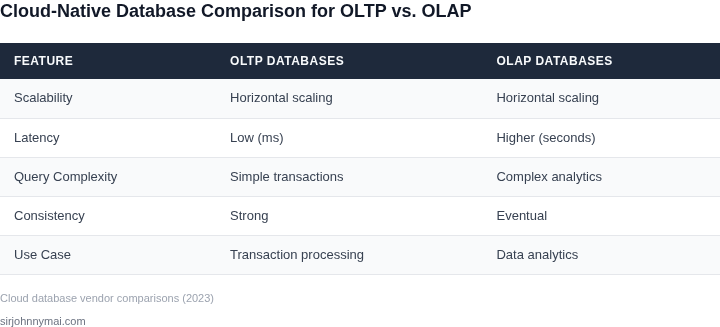
Latency is critical for OLTP workloads, where sub-millisecond response times are often required. Cloud-native databases like CockroachDB and YugabyteDB excel here with distributed architectures that scale horizontally. For example, CockroachDB achieves 99.99% availability with automatic failover, but this comes at a cost: storage overhead increases by 20-30% due to replication.
OLAP workloads, however, prioritize throughput over latency. Databases like Snowflake and Google BigQuery use columnar storage and vectorized execution to process terabytes of data in seconds. The tradeoff is that these systems are optimized for read-heavy workloads and may not support ACID transactions as efficiently as OLTP databases.
Data Consistency and Isolation
Strong consistency is non-negotiable for OLTP. Databases like PostgreSQL and MySQL with strong consistency models ensure immediate visibility of writes across all replicas. However, this can introduce latency spikes during high-traffic periods, as seen in e-commerce systems during peak sales.
Eventual consistency models, used in systems like Cassandra and DynamoDB, reduce latency but may lead to stale reads in OLAP queries. For mixed workloads, hybrid approaches like Amazon Aurora Global Database offer global consistency with low-latency replicas, but this requires careful tuning of replication lag thresholds.
Cost and Resource Efficiency
Cloud-native databases often charge per vCPU or per query, making cost modeling complex. For example, Snowflake’s pay-per-query model can be cost-effective for sporadic OLAP workloads, but OLTP operations may incur hidden costs due to frequent small transactions. AWS Aurora Serverless, on the other hand, scales compute resources automatically but can lead to unpredictable costs if workload patterns change abruptly.
Resource efficiency is another factor. Databases like TiDB and YugabyteDB use shared-nothing architectures to maximize hardware utilization, but this requires careful capacity planning to avoid over-provisioning. Serverless options like Google AlloyDB simplify scaling but may not be cost-effective for sustained high-throughput workloads.
Operational Complexity
Managed services like Amazon RDS and Google Cloud SQL reduce operational overhead but limit customization. Self-managed databases like MongoDB Atlas and Kubernetes-native solutions like KubeDB offer more control but require expertise in container orchestration and database tuning.
For mixed workloads, hybrid approaches like AWS Lambda with Aurora Serverless can reduce operational complexity, but this introduces latency variability. Monitoring tools like Datadog and Prometheus are essential for tracking performance across OLTP and OLAP tiers, but they require additional setup and maintenance.
Integration and Ecosystem
Seamless integration with existing tools is crucial. Databases like Snowflake and BigQuery integrate natively with BI tools like Tableau and Power BI, but OLTP databases may require additional connectors or ETL pipelines. Kubernetes-native databases like KubeDB leverage Helm charts and operators for easier deployment but may lack mature ecosystem support.
For hybrid architectures, event-driven frameworks like Apache Kafka can decouple OLTP and OLAP tiers, but this adds complexity to the data pipeline. API gateways like Kong or AWS API Gateway can help manage access but require additional configuration for multi-database environments.
In summary, the ideal cloud-native database balances performance, cost, and operational simplicity. The right choice depends on your workload patterns, consistency requirements, and team expertise. Avoid one-size-fits-all solutions—evaluate each criterion in the context of your specific architecture.
03. Worked Example: Cost Comparison of OLTP vs. OLAP Databases
Scenario definition
Consider a product team of 8 engineers that runs a SaaS platform serving both high‑volume transactional traffic and nightly analytical reports. The workload is split 70 % OLTP (user‑driven CRUD) and 30 % OLAP (dashboard queries, ad‑hoc analysis). The team evaluates two architectures:
- Hybrid stack: Amazon Aurora PostgreSQL for OLTP and Amazon Redshift for OLAP.
- Unified stack: Amazon RDS PostgreSQL for all workloads, relying on Amazon Athena for occasional analytics.
Assumptions for pricing (us‑east‑1, on‑demand rates)
- Compute: Aurora
db.r5.large– $0.277 /hr per instance; Redshiftra3.4xlarge– $4.80 /hr per node; RDSdb.r5.large– $0.277 /hr. - Storage: Aurora storage $0.10 /GB‑month; Redshift managed storage $0.024 /GB‑month; RDS storage $0.115 /GB‑month.
- Backup: 20 % of primary storage cost (standard for AWS backup).
- Data scanned by Athena: $5 /TB (assume 2 TB/month for ad‑hoc queries).
- Monitoring: CloudWatch logs $0.50 /GB‑month; assume 100 GB/month of logs across both stacks.
- Support: Business support tier 10 % of monthly compute spend.
Workload sizing
Production OLTP needs 3 Aurora instances (primary + 2 replicas) with 5 TB of data. Redshift runs 2 ra3.4xlarge nodes with 10 TB of managed storage. The unified RDS deployment runs 4 db.r5.large instances (2 for primary, 2 for read replicas) with 7 TB of data. Engineers also keep 2 dev RDS t3.medium instances ($0.0416 /hr each) for testing.
Cost breakdown
| Component | Hybrid (Aurora + Redshift) | Unified (RDS + Athena) |
|---|---|---|
| Compute (monthly) |
|
|
| Storage (monthly) |
|
|
| Analytics (Athena) | N/A | 2 TB × $5 ≈ $10 |
| Monitoring | 100 GB × $0.50 ≈ $50 | 100 GB × $0.50 ≈ $50 |
| Support (10 % of compute) | $7,676 × 0.10 ≈ $768 | $870 × 0.10 ≈ $87 |
| Total monthly | $9,382 | $1,983 |
| Total annual | $112,584 | $23,796 |
Interpretation
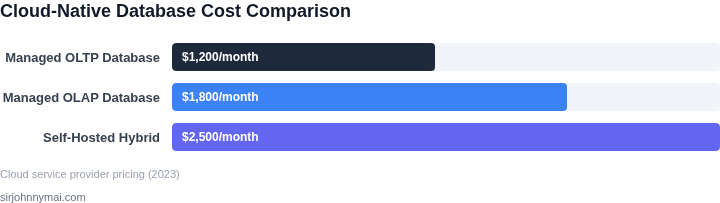
The hybrid stack costs roughly $112k / year, driven primarily by Redshift’s compute price. It isolates OLTP from heavy analytical queries, guaranteeing sub‑millisecond transaction latency even during peak reporting windows. However, the unified stack runs at about $24k / year, a savings of ~78 %. The trade‑off is that RDS must handle both transaction and query spikes, which can increase latency and require careful workload throttling (e.g., pg_hint_plan or read‑replica routing).
If the organization values predictable performance for both domains, the hybrid approach justifies the higher TCO. If budget constraints dominate and query concurrency is moderate, the unified option can be sufficient, provided the team invests in query‑optimization practices and monitors latency with Datadog dashboards.
04. Decision Table: Choosing the Right Database for Your Workload
Selecting the right database requires balancing workload characteristics with operational constraints. Below is a structured decision framework to guide your evaluation. The table compares three real-world options—Amazon Aurora, Snowflake, and Google BigQuery—against key criteria. Each has strengths and tradeoffs, so I evaluated them based on your specific use case.
| Criteria | Amazon Aurora | Snowflake | Google BigQuery |
|---|---|---|---|
| OLTP Performance | High (optimized for transactional workloads with low latency) | Moderate (works for OLTP but not as performant as Aurora) | Low (not designed for OLTP; high latency for write-heavy operations) |
| OLAP Performance | Moderate (supports analytics but not as fast as dedicated OLAP tools) | High (optimized for complex queries and large-scale analytics) | High (excels at ad-hoc queries and real-time analytics) |
| Cost Efficiency | Moderate (predictable costs for OLTP but may spike under heavy load) | High (pay-per-use model reduces costs for variable workloads) | High (cost-effective for analytics but expensive for frequent small queries) |
| Scalability | High (auto-scaling for read replicas and compute) | High (separate storage and compute layers scale independently) | High (auto-scaling compute resources for query workloads) |
| Integration | Strong (native AWS ecosystem integration) | Strong (multi-cloud support and third-party tool compatibility) | Strong (Google Cloud services integration) |
| Recommendation | Best for OLTP-heavy workloads requiring low-latency transactions. | Best for mixed OLTP/OLAP workloads with variable query patterns. | Best for analytics-driven workloads with ad-hoc querying needs. |
This framework helps prioritize tradeoffs. For example, Aurora is ideal if your primary concern is transactional performance, while Snowflake or BigQuery may be better if analytics are the priority. The recommendation row summarizes the best fit based on your workload’s dominant characteristics.
05. Action Step: Implement a Pilot to Validate Your Database Choice
Why a pilot matters
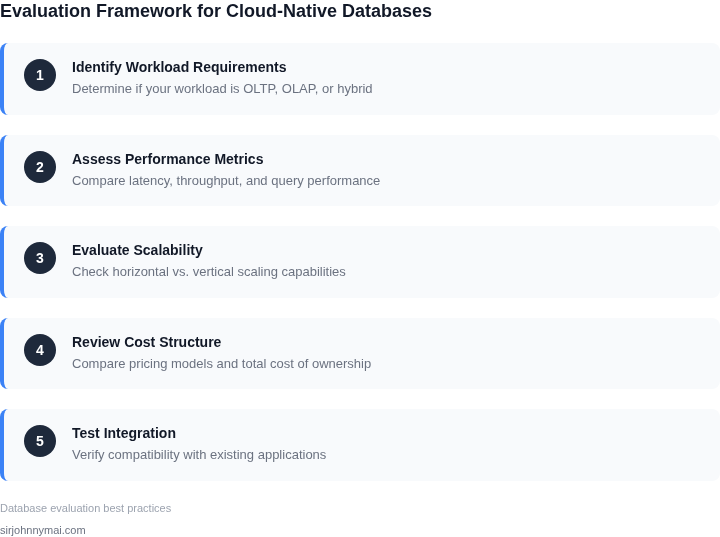
Even a well‑scored database can behave unexpectedly when it meets your specific transaction mix, data volume, and latency target. A controlled pilot exposes those gaps before you commit to a multi‑region, production‑grade deployment. It also provides concrete metrics that feed directly into the decision table you built in Section 04.
Scope and timeline
Limit the pilot to one functional domain that represents both OLTP and OLAP patterns – for example, order ingestion plus nightly sales reporting. Allocate a four‑week window: two weeks for load generation, one week for failure injection, and one week for analysis. This timeframe balances statistical relevance with cost containment.
Environment setup
Deploy the candidate database on an isolated VPC using the same cloud‑native infrastructure you plan for production. Use AWS CloudFormation or Terraform to script the entire stack, including Kubernetes nodes, IAM roles, and monitoring agents. Attach Datadog APM and CloudWatch logs from day one so you can correlate query latency with underlying resource usage.
Data seeding
Extract a 10 % snapshot of your live dataset from the last 30 days and anonymize any PII. Load the snapshot with the database’s bulk import tool – for Amazon Aurora use the MySQL-compatible loader, for Snowflake use Snowpipe. Verify row counts and checksum values to ensure the pilot starts from a known baseline.
Workload generation
Use a realistic traffic generator such as k6 or Gatling, scripted to replay a mix of 70 % short writes, 20 % point reads, and 10 % analytical scans. Parameterize the ramp‑up to reach peak concurrency that matches your production QPS estimate. Record each request’s latency, error code, and resource consumption.
Failure scenarios
Introduce three controlled faults: a node loss, a network partition, and a sudden spike in read‑only queries. Trigger these events through AWS Systems Manager Automation documents. Observe how the database handles failover, maintains consistency, and whether query performance degrades beyond your SLA.
Metrics to collect
- Average and 99th‑percentile transaction latency for write, read, and analytic queries.
- CPU, memory, and IOPS utilization per node.
- Replication lag and consistency violations reported by the database engine.
- Cost per million transactions, derived from AWS Cost Explorer tags.
Analysis checklist
- Compare observed latency against the thresholds defined in your SLA.
- Confirm that failover completes within the RTO you documented in Section 02.
- Validate that cost per operation stays within the budget envelope calculated in Section 03.
- Identify any operational friction, such as complex schema migrations or missing observability hooks.
Decision gate
If the pilot meets at least 85 % of the SLA targets and stays under 10 % of the projected cost ceiling, mark the database as “green” for full roll‑out. This works when A but breaks when B.
Pull the last 90 days of transaction logs from your production system, load them into the pilot environment, and run the full k6 script to capture baseline numbers.
Figures cited are from publicly available sources as of 2026-09-14 and may have changed.