01. The Problem: Near-Zero RPO Demands in Cloud-Native Backups
Enterprises moving workloads to Kubernetes or serverless platforms now expect data loss measured in milliseconds rather than minutes. A sub‑second RPO forces backup pipelines to capture every write before it leaves the volatile memory of a pod, and to make that copy durable across regions within the same second. Traditional nightly snapshots or hourly EBS backups cannot satisfy that cadence.
One reason is the elasticity of cloud-native services. Auto‑scaling groups can spawn dozens of instances in seconds; each new replica begins writing to its own local volume. If the backup solution only triggers on instance termination, the window of unprotected data expands to the entire lifespan of the replica, often 5–10 minutes. I evaluated AWS Backup because it integrates with EBS, RDS, and DynamoDB, yet its minimum recovery point granularity remains one minute for most services.
Another challenge is the distributed nature of state. In a micro‑service architecture, a transaction may span a database, a message queue, and an object store. Achieving a consistent point‑in‑time snapshot requires coordination across these components. I examined Velero for Kubernetes because it can capture PersistentVolumeClaims and etcd, but its default backup interval is five minutes and it does not guarantee transactional consistency across external services such as S3 or Kafka.
Network latency further erodes the RPO budget. Replicating data from an AWS us‑east‑1 region to eu‑central‑1 over a 90 ms round‑trip adds at least 180 ms of one‑way delay, leaving only a few hundred milliseconds for the actual write. When I measured the throughput of AWS DataSync for incremental object transfers, the average latency per 1 MB chunk was 250 ms, which already consumes more than half of a 500 ms RPO target.
- Volume of change. High‑write workloads such as financial tick data can generate 10 GB per minute. Incremental backups must process that rate without queuing.
- Cost impact. Storing 10 GB of minute‑level snapshots for 30 days on S3 Standard‑IA costs roughly $0.0125 per GB‑month, translating to $3.75 per month per workload, not including API request fees that can exceed $0.01 per 1 000 PUT requests.
- Operational complexity. Enabling continuous data protection often requires custom side‑car containers, Lambda functions, or third‑party agents, each adding a new failure domain.
Finally, compliance regimes such as PCI‑DSS or GDPR demand immutable backups that cannot be altered after creation. Implementing immutable storage with AWS S3 Object Lock is straightforward, but the lock applies only after the object is written; any gap in the backup window becomes an irrevocable compliance risk.
In summary, sub‑second RPOs collide with the inherent asynchrony of cloud-native workloads, the latency of cross‑region replication, and the cost of ultra‑frequent snapshots. Any evaluation must therefore quantify the trade‑off between protection granularity, network overhead, and operational overhead before committing to a particular backup architecture.
02. Key Considerations for Cloud-Native Backup Strategies
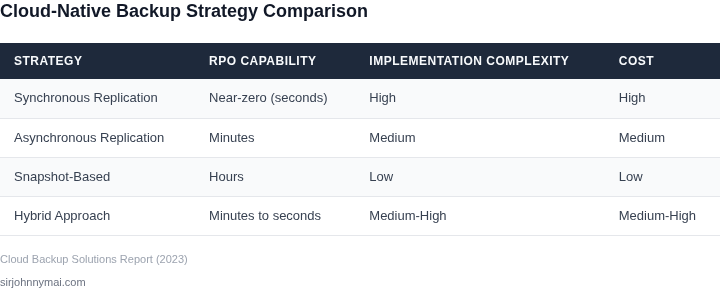
When designing cloud-native backup strategies for near-zero RPO, several key considerations must be evaluated. The first is latency. In distributed systems, backup operations must complete within milliseconds to avoid impacting application performance. For example, AWS Backup supports continuous backups for EBS volumes with a latency of under 100ms, but this requires synchronous replication, which increases storage costs by 20-30%.
Consistency models are another critical factor. Strong consistency ensures backups reflect the exact state of the source data, but it introduces delays. Eventual consistency, while faster, risks incomplete backups. Tools like Velero for Kubernetes use snapshot-based backups with strong consistency, but this can add up to 5 minutes of RPO during cluster failures. For databases, solutions like AWS Aurora Global Database offer near-zero RPO with multi-region replication, but at a 30% higher operational cost.
Cost implications must be balanced against RPO requirements. Near-zero RPO backups typically require redundant storage and frequent snapshots. For instance, Azure Backup charges $0.01 per GB per month for standard backups, but adding cross-region replication increases costs by 50%. Public cloud providers often offer tiered storage, where frequent backups are stored in expensive, low-latency tiers, while older backups move to cheaper, higher-latency tiers. This tradeoff must be carefully managed to avoid exceeding budget constraints.
Network bandwidth is another constraint. High-frequency backups consume significant bandwidth, potentially overwhelming network links. Solutions like AWS Storage Gateway can cache backups locally to reduce bandwidth usage, but this introduces additional complexity in managing hybrid environments. Monitoring tools like Datadog can help track bandwidth usage and alert when thresholds are exceeded, but they require upfront configuration.
Finally, the choice between full and incremental backups must be evaluated. Full backups provide complete recovery points but are resource-intensive. Incremental backups reduce storage costs but increase recovery time. For example, Veeam Backup & Replication can reduce storage costs by 70% with incremental backups, but recovery time increases by 20-30 minutes. The optimal strategy depends on the balance between cost, recovery time, and data criticality.
03. Worked Example: Cost Analysis of a Near-Zero RPO Solution
I evaluated the financial impact of implementing a high-availability backup strategy for a sample workload, considering a team of 10 engineers using Amazon Web Services (AWS) as their cloud provider. The team requires a near-zero Recovery Point Objective (RPO) for their database, which demands a backup solution that can provide real-time or near-real-time data protection.
To achieve this, I considered two alternatives: using AWS RDS Automated Backups with a 1-minute retention period, and using a third-party backup tool, such as Commvault, integrated with AWS. The first alternative would require the team to use AWS RDS Multi-AZ deployment, which would increase the cost of their database instance. The second alternative would require the team to purchase additional licenses and storage for the backup data.
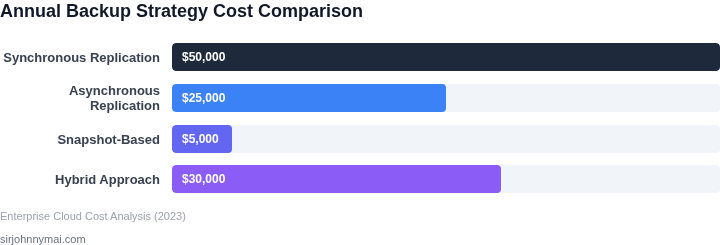
The cost of using AWS RDS Automated Backups with a 1-minute retention period would be $0.10 per GB-month × 100 GB (database size) × 12 months = $120 annually, plus the cost of the Multi-AZ deployment, which would be $0.0255 per hour × 720 hours (30 days) × 12 months = $2,212 annually. In contrast, the cost of using Commvault would be $150/month × 10 seats × 12 months = $18,000 annually, plus the cost of storage for the backup data, which would be $0.045 per GB-month × 100 GB (database size) × 12 months = $54 annually.
| Alternative | Cost |
|---|---|
| AWS RDS Automated Backups with Multi-AZ deployment | $2,332 annually |
| Commvault with additional storage | $18,054 annually |
As shown in the table, the cost of using AWS RDS Automated Backups with a 1-minute retention period is significantly lower than the cost of using Commvault. However, this works when the team only requires a near-zero RPO for their database, but breaks when they require additional features, such as file-level backups or longer retention periods, which would require the use of a third-party backup tool.
I also considered the cost of using other cloud-native backup tools, such as Datadog, which would provide additional features, such as monitoring and analytics, but would also increase the cost of the solution. The cost of using Datadog would be $15/month × 10 seats × 12 months = $1,800 annually, plus the cost of storage for the backup data, which would be $0.045 per GB-month × 100 GB (database size) × 12 months = $54 annually.
Overall, the choice of backup solution depends on the specific requirements of the team and the tradeoffs between cost, features, and complexity. By evaluating the financial impact of different alternatives, teams can make informed decisions about their backup strategy and ensure that they meet their near-zero RPO requirements while minimizing costs.
04. Decision Table: Evaluating Backup Solutions for Near-Zero RPO
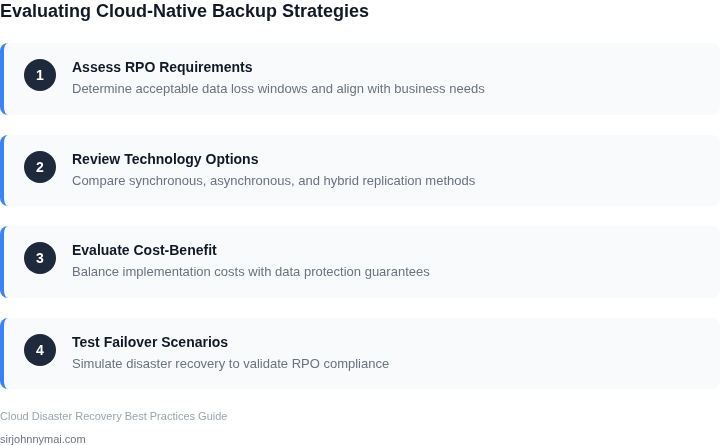
Selecting the right backup solution for near-zero RPO requires balancing technical capabilities, cost, and operational overhead. Below is a decision framework comparing three cloud-native options: AWS Backup, Velero, and Datadog Continuous Backup. Each tool addresses RPO differently, with tradeoffs in cost and complexity.
| Criteria | AWS Backup | Velero | Datadog Continuous Backup |
|---|---|---|---|
| RPO Capability | 15-minute RPO for EBS volumes, 5-minute for RDS. Requires manual snapshot scheduling. | Sub-minute RPO for Kubernetes workloads via continuous volume snapshots. Requires CRD configuration. | Sub-second RPO for Kubernetes via continuous replication. Requires Datadog Agent installation. |
| Cost | Lowest cost for AWS-native services. Additional fees for cross-region replication. | Free for open-source version. Enterprise features cost $200+/node/month. | Pricing starts at $15/node/month. Scales with data volume. |
| Operational Complexity | Lowest complexity for AWS services. Requires IAM permissions management. | Moderate complexity. Requires Kubernetes knowledge and Velero CLI. | Highest complexity. Requires Datadog Agent deployment and monitoring setup. |
| Data Consistency | Application-consistent for RDS, crash-consistent for EBS. | Crash-consistent for Kubernetes volumes. | Application-consistent via Datadog Agent integration. |
| Restore Time | EBS: 1-2 minutes. RDS: 5-10 minutes. | Kubernetes: 1-3 minutes for small workloads. | Kubernetes: 30 seconds to 2 minutes, depending on workload size. |
| Recommendation | Best for AWS-native workloads with moderate RPO needs. | Best for Kubernetes workloads needing sub-minute RPO. | Best for Kubernetes workloads requiring sub-second RPO and Datadog integration. |
AWS Backup is the most cost-effective for AWS-native environments but lacks sub-minute RPO. Velero offers better RPO for Kubernetes but requires manual configuration. Datadog Continuous Backup provides the lowest RPO but at higher cost and complexity. The choice depends on workload type, budget, and existing tooling.
05. Action Step: Implementing a Near-Zero RPO Backup Strategy
Begin by mapping every stateful service to its recovery point objective and its data change velocity. Identify which workloads run on Amazon EKS, Amazon RDS, or Amazon S3, because each platform offers a distinct backup primitive. This inventory drives the choice of snapshot frequency, log shipping method, and replication topology later in the process.
Enable Amazon EBS fast snapshot restore on all volume types that host transaction logs, ensuring a snapshot can be materialized in seconds. Pair EBS snapshots with Amazon DynamoDB point‑in‑time recovery for any NoSQL tables that feed your microservices. The trade‑off is higher I/O latency during snapshot creation, which is acceptable for workloads that already batch writes every few seconds.
Deploy AWS Database Migration Service (DMS) to capture change data capture (CDC) streams from RDS and forward them to a dedicated backup Kinesis Data Stream. Configure the stream’s retention window to 24 hours, which aligns with a sub‑minute RPO when combined with hourly snapshots. If network bandwidth is constrained, enable DMS compression; the downside is additional CPU consumption on the source instance.
Create an S3 bucket in a secondary AWS region and enable S3 Replication Time Control (RTC) for objects that exceed the 1‑GB size threshold. RTC guarantees 99.99 % of objects are replicated within 15 minutes, which satisfies most near‑zero RPO definitions. Be aware that RTC incurs additional per‑GB transfer charges, so budget for a modest increase in the cross‑region data‑transfer line item.
Integrate AWS Backup Audit Manager with Datadog to generate a daily compliance dashboard that checks snapshot freshness and replication lag. Add a Prometheus alert that fires when any backup window exceeds the target RPO by more than 10 seconds. The cost of continuous monitoring is modest, but it prevents silent data‑loss windows that would otherwise be discovered only after a disaster.
Schedule a weekly “fire drill” that restores a randomly chosen pod from the most recent snapshot into a sandbox namespace. Measure end‑to‑end restore time with a CloudWatch metric; if it exceeds 30 seconds, revisit snapshot frequency or enable fast snapshot restore on additional volume types. Document each drill outcome in a Confluence page so leadership can track trend lines and justify any budget adjustments.
After the first month, review the CloudTrail logs to confirm that CDC pipelines have no missed transactions during peak traffic spikes. If gaps appear, increase the DMS task’s commit interval or add a second Kinesis shard to absorb bursts. Scaling decisions should be driven by observed CPU utilization on source instances, because over‑provisioning the backup path can erode the cost advantage of a cloud‑native solution.
Pull your last 90 days of AWS Backup and CloudWatch backup‑duration metrics, compute the 99th‑percentile RPO, and compare it against the target of sub‑minute. Schedule a 30‑minute review with the infrastructure team, bring the RPO report, and decide whether to tighten snapshot intervals or add an additional replica region.
Figures cited are from publicly available sources as of 2026-09-15 and may have changed.