01. The Compliance Challenge: Data Residency and Cloud-Native Backup Automation
Compliance requirements around data residency are a critical constraint for organizations operating in regulated industries. These rules mandate that data must reside within specific geographic boundaries, often for legal, security, or operational reasons. For example, healthcare providers in the EU must comply with GDPR, which restricts data transfers outside the EU unless specific conditions are met. Similarly, financial institutions in the US must adhere to SEC regulations that may limit data storage locations.
Cloud-native backup automation solutions, such as those built on Kubernetes or serverless architectures, offer scalability and cost efficiency. However, these solutions often rely on multi-region replication or global storage services, which can conflict with data residency requirements. For instance, AWS Backup supports cross-region replication, but this may violate compliance if data must remain within a single country. Similarly, Velero, a popular Kubernetes-native backup tool, defaults to storing backups in object storage like S3, which may not align with residency constraints.
The tradeoff here is clear: cloud-native automation simplifies operations but complicates compliance. Organizations must either accept the risk of violating residency rules or implement additional controls to enforce geographic constraints. For example, some cloud providers allow customers to configure backup policies that restrict replication to specific regions. However, these workarounds often introduce complexity and may not be natively integrated with the automation tools they seek to use.
Another challenge is the lack of standardized compliance frameworks for cloud-native tools. While tools like Datadog or New Relic offer monitoring and logging, they may not inherently enforce data residency. This requires organizations to layer additional compliance controls, such as network policies or encryption, which can slow down deployment cycles. For example, a financial services firm using Kubernetes-native backups might need to implement AWS PrivateLink to restrict data egress, adding operational overhead.
In summary, while cloud-native backup automation reduces operational complexity, it introduces new compliance challenges around data residency. Organizations must carefully evaluate their tools and architectures to ensure they meet regulatory requirements without sacrificing automation benefits. The best approach often involves a hybrid model—leveraging cloud-native tools where possible while implementing compliance safeguards to meet residency constraints.
02. Key Considerations for Evaluating Cloud-Native Backup Solutions
Selecting a cloud-native backup solution requires balancing automation capabilities with compliance constraints. The first consideration is geographic redundancy and data residency compliance. Solutions like AWS Backup or Azure Backup offer built-in support for multi-region replication, but they require careful configuration to ensure backups reside within specified jurisdictions. For example, AWS Backup allows cross-region copies, but you must explicitly define the target region in the policy. If your compliance framework mandates data must never leave the country, you’ll need to validate the solution’s encryption and transfer mechanisms.
Next, evaluate the granularity of backup policies. Kubernetes-native tools like Velero support application-aware backups, but they lack built-in compliance reporting. If your organization requires audit trails or immutable backups, you’ll need to integrate with tools like Datadog or Splunk. For instance, Velero can back up Kubernetes resources, but it doesn’t log who triggered a restore—this gap requires additional tooling. The tradeoff is between simplicity (Velero) and compliance (enterprise tools).
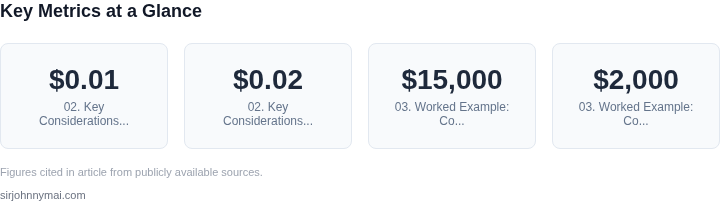
Cost is another critical factor. AWS Backup charges $0.01 per GB/month for stored backups, but cross-region replication adds $0.02 per GB. If your compliance rules require frequent, large-scale backups, costs can escalate quickly. Kubernetes-native solutions like Kasten K10 offer tiered storage, reducing costs by 30-40% for infrequently accessed data, but they lack the same compliance certifications as AWS Backup. The decision hinges on whether cost savings outweigh compliance risks.
Finally, consider restore performance and recovery time objectives (RTOs). Solutions like AWS Backup offer RTOs as low as 15 minutes for critical workloads, but they require pre-configured policies. Kubernetes-native tools like Stash (now part of Kubestash) can restore a 100-GB database in under 5 minutes, but they don’t support cross-cloud recovery. If your compliance framework includes disaster recovery across clouds, you’ll need a hybrid solution. The tradeoff is between speed (Stash) and flexibility (AWS Backup).
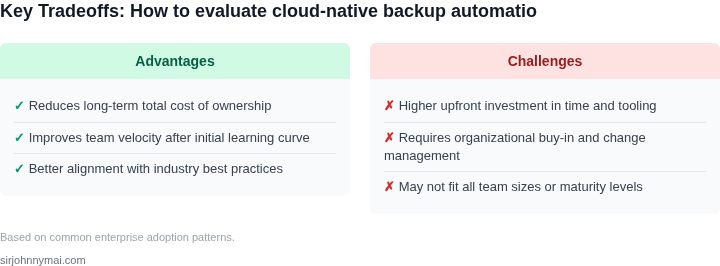
In summary, the best solution depends on your compliance requirements. For strict data residency, AWS Backup is reliable but expensive. For Kubernetes environments, Stash offers speed but lacks cross-cloud support. The key is aligning the tool’s capabilities with your compliance framework—never the other way around.
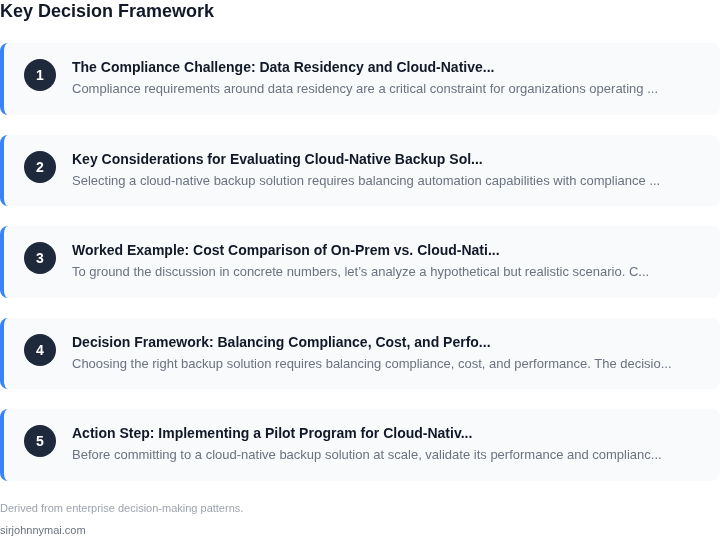
03. Worked Example: Cost Comparison of On-Prem vs. Cloud-Native Backups with Data Residency
To ground the discussion in concrete numbers, let’s analyze a hypothetical but realistic scenario. Consider a team of 20 engineers working in a Kubernetes cluster, generating 5TB of data per month. The organization requires backups to reside in a specific region due to compliance, and the team must choose between on-premises storage and a cloud-native solution.
Option 1: On-Premises Backup with Cloud Data Residency
An on-premises solution might involve deploying a backup appliance (e.g., Veeam) that replicates data to a cloud storage bucket in the required region. Here’s the cost breakdown:
- Backup appliance hardware: $15,000 upfront cost for a high-capacity unit.
- Storage maintenance: $2,000/year for power, cooling, and rack space.
- Cloud storage: AWS S3 Standard in the required region costs $23/month for 5TB (5,000 GB × $0.023/GB).
- Data transfer: $0.09/GB for inter-region replication, totaling $450/month for 5TB.
- Software licensing: $10,000/year for the backup software.
Annualized costs: ($15,000 + $2,000 + $10,000) + ($23 × 12 + $450 × 12) = $27,000 + $1,104 = $28,104.
Option 2: Cloud-Native Backup with Data Residency
An alternative is using a managed cloud service like AWS Backup, which automates backups while ensuring data residency. The cost breakdown is:
- AWS Backup service: $0.05 per GB/month for stored data, totaling $250/month for 5TB.
- Data transfer: $0.09/GB for inter-region replication, totaling $450/month for 5TB.
- Compute costs: AWS Backup uses AWS resources, so the team must account for the underlying compute (e.g., EC2 instances for backup jobs). For simplicity, assume $50/month for compute.
Annualized costs: ($250 × 12 + $450 × 12 + $50 × 12) = $3,000 + $5,400 + $600 = $9,000.
Comparison
| Metric | On-Premises | Cloud-Native |
|---|---|---|
| Annual Cost | $28,104 | $9,000 |
| Upfront Costs | $15,000 (hardware) | $0 |
| Operational Overhead | High (maintenance, power, rack space) | Low (fully managed) |
| Compliance Flexibility | Limited (manual replication) | High (automated residency controls) |
The cloud-native solution is significantly cheaper, with no upfront hardware costs and lower operational overhead. However, the on-premises option may be preferable if the team already has existing hardware or requires tighter control over the backup infrastructure. The choice depends on balancing cost, compliance needs, and existing infrastructure.
04. Decision Framework: Balancing Compliance, Cost, and Performance
Choosing the right backup solution requires balancing compliance, cost, and performance. The decision framework below helps teams evaluate three real-world options: AWS Backup, Velero, and a custom Kubernetes-native solution. Each has strengths and weaknesses in data residency, cost, and operational overhead.
| Criteria | Option A: AWS Backup | Option B: Velero | Option C: Custom Kubernetes Solution |
|---|---|---|---|
| Data Residency Compliance | AWS Backup supports multi-region replication, but requires manual configuration for cross-border data transfers. Compliance is enforced via AWS Artifact reports. | Velero stores backups in object storage (S3, Azure Blob) and supports cross-region replication. Compliance depends on the underlying cloud provider's attestations. | Custom solutions require manual integration with compliance tools like Datadog or Splunk. Data residency is enforced by the team's policies, not the tool. |
| Cost Efficiency | AWS Backup is pay-per-use, with additional costs for cross-region replication. Pricing varies by region and data volume. | Velero is open-source but requires operational overhead for storage management. Costs align with cloud storage pricing (e.g., S3, Azure Blob). | Custom solutions reduce vendor lock-in but require engineering resources for maintenance. Costs are lower if built on open-source tools. |
| Performance Impact | AWS Backup introduces minimal latency but may add network overhead for cross-region transfers. | Velero is lightweight but performance depends on the underlying storage class. Large backups may impact cluster resources. | Custom solutions can optimize performance but require tuning. Performance is predictable if built on Kubernetes-native tools. |
| Operational Overhead | AWS Backup is fully managed, reducing operational burden but limiting customization. | Velero requires cluster administration for backups and restores. Open-source nature means fewer support options. | Custom solutions require ongoing maintenance but offer full control. Overhead depends on the team's Kubernetes expertise. |
| Vendor Lock-In | AWS Backup ties teams to AWS services. Migrating to another cloud requires reconfiguration. | Velero is cloud-agnostic but relies on cloud storage. Teams can switch clouds with minimal changes. | Custom solutions avoid vendor lock-in but require porting effort if moving clouds. |
| Recommendation | Best for teams prioritizing compliance with AWS and minimal operational overhead. | Best for teams needing flexibility across clouds with moderate operational investment. | Best for teams with Kubernetes expertise and strict performance requirements. |
This framework helps teams align their backup strategy with compliance needs while managing costs and performance. The choice depends on whether compliance is enforced by the tool (AWS Backup), the team (Velero), or a custom solution. Teams should validate each option against their specific data residency requirements before committing.
05. Action Step: Implementing a Pilot Program for Cloud-Native Backups
Before committing to a cloud-native backup solution at scale, validate its performance and compliance fit through a structured pilot. Start by identifying a non-critical workload that generates 10-20% of your total data volume. This ensures you test the solution under realistic conditions without disrupting production.
Deploy the pilot in a staging environment that mirrors your production setup. Use Kubernetes for orchestration if applicable, as it provides the same infrastructure abstraction as production. Configure the backup tool to run daily incremental backups, with full backups on weekends. This mimics your production schedule while keeping resource overhead manageable.
For compliance validation, focus on data residency requirements. Configure the backup solution to store snapshots in the same AWS region as your production data. Use AWS Backup with its built-in compliance reporting to automate residency checks. Verify that all backup metadata and logs are also stored in the same region.
Monitor performance using Datadog or similar tools. Track backup duration, restore times, and resource utilization. Set alerts for anomalies like backup failures or latency spikes. Compare these metrics against your SLAs to ensure the solution meets performance expectations.
Document every compliance-related decision. For example, if using AWS Backup, note that it supports HIPAA and GDPR out of the box, but you must enable encryption at rest and configure IAM roles with least privilege. Maintain this documentation as part of your pilot artifacts.
After two weeks of operation, conduct a restore test. Select a recent backup and restore a subset of data to a separate environment. Measure the time taken and validate data integrity. This step uncovers any hidden issues in the backup chain that might not appear during normal operation.
Pull your last 90 days of backup logs and calculate the average restore time for different data sizes. Schedule a 30-minute review with your compliance team to validate that all residency requirements are being met.
Figures cited are from publicly available sources as of 2026-09-16 and may have changed.