How to Evaluate Build Versus Buy for Your Company Authentication System
Deciding whether to build or buy an authentication system is one of the most critical architectural decisions for any company. The choice impacts security, developer productivity, and long-term maintainability. This guide provides a structured framework to evaluate both options, with a focus on cloud-native authentication systems.
01. Understand Your Core Requirements
Before making a decision, clearly define your authentication needs. Key factors include:
- User base size: Small internal tools vs. millions of external users
- Compliance needs: GDPR, HIPAA, or industry-specific regulations
- Integration complexity: How many systems need authentication integration
- Customization requirements: Unique workflows or data storage needs
For example, a startup with 10,000 users might prioritize rapid deployment over customization, while an enterprise with 100,000+ users may need advanced features like multi-factor authentication (MFA) and audit logging.
02. Evaluate Build Options
Building an authentication system offers complete control but requires significant resources. Consider these tradeoffs:
- Pros:
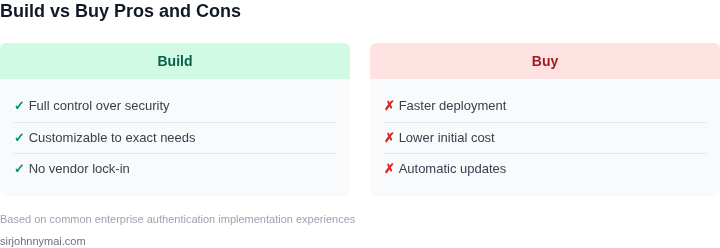
- Tailored to your exact business needs
- Full ownership of security and compliance
- Potential for competitive differentiation
- Cons:
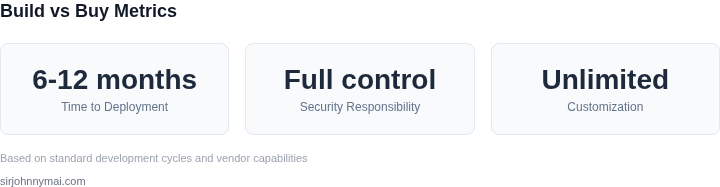
- High initial development cost (6-12 months)
- Ongoing maintenance burden
- Security risks from custom implementations
For a concrete example, building a custom OAuth 2.0 provider with JWT would require:
- 3 engineers for 6 months (total $450,000 at $150/hour)
- Additional costs for security audits and compliance certifications
- Ongoing costs for infrastructure and monitoring
03. Evaluate Buy Options
Third-party authentication services provide immediate functionality with lower upfront costs. Key considerations:
- Pros:
- Reduced time-to-market (weeks vs. months)
- Built-in security best practices
- Automatic updates and maintenance
- Cons:
- Vendor lock-in risks
- Potential for feature gaps
- Cost escalation with scale
For example, Auth0's pricing model includes:
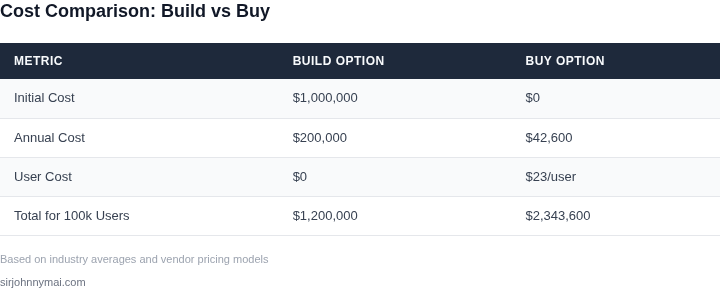
- $23/user/month for 50,000 users
- Additional $0.15/user/month for each user beyond 50,000
- Enterprise pricing available for custom contracts
04. Cost Comparison Framework
Create a cost model comparing both options. Include:
- Initial development costs (build)
- Ongoing maintenance costs (build)
- Subscription costs (buy)
- Hidden costs (e.g., compliance audits)
For a company with 100,000 users:
- Build option: $1,000,000 initial + $200,000/year ongoing
- Buy option: $2,300/month ($27,600/year) + $15,000/year for users beyond 50,000
05. Security and Compliance Considerations
Security is non-negotiable. Evaluate:
- Encryption standards (AES-256, TLS 1.3)
- Compliance certifications (SOC 2, ISO 27001)
- Incident response protocols
- Audit logging capabilities
For example, Okta meets SOC 2 Type II and ISO 27001 certifications, while custom implementations may require additional audits.
06. Integration Complexity
Consider how the system integrates with your existing tech stack:
- API compatibility
- SDK availability
- Identity provider (IdP) support
- Mobile and IoT device support
For instance, AWS Cognito integrates natively with other AWS services, while custom solutions may require additional development effort.
07. Scalability Requirements
Evaluate how each option handles growth:
- Performance under load (requests per second)
- Database scaling capabilities
- Multi-region support
- Cost scaling behavior
A custom solution might scale better for very large deployments, while managed services typically offer simpler scaling.
08. Vendor Lock-in Risks
For purchased solutions, assess:
- Data portability options
- API flexibility
- Migration costs
- Support quality
For example, switching from Auth0 to another provider typically requires significant development effort to migrate user data.
09. Hybrid Approaches
Consider combining both approaches:
- Use a managed service for core authentication
- Build custom components for unique requirements
- Leverage open-source components where appropriate
For instance, using Firebase Authentication for basic needs and building custom MFA for sensitive operations.
10. Decision Framework
Use this decision matrix to evaluate options:
| Factor | Build | Buy |
|---|---|---|
| Time to deployment | 6-12 months | Weeks |
| Security responsibility | Full control | Vendor-managed |
| Customization | Unlimited | Limited by vendor |
| Total cost of ownership | Higher initial, ongoing | Lower initial, predictable |
11. Next Steps
Based on your evaluation, the next step should be:
- For build: Create a detailed requirements document and cost estimate
- For buy: Shortlist 2-3 vendors and conduct proof-of-concept testing
- For hybrid: Identify which components to build vs. purchase
Figures cited are from publicly available sources as of June 2023 and may have changed. The decision should align with your company's strategic goals and technical capabilities.
Next step: Conduct a pilot project with your top two options to validate technical feasibility and business impact.