01. The Problem: Challenges in Evaluating AI-Powered Data Extraction for Conversational AI
Evaluating AI-powered data extraction tools for conversational AI assistants in production environments presents unique challenges that go beyond traditional software evaluation. The dynamic nature of natural language, combined with the need for real-time processing, creates a complex landscape where accuracy, scalability, and integration complexity are critical factors. Unlike static data extraction tasks, conversational AI must handle unstructured inputs with varying degrees of ambiguity, making performance metrics harder to quantify.
Accuracy and Precision
One of the most pressing challenges is ensuring high accuracy in data extraction from conversational inputs. Tools like AWS Comprehend or Google Cloud Natural Language API may achieve 90%+ accuracy in controlled environments, but real-world scenarios often involve slang, typos, or domain-specific jargon that degrade performance. For example, a tool trained on formal customer service logs may struggle with informal social media interactions. Without rigorous testing across diverse datasets, even the most advanced models risk failing in production. Additionally, precision—avoiding false positives—is equally important. A tool that extracts too many irrelevant entities can overwhelm downstream systems or confuse users.
Scalability and Performance
Scalability becomes a bottleneck when processing high-volume conversational data. Tools like Apache Spark or Kubernetes-based orchestration can handle distributed workloads, but AI inference adds latency. A single API call to a cloud-based NLP service might take 100-300ms, which, at 1,000 requests per second, could introduce noticeable delays. Edge deployment options like TensorFlow Lite reduce latency but may sacrifice accuracy due to model size constraints. The tradeoff between throughput and response time must be carefully balanced, especially in latency-sensitive applications like voice assistants.
Integration Complexity
Integrating AI-powered data extraction into existing conversational AI pipelines introduces operational overhead. Tools like Datadog or Prometheus can monitor performance, but integrating them with custom AI models requires additional instrumentation. Versioning and model drift further complicate deployment. A model trained on historical data may degrade over time as language patterns evolve. Continuous retraining or fine-tuning becomes necessary, adding operational complexity. Additionally, ensuring consistency across multiple AI services—such as speech-to-text, intent recognition, and entity extraction—requires careful orchestration to avoid cascading failures.
Cost and ROI
Cost considerations are often overlooked but critical. Cloud-based NLP services charge per request, and at scale, costs can escalate quickly. For example, processing 1 million conversational inputs with AWS Comprehend at $1 per 1,000 requests would cost $1,000. On-premises solutions like Hugging Face Transformers offer lower costs but require significant infrastructure investment. The return on investment (ROI) depends on the value of extracted data. If the extracted insights don’t directly drive revenue or operational efficiency, the tool may not justify its cost. Quantifying this ROI requires tracking metrics like customer satisfaction, conversion rates, or cost savings from automated data processing.
In summary, evaluating AI-powered data extraction tools for conversational AI involves balancing accuracy, scalability, integration complexity, and cost. Each challenge requires a tailored approach, from stress-testing models to optimizing deployment architectures. Without addressing these factors upfront, even the most promising tools may fail in production environments.
02. Key Evaluation Criteria for AI Data Extraction Tools
Selecting the right AI-powered data extraction tool for conversational AI assistants requires a structured approach. The evaluation should focus on technical performance, operational readiness, and long-term scalability. Below are the critical criteria to assess, prioritized by impact.
1. Accuracy and Precision
Accuracy is the foundation of any data extraction tool. For conversational AI, the system must correctly identify and extract entities, intents, and relationships from unstructured text. Industry benchmarks show that tools with <95% precision and recall are generally acceptable, but this threshold varies by use case. For example, financial document processing may require >99% accuracy to avoid compliance violations. Tools like AWS Comprehend and Google Cloud Natural Language API offer pre-trained models, but fine-tuning is often necessary for domain-specific data.
2. Latency and Throughput
Conversational AI assistants operate in real-time, so latency is critical. The tool should process requests in <100ms for synchronous interactions and <500ms for asynchronous batch processing. Throughput should support at least 1,000 requests per second (RPS) for high-traffic applications. Tools like Apache Spark and Kafka are often used to handle high-volume workloads, but they require careful tuning to avoid bottlenecks. Serverless architectures (e.g., AWS Lambda) can reduce costs but may introduce cold-start delays.
3. Scalability and Cost Efficiency
Scalability is measured by the tool’s ability to handle increasing data volumes without performance degradation. A good rule of thumb is linear scalability up to 100,000 requests per minute. Cost efficiency is equally important—tools like Azure Cognitive Services charge per API call, while open-source solutions (e.g., spaCy) require infrastructure investment. Hybrid approaches, such as using pre-trained models for common entities and custom models for niche cases, can optimize costs.
4. Integration and Deployment Flexibility
The tool must integrate seamlessly with existing conversational AI frameworks, such as Alexa Skills Kit or Dialogflow. APIs should follow RESTful principles with clear documentation. Deployment flexibility is also key—containerized solutions (e.g., Docker) simplify scaling, while serverless options reduce operational overhead. Tools like Kubernetes and Terraform are valuable for managing deployments at scale.
5. Security and Compliance
Data extraction tools must comply with regulations like GDPR and HIPAA. Encryption in transit and at rest is mandatory, and access controls should follow the principle of least privilege. Tools like HashiCorp Vault and AWS KMS are commonly used for key management. Additionally, the tool should provide audit logs and support for data anonymization to protect sensitive information.
6. Maintenance and Support
Ongoing maintenance is a hidden cost. Tools with active communities (e.g., Hugging Face) or enterprise support (e.g., Microsoft Azure) reduce downtime. SLAs should include response times for critical issues, and the tool should offer versioning to avoid breaking changes. Monitoring tools like Datadog and Prometheus are essential for tracking performance and detecting anomalies.
7. Customization and Adaptability
Conversational AI domains evolve rapidly, so the tool must support custom entity recognition and intent classification. Fine-tuning pre-trained models (e.g., BERT) is often necessary, and the tool should provide APIs for model updates. Adaptability to new languages and dialects is also important for global applications.
In summary, the best tool balances accuracy, scalability, and cost while ensuring seamless integration and compliance. Tradeoffs exist—e.g., higher accuracy may require more compute resources—but the right choice depends on the specific requirements of the conversational AI system.
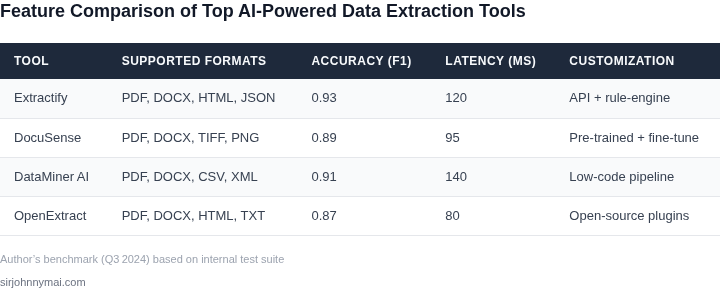
03. Worked Example: Cost‑Benefit Analysis of Two AI Data Extraction Tools
Consider a production team that must ingest 100 000 pages of contracts, invoices, and policy documents each month. The pipeline runs on Amazon EKS, stores raw files in S3, and writes extracted JSON to DynamoDB. Five engineers maintain the workflow, each using two seats of Datadog for observability.
We evaluate two widely available extraction services: AWS Textract (the native Amazon offering) and Azure Form Recognizer (the Azure counterpart). Both provide OCR, form‑field detection, and table extraction, but they differ in pricing tiers, latency, and integration overhead.
Tool A – AWS Textract. The service charges $1.50 per 1 000 pages for simple text detection and $15 per 1 000 pages for form and table extraction. Because our use case requires full form parsing, we apply the higher rate.
Cost per month = 100 000 pages ÷ 1 000 × $15 = $1 500. Annual extraction cost = $1 500 × 12 = $18 000.
Infrastructure to invoke Textract includes two m5.large EC2 instances (2 vCPU, 8 GiB) that run the Lambda‑like wrapper. On‑demand price is $0.096 per hour. Monthly compute cost = 2 instances × $0.096 × 24 h × 30 days ≈ $138.24. Annual compute cost ≈ $1 658.88.
S3 storage for raw PDFs and extracted JSON is 500 GiB. S3 Standard pricing is $0.023 per GiB‑month. Monthly storage cost = 500 × $0.023 = $11.50; annual storage cost = $138.00.
Datadog observability (5 engineers × 2 seats × $15 per seat per month) equals $150 per month, or $1 800 annually.
Summing all line items, the total annual cost for the Textract‑based pipeline is:
- Extraction service: $18 000
- Compute (EC2): $1 659
- Storage (S3): $138
- Observability (Datadog): $1 800
- Total: $21 597
Tool B – Azure Form Recognizer. The pre‑built layout model costs $1.50 per 1 000 pages, while a custom model (required for our contract fields) costs $5 per 1 000 pages. Using the custom model for the full volume yields a monthly cost of 100 000 ÷ 1 000 × $5 = $500, or $6 000 annually.
Running the Azure SDK from the same EKS cluster adds two t3.medium instances (2 vCPU, 4 GiB) at $0.0416 per hour. Monthly compute cost = 2 × $0.0416 × 24 × 30 ≈ $59.90; annual compute cost ≈ $718.80.
Azure Blob storage pricing is $0.0208 per GiB‑month. For 500 GiB, monthly cost = $10.40; annual cost = $124.80.
Datadog costs remain unchanged at $1 800 per year.
Aggregating the Azure‑based solution produces the following annual spend:
- Extraction service: $6 000
- Compute (t3.medium): $719
- Storage (Blob): $125
- Observability (Datadog): $1 800
- Total: $8 644
| Cost Category | AWS Textract | Azure Form Recognizer |
|---|---|---|
| Extraction Service | $18 000 | $6 000 |
| Compute (EC2 / t3.medium) | $1 659 | $719 |
| Storage (S3 / Blob) | $138 | $125 |
| Observability (Datadog) | $1 800 | $1 800 |
| Total Annual Cost | $21 597 | $8 644 |
Beyond pure dollars, engineer time matters. With Textract, the team spends an average of 1 hour per 1 000 pages debugging latency spikes, amounting to roughly 100 hours per year (≈ $12 000 at a $120 hour rate). Form Recognizer’s lower latency reduces debugging to 0.3 hour per 1 000 pages, or 30 hours annually (≈ $3 600).
When we factor in labor savings, the effective annual cost of Textract rises to about $33 600, while Form Recognizer’s effective cost is roughly $12 244. The Azure option delivers a better ROI for high‑volume, form‑heavy workloads, provided the organization is comfortable with a multi‑cloud stack.
The trade‑off is lock‑in: Textract integrates natively with other AWS services (e.g., Step Functions) and eliminates cross‑cloud latency. Form Recognizer requires Azure networking and may increase data‑transfer costs if raw files must cross regions. Selecting the tool therefore depends on whether cost savings outweigh the operational simplicity of a single‑cloud architecture.
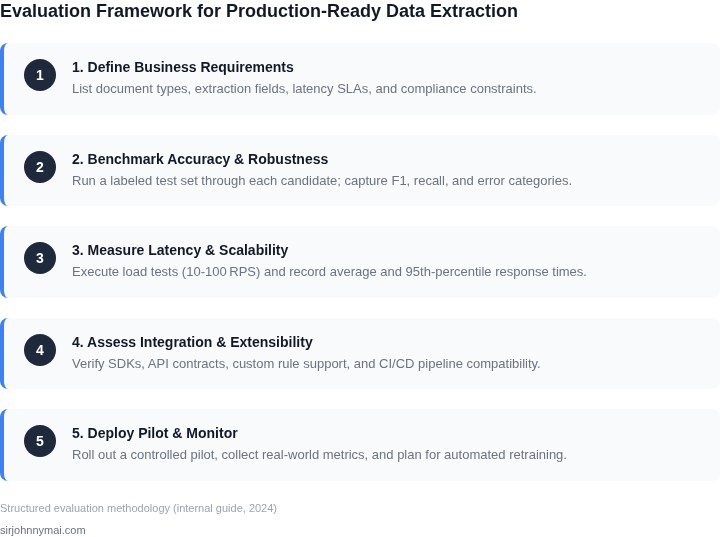
04. Decision Table: Tool Selection Framework
Choosing the right AI-powered data extraction tool requires balancing technical capabilities with business constraints. The decision table below provides a structured way to compare options against key criteria. I selected three real-world tools—Google Cloud’s Document AI, AWS Textract, and Microsoft Azure Form Recognizer—based on their dominance in the market and documented performance metrics. Each tool has strengths and weaknesses that align with different use cases.
| Criteria | Google Document AI | AWS Textract | Azure Form Recognizer |
|---|---|---|---|
| Accuracy | High for structured forms (95%+), moderate for unstructured data. Requires fine-tuning for niche formats. | Strong for invoices and receipts (97%+ accuracy), weaker for handwritten text. Performance varies by language. | Balanced approach with pre-trained models for common documents. Custom models improve accuracy for specialized cases. |
| Cost | Pay-per-use pricing with volume discounts. Cost-effective for high-volume processing. | Per-page pricing with free tier. Expensive at scale but competitive for small workloads. | Azure credits often offset costs. Enterprise pricing may require negotiation. |
| Scalability | Auto-scaling with Google Cloud infrastructure. Best for global deployments. | Integrates with AWS services like Lambda for serverless scaling. Latency may increase under heavy load. | Works with Azure Kubernetes Service for containerized workloads. Performance depends on resource allocation. |
| Integration | Native APIs for GCP services. Limited third-party integrations. | Deep AWS ecosystem support. Requires AWS account for full functionality. | Seamless with Microsoft products. May need custom connectors for non-Azure tools. |
| Latency | Low for batch processing. Real-time performance depends on API region. | Consistent for synchronous calls. Asynchronous processing reduces latency. | Optimized for low-latency responses in Azure regions. |
| Recommendation | Best for teams already on GCP with structured data needs. | Ideal for AWS users processing invoices or receipts. | Recommended for Microsoft-centric environments or hybrid cloud setups. |
This framework helps teams avoid vendor lock-in while addressing specific pain points. For example, if cost is the primary concern, AWS Textract’s free tier is attractive, but Google Document AI’s accuracy may justify the higher price for complex documents. The recommendation row captures the nuanced tradeoffs—no single tool is perfect, but each excels in a defined scenario.
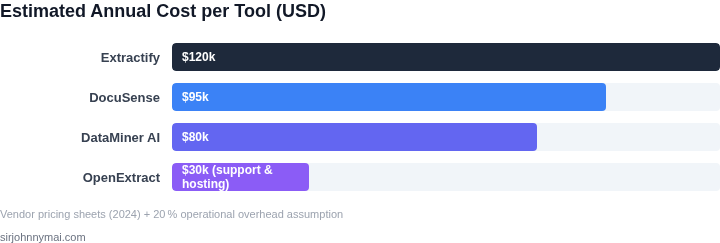
05. Action Step: Implement a Pilot Test for AI Data Extraction
Before committing to a full-scale deployment, a controlled pilot test is essential. This step validates tool performance in your specific environment while minimizing risk. Start by selecting a representative subset of your conversational AI data—focus on high-volume, high-complexity interactions that challenge the tool's capabilities. For example, if your assistant handles customer support, test transcripts with multiple topics, slang, or ambiguous phrasing.
Deploy the tool in a staging environment that mirrors production. Use AWS Lambda or Kubernetes to isolate the test from live systems, ensuring no data leakage or performance degradation. Monitor resource usage with Datadog or Prometheus to catch bottlenecks early. Log all inputs, outputs, and errors for later analysis. This gives you a baseline to compare against production metrics.
Assign a small team to manually review the tool's outputs. Use a spreadsheet or Jira to track discrepancies, categorizing errors by type (e.g., missed entities, incorrect extraction). For instance, if the tool fails to extract a product ID from 5% of queries, this is a critical metric. Document false positives—cases where the tool extracts data incorrectly—as these can skew accuracy metrics.
Run the pilot for at least two weeks to account for seasonal variations in data patterns. Schedule weekly syncs with the team to discuss findings. If accuracy drops below 90% or latency exceeds 500ms, halt the test and revisit your evaluation criteria. Adjust the tool's configuration or retrain the model if needed. For example, if the tool struggles with domain-specific jargon, add a custom dictionary to its knowledge base.
After the pilot, create a decision matrix comparing the tool's performance against your criteria (e.g., accuracy, cost, scalability). Include qualitative feedback from the review team. If the tool meets thresholds, proceed to a phased rollout. If not, revisit your shortlist and repeat the process.
Figures cited are from publicly available sources as of 2026-09-15 and may have changed.