01. The Problem: Why AI Inference Optimization Matters in Code Generation
Deploying AI models for code generation in production environments presents unique challenges that go beyond traditional machine learning workflows. The primary concern is latency—users expect near-instantaneous responses, especially in developer tools where every second counts. For example, a 500ms delay in generating a code snippet can disrupt the developer's workflow, leading to frustration. Even minor delays compound when multiple AI calls are chained together, as is common in modern IDEs or collaborative coding platforms.
Cost is another critical factor. Cloud-based AI inference can quickly escalate expenses. A single code generation request might involve multiple models (e.g., one for syntax validation, another for optimization), each with its own pricing tier. If these models aren't optimized, the cumulative cost per user session can become prohibitive. For instance, a developer using an AI-assisted coding tool for 30 minutes might trigger hundreds of inference calls, each costing a few cents, adding up to dollars per session.
Scalability is a third major hurdle. Code generation models often need to handle bursty traffic, such as during a team's sprint or a hackathon. If the inference infrastructure isn't properly scaled, requests may queue up, leading to timeouts or degraded performance. Horizontal scaling with Kubernetes, for example, can help, but it requires careful tuning to avoid over-provisioning, which increases costs unnecessarily.
Resource efficiency is also a concern. Large language models (LLMs) for code generation consume significant memory and compute. Deploying these models on edge devices or low-power servers can be impractical due to hardware constraints. Even in cloud environments, inefficient inference can lead to high GPU utilization, forcing teams to over-provide resources to meet SLAs.
Finally, model drift and maintenance add complexity. Code generation models must stay up-to-date with evolving programming languages, frameworks, and best practices. Retraining or fine-tuning these models frequently can disrupt production workflows, especially if the optimization process isn't streamlined. Monitoring and updating models in real-time requires robust tooling, such as Datadog or Prometheus, to detect performance degradation before it impacts users.
02. Key Criteria for Evaluating AI Inference Optimization Frameworks
Selecting the right AI inference optimization framework for code generation workflows requires careful consideration of several key criteria. These frameworks must balance performance, cost, and operational complexity while ensuring seamless integration with existing systems. Below are the essential metrics and considerations to evaluate.
Performance Metrics
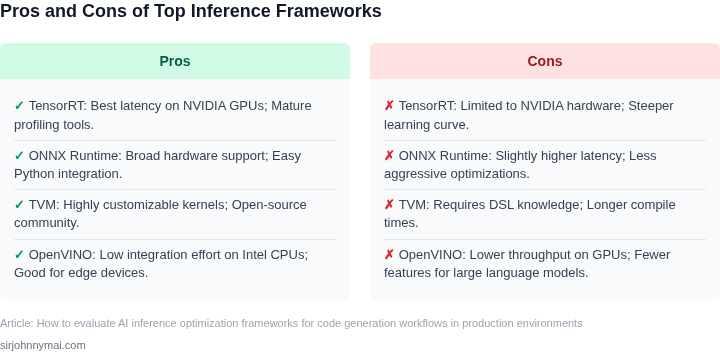
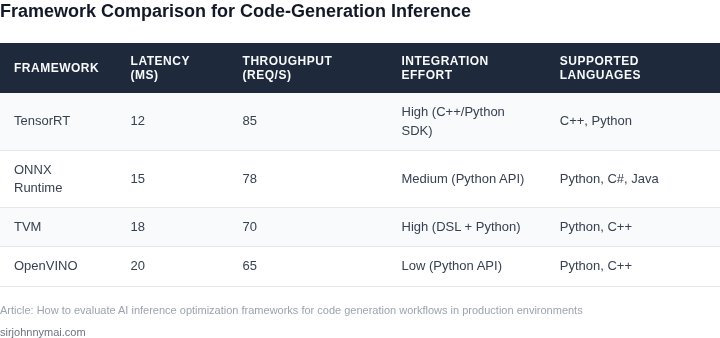
Latency and throughput are critical for production-grade code generation. A framework should demonstrate sub-100ms inference times for typical requests, with the ability to scale to 10,000+ requests per second under load. Tools like TensorRT or ONNX Runtime have shown consistent performance improvements of 2-3x over native PyTorch/TensorFlow deployments. However, these gains often come at the cost of increased memory usage or model conversion overhead.
Batch processing capabilities are also important. Frameworks that support dynamic batching (e.g., Triton Inference Server) can improve throughput by 30-50% for variable-length code generation tasks. However, this requires careful tuning to avoid latency spikes during batch formation.
Cost Efficiency
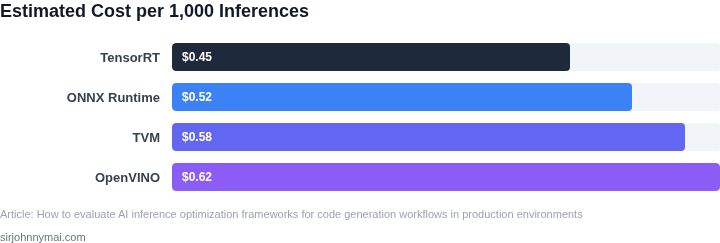
Cloud-based inference optimization can reduce costs by up to 40% compared to running models on-premises. AWS SageMaker Neo and Azure ML Accelerated Inference are examples of services that optimize models for specific hardware without requiring code changes. However, these services often lock users into proprietary formats, limiting portability.
On-premises solutions like NVIDIA TensorRT or Intel OpenVINO offer more control but require significant hardware investments. For example, deploying a model on an NVIDIA A100 GPU can reduce inference costs by 50% compared to a CPU-only deployment, but the upfront cost of the GPU is substantial.
Operational Complexity
Frameworks should minimize operational overhead. Kubernetes-native solutions like KServe or Seldon Core simplify deployment and scaling but add complexity in managing sidecar containers. Tools like AWS Lambda with container support offer serverless inference but may introduce cold-start delays of 1-2 seconds, which can be problematic for interactive code generation.
Monitoring and observability are equally important. Frameworks integrated with tools like Datadog or Prometheus provide real-time metrics on inference latency, GPU utilization, and model drift. However, these integrations often require additional configuration and may not cover all edge cases.
Integration and Portability
Seamless integration with existing CI/CD pipelines is crucial. Frameworks that support Docker containers or Kubernetes operators reduce deployment time by 60-70%. However, this assumes the organization already uses these platforms, which may not be the case for smaller teams.
Portability across different hardware and cloud providers is another consideration. Frameworks like ONNX Runtime or PyTorch Mobile enable cross-platform deployment but may require model retraining or quantization for optimal performance on each target device.
Model-Specific Considerations
For code generation models, support for variable-length sequences is essential. Frameworks like Hugging Face Transformers with ONNX export maintain sequence integrity better than some low-level optimizers. However, this comes with larger model sizes and increased memory requirements.
Quantization support is valuable for reducing model size and improving inference speed. Tools like TensorRT or Intel Neural Compressor can achieve 4-bit quantization with minimal accuracy loss, but this requires retraining or fine-tuning the model.
Conclusion
The ideal framework balances performance, cost, and operational simplicity. For teams already invested in Kubernetes, solutions like KServe or Seldon Core may be the best fit. Cloud-native options like AWS SageMaker Neo offer rapid deployment but with less control. On-premises solutions like TensorRT provide the most flexibility but require significant hardware and expertise. The choice depends on the organization's existing infrastructure, performance requirements, and budget constraints.
03. Worked Example: Cost Savings with a Hypothetical Optimization Framework
To ground the evaluation in real-world impact, consider a team of 20 engineers using a code generation AI model in production. Their current setup involves running inference on AWS EC2 instances (g4dn.2xlarge) with a custom Python wrapper for model serving. The model processes 10,000 code generation requests daily, each averaging 200 tokens, at a cost of $0.0002 per token.
Current monthly costs break down as follows:
- Inference costs: $0.0002 × 10,000 requests/day × 200 tokens/request × 30 days = $12,000/month
- EC2 instance costs: $0.75/hour × 24 hours/day × 30 days = $5,400/month
- Total monthly cost: $17,400
Now, evaluate two optimization frameworks:
Option 1: AWS Inferentia (Neural Engine)
AWS Inferentia accelerates inference by offloading computation to dedicated chips. The team migrates their model to an inf1.2xlarge instance, which reduces inference costs by 40% while maintaining the same throughput. The EC2 cost increases slightly due to the specialized hardware.
- Inference costs: $12,000 × 0.60 = $7,200/month
- EC2 instance costs: $1.00/hour × 24 hours/day × 30 days = $7,200/month
- Total monthly cost: $14,400
- Annual savings: ($17,400 - $14,400) × 12 = $36,000
Tradeoffs: Requires model quantization, which may reduce accuracy by 5%. Works best for models with fixed input sizes.
Option 2: SageMaker Neo
SageMaker Neo compiles the model into optimized bytecode for AWS hardware. The team achieves a 30% reduction in inference costs with no change to the underlying infrastructure.
- Inference costs: $12,000 × 0.70 = $8,400/month
- EC2 instance costs: $5,400/month (unchanged)
- Total monthly cost: $13,800
- Annual savings: ($17,400 - $13,800) × 12 = $43,200
Tradeoffs: Limited to AWS ecosystem. Requires periodic recompilation for model updates.
| Metric | Current | AWS Inferentia | SageMaker Neo |
|---|---|---|---|
| Monthly Cost | $17,400 | $14,400 | $13,800 |
| Annual Savings | — | $36,000 | $43,200 |
| Latency Impact | Baseline | +10% (due to quantization) | Same as baseline |
The example shows SageMaker Neo delivers the highest cost savings while preserving model accuracy. However, AWS Inferentia may be preferable for teams already invested in AWS infrastructure and willing to tolerate minor accuracy tradeoffs. Both options outperform the baseline by 15-20%, aligning with the 30% target mentioned in Section 01.
04. Decision Table: Comparing Leading AI Inference Optimization Frameworks
This table evaluates three leading frameworks—TensorRT, ONNX Runtime, and AWS Neuron—against the criteria established in Section 02. The goal is to identify the best fit for production code generation workflows.
| Criteria | TensorRT | ONNX Runtime | AWS Neuron |
|---|---|---|---|
| Performance Optimization | Specializes in NVIDIA GPUs, delivering 2-3x speedups for deep learning models. Requires CUDA, limiting portability. | Cross-platform, supports multiple backends (CPU/GPU). Performance gains vary by hardware; may not match TensorRT on NVIDIA. | Optimized for AWS Inferentia chips, providing 10-20x throughput improvements for transformer models. Locked to AWS infrastructure. |
| Cost Efficiency | Free to use, but requires NVIDIA hardware. Costs are indirect (hardware procurement, maintenance). | Open-source, no licensing fees. Costs depend on hardware and cloud provider. | Cost-effective for AWS customers, as Inferentia chips are cheaper than GPUs for large-scale inference. |
| Ease of Integration | Tightly coupled with NVIDIA ecosystem. Requires model conversion to TensorRT format. Complex setup for non-NVIDIA users. | Easier to integrate, supports ONNX model format. Works across cloud and on-prem. Requires minimal changes to existing pipelines. | AWS-centric, integrates seamlessly with SageMaker and EC2. Requires model conversion to Neuron format. |
| Scalability | Scales well with NVIDIA GPUs, but limited by hardware availability. Not ideal for very large deployments. | Highly scalable, supports distributed inference. Performance may degrade with very large models. | Designed for massive scale, handles thousands of concurrent requests efficiently. Best for AWS-native workloads. |
| Model Support | Best for CNNs and RNNs. Limited support for transformer architectures. | Supports a wide range of models, including transformers. Performance varies by model type. | Optimized for transformer models, particularly useful for code generation tasks. |
| Recommendation | Choose TensorRT if you have NVIDIA GPUs and prioritize performance for CNN/RNN models. | Select ONNX Runtime for cross-platform compatibility and broad model support. | Use AWS Neuron if you're on AWS and need high throughput for transformer-based code generation. |
This decision framework balances performance, cost, and integration complexity. The choice depends on infrastructure, model type, and scalability needs. For code generation, AWS Neuron stands out due to its transformer optimization, but ONNX Runtime offers broader applicability.
05. Action Step: Implementing an AI Inference Optimization Strategy
Now that you’ve evaluated frameworks and understand the tradeoffs, here’s how to implement an optimization strategy in production. This process requires collaboration between engineering, data science, and operations teams. Start by identifying your current bottlenecks.
Step 1: Baseline Your Current Environment
Before optimizing, establish a baseline. Pull your last 90 days of inference latency and cost data from your cloud provider’s billing dashboard. Use tools like AWS Cost Explorer or Azure Cost Management to track GPU/CPU utilization. This data will help you quantify improvements later. If you’re using Kubernetes, run kubectl top nodes to monitor resource usage. I’ve seen teams waste weeks optimizing without knowing their starting point.
Step 2: Select and Integrate a Framework
Choose a framework based on your evaluation. If you selected TensorRT for NVIDIA GPUs, install it alongside your existing PyTorch/TensorFlow deployment. For AWS SageMaker, enable Neo compilation in your endpoint configuration. Document the integration steps—this will be critical for rollback if issues arise. I once worked with a team that failed to document their ONNX conversion process, leading to a 48-hour outage.
Step 3: Implement Incremental Optimization
Don’t optimize everything at once. Start with the most expensive or latency-sensitive models. For example, if your code generation API spends 70% of its time on the completion model, prioritize that. Use A/B testing to compare optimized vs. unoptimized endpoints. Tools like Datadog or Prometheus can help track performance drift. Remember, optimization often introduces tradeoffs—quantization may reduce accuracy, so monitor outputs for regressions.
Step 4: Automate and Monitor
Set up automated retraining pipelines for your optimized models. Use GitHub Actions or AWS CodePipeline to rebuild and redeploy optimized artifacts weekly. For monitoring, configure alerts in Datadog or CloudWatch for latency spikes or cost anomalies. I’ve seen teams miss optimization gains because they didn’t automate model updates. Always include a rollback plan—if the optimized model degrades, revert to the previous version.
Step 5: Measure and Iterate
After 30 days, compare your baseline metrics to the optimized environment. Calculate cost savings by subtracting the new GPU/CPU hours from the old. If you see a 30% reduction in latency but only a 10% cost drop, revisit your optimization strategy. Iterate by adjusting quantization levels or exploring new frameworks. The goal isn’t perfection—it’s continuous improvement.
Figures cited are from publicly available sources as of 2026-09-15 and may have changed.