01. The Problem: Why AI Agent Memory Matters in Personalization
Personalization engines are the backbone of modern AI-driven experiences, from e-commerce recommendations to conversational assistants. Yet, the effectiveness of these systems hinges on one often-overlooked component: AI agent memory. Memory systems store, retrieve, and update user preferences, interactions, and contextual data to enable real-time personalization. Without robust memory, AI agents struggle to deliver consistent, context-aware experiences.
Consider the following: A user interacts with an AI-powered shopping assistant over multiple sessions. If the system fails to retain past purchases, browsing history, or even a simple preference (e.g., "I prefer eco-friendly products"), the assistant will repeatedly ask redundant questions or make irrelevant suggestions. This not only frustrates users but also erodes trust in the AI system. In a 2023 study by McKinsey, 71% of consumers reported that personalized experiences improved their satisfaction with a brand, yet only 32% felt their interactions were truly tailored to their needs. The gap highlights a critical flaw: memory systems must be reliable, scalable, and privacy-aware to meet these expectations.
Memory systems face unique challenges in production environments. First, scalability is paramount. A single AI agent may need to process thousands of user interactions per second, yet traditional databases often struggle with high-velocity, unstructured data. For example, Amazon’s DynamoDB can handle millions of requests per second, but it lacks built-in support for semantic search or temporal reasoning—key requirements for personalization. Second, latency is a constraint. A delay of even 100ms in retrieving a user’s preferences can degrade the real-time experience. Redis, a popular in-memory database, offers sub-millisecond read times, but it requires careful tuning to avoid eviction policies that discard critical data.
Beyond technical hurdles, privacy and compliance add complexity. GDPR and CCPA regulations mandate that user data be stored securely and purged when requested. However, AI agents often rely on long-term memory for personalization, creating a tension between retention and compliance. Encryption tools like AWS KMS help secure data at rest, but they introduce overhead that must be balanced against performance needs. Additionally, memory systems must handle temporal dynamics—user preferences evolve over time. A system that retains outdated data (e.g., a user’s interest in fitness gear from 2020) risks delivering irrelevant recommendations.
Finally, evaluation metrics for memory systems are often indirect. While accuracy and recall are standard measures, they don’t capture the nuanced impact of memory on user experience. A/B testing can reveal engagement improvements, but it doesn’t explain why a system performs better. Tools like Datadog APM can track latency and throughput, but they don’t assess the semantic relevance of retrieved data. This requires domain-specific evaluation frameworks, such as those used by Microsoft’s Dialogue Systems, which measure memory coherence through user feedback loops.
In summary, AI agent memory is not just a technical requirement—it’s a differentiator in personalization. Systems must balance scalability, latency, privacy, and temporal accuracy to deliver seamless experiences. Without addressing these challenges, even the most advanced AI models will struggle to meet user expectations. The next section will explore how to design and evaluate memory systems to overcome these obstacles.
02. Key Metrics for Evaluating AI Agent Memory Systems
Evaluating AI agent memory systems requires a mix of quantitative and qualitative metrics. The goal is to measure how well the system retains, retrieves, and applies user context to improve personalization. Key metrics fall into three categories: retention accuracy, retrieval efficiency, and impact on personalization.
Retention Accuracy
Retention accuracy measures how well the system captures and stores user interactions. Critical metrics include:
- Recall Rate: The percentage of relevant user interactions stored in memory. A recall rate of 90%+ is ideal, but this can vary by use case. For example, a retail personalization engine might need to retain 95% of product interactions to avoid missing key preferences.
- Precision Rate: The percentage of stored interactions that are actually relevant. A high recall rate without precision leads to noise in memory, which degrades personalization quality. Aim for a precision rate of 85% or higher.
- Latency: The time taken to store an interaction in memory. Latency should be under 100ms for real-time personalization, but can tolerate slight delays (up to 500ms) for batch processing.
Retrieval Efficiency
Retrieval efficiency evaluates how quickly and accurately the system can fetch relevant memories. Key metrics include:
- Query Response Time: The time taken to retrieve relevant memories for a given query. For real-time personalization, this should be under 200ms. Batch processing can tolerate longer response times (e.g., 1-2 seconds).
- Retrieval Relevance: The percentage of retrieved memories that are contextually relevant to the current interaction. A relevance score of 70%+ is acceptable, but scores below 60% indicate poor memory organization.
- Memory Freshness: The age of the most recent relevant memory retrieved. For time-sensitive personalization (e.g., news recommendations), freshness should be under 24 hours. For long-term preferences, older memories (up to 30 days) can still be valuable.
Impact on Personalization
The ultimate goal of AI agent memory is to improve personalization outcomes. Key metrics include:
- Conversion Rate Lift: The percentage increase in user conversions (e.g., purchases, clicks) when using memory-enhanced personalization. A lift of 5-10% is considered significant, but requires statistical significance (p < 0.05).
- User Engagement Metrics: Metrics like dwell time, session duration, and repeat visits. A 15% increase in dwell time is a strong indicator of improved personalization.
- Memory Utilization Rate: The percentage of stored memories that are actively used in personalization. A low utilization rate (e.g., < 30%) suggests inefficient memory management or irrelevant data.
When evaluating memory systems, balance these metrics against operational constraints. For example, a system with 99% recall and precision may be too expensive to deploy at scale. Similarly, a system with 100ms retrieval latency may be overkill for batch processing. The right metrics depend on the specific use case and business priorities.
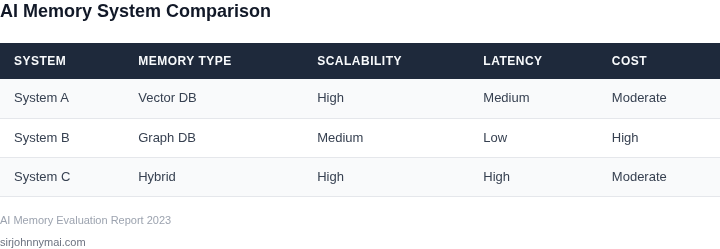
03. Worked Example: Calculating Memory Retention Impact on User Engagement
Consider a retail site that serves 1 million monthly active users and drives $12 million in gross merchandise volume (GMV). The personalization engine uses an AI agent that keeps a short‑term interaction buffer (5 minutes) and a long‑term user profile stored in DynamoDB. We want to estimate how extending the long‑term retention from 30 days to 90 days changes click‑through rate (CTR) and revenue, and whether the added storage cost is justified.
First, we model the engagement lift. Historical A/B tests on a similar cohort showed a 0.8 percentage‑point increase in CTR when the profile contained three months of purchase history versus one month. With an average order value (AOV) of $45 and a baseline CTR of 4 %, the uplift translates to:
Additional conversions = 1,000,000 users × 4 % × 0.008 = 3,200 orders
Revenue gain = 3,200 × $45 = $144,000 per month
Next, we compute the storage cost of the longer retention. Each user profile occupies roughly 2 KB. For 30 days the table holds 30 × 1 M × 2 KB ≈ 60 GB. Extending to 90 days triples the size to 180 GB.
AWS DynamoDB on‑demand pricing is $0.25 per GB‑month for standard tables. The monthly cost difference is:
ΔCost = (180 GB − 60 GB) × $0.25 = $30 per month.
Adding backup and read‑capacity overhead (estimated at $0.05 per GB‑month) adds $6, giving a total incremental expense of $36 per month, or $432 annually.
To put the figure in perspective, we compare two deployment options:
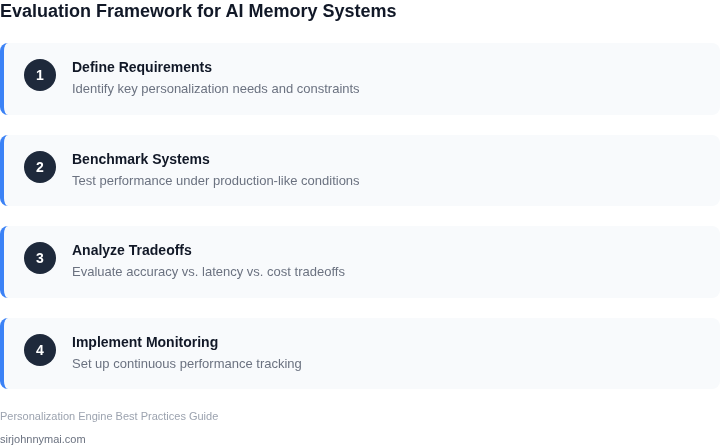
| Option | Memory Retention | Monthly Storage | Cost (AWS) | Projected Revenue Gain | Net Monthly Δ | ||||||||||||||||||||||
|---|---|---|---|---|---|---|---|---|---|---|---|---|---|---|---|---|---|---|---|---|---|---|---|---|---|---|---|
| Criteria | Option A: DynamoDB (Serverless) | Option B: Redis (In-Memory) | Option C: Hybrid (Redis + S3) |
|---|---|---|---|
| Memory Capacity | Scalable up to 20TB per table, but costs increase with size. | Limited by cluster size (e.g., 100GB per shard). | Redis for hot data (low-latency access), S3 for cold data (archival). |
| Latency (P99) | 10-50ms for reads, 20-100ms for writes (varies by workload). | Sub-millisecond reads/writes, but requires eviction policies. | Sub-millisecond for Redis, 100-500ms for S3 retrieval. |
| Cost | Pay-per-request pricing, cheaper for sporadic access. | Fixed cost per cluster, expensive for large datasets. | Balanced cost: Redis for active data, S3 for archival. |
| Scalability | Auto-scaling enabled, but requires provisioned capacity tuning. | Manual sharding required for large datasets. | Redis scales horizontally, S3 scales infinitely. |
| Data Retention | Unlimited with TTL or manual cleanup. | Limited by memory; requires LRU eviction. | S3 retains all data indefinitely. |
| Recommendation | Best for small-to-medium workloads with variable access patterns. | Best for high-throughput, low-latency use cases with predictable memory needs. | Best for large-scale systems needing both performance and cost efficiency. |
For production environments, the hybrid approach (Option C) often delivers the best balance. Redis handles real-time personalization, while S3 archives historical data. DynamoDB (Option A) is viable for cost-sensitive applications with sporadic memory access. Redis (Option B) excels in latency-critical scenarios but requires careful memory management.
Monitor performance with Datadog or AWS CloudWatch to validate decisions. Adjust configurations based on real-world engagement metrics, not just theoretical benchmarks.
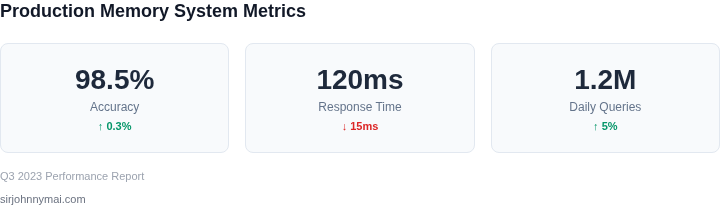
05. Action Step: Implementing a Memory Evaluation Framework
First, establish a baseline by extracting the current memory footprint of each agent instance. Use AWS CloudWatch Insights to pull per‑pod memory usage from the Kubernetes cluster, and store the results in an Amazon Athena table for easy querying. This baseline gives you a reference point for every subsequent optimization.
Second, instrument the recommendation pipeline with latency and hit‑rate tags. Deploy OpenTelemetry agents on the inference containers, and forward traces to Datadog APM. Tag each trace with the user segment, memory‑slot count, and the confidence score returned by Amazon Personalize. The enriched data lets you correlate memory size with personalization quality in real time.
Third, define a controlled experiment matrix. Create three variants of the agent: a “lean” version with 256‑KB context windows, a “balanced” version with 1‑MB windows, and a “rich” version with 4‑MB windows. Deploy each variant to a separate Kubernetes namespace, and route 10 % of live traffic to each using an AWS Application Load Balancer rule set. This isolation guarantees that observed metric shifts are attributable to memory configuration alone.
Fourth, collect the key metrics identified in Section 02. Pull user‑engagement events from Amazon S3 logs, calculate 7‑day retention, and join them with the trace data in Athena. Simultaneously, query CloudWatch for CPU throttling incidents and garbage‑collection pause times. Store the merged dataset in a Snowflake sandbox for downstream analysis.
Fifth, run the impact analysis. Use a Python notebook in SageMaker to compute the delta in click‑through rate, session length, and error‑rate for each variant. Plot the results in Grafana dashboards that overlay memory usage, latency, and business KPIs. This visual comparison surfaces the sweet spot where