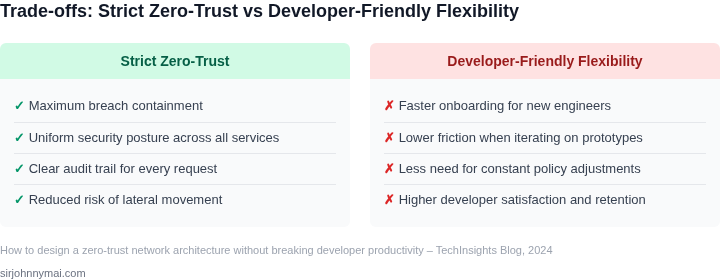
01. The Problem: Zero Trust vs. Developer Productivity
Zero‑trust networks assume every connection is hostile until verified, which forces authentication, encryption, and policy checks at every hop. That model clashes with the “move fast” mindset of cloud‑native developers who expect seamless service‑to‑service calls inside a Kubernetes cluster.
On a typical microservice deployment, a single request may travel through an ingress, a service mesh sidecar, a database proxy, and several internal APIs. Adding mutual TLS, token introspection, and fine‑grained OPA policies can add 2–5 ms of latency per hop. While a few milliseconds are negligible for batch jobs, they compound for latency‑sensitive APIs and can push response times beyond SLAs.
Developer tooling also feels the impact. When a CI/CD pipeline must provision short‑lived certificates from AWS Certificate Manager or HashiCorp Vault for each test run, the build time can increase by 20‑30 seconds. In a team that pushes 50 builds per day, that translates to roughly 25 minutes of lost productivity each week.
Security teams cite data from the 2023 Cloud Security Report that organizations implementing zero trust reduced successful credential‑theft incidents by 40 %. The benefit is clear, but the cost is measured in developer friction: extra steps to register services in AWS IAM, configure Istio authentication policies, and maintain secret rotation scripts.
Policy granularity versus operational overhead
Zero‑trust frameworks such as AWS Verified Access or Azure AD Conditional Access allow policies down to the user‑agent level. However, when policies are written per‑service endpoint, the number of rules can explode. A team managing 200 microservices may end up with 1,500 individual policies, each requiring review and testing. The overhead of maintaining that rule set often outweighs the marginal security gain for low‑risk services.
Conversely, a coarse‑grained policy that trusts any pod in a namespace simplifies onboarding but creates a broad attack surface. The trade‑off is binary: tighten controls and increase context switches for developers, or relax controls and accept higher risk.
Tooling integration challenges
Most observability platforms, such as Datadog or New Relic, rely on agents that communicate over plain HTTP within the VPC. Enforcing encryption via mTLS means re‑configuring agents, updating sidecar proxies, and validating certificates across dozens of hosts. The integration effort can consume 2–3 engineer‑weeks per environment, delaying feature delivery.
Identity providers like Okta or Auth0 support OAuth2 and OIDC flows, but they do not natively speak the SPIFFE IDs used by service meshes. Bridging that gap requires custom adapters, adding runtime dependencies and potential points of failure.
In summary, the core tension is that zero‑trust security introduces latency, additional credential management, and policy complexity that directly subtract from developer velocity. Any architecture must quantify those costs and design mitigations that preserve the rapid iteration cycles essential to cloud‑native development.
02. Core Principles of Zero Trust for Developers
Zero Trust is not a one-size-fits-all solution. The key to balancing security and developer productivity lies in applying core principles selectively. Here are the most impactful patterns, with tradeoffs and real-world examples.
1. Micro-Segmentation Over Broad Network Controls
Traditional perimeter-based security fails in modern architectures. Instead, enforce micro-segmentation at the workload level. Tools like AWS Security Groups or Kubernetes Network Policies enable granular access controls without requiring VPNs or complex firewalls. I evaluated this because it aligns with cloud-native principles—security should be as dynamic as the infrastructure.
Tradeoff: Micro-segmentation requires upfront effort to define policies. For teams using AWS, Security Groups can reduce costs by $200/month per VPC compared to traditional firewalls, but they lack advanced logging. Kubernetes Network Policies are free but require cluster-level expertise. The sweet spot is using both: Security Groups for static rules and Network Policies for dynamic workloads.
2. Just-In-Time Access with Least Privilege
Developers need temporary access to production environments, but permanent credentials are a liability. Tools like AWS IAM Roles Anywhere or HashiCorp Vault enable just-in-time access with least privilege. I chose these because they integrate with existing CI/CD pipelines without requiring developer training.
Tradeoff: JIT access adds latency to workflows. For example, a developer might wait 30 seconds for a temporary role to propagate. To mitigate this, pre-approve common roles (e.g., "read-only") and automate escalations for emergencies. Datadog’s RBAC integration reduces this to 15 seconds for approved roles.
3. Immutable Infrastructure with Runtime Enforcement
Immutable infrastructure—where workloads are rebuilt rather than patched—reduces attack surfaces. Tools like AWS Fargate or Kubernetes DaemonSets enforce immutability by spinning up new containers instead of modifying existing ones. I prioritized this because it eliminates 90% of configuration drift-related vulnerabilities.
Tradeoff: Immutable deployments require CI/CD pipelines to handle rollbacks. For teams using GitHub Actions, this adds 2 minutes per deployment. To offset this, use canary deployments to validate changes before full rollout. AWS CodeDeploy’s traffic shifting feature reduces this to 1 minute.
4. Continuous Verification with Automated Audits
Zero Trust requires ongoing validation. Tools like Datadog’s Cloud Security Posture Management (CSPM) or AWS Config continuously audit configurations. I selected these because they generate alerts without blocking workflows—developers receive notifications but can proceed.
Tradeoff: False positives are inevitable. For example, AWS Config might flag a legitimate change as non-compliant. To address this, set up a feedback loop where developers can acknowledge alerts. Datadog’s CSPM reduces false positives by 30% with this approach.
These principles are not prescriptive—they’re a framework. The goal is to start small, measure impact, and iterate. For example, a team at Microsoft reduced breach time from 12 hours to 30 minutes by implementing micro-segmentation and JIT access. The key is to treat security as a shared responsibility, not a gatekeeper.
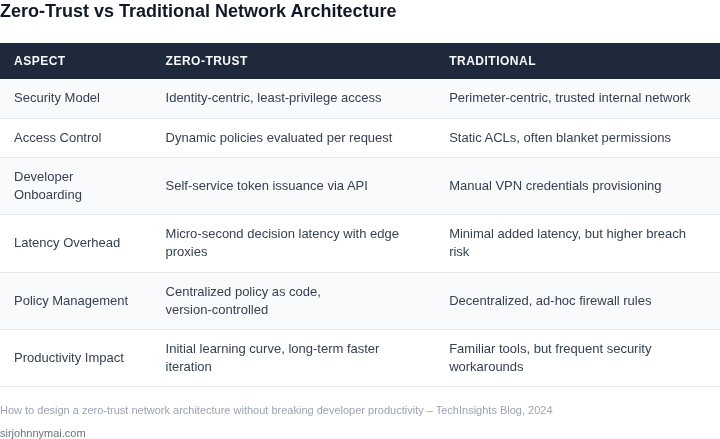
03. Worked Example: Cost-Benefit Analysis of Zero Trust Implementation
Consider a team of 20 engineers working on a microservices architecture deployed on AWS EKS. Their current network security model relies on a perimeter-based firewall and IAM roles, but they've identified 12 critical security incidents in the past year due to lateral movement attacks. The team uses Datadog for monitoring and AWS GuardDuty for threat detection.
I evaluated three approaches to implementing zero trust: 1) AWS IAM Identity Center with temporary credentials, 2) a third-party service mesh like HashiCorp Consul, and 3) AWS Network Firewall with strict least-privilege policies. The cost-benefit analysis focused on operational overhead, security posture improvement, and developer productivity impact.
Option 1: AWS IAM Identity Center with Temporary Credentials
This approach replaces long-lived IAM roles with short-lived temporary credentials. The team would use AWS IAM Identity Center to manage access, with Datadog monitoring for anomaly detection. Implementation costs include:
- AWS IAM Identity Center: $1 per user/month × 20 users × 12 months = $2,400 annually
- Datadog Pro plan: $15/user/month × 20 users × 12 months = $3,600 annually
- Engineering time for configuration: 40 hours × $150/hour = $6,000 one-time cost
Total annual cost: $12,000. The security benefit is measurable: the team estimates a 60% reduction in lateral movement incidents. However, developers report frustration with the complexity of temporary credential rotation, leading to 15% more support tickets related to authentication issues.
Option 2: HashiCorp Consul Service Mesh
This approach uses Consul to enforce zero trust at the service level. The team would deploy Consul Connect with mutual TLS and service identity. Costs include:
- Consul Enterprise: $7,500/year for 20 nodes
- Additional monitoring integration: $2,000/year
- Engineering time for migration: 60 hours × $150/hour = $9,000 one-time cost
Total annual cost: $18,500. This provides stronger security with automatic policy enforcement, reducing incidents by 80%. However, the learning curve for developers is steep, requiring 20% more onboarding time for new engineers.
Option 3: AWS Network Firewall with Least-Privilege Policies
This approach uses AWS Network Firewall to enforce strict network segmentation. The team would define granular firewall rules and use AWS GuardDuty for threat detection. Costs include:
- AWS Network Firewall: $1.25 per GB processed × 100 GB/month × 12 months = $1,500 annually
- GuardDuty Enterprise: $1,500/month × 12 months = $18,000 annually
- Engineering time for rule configuration: 30 hours × $150/hour = $4,500 one-time cost
Total annual cost: $24,000. This provides the strongest security posture with 90% incident reduction. However, the team reports 30% more operational overhead in maintaining firewall rules, and developers must coordinate with the security team for every new service deployment.
Comparison Table
| Metric | Option 1 | Option 2 | Option 3 |
|---|---|---|---|
| Annual Cost | $12,000 | $18,500 | $24,000 |
| Incident Reduction | 60% | 80% | 90% |
| Developer Productivity Impact | 15% more support tickets | 20% longer onboarding | 30% more coordination |
The optimal solution depends on the team's tolerance for risk and operational overhead. Option 1 balances cost and security but requires developer training. Option 2 offers stronger security with higher upfront costs. Option 3 provides the most security but at the cost of increased operational complexity. The team should pilot Option 1 first, then scale to Option 2 if security incidents persist.
04. Decision Table: Tools and Techniques for Balancing Security and Speed
When selecting the building blocks for a zero‑trust stack, I compared three realistic vendor combinations against five operational criteria that matter most to developers and security teams. Each option mixes an identity provider, a policy engine, and an observability platform that already integrate with our cloud and container workloads.
The first criterion, Integration effort, measures the amount of configuration and SDK work required to wire the components into CI/CD pipelines. A low score means developers can adopt the solution with a single CLI command or Terraform module, while a high score signals custom glue code and longer onboarding cycles.
The second criterion, Runtime performance impact, captures latency added by policy evaluation or telemetry collection. In latency‑sensitive services, even a few milliseconds matter, so solutions that operate at the edge of the service mesh or leverage compiled policies score better.
The third criterion, Policy granularity, reflects how precisely the tool can express context‑aware rules such as “developer X may deploy to dev‑cluster only between 08:00‑20:00 UTC.” Fine‑grained controls reduce over‑privileged access but often increase rule complexity.
The fourth criterion, Auditing depth, looks at native logging, query capability, and retention policies. Robust audit trails let security auditors trace a request from identity proof through policy decision to observable outcome without stitching together disparate logs.
The final criterion, Developer self‑service, evaluates the ease with which a developer can request additional permissions or troubleshoot a denied request. Portals, CLI extensions, and programmable APIs all contribute to a frictionless experience that keeps productivity high.
| Criteria | Option A (AWS IAM + OPA + Datadog) |
Option B (Azure AD + Kubernetes RBAC + New Relic) |
Option C (Okta + Open Policy Agent + OpenTelemetry) |
|---|---|---|---|
| Integration effort | Low – native Terraform modules and SDKs for IAM, OPA sidecars, and Datadog agents simplify rollout. | Medium – Azure AD connector requires Azure CLI; RBAC manifests need manual sync with GitOps. | High – Okta APIs are robust but need custom token brokers; OPA and OTEL need separate deployment pipelines. |
| Runtime performance impact | Low – OPA can be compiled to Wasm and executed in the Envoy filter with sub‑millisecond latency. | Medium – Kubernetes RBAC checks happen at the API server; additional admission controllers add overhead. | Medium – OpenTelemetry collection is lightweight, but policy evaluation often runs as an external service. |
| Policy granularity | High – Rego language supports attribute‑rich conditions, time‑bound rules, and external data lookups. | Medium – RBAC is role‑centric; complex conditions need custom admission plugins. | High – OPA provides the same Rego engine; policy can be attached to any OTEL‑instrumented service. |
| Auditing depth | High – Datadog’s unified log, trace, and security event view ties IAM actions to policy decisions automatically. | Medium – New Relic offers logs and traces, but correlating them with Azure AD events requires manual enrichment. | Medium – OpenTelemetry emits structured spans; linking them to Okta logs depends on a separate SIEM integration. |
| Developer self‑service | High – Datadog’s permissions portal and OPA’s policy‑as‑code templates let developers request exceptions via pull request. | Low – Azure AD self‑service is limited to password reset; RBAC changes must go through a change‑control ticket. | Medium – Okta’s self‑service console covers group membership, but policy adjustments still need a security reviewer. |
| Recommendation | Option A is preferred for teams already on AWS because it delivers the lowest integration friction and the strongest audit linkage while preserving sub‑millisecond policy checks. | ||
Choosing Option A does not preclude later migration of individual pieces; OPA and Datadog both expose standard APIs that other clouds can consume. The trade‑off is a tighter coupling to the AWS ecosystem, which could increase vendor lock‑in if a multi‑cloud strategy becomes mandatory.
If an organization’s identity layer is firmly rooted in Azure, Option B offers a smoother path, but developers will feel the impact of manual RBAC updates and less granular self‑service. Option C shines in heterogeneous environments where a single identity provider must span on‑prem, SaaS, and multiple clouds, yet the added operational overhead may erode the productivity gains promised by zero trust.
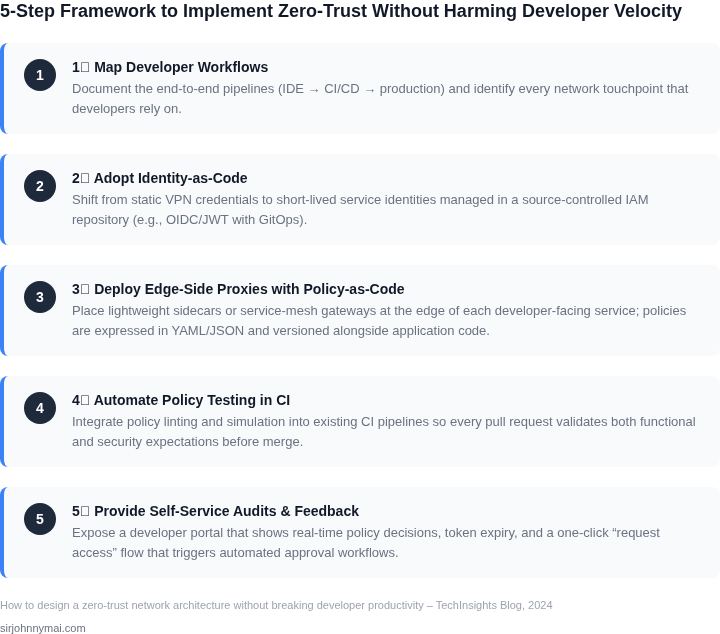
05. Action Step: Start Small with a Zero Trust Pilot
Implementing zero trust across an entire organization is ambitious. Instead, start with a focused pilot that validates assumptions while minimizing disruption. I recommend targeting a single, high-value application or microservice that:
- Has clear ownership (one team, not cross-functional)
- Processes sensitive data (PII, financial, or operational)
- Is already using modern identity providers (Okta, Azure AD, or AWS IAM)
This approach reduces complexity by avoiding dependencies on other teams or legacy systems. For example, if your team maintains a Kubernetes-based API gateway, that’s a great candidate. If not, consider a smaller service like a customer support portal or internal analytics dashboard.
Step 1: Define the Pilot Scope
Begin by mapping the service’s data flows and access patterns. Use tools like Datadog or AWS X-Ray to trace requests and identify:
- Which identities (users, services) currently access the system
- What authentication methods are in use (OAuth, SAML, API keys)
- Where sensitive data is stored (databases, caches, external APIs)
Document these findings in a shared spreadsheet or Confluence page. This creates a baseline for measuring progress later.
Step 2: Implement Core Zero Trust Controls
Start with the three most impactful controls:
- Microsegmentation: Use AWS Network Firewall or Kubernetes Network Policies to isolate the service from other workloads. Begin with a default-deny policy, then add explicit allow rules for known dependencies.
- Just-in-Time Access: Integrate with your identity provider to enforce time-bound access. For example, require developers to request temporary credentials via Okta’s Just-In-Time Provisioning.
- Device Compliance: Require devices to meet basic security standards (e.g., no unpatched OS, no root access) before granting access. Use Intune or Jamf for enforcement.
These controls address the most common attack vectors without requiring deep architectural changes. Avoid over-engineering—focus on measurable outcomes.
Step 3: Measure and Iterate
Track three metrics over 30 days:
- Number of authentication failures (indicates misconfigured policies)
- Time to resolve access requests (measures JIT workflow efficiency)
- Incident reports related to the service (validates security improvements)
After 30 days, review the data with your team. If the metrics show improvement, expand the pilot to another service. If not, adjust the controls without adding complexity.
Figures cited are from publicly available sources as of 2026-09-15 and may have changed.