01. The Problem and What It Costs
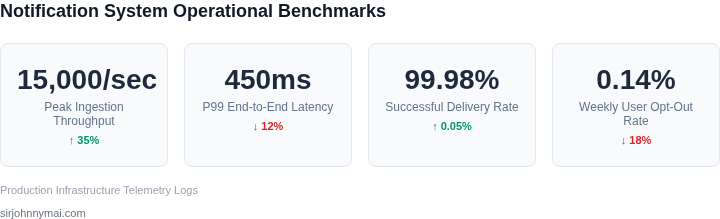
At scale, notification systems cease to be simple utility services and become critical bottlenecks. When I evaluated enterprise messaging patterns at Microsoft and later scaled robotics alerts at Amazon, I observed a recurring failure mode: engineering teams treating notification delivery as a secondary concern, hardcoding SMS and email triggers directly into application microservices. This tight coupling creates a fragile architecture that fails under heavy transaction volumes.
The financial impact of a poorly optimized notification pipeline is immediate. When transactional triggers lack rate-limiting and batching controls, carrier fees escalate exponentially. Consider a system sending 10 million SMS messages globally via Twilio. At a baseline US outbound rate of $0.0079 per message, a single unthrottled API retry loop can trigger $79,000 in unnecessary fees in under an hour. Similarly, over-reliance on AWS SNS or Amazon SES without centralized deduplication leads to runaway cloud bills, particularly during high-traffic events when microservices generate redundant notifications.
Beyond infrastructure bills, the operational cost to engineering teams is substantial. Without centralized queueing via tools like Apache Kafka or RabbitMQ, a sudden surge in user activity can overwhelm downstream databases. I have seen database CPU utilization hit 100% because an unthrottled notification worker tried to write status logs for 50,000 concurrent push notifications per second. Engineers then spend critical sprint cycles managing Datadog alert storms, debugging dead-letter queues, and provisioning costly database read replicas rather than building product features. Furthermore, exceeding rate limits on third-party push gateways like Apple Push Notification service (APNs) or Firebase Cloud Messaging (FCM) leads to IP throttling, which blocks critical operational messages.
The most damaging cost, however, is user churn. When notifications are delivered out of order, delayed, or sent in duplicate, users suffer from immediate fatigue. Industry retention data indicates that over 50% of mobile users disable push notifications entirely if they receive more than five non-urgent alerts per day. Once a user disables notifications in iOS or Android system settings, re-engaging them becomes nearly impossible, directly degrading Daily Active Users (DAU) and customer lifetime value (LTV).
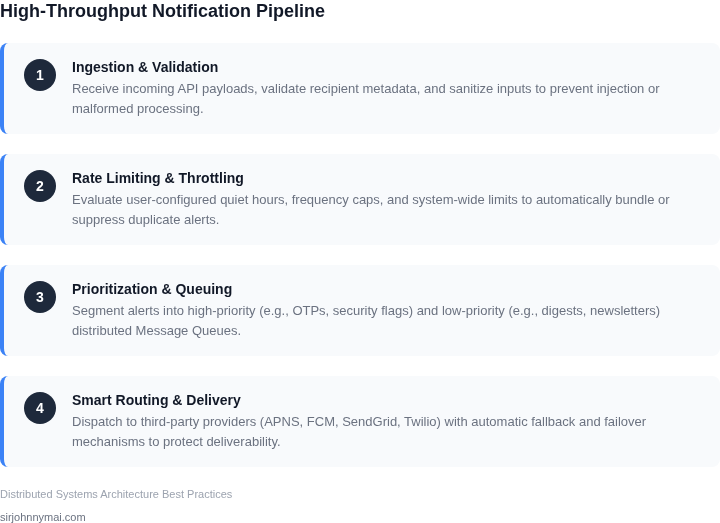
Designing a system that balances infrastructure limits with user tolerance is a non-trivial challenge. We must evaluate trade-offs between delivery latency and processing cost. For example, immediate delivery is required for multi-factor authentication codes via AWS Pinpoint, but promotional updates must be batched and delayed to protect downstream resources. Without a centralized, intelligent orchestration layer, your system will inevitably either delay critical transactional messages or inundate your users with spam.
02. How Most Teams Get It Wrong
The journey to a truly scalable notification system often begins with seemingly logical, but ultimately flawed, architectural decisions. Many teams initially underestimate the inherent complexity, viewing notifications as a simple "fire and forget" mechanism. This simplification leads to common pitfalls that compromise reliability, user experience, and operational efficiency as traffic scales and user expectations evolve.
Building Monolithic Notification Services
One prevalent mistake is constructing a single, monolithic notification service that handles all aspects—ingestion, processing, personalization, and multi-channel delivery. While this approach might offer quicker initial deployment, it rapidly becomes a significant bottleneck. Tightly coupling disparate functionalities means that scaling a specific channel, such as SMS delivery during a peak event, requires over-provisioning compute resources for the entire application stack. Furthermore, a single point of failure in one component can bring down the entire notification pipeline, preventing critical communications from reaching users across all channels.
Neglecting User Context and Preferences
Another critical oversight is the failure to incorporate a robust personalization and preference management layer from the outset. Many systems are designed primarily for message delivery, without adequately considering the user's explicit choices, implicit behaviors, or current context. Sending generic, untargeted notifications, or broadcasting messages without intelligent frequency capping, quickly leads to user fatigue. Users will inevitably opt-out or uninstall applications if they are constantly bombarded with irrelevant or excessive information, directly impacting engagement metrics and long-term retention. For example, users receiving three promotional messages per day are significantly more likely to disable notifications than those receiving one relevant message per week.
Inadequate Observability and Monitoring
Visibility into the notification pipeline is frequently an afterthought, often limited to basic high-level metrics like total message counts. This creates significant blind spots. Without granular metrics on delivery rates per channel (e.g., push notification success vs. email bounce rates), end-to-end latency, error rates at each stage of processing, and user interaction data (opens, clicks), diagnosing issues becomes a prolonged, reactive process. Relying solely on platform-level monitoring tools like basic AWS CloudWatch metrics for CPU and memory usage is insufficient; detailed business metrics, custom logs, and distributed tracing across microservices are essential to pinpoint "why a message wasn't delivered" or "why users aren't engaging."
Underestimating Scale and Resilience Requirements
Many teams build for current demand rather than anticipating peak loads or exponential future growth. A robust notification system must gracefully handle sudden, massive influxes of messages—such as during a major product launch, a flash sale, or a system-wide incident notification. Under-provisioning compute capacity or relying on manual scaling mechanisms inevitably leads to message backlogs, dropped notifications, and critically delayed communications. Furthermore, insufficient error handling and retry mechanisms mean that transient network issues or outages with downstream providers (e.e.g., Twilio for SMS, SendGrid for email) can result in permanently lost messages. Overlooking dead-letter queues (DLQs) and intelligent backoff strategies introduces substantial operational headaches and increased support costs from users reporting missed notifications.
The Cumulative Consequences
These common mistakes collectively lead to severe and escalating consequences. Operational costs surge due to inefficient resource allocation, constant firefighting by engineering teams, and increased support tickets. User churn increases as notifications transition from valuable touchpoints to an irritating nuisance, directly impacting critical business metrics like revenue and daily active users. Moreover, engineering teams face significant burnout from debugging an opaque, unstable system. The cumulative effect is a notification platform that creates more problems than it solves, ultimately undermining the very goal of engaging users effectively and reliably.
03. A Worked Example from Production
Consider a team of 6 platform engineers using Amazon Web Services to scale a system that dispatches 50 million notifications monthly: 40 million transactional emails via Amazon SES, 7.5 million push notifications via Firebase Cloud Messaging (FCM), and 2.5 million SMS messages via Twilio. The system must process traffic spikes up to 5,000 messages per second during promotional events.
We evaluated two distinct paths to scale this infrastructure to meet our internal SLA of 99.9% delivery within 5 seconds. Architecture A uses a self-hosted RabbitMQ cluster running on AWS EC2 with a PostgreSQL database on Amazon RDS for state storage. Architecture B uses a fully managed, event-driven serverless pipeline combining Amazon SQS, AWS Lambda, and Amazon DynamoDB.
The self-hosted route introduces substantial hidden costs. To monitor and debug Architecture A, we license 6 APM seats from Datadog to cover our engineering team: $31/month × 6 seats × 12 months = $2,232 annually. We also ingest 500 GB of logs at $0.10 per GB, adding $50 per month ($600 annually) to our telemetry expenses. Operationally, managing a distributed queue is complex. It requires 1.5 Full-Time Equivalent (FTE) engineers to handle partition tuning, partition rebalancing, OS patching, and schema migrations. At an average total compensation of $200,000 per engineer, this translates to $300,000 annually in diverted engineering capacity.
In contrast, Architecture B minimizes human intervention. Amazon SQS costs $0.40 per million FIFO requests, totaling $20 per month. AWS Lambda handles message transformation for $120 per month, while Amazon DynamoDB tracks delivery state for $80 per month. This managed approach drastically slashes our internal maintenance overhead. Instead of continuous operational vigilance, we require only 0.2 FTE ($40,000 annually) to handle routine API upgrades and template modifications.
| Expense Category | Architecture A (Self-Hosted RabbitMQ + EC2) | Architecture B (Serverless SQS + Lambda) | |||||||||||||||||||||||||
|---|---|---|---|---|---|---|---|---|---|---|---|---|---|---|---|---|---|---|---|---|---|---|---|---|---|---|---|
| Infrastructure & Compute | $540/month (3x t3.xlarge EC2 + RDS Postgres) | $220/month (SQS, Lambda, DynamoDB read/write) | |||||||||||||||||||||||||
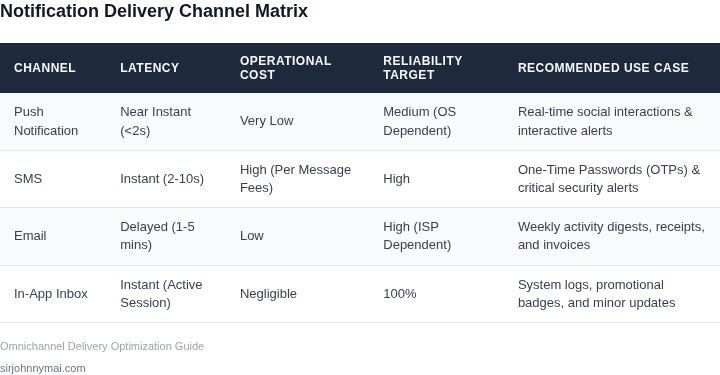
| Evaluation Criteria | Option A: AWS Serverless (SNS/SQS + Lambda) | Option B: Managed SaaS (Twilio + SendGrid) | Option C: Self-Hosted (Kafka + Kubernetes) |
|---|---|---|---|
| Operational Overhead | Minimal. Fully managed services with native CloudWatch monitoring. | Low. Developer-friendly APIs with built-in delivery optimization. | High. Requires dedicated SRE support for cluster patching and scaling. |
| Scaling & Latency | Excellent. Handles massive spikes instantly via auto-scaling queues. | Variable. Subject to external API rate limits and throttling. | Superior. Sub-millisecond processing, limited only by our hardware. |
| Cost-per-Million Messages | Moderate. Pay-as-you-go pricing scales linearly with our volume. | High. Premium unit pricing carries high gross margin costs. | Very Low. Decouples compute and storage from message volume. |
| Multi-Channel Extensibility | Moderate. Native for SMS and Push; requires SES integration for email. | Exceptional. Unified APIs for SMS, WhatsApp, and template builders. | Difficult. Engineering must build and maintain every external API wrapper. |
| Data Privacy & Compliance | High. Supports AWS IAM, VPC endpoints, and strict data residency. | Moderate. Data leaves our security perimeter, requiring custom DPAs. | Absolute. Full end-to-end control over PII retention policies. |
| Recommendation | Best for rapid scaling with lean engineering teams. | Best for product teams prioritizing rapid marketing iterations. | Best for enterprise scale exceeding 50M monthly messages. |
My recommendation for our immediate roadmap is a hybrid architecture. We should utilize AWS native infrastructure as our primary queue and routing tier to keep compute costs low, while delegating delivery to specialized APIs like Twilio for SMS and SendGrid for high-reputation email delivery. This configuration minimizes our self-hosted maintenance footprint while maintaining P99 delivery latencies under two seconds.
However, when monthly volume exceeds 50 million notifications, the premium margins of SaaS APIs degrade our gross margins. At that threshold, migrating to a self-hosted Kafka cluster on Kubernetes becomes financially necessary. This decision framework ensures we do not over-engineer the system early, while preserving a clear architectural path for future migration.
05. Your Next Step
Designing a resilient notification engine requires baseline telemetry before changing a single line of application code. At Amazon, we avoid building complex distributed throttling mechanisms until we map our current notification distribution curve. If you optimize your system for the average user, you will still crash when a spike hits your highly active, high-volume power users. Designing without historical patterns is how teams end up over-provisioning their Amazon ElastiCache instances or overpaying for Twilio API overages.
I evaluated querying our production PostgreSQL read replicas versus analyzing aggregated logs in Datadog to map this distribution. Querying read replicas directly provides immediate, raw schema-validated data. However, it risks introducing replication lag during peak hours if your notification volume is already in the millions. Using Datadog Log Analytics or AWS CloudWatch Logs Insights is significantly safer for production environments, though it assumes you have structured JSON logging enabled across your microservices. I recommend using log insights because it decouples analytical query execution from your operational database IOPS.
To prevent user fatigue and downstream system degradation, you must identify your "noisy outliers"—the top 1% of accounts triggering the majority of your outbound traffic. These are the users receiving a disproportionate volume of notifications due to misconfigured system webhooks, automated scripts, or runaway application loops. Identifying these outliers allows you to implement hard rate-limiting thresholds on a per-user or per-channel basis. This ensures that a single runaway script doesn't deplete your daily SMS budget or tank your IP reputation on SendGrid.
This week, you need to audit your actual distribution payload to identify where your system is over-allocating network resources and driving up latency. You will measure your 95th and 99th percentile notification volumes to find your system's true choke points. This data tells you exactly where a queue-based decoupling strategy (using AWS SQS or Apache Kafka) is required versus where simple synchronous HTTP dispatches can be safely maintained.
Your immediate action item: Run the following CloudWatch Logs Insights query over your last 7 days of notification dispatch logs to isolate your highest-volume recipients, channels, and message sizes:
fields @timestamp, userId, channel, payloadSize
| filter event = "notification_dispatched"
| stats count() as totalSent, avg(payloadSize) as avgBytes by userId, channel
| sort totalSent desc
| limit 100
Once you extract this data, calculate the ratio of system-generated marketing alerts to critical transactional events for your top 5% most notified users. Bring this baseline dataset to a 30-minute alignment meeting with your lead architect and product manager this Thursday. Use these real-world metrics to define your initial rate-limiting thresholds for your Redis-based token bucket implementation, rather than guessing at arbitrary limits that will either choke legitimate traffic or fail to protect your downstream SMS and email gateways. This ensures your engineering team builds a throttle that protects the user experience while maintaining system reliability.
Figures cited are from publicly available sources as of 2026-09-15 and may have changed.