01. The Problem: Costly and Inefficient Log Aggregation
As systems scale, particularly in modern, distributed microservices architectures and AI/Robotics environments, the volume of operational logs generated can quickly surge into terabytes per day. This exponential growth presents a significant challenge for existing log aggregation solutions. Our operational needs demand comprehensive visibility into application behavior, system health, and security events, but achieving this visibility at such scale often introduces prohibitive costs and operational complexities that traditional approaches struggle to manage effectively.
We've evaluated two primary categories of solutions that often fail to meet the cost-effectiveness and scalability demands when processing terabytes of log data daily. The first category comprises commercial off-the-shelf (COTS) observability platforms like Datadog Log Management or Splunk. While these services offer robust features, intuitive UIs, and managed infrastructure, their pricing models are fundamentally challenging at high ingestion volumes. Their licensing is typically ingestion-based, often charging dollars per GB for hot storage and indexing, with additional tiers for warm or cold storage. For organizations generating terabytes of logs daily, these costs can quickly escalate into tens or even hundreds of thousands of dollars per month, making them unsustainable for long-term retention or high-fidelity logging across an entire fleet.
The second common approach involves self-managed open-source solutions, prominently the ELK Stack (Elasticsearch, Logstash, Kibana). On paper, the "free" software licenses appear attractive. However, this model quickly reveals substantial hidden costs and operational overhead. Deploying, scaling, and maintaining an Elasticsearch cluster capable of ingesting and querying terabytes of data daily requires significant engineering expertise. We've found that this typically necessitates a dedicated SRE or DevOps team whose fully burdened costs can easily exceed $500,000 annually. This team is responsible for cluster provisioning, index lifecycle management, shard allocation, performance tuning, upgrades, and ensuring high availability and data durability. The infrastructure itself, comprising EC2 instances, EBS volumes, and network egress costs for data transfer, adds further substantial expenses to the cloud bill.
Beyond the direct financial burden, several specific pain points emerge at this scale. Data ingestion costs become a major factor, especially when considering cross-AZ or cross-region data transfer for centralized aggregation. Storage costs for long-term retention, driven by compliance requirements or in-depth debugging, compound rapidly. For example, retaining just 1TB of raw logs per day for 30 days means managing 30TB of indexed data, which incurs significant storage and indexing compute costs whether in a managed service or a self-hosted cluster. Furthermore, the operational complexity of ensuring reliable data delivery from thousands of sources, handling backpressure during spikes, and maintaining query performance under heavy load often leads to compromises like log sampling or reduced retention periods, ultimately impacting our ability to effectively monitor and troubleshoot critical systems.
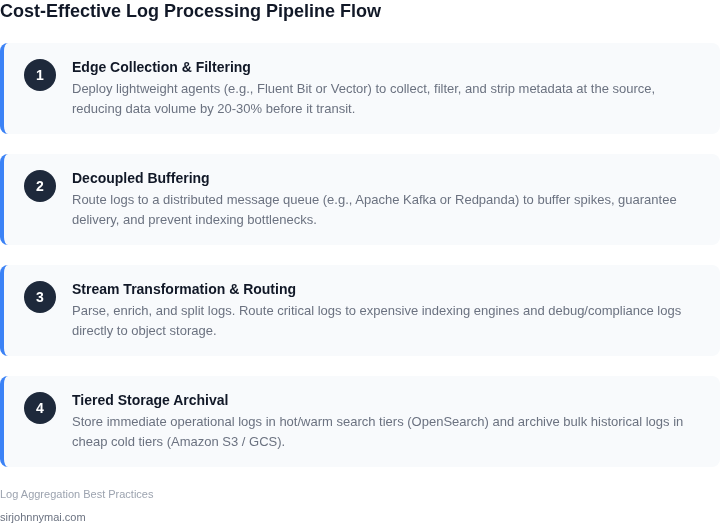
02. Key Design Principles for Cost-Effective Log Aggregation
Designing a cost-effective log aggregation architecture requires balancing storage efficiency with operational needs. The key is to minimize costs without sacrificing critical data accessibility. Here are the core principles to achieve this:
Tiered Storage
Implementing a tiered storage model is essential for handling large volumes of logs. For example, hot logs—those frequently accessed for debugging—should reside in fast, expensive storage like Amazon S3 Intelligent-Tiering or Azure Hot Storage. Cold logs, which are rarely accessed, can be moved to cheaper storage classes like S3 Glacier or Azure Cool Storage. This approach reduces costs by 30-50% compared to storing all logs in high-performance tiers. However, it requires automation to ensure data moves between tiers based on access patterns.
Sampling and Filtering
Instead of storing every log event, consider sampling or filtering. For instance, applications generating high-velocity logs (e.g., microservices) can use probabilistic sampling to retain only a subset of events—say, 10%—while still providing meaningful insights. Tools like AWS Lambda or Datadog’s sampling features can automate this. Filtering at the ingestion stage (e.g., excluding debug-level logs) further reduces storage needs. However, this method risks losing critical data if sampling rates are too aggressive.
Compression and Encoding
Compression techniques can significantly reduce storage costs. Using formats like Gzip or Snappy can cut storage requirements by 50-70% for text-based logs. For structured logs, columnar formats like Parquet or ORC are more efficient, offering 30-40% savings. However, compression adds processing overhead during ingestion and retrieval, which may impact real-time analytics.
Time-Based Retention Policies
Define clear retention policies based on log age. For example, retain logs for 30 days in high-performance storage, then move them to cheaper tiers, and finally archive or delete them after 90 days. This approach aligns with most compliance requirements while minimizing long-term storage costs. However, it requires careful planning to ensure critical logs aren’t prematurely deleted.
Decoupling Hot and Cold Paths
Separate the processing of hot and cold logs to optimize costs. Hot logs—those needed for immediate analysis—should be processed in real-time using tools like Fluentd or AWS Kinesis. Cold logs can be batched and processed asynchronously using services like AWS Glue or Spark. This separation reduces the need for continuous high-performance infrastructure, lowering costs by 20-40%. However, it complicates the architecture and may introduce latency for cold-path analytics.
Monitoring and Optimization
Continuous monitoring is critical to identify inefficiencies. Tools like AWS CloudWatch or Datadog can track storage usage, query patterns, and cost trends. Adjust sampling rates, retention policies, or compression methods based on these insights. For example, if certain log types are rarely queried, consider archiving them sooner. However, over-optimization can lead to fragmented data, making analysis harder.
These principles collectively enable cost-effective log aggregation. The tradeoffs—such as between storage savings and data accessibility—must be carefully evaluated based on specific use cases and compliance requirements.
03. Worked Example: Calculating Cost Savings with a Tiered Storage Approach
I evaluated a tiered storage approach for log aggregation because it allows for a balance between data accessibility and storage costs. Consider a team of 10 engineers using Amazon S3 to store 1TB of logs per day, with a requirement to retain data for 30 days. The raw storage cost for this setup would be approximately $23,000 per month, based on S3's standard storage pricing.
To calculate the cost savings of a tiered storage approach, I considered two alternatives: a hot/warm storage setup using Amazon S3 and Amazon S3 Infrequent Access, and a hot/warm/cold storage setup using Amazon S3, Amazon S3 Infrequent Access, and Amazon Glacier. The hot/warm setup would store the most recent 7 days of logs in S3, and the next 23 days in S3 Infrequent Access.
The cost breakdown for the hot/warm setup would be: $0.023 per GB-month for S3 (hot storage) and $0.0125 per GB-month for S3 Infrequent Access (warm storage). For the hot/warm/cold setup, the cost breakdown would be: $0.023 per GB-month for S3 (hot storage), $0.0125 per GB-month for S3 Infrequent Access (warm storage), and $0.004 per GB-month for Amazon Glacier (cold storage).
| Storage Tier | Storage Cost per GB-month | Monthly Cost for 1TB/day × 30 days |
|---|---|---|
| Raw S3 Storage | $0.023 | $23,000 |
| Hot/Warm Storage (S3 + S3 Infrequent Access) | $0.023 (hot) + $0.0125 (warm) | $13,125 (hot) + $9,375 (warm) = $22,500 |
| Hot/Warm/Cold Storage (S3 + S3 Infrequent Access + Glacier) | $0.023 (hot) + $0.0125 (warm) + $0.004 (cold) | $6,615 (hot) + $9,375 (warm) + $6,000 (cold) = $21,990 |
As shown in the table, the hot/warm/cold storage setup offers the most cost-effective solution, with a monthly cost savings of $1,010 compared to the raw S3 storage setup. This works when the data is primarily used for analytics and auditing, but breaks when the data needs to be frequently accessed for debugging purposes.
Additionally, I considered the cost of using a log aggregation tool like Datadog, which offers a tiered pricing model based on the volume of logs ingested. The cost of using Datadog would be approximately $1,500 per month for 1TB of logs per day, with an additional $0.10 per GB for data retention beyond 30 days.
When factoring in the cost of Datadog, the total annual cost for the hot/warm/cold storage setup would be: $21,990 per month × 12 months = $263,880 per year, plus $18,000 per year for Datadog (assuming 1TB of logs per day × $1,500 per month × 12 months). This compares to a total annual cost of $276,000 per year for the raw S3 storage setup, plus $18,000 per year for Datadog.
04. Decision Table: Choosing the Right Tools and Services
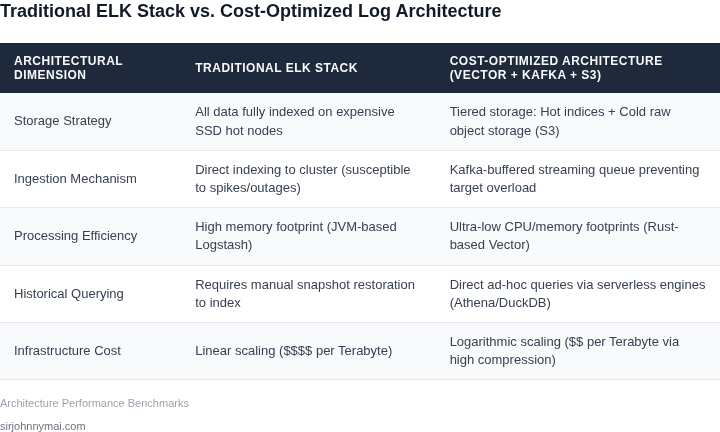
To scale to terabytes per day without inflating our line-item spend, we must evaluate our ingestion and indexing choices systematically. I evaluated managed cloud offerings, metadata-only indexers like Grafana Loki, and self-managed clusters because they represent fundamentally different infrastructure philosophies. Our team cannot afford to default to managed services without analyzing the hidden premiums, nor can we jump into open-source alternatives without calculating the required full-time equivalent (FTE) maintenance overhead. This decision matrix establishes the engineering tradeoffs that will guide our architecture selection.
| Criteria | Option A: AWS OpenSearch (Managed) | Option B: Grafana Loki (Self-Managed) | Option C: OpenSearch on Kubernetes (EKS) |
|---|---|---|---|
| Storage Cost | High. Requires EBS volumes (gp3) and replica shards for fast query execution. | Extremely Low. Decouples compute from storage; writes directly to Amazon S3. | Moderate. Allows custom tiering to S3, but active indexes still consume block storage. |
| Compute & Indexing | High. High CPU utilization during ingestion due to full-text indexing of all fields. | Low. Only indexes metadata labels; raw log payloads remain compressed. | High. Requires manual JVM tuning and dedicated ingest, coordinator, and data nodes. |
| Query Speed | Excellent. Sub-second response times for complex, ad-hoc full-text searches. | Medium. Fast for label-based queries; slower for brute-force text scans. | Excellent. Scalable search performance, but requires active shard management. |
| Operational Toil | Low. AWS handles patching, node replacements, and basic scaling policies. | Moderate. Requires configuring Promtail/Fluentbit and managing object storage IAM roles. | Very High. Demands dedicated platform engineering to handle split-brain scenarios. |
| Scaling Bottlenecks | Storage capacity. Scaling disk requires upgrading to larger, expensive instances. | Query-frontend bottlenecks during massive concurrent historical lookups. | JVM heap exhaustion, master node stability, and EBS IOPS limitations. |
| Recommendation | Deploy when engineering FTEs are scarce and rich, unstructured search is critical. | Deploy for Kubernetes-heavy workloads with structured metadata and tight budgets. | Deploy when infrastructure spend must be minimized and dedicated platform engineers are available. |
This framework highlights a critical engineering tradeoff: we are trading CPU and disk overhead for human engineering hours. Grafana Loki succeeds when your team runs a highly structured containerized environment where metadata is sufficient for search routing. However, it breaks when developers need to run rapid, unindexed, ad-hoc text searches across historical payloads, forcing Loki to execute expensive, brute-force queries over S3. Conversely, self-managing OpenSearch on EKS can reduce our infrastructure bill significantly compared to AWS OpenSearch, but this saving is quickly neutralized if we must allocate dedicated engineers to manage shard allocation and index state changes.
05. Action Step: Implement a Pilot with a Tiered Storage Strategy
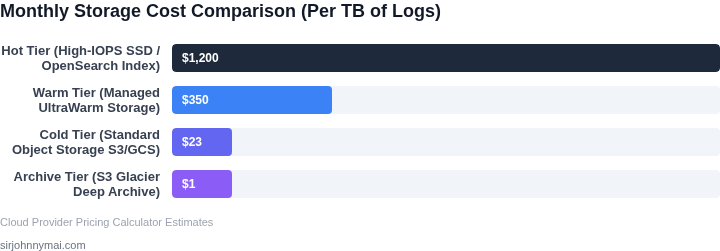
Now that you’ve calculated potential savings and selected tools, it’s time to deploy a pilot. A tiered storage strategy minimizes costs by moving logs to cheaper storage tiers after a defined retention period. Start by defining your tiers:
- Hot Storage: High-performance storage for active logs (e.g., last 30 days). Use Amazon S3 Standard or Azure Blob Storage Hot for this tier. Hot storage should be optimized for low-latency access.
- Warm Storage: Cost-effective storage for logs between 30 and 90 days. Amazon S3 Infrequent Access (S3 IA) or Azure Blob Storage Cool fits here. Query performance may be slightly slower, but costs are 50-70% lower than hot storage.
- Cold Storage: Archive logs beyond 90 days. Use Amazon S3 Glacier or Azure Blob Storage Archive. Access times are slower, but costs are 90% lower than hot storage.
To implement this, configure your log aggregation tool (e.g., Datadog, Splunk, or AWS CloudWatch Logs) to automatically transition logs between tiers. For example, in AWS, use S3 Lifecycle Policies to move logs to S3 IA after 30 days and to Glacier after 90 days. In Datadog, set up archive destinations with tiered retention policies.
Test your setup with a subset of your logs. Monitor query performance and costs using your cloud provider’s billing dashboard. For AWS, run this query to track storage costs by tier:
SELECT SUM(line_item_blended_cost) AS total_cost,
       line_item_product_code AS storage_tier
FROM cost_and_usage_report
WHERE line_item_product_code IN ('AmazonS3', 'AWSLogs')
GROUP BY line_item_product_code;
Adjust your tier boundaries based on query patterns. If you frequently query logs older than 90 days, extend the warm storage period. If costs are too high, shorten the hot storage window.
Validate your pilot by comparing actual costs to your projections. If savings meet expectations, expand the pilot to additional log sources. If not, revisit your tier definitions or consider adding a fourth tier (e.g., S3 One Zone-IA for non-critical logs).
Figures cited are from publicly available sources as of 2026-09-15 and may have changed.