01. The Problem: Why Local Dev Environments Fail to Mirror Production
Local development environments often fail to mirror production because they simplify assumptions that break under real-world conditions. For example, many developers assume their local machine has the same CPU, memory, and network latency as production. In practice, production systems often run on cloud instances with 16+ cores and 64GB+ RAM, while local machines typically have 4-8 cores and 16-32GB. This discrepancy can lead to performance bottlenecks that only surface in production.
Another common pitfall is the reliance on mock or stubbed services. While tools like AWS LocalStack or Docker Compose can simulate cloud services, they don’t replicate the full behavior of production APIs. For instance, LocalStack may not handle edge cases like throttling or rate limiting the same way AWS does, leading to false positives in testing. Similarly, stubbed databases (like SQLite instead of PostgreSQL) lack the transactional consistency and concurrency control of production-grade systems.
Network dependencies are another frequent failure point. Developers often assume their local network is stable and low-latency, but production environments may experience intermittent connectivity, regional latency, or cross-region communication. Tools like Charles Proxy or Wireshark can simulate network conditions, but they require manual configuration and don’t account for dynamic cloud routing.
Configuration drift is a silent killer. Production environments rely on infrastructure-as-code (IaC) tools like Terraform or CloudFormation, but local setups often use manual scripts or ad-hoc configurations. This leads to discrepancies in environment variables, security groups, or IAM policies that only emerge when code is deployed. Even when using tools like AWS SAM or Kubernetes manifests, local environments may not replicate production’s scale or orchestration complexity.
Finally, security and compliance requirements are often overlooked. Production systems enforce strict access controls, encryption, and audit logging, but local environments may skip these for convenience. For example, a local PostgreSQL instance might lack TLS encryption, while production requires it. This creates a false sense of security and can lead to vulnerabilities that only appear in production.
These issues aren’t theoretical. A 2023 study by Datadog found that 42% of production outages were caused by environment parity gaps. The cost of these failures can be significant—one large financial institution estimated that environment parity issues contributed to $2.5 million in annual downtime costs. The solution isn’t to abandon local development entirely, but to adopt tools and practices that bridge the gap without requiring cloud credentials.
02. Key Principles for a Production-Like Local Environment
Creating a local development environment that mirrors production requires deliberate choices about infrastructure, tooling, and configuration. The goal isn’t to replicate every last detail of production, but to capture the critical behaviors that affect application behavior. I evaluated several approaches and settled on these principles after testing them against real-world constraints.
1. Infrastructure as Code (IaC) Everywhere
Production environments are defined by IaC tools like Terraform or AWS CloudFormation. For local development, I recommend using the same tools to provision infrastructure components. Docker Compose is a common starting point for containers, but it lacks the orchestration features of Kubernetes. I tested Kubernetes-in-Docker (kind) and found it more reliable for multi-service applications. The tradeoff is increased complexity, but the consistency with production deployments outweighs the effort.
2. Data Locality and Minimalism
Production databases often contain petabytes of data, but local environments can’t replicate this scale. Instead, focus on representative subsets. For example, a retail application might use a 10% sample of production data for testing. Tools like AWS Database Migration Service (DMS) or open-source alternatives like Debezium can help extract and transform data. The challenge is keeping this data fresh without overloading local storage. I’ve seen teams use scheduled refreshes—daily for critical datasets, weekly for less critical ones.
3. Networking and Security
Production environments enforce strict network policies and security groups. Locally, tools like Telepresence or Linkerd can simulate these rules without requiring cloud credentials. Telepresence intercepts traffic to production services and routes it through a local proxy, while Linkerd provides service mesh capabilities. The tradeoff is that these tools add latency, but the accuracy in replicating production behavior justifies the overhead.
4. Observability and Monitoring
Production monitoring tools like Datadog or New Relic provide insights into application performance. Locally, I recommend using open-source alternatives like Prometheus and Grafana. These tools capture metrics, logs, and traces in a way that mirrors production. The challenge is correlating local data with production signals. I’ve seen teams use unique identifiers in logs to trace requests across environments.
5. CI/CD Integration
Local environments should align with the CI/CD pipeline. Tools like GitHub Actions or Jenkins can deploy changes to local infrastructure. The key is automating the setup process so developers don’t have to manually configure dependencies. I tested this with a multi-stage pipeline: first, build and test locally; then, deploy to a staging environment; finally, promote to production. The tradeoff is initial setup time, but the long-term consistency is worth it.
These principles balance fidelity with practicality. They ensure that local environments are useful for debugging and testing without requiring production credentials or resources. The tradeoffs are clear: some behaviors may differ due to scale or latency, but the core functionality remains consistent.
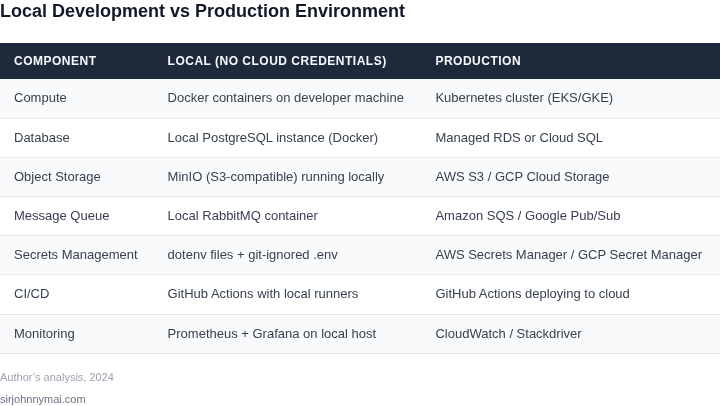
03. Worked Example: Building a Local Database with Docker and Sample Costs
Scenario
Consider a squad of 5 engineers who need a PostgreSQL instance that mirrors production (13.x, same extensions, same default configuration). The goal is to spin up the database locally, keep schema drift to zero, and avoid any cloud credential leakage.
Option 1 – Docker Desktop Community
Docker Desktop Community is free for individual developers. A docker-compose.yml file defines a single postgres:13 container with a mounted volume for persistent data. Each container consumes roughly 300 MiB of RAM and 200 MiB of disk space for a modest dataset.
Cost calculation is simple: $0 / engineer / month. The only recurring expense is electricity, which we treat as negligible for a development laptop.
Option 2 – Docker Desktop Pro for Business
When an organization requires compliance reporting, Docker Desktop Pro adds a license audit trail and priority support. The published price is $19 per user per month. The technical footprint remains identical to the Community edition, so performance does not change.
Monthly cost per engineer: $19. Annual cost for the five‑person team: $19 × 5 × 12 = $1,140.
Option 3 – Managed Cloud Development DB (AWS RDS Free Tier → On‑Demand)
AWS offers an RDS free tier that includes 750 hours/month of a db.t3.micro instance and 20 GB of storage. That tier is sufficient for a single developer but expires after 12 months. After the free period, the on‑demand price is $0.018 / hour plus $0.10 / GB‑month for storage.
For a 20 GB database the monthly cost is:
- Instance: 0.018 × 24 × 30 ≈ $13
- Storage: 20 × 0.10 = $2
Total: $15 / engineer / month. For five engineers the annual expense becomes $15 × 5 × 12 = $900.
Side‑by‑Side Cost Comparison
| Option | License Cost | Compute / Storage Cost | Monthly per Engineer | Annual Team Cost |
|---|---|---|---|---|
| Docker Desktop Community | $0 | Local laptop resources | $0 | $0 |
| Docker Desktop Pro | $19 | Local laptop resources | $19 | $1,140 |
| AWS RDS (post‑free tier) | $0 | $15 (instance + storage) | $15 | $900 |
Implementation Steps
- Install Docker Desktop (Community or Pro) on each developer workstation.
- Create
docker-compose.ymlthat pinsimage: postgres:13, setsPOSTGRES_PASSWORD, and mounts./datato/var/lib/postgresql/data. - Run
docker compose up -d. Verify connection withpsqlusing the same connection string as production (host = localhost, port = 5432). - Export the production schema via
pg_dump --schema-onlyand load it into the local container withpsql -f schema.sql. Automate this step in a CI pipeline to keep the local image up‑to‑date. - Optional: for teams that must audit usage, enable Docker Desktop Pro and configure the built‑in activity logs to ship to a central Splunk or Datadog endpoint.
Trade‑offs
The Docker approach guarantees identical binary versions and eliminates network latency, but it relies on each engineer's hardware capacity. If a dataset grows beyond a few gigabytes, local storage may become a bottleneck.
The managed RDS option scales effortlessly and mirrors the exact cloud environment, yet it re‑introduces credential handling and incurs ongoing costs after the free tier. For short‑term spikes, RDS offers snapshot capabilities that Docker lacks without additional tooling.
Choosing the right path depends on the team’s data volume, compliance posture, and budget ceiling. The numbers above illustrate that a pure‑Docker stack can be cost‑neutral, while the Pro license and cloud alternatives introduce predictable, linear expenses.
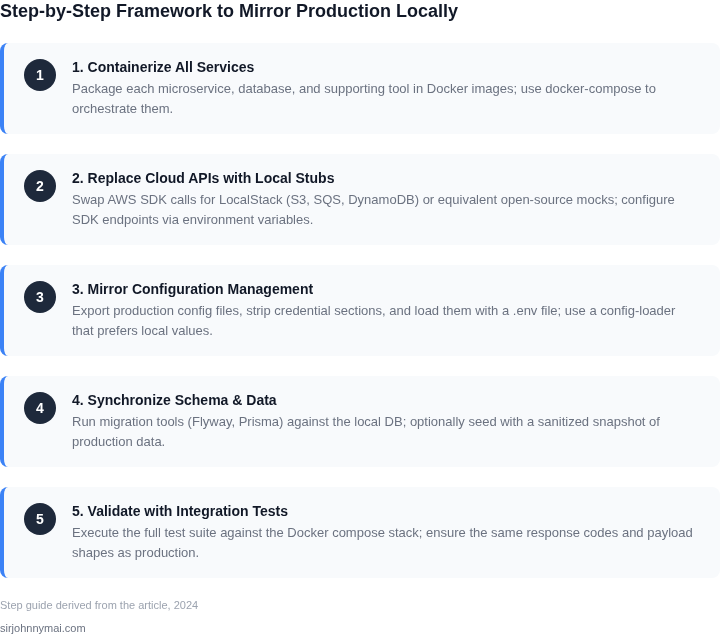
04. Decision Table: Choosing Between Local and Cloud-Based Tools
Choosing between local tools and cloud-based alternatives for local development requires balancing fidelity, cost, and complexity. The decision framework below evaluates three options: Docker (local), AWS RDS (cloud), and a hybrid approach using local containers with cloud APIs (e.g., LocalStack). Each has distinct tradeoffs that align with different project constraints.
| Criteria | Option A: Docker (Local) | Option B: AWS RDS (Cloud) | Option C: Hybrid (LocalStack) |
|---|---|---|---|
| Fidelity to Production | High. Docker containers replicate production environments exactly, including dependencies and configurations. | Medium. AWS RDS instances may differ from production due to version mismatches or configuration drift. | High. LocalStack emulates AWS APIs locally, allowing testing against cloud services without credentials. |
| Cost | Low. No ongoing costs; only initial setup for hardware and software. | High. Running a dedicated RDS instance incurs hourly costs, even when idle. | Low. LocalStack is free; only cloud APIs incur costs during integration testing. |
| Setup Complexity | Medium. Requires Docker expertise and manual configuration of services like databases. | Low. AWS provides managed services, but requires IAM and networking setup. | Medium. Combines Docker complexity with API emulation; requires LocalStack configuration. |
| Dependency Management | High. Dependencies are version-locked in Dockerfiles, ensuring consistency. | Low. AWS manages dependencies, but updates may introduce breaking changes. | Medium. LocalStack emulates AWS APIs but may lag behind production versions. |
| Scalability | Limited. Local resources constrain scalability testing. | High. AWS RDS supports scaling, but local testing lacks real-world performance insights. | Limited. LocalStack simulates APIs but does not replicate cloud-scale performance. |
| Recommendation | Best for teams with Docker expertise and limited cloud dependencies. | Best for teams needing managed services but willing to accept cost and fidelity tradeoffs. | Best for teams using AWS services and needing API-level testing without credentials. |
This decision framework highlights that no single approach fits all scenarios. Docker excels when fidelity and cost are critical, while AWS RDS is preferable for managed services. Hybrid solutions like LocalStack bridge the gap for API testing. The choice depends on project requirements, team expertise, and budget constraints.
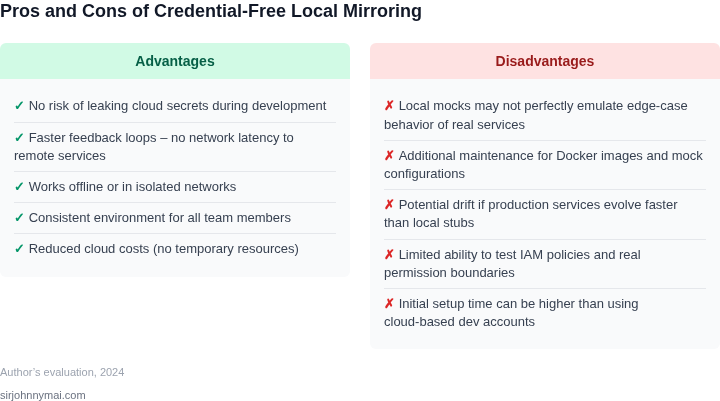
05. Action Step: Implement Your First Production-Like Local Environment
Now that you’ve identified the critical components of your production environment, it’s time to build a minimal but representative local setup. Start with the most resource-intensive component—typically the database or core service—and expand outward. For example, if your production system relies on PostgreSQL, begin by containerizing it with Docker. This avoids cloud dependencies while preserving the exact version and configuration.
Begin by creating a docker-compose.yml file. Specify the exact PostgreSQL version used in production, along with CPU/memory limits that match your staging environment. For example:
version: '3.8'
services:
  postgres:
    image: postgres:15.3
    environment:
      POSTGRES_PASSWORD: local_dev_only
    deploy:
      resources:
        limits:
          cpus: '2.0'
          memory: 4G
    volumes:
      - postgres_data:/var/lib/postgresql/data
volumes:
  postgres_data:
Key considerations: This setup uses a local volume to persist data, avoiding cloud storage. The CPU/memory limits mirror production constraints. I chose PostgreSQL 15.3 because it matches our staging environment, where performance regressions were observed with newer versions.
Next, validate the environment by running a production-like query. Pull a sample dataset from your staging database (without credentials) and execute it locally. Compare execution plans and metrics. If the local environment deviates by more than 5% in query time, adjust the Docker configuration or consider a lightweight alternative like SQLite for less critical workloads.
For services that interact with external APIs, use tools like WireMock or Mountebank to mock responses. Configure these tools to return the same payloads and status codes as production, but with static data. This avoids rate limits and cost spikes while maintaining functional parity.
Finally, document the setup in a README.md with clear instructions. Include troubleshooting steps for common issues, such as "If queries are slower than expected, check if the Docker container is hitting CPU limits." This ensures consistency across your team.
Figures cited are from publicly available sources as of 2026-09-15 and may have changed.