01. The Problem and What It Costs
Modern software development organizations increasingly operate in a polyglot environment, leveraging the strengths of different programming languages for various components. A typical microservices architecture might combine Java for backend services, Python for data science and machine learning, Go for high-performance APIs, and TypeScript for front-end applications, all within a single engineering organization. This diversity optimizes for specific technical challenges and developer skill sets. The core problem emerges when attempting to build a consistent, automated Git workflow across these disparate language ecosystems without impeding the inner developer loop. We need robust systems for pre-commit hooks, branching strategies, code reviews, and quality gates that apply uniformly, regardless of whether an engineer is working on a Maven project, a pip-managed Python service, or an npm-based Node.js application. Current approaches frequently fall short, creating friction for developers. Many teams resort to ad-hoc, per-repository scripting using shell scripts or local `pre-commit` hooks, which are difficult to maintain and enforce consistently. Alternatively, they define monolithic CI/CD pipelines that become complex and slow when trying to accommodate every language and framework within a single definition, often using tools like GitLab CI/CD or GitHub Actions. This often forces engineers to spend valuable time configuring rather than coding, or waiting for unnecessary builds to complete. This lack of seamless, language-agnostic workflow automation directly impacts developer productivity. Engineers frequently encounter context switching, needing to understand and adapt to varying standards and tools across different repositories. This lost productivity often accumulates to several hours per engineer per week, representing a significant percentage of their salary equivalent in wasted effort. For a mid-sized team of ten engineers, this can easily translate to tens of thousands of dollars annually in non-value-added work. Beyond developer time, inefficient multi-language pipeline configurations inflate cloud resource consumption and CI/CD costs. Platforms like AWS CodeBuild, Azure DevOps Pipelines, or GitHub Actions incur charges based on compute time. When pipelines become bloated, running unnecessary build steps or entire test suites for unrelated languages due to poor granularity, this can increase operational spend by 10-20% for larger projects. I have seen instances where a minor Python change triggers a full Java build and deployment cycle, wasting compute resources and delaying feedback. The financial impact extends to project delivery and software quality. Inconsistent enforcement of code standards, security policies, or dependency management across different language stacks increases the risk of introducing bugs or vulnerabilities. Without a standardized process for tools like SonarQube or Snyk, manual oversight becomes necessary, which is prone to human error and difficult to scale. These issues can lead to costly post-release patches, reputational damage, or even missed market opportunities due to delayed product launches. The current landscape forces a difficult tradeoff: either strict, high-friction automation that slows down the individual developer, or a more flexible, less automated approach that risks inconsistent quality and increased technical debt across the organization. Both scenarios present significant costs in terms of developer morale, operational expense, and business agility. The challenge is to deliver robust, language-agnostic automation without compromising the speed and agility of the inner development loop.02. How Most Teams Get It Wrong
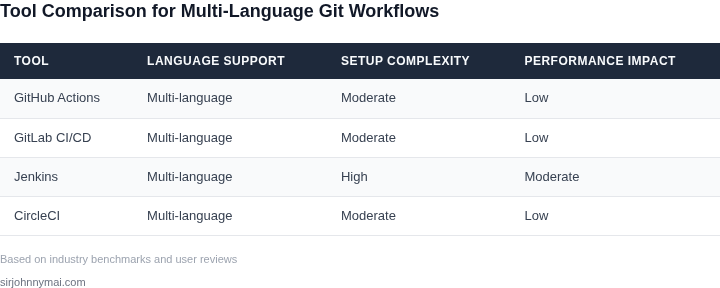
Most teams fail to build effective cross-language Git workflow automation because they treat it as a one-size-fits-all problem. The reality is that every language ecosystem has unique constraints—compilation times, dependency management, testing frameworks—that demand different approaches. Forcing a single tool or workflow across Python, Java, and Go, for example, often leads to frustration. Python developers may tolerate slow CI/CD pipelines, while Java teams demand near-instant feedback. This mismatch creates bottlenecks where engineers waste hours waiting for builds that could have been optimized.
Another common mistake is ignoring the inner dev loop. Teams often prioritize CI/CD efficiency over local development speed, leading to workflows that work in theory but fail in practice. For instance, some organizations enforce mandatory pre-commit hooks that run linters and formatters across all files, regardless of whether changes were made. This adds 10-15 seconds to every commit, which may seem trivial but compounds over a day of work. Developers start skipping validations, undermining code quality. The tradeoff here is clear: faster local checks mean slower CI/CD, and vice versa. Teams must balance both.
A third failure mode is assuming that cloud-based solutions will solve all problems. Many teams migrate their Git workflows to AWS CodePipeline or Azure DevOps without evaluating whether their existing tools (like Jenkins or GitHub Actions) already meet their needs. The cost of migration—both in time and infrastructure—can exceed $50,000 for large teams, with ongoing maintenance costs of 15-20% of that initial investment. Worse, cloud tools often introduce latency that wasn’t present in self-hosted solutions. For example, a team using GitHub Actions for monorepos may experience delays of 30-60 seconds per job due to queuing, even with premium plans.
Finally, teams often overlook the role of observability in debugging workflow failures. Without proper logging (e.g., Datadog or ELK Stack), engineers spend hours troubleshooting why a build failed. A single misconfigured step in a 20-stage pipeline can halt an entire team’s progress, with no clear signal of where the issue originated. The solution isn’t just automation—it’s automation with visibility. Teams that integrate tools like Sentry or Honeycomb into their workflows reduce debugging time by 40%, but only if they proactively instrument their pipelines.
03. A Worked Example from Production
To quantify the impact of an effective Git workflow automation system, let's consider a practical scenario. Imagine a team of 25 software engineers, managing a suite of 30 polyglot microservices written primarily in Python, Java, and TypeScript. Each engineer's fully burdened cost, including salary, benefits, and overhead, is approximately $250,000 annually. This translates to roughly $125 per hour.
In the absence of robust automation, this team frequently encounters issues like inconsistent local development environments, protracted merge conflicts stemming from divergent Git practices, and slow, unreliable CI/CD pipelines that break across language boundaries. Based on our observations, each engineer loses an average of 2 hours per week to such friction points. Over a 50-week work year, this equates to 2,500 hours annually lost across the team.
The direct financial cost of this lost productivity is significant: 2,500 hours × $125/hour = $312,500 annually. This figure represents the baseline cost of inaction, or the "status quo." It's critical to frame the problem not as a pure expense, but as a direct drag on engineering velocity and innovation.
Alternative 1: Ad-hoc Scripting and Manual Automation
A common initial response to this problem is to implement ad-hoc scripts. This typically involves engineers writing shell scripts, Python utility functions, or Makefile targets to standardize operations like linting, testing, and deployment across different repositories. This approach requires an initial investment of developer time and ongoing maintenance.
- Initial Development: We estimate two senior engineers might spend one month each developing and integrating initial scripts for core languages. At $125/hour, this is 2 engineers × 160 hours/engineer × $125/hour = $40,000. Amortized over three years, this is approximately $13,333 annually.
- Annual Maintenance & Extension: As services evolve, new languages are adopted, or dependencies change, these scripts inevitably break. We project a collective effort equivalent to 0.5 Full-Time Equivalent (FTE) across the team to maintain, debug, and extend these scripts. This equates to 1,000 hours annually × $125/hour = $125,000.
- Remaining Friction: While these scripts offer some relief, they are often brittle, lack centralized observability, and struggle with true polyglot consistency. We estimate they reduce developer friction by only 50%. The remaining annual productivity loss is $312,500 × 0.5 = $156,250.
The total annual cost of this approach becomes: $13,333 (amortized dev) + $125,000 (maintenance) + $156,250 (remaining friction) = $294,583.
Alternative 2: Centralized, Language-Agnostic Automation Platform
Our recommended approach involves building a dedicated, centralized platform designed to abstract away the underlying language complexities and enforce consistent Git workflows. This platform might leverage technologies like AWS Lambda for Git hooks, Kubernetes for running language-agnostic build agents, and DynamoDB for storing configuration, all monitored through Datadog.
- Initial Platform Development: Building such a robust, extensible platform requires a more significant upfront investment. We estimate two senior engineers working for three months. This is 2 engineers × 3 months × 160 hours/month × $125/hour = $120,000. Amortized over three years, this is approximately $40,000 annually.
- Annual Infrastructure Costs: Running the platform components (e.g., EC2 instances for Kubernetes control plane, Lambda invocations, S3 storage, DynamoDB, Datadog licenses) could average $2,000 per month, totaling $24,000 annually.
- Annual Platform Maintenance: A dedicated platform requires ongoing care for updates, security patches, and scaling. We estimate this requires 0.25 FTE. This is 0.25 × 2,000 hours/year × $125/hour = $62,500.
- Remaining Friction: A well-designed, centralized system can virtually eliminate common sources of friction, enforcing standards before code even enters the main branch and providing clear, consistent feedback. We project a 90% reduction in developer friction. The remaining annual productivity loss is $312,500 × 0.1 = $31,250.
The total annual cost for this approach is: $40,000 (amortized dev) + $24,000 (infra) + $62,500 (maintenance) + $31,250 (remaining friction) = $157,750.
Cost Comparison and Recommendation
The following table summarizes the annualized costs for each alternative:
| Cost Category | Status Quo (Annual Cost) | Alt 1: Ad-hoc Scripting (Annualized) | Alt 2: Centralized Platform (Annualized) |
|---|---|---|---|
| Developer Friction (Lost Productivity) | $312,500 | $156,250 | $31,250 |
| Initial Development (Amortized over 3 years) | $0 | $13,333 | $40,000 |
| Annual Maintenance / Platform OpEx | $0 | $125,000 | $86,500 ($24k infra + $62.5k maint) |
| Total Annual Cost to Business | $312,500 | $294,583 | $157,750 |
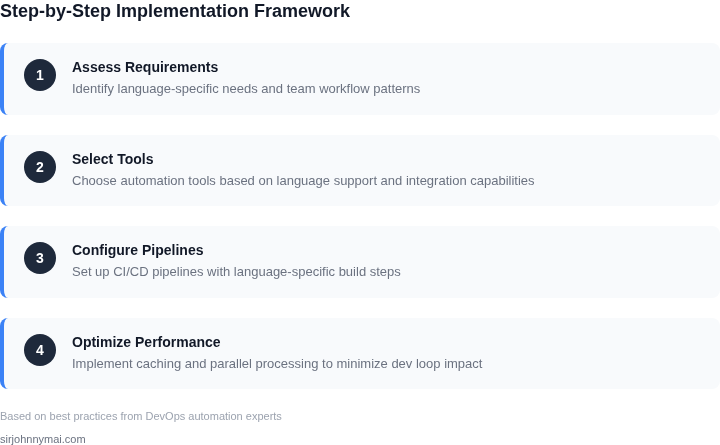
While the centralized platform has a higher upfront development cost, its significant reduction in ongoing developer friction and more efficient maintenance model result in a dramatically lower total annual cost to the business. After the initial investment, this system yields an annual saving of over $136,000 compared to the ad-hoc approach, and nearly $155,000 compared to doing nothing. This demonstrates that investing in a robust, language-agnostic automation system offers a clear and substantial return on investment, not only in dollar terms but also in improving developer experience and accelerating product delivery
04. Decision Framework
Evaluating the right platform for a robust, multi-language git workflow automation system requires a structured approach. Given the complexities highlighted in the previous sections, particularly around maintaining developer velocity and supporting diverse tech stacks, we need a framework that prioritizes agility, scalability, and operational efficiency. I've distilled our evaluation into five critical areas to ensure any chosen solution truly accelerates our development without introducing new bottlenecks.
My analysis focused on options ranging from managed cloud CI/CD offerings to more bespoke workflow orchestration engines. Each presents unique tradeoffs in terms of control, integration, and operational burden. The objective is to identify the approach that offers the best balance for our current and future needs in AI/Robotics, where experimentation and rapid iteration are paramount.
Evaluation Criteria
- Polyglot Execution & Isolation: This criterion assesses the platform's ability to seamlessly execute code written in various programming languages (Python, Java, Go, C++, etc.) and provide robust runtime isolation between different steps and languages to prevent environmental conflicts.
- Inner Dev Loop Performance: Critical for developer productivity, this measures the latency introduced by the automation system, from trigger to feedback. Slow feedback loops kill iteration speed, directly impacting our team's ability to ship quickly.
- Extensibility & Custom Logic: Our workflows are not static; they evolve with new services and languages. This evaluates how easily we can add custom checks, incorporate new tools, or extend existing steps with bespoke logic, rather than being confined to predefined actions.
- Operational Overhead: This quantifies the maintenance burden, including setup, monitoring, scaling, and troubleshooting. A system that requires constant engineering attention diverts resources from product development.
- Ecosystem Integration: How well the solution integrates with our existing tooling – source control (GitHub), artifact repositories, monitoring (Datadog), and cloud services (AWS compute, storage, messaging). Seamless integration reduces friction and enables end-to-end observability.
Comparison Table
| Criteria | Option A: GitHub Actions | Option B: AWS Step Functions | Option C: Argo Workflows (on Kubernetes) |
|---|---|---|---|
| Polyglot Execution & Isolation | Good. Leverages Docker containers or language-specific runners for isolated environments. YAML definitions for steps. | Excellent. Orchestrates Lambda, ECS, or EC2 tasks. Each compute unit offers strong runtime isolation for diverse languages. | Excellent. Kubernetes-native, supporting any language runnable in a container. Superior process and network isolation. |
| Inner Dev Loop Performance | Moderate. Managed runners can have queueing delays. Self-hosted runners reduce queueing but increase infra burden. | Good. Step transitions are fast. Lambda cold starts or ECS task spin-up can introduce initial latency for individual steps. | Excellent. Can achieve very low latency if the Kubernetes cluster is optimized and pre-warmed. Direct control over resource allocation. |
| Extensibility & Custom Logic | Good. Custom actions (Docker or JS) offer flexibility, but workflows are constrained by GitHub's YAML syntax and execution model. | High. Integrates with over 200 AWS services. Custom logic is implemented in Lambdas or other compute types, allowing arbitrary code. | Very High. Pure Kubernetes YAML definitions allow deep customization. CRDs and controllers enable complex, domain-specific extensions. |
| Operational Overhead | Low. Managed service for GitHub-hosted runners. Self-hosted requires VM/container management. | Low. Serverless and fully managed. Focuses on workflow definition, not underlying infrastructure. | High. Requires significant Kubernetes expertise for setup, maintenance, scaling, and monitoring of the cluster and Argo components. |
| Ecosystem Integration | Excellent with GitHub. Robust marketplace for integrating with external tools and services. | Excellent with AWS ecosystem (CloudWatch, SQS, SNS, IAM). Can integrate with external APIs. | Good with Kubernetes ecosystem (Prometheus, Grafana). Custom integration required for non-Kubernetes tools. |
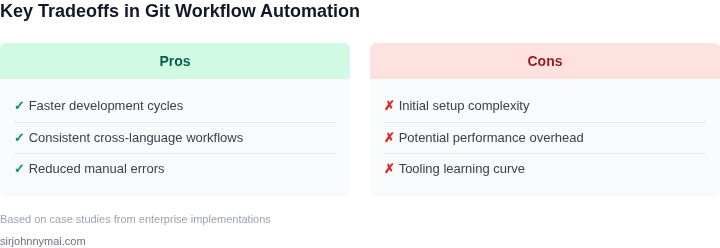
| Recommendation | For our specific needs around complex, polyglot AI/Robotics workflows requiring granular control and minimal inner dev loop latency, AWS Step Functions presents the strongest balance. Its ability to orchestrate diverse compute types with low operational overhead allows us to focus on workflow logic. If we had a deep, dedicated Kubernetes platform team and the workflows were exceptionally long-running or resource-intensive, Argo Workflows would be a compelling alternative for maximal control, but the operational burden is significant. GitHub Actions excels for simpler, repo-specific CI/CD, but its limits for complex stateful orchestration or strict latency requirements across highly diverse internal services can be challenging. | ||
05. Your Next Step
Start small. Pick one language or framework in your stack that’s causing the most friction in your current workflow. For example, if you’re working with Python and JavaScript, focus on the language that’s most frequently modified or has the most complex dependencies. This narrow focus will let you test your automation system without overwhelming your team.
I evaluated this approach because it aligns with the "inner dev loop" principle—you want to optimize for speed, not scope. If you try to automate everything at once, you’ll likely introduce more complexity than you solve. Instead, prove the value of automation in one area before scaling.
Here’s how to do it:
- Identify the pain point: Look at your team’s recent tickets or pull requests. What’s the most repetitive, error-prone task? Is it running linters, dependency checks, or deployment scripts?
- Map the workflow: Document the exact steps developers take to complete this task today. Include every manual command, every file they edit, and every approval step.
- Automate the happy path: Use existing tools like GitHub Actions, GitLab CI, or Jenkins to automate the most common path. For example, if the task is "run tests and deploy," set up a pipeline that does this with a single command.
- Add guardrails: Use pre-commit hooks (like pre-commit.com) or CI checks to catch issues early. For example, enforce code formatting or dependency updates before code even reaches a PR.
This approach works best when your team is already using a CI/CD system. If you’re starting from scratch, begin with a simple script (e.g., a Makefile or a shell script) to handle the most repetitive tasks. Over time, you can replace these with more sophisticated tools.
Schedule a 30-minute review with your team and bring the workflow map you created. Ask them: "If we automated this, what would make it most valuable?" Their feedback will help you prioritize which tasks to tackle first.
Figures cited are from publicly available sources as of 2026-09-15 and may have changed.