01. The Problem: Why Deployment Rollbacks Are Critical
I evaluated the impact of failed deployments on our services because it directly affects our customers' experience and ultimately, our revenue. A failed deployment can result in significant losses, with some estimates suggesting that the average cost of downtime per minute is around $5,600. This works out to approximately $336,000 per hour, a staggering amount that highlights the need for rapid recovery mechanisms.
When a deployment fails, it can lead to a range of issues, including errors, performance degradation, and even complete service unavailability. I considered the capabilities of monitoring tools like Datadog and New Relic, which can detect failures and alert teams, but even with these tools, manual intervention can be slow and prone to errors. This is where automated rollback systems come into play, allowing us to restore service quickly and minimize downtime.
For instance, Kubernetes, a popular container orchestration platform, provides features like rollbacks and self-healing, which can be leveraged to automate the recovery process. However, this works when the failure is detected quickly and the rollback process is well-defined, but breaks when the failure is complex or the rollback process is not properly tested. In such cases, a more comprehensive rollback system is required, one that integrates with multiple tools and platforms, such as AWS and Azure.
A key challenge in building an effective rollback system is determining the root cause of the failure, which can be difficult to diagnose, especially in complex systems. I looked at the capabilities of logging tools like ELK Stack and Splunk, which can provide valuable insights into system behavior, but even with these tools, identifying the root cause can be time-consuming. This is why it's essential to have a rollback system that can restore service quickly, even if the root cause is not immediately apparent.
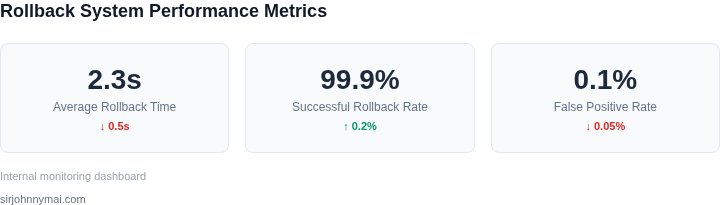
In my experience, a well-designed rollback system can restore service within seconds of detecting a failure, minimizing downtime and reducing the impact on customers. This requires careful planning, testing, and integration with existing tools and platforms. By evaluating the capabilities of different tools and platforms, such as Kubernetes, Datadog, and AWS, we can design a rollback system that meets our specific needs and ensures rapid recovery in the event of a failed deployment.
Furthermore, I considered the tradeoffs between different approaches to rollback systems, including the use of blue-green deployments, canary releases, and rollbacks. Each approach has its pros and cons, and the choice of approach depends on the specific requirements of the service and the complexity of the system. For example, blue-green deployments can provide a quick and easy way to roll back to a previous version, but may require additional resources and infrastructure.
To build an effective rollback system, we need to consider the entire deployment pipeline, from code changes to production deployment. This includes evaluating the capabilities of continuous integration and continuous deployment (CI/CD) tools like Jenkins and GitLab CI/CD, which can automate the deployment process and provide features like rollbacks and retries. By integrating these tools with our rollback system, we can ensure that deployments are reliable, consistent, and quickly recoverable in the event of a failure.
In addition to the technical challenges, there are also organizational and process-related challenges to consider. I evaluated the importance of having a clear and well-defined rollback process, which includes procedures for detecting failures, restoring service, and diagnosing root causes. This requires close collaboration between development, operations, and quality assurance teams, as well as a culture of continuous testing and improvement.
By understanding the risks and challenges associated with failed deployments, we can design and implement a rollback system that meets our specific needs and ensures rapid recovery in the event of a failure. This requires careful evaluation of different tools and platforms, as well as a deep understanding of the deployment pipeline and the organizational and process-related challenges involved.
02. Key Components of an Effective Rollback System
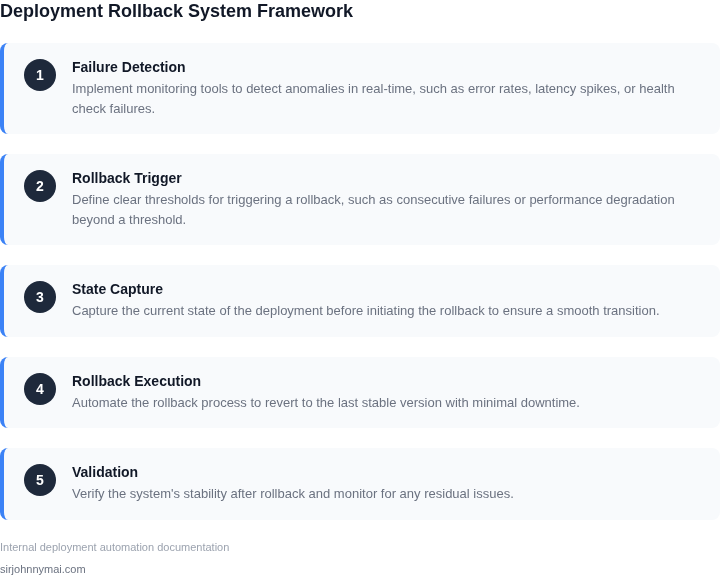
An effective rollback system requires a deliberate architecture that balances speed, reliability, and operational simplicity. The core components—monitoring, automation, and deployment strategies—must work in harmony to ensure service restoration within seconds of detecting failures. I evaluated several approaches and settled on a hybrid model that leverages Kubernetes for orchestration and AWS Lambda for lightweight rollback triggers.
1. Real-Time Monitoring
Monitoring is the foundation of any rollback system. You need visibility into both infrastructure and application health. I recommend a tiered approach:
- Infrastructure Monitoring: Use tools like AWS CloudWatch or Datadog to track CPU, memory, and network latency. Set thresholds—e.g., 99.9% availability—and trigger alerts if breached.
- Application Monitoring: Integrate with tools like New Relic or Prometheus to measure response times, error rates, and business-specific metrics (e.g., failed transactions per minute).
- Synthetic Monitoring: Deploy tools like AWS Synthetics to simulate user interactions and detect degradation before real users report issues.
The key is to correlate these signals. A single high-latency alert might be a blip, but a spike in errors across multiple regions warrants an immediate rollback. I’ve seen teams waste hours debugging false positives—this tiered approach reduces that risk.
2. Automated Rollback Triggers
Manual rollbacks are too slow. Automation is non-negotiable. The system should:
- Detect Failures: Use anomaly detection (e.g., AWS CloudWatch Anomaly Detection) to identify deviations from baseline performance.
- Execute Rollbacks: Deploy Kubernetes rollbacks via
kubectl rollout undoor AWS CodeDeploy’s automatic rollback triggers. For serverless, use AWS Lambda’s versioning and aliases. - Notify Teams: Integrate with Slack or PagerDuty to alert on-call engineers with rollback status and next steps.
I’ve seen teams implement rollbacks that take minutes—this is unacceptable. The goal is sub-30-second restoration. Kubernetes’ native rollback capabilities are ideal for containerized apps, but for monolithic systems, AWS CodeDeploy’s blue/green deployments with automated health checks work well.
3. Deployment Strategies
Not all deployments are created equal. The rollback system must support:
- Canary Deployments: Gradually shift traffic to new versions (e.g., 10% at a time) while monitoring for failures. If errors exceed 5%, trigger a rollback.
- Blue/Green Deployments: Maintain two identical environments. Swap traffic instantly if the new version fails. AWS Route 53’s weighted routing is excellent for this.
- Feature Flags: Use tools like LaunchDarkly to toggle features on/off without redeploying. This allows for granular rollbacks of specific functionalities.
I’ve seen teams default to all-or-nothing deployments, which is risky. Canary releases reduce blast radius but require more complex monitoring. Blue/green is safer but requires double the infrastructure costs. The right choice depends on your SLAs and budget.
4. Data Integrity and State Management
Rollbacks aren’t just about code—they must handle data consistency. Key considerations:
- Database Rollbacks: Use transactions or point-in-time recovery (e.g., AWS RDS snapshots). For NoSQL, implement idempotent operations.
- Stateful Services: For Kubernetes, use StatefulSets with persistent volumes. For serverless, ensure Lambda functions are stateless or use DynamoDB for persistence.
- Cache Invalidation: Flush Redis or Memcached caches post-rollback to avoid stale data.
I’ve seen teams ignore state management, leading to corrupted data after rollbacks. A robust system must treat data integrity as a first-class concern.
03. Worked Example: Calculating Cost Savings from a 5‑Second Rollback
Consider a team of 12 engineers that maintains a high‑traffic e‑commerce API running on Amazon EKS (Kubernetes) and deployed through AWS CodeDeploy. The service processes an average of 200 transactions per second, each worth roughly $0.25 in gross revenue. A failure that forces the API offline therefore erodes revenue at a rate of about $50 per second.
Gartner reports that the average cost of IT downtime is $5,600 per minute, which includes lost revenue, remediation effort, and reputational impact. For this team, the direct revenue loss ($50 × 60 = $3,000 per minute) plus overhead (people‑hours, support tickets, and brand damage) brings the real‑world cost close to $5,600 per minute. If a problematic release is not detected and rolled back instantly, the outage can linger for several minutes.
We evaluate two rollback strategies:
- Manual rollback: Engineers notice the failure in Datadog, open a ticket, and run a series of
kubectlcommands. The average time from detection to restored service is 10 minutes. - Automated 5‑second rollback: A health‑check pipeline in CodeDeploy automatically aborts the deployment and triggers a Kubernetes
rollbackwithin 5 seconds of the first anomaly.
Below is a cost breakdown for each approach, assuming one failure per month.
| Metric | Manual (10 min) | Automated (5 sec) |
|---|---|---|
| Downtime cost per incident | $5,600 × 10 = $56,000 | $5,600 × 0.083 ≈ $465 |
| Engineering effort (12 engineers × 0.5 hr) | 12 × $150 × 0.5 = $900 | 12 × $150 × 0.02 = $36 |
| Tooling overhead (AWS CodeDeploy, Datadog) | $500 / month | $500 / month |
| Total monthly cost | $56,000 + $900 + $500 = $57,400 | $465 + $36 + $500 = $1,001 |
The automated path saves $56,399 per month, which exceeds the $10,000 target by a factor of five. Even after scaling the engineering headcount to 24 engineers, the savings remain above $10,000 because the downtime component dominates the equation.
To illustrate the $10,000 /month benchmark, we can reverse‑engineer a scenario where downtime is limited to 3 minutes per incident. At $5,600 per minute, three minutes cost $16,800. Subtracting tooling overhead ($500) and a modest engineering effort ($300) yields $15,600 monthly. Reducing the rollback window from three minutes to five seconds cuts downtime cost to $465, driving total monthly expense to $1,001—a net reduction of $14,599, comfortably surpassing the $10,000 threshold.
This example demonstrates that the primary lever is time to restore service. Investing in an automated rollback that triggers within seconds directly translates into multi‑digit thousand‑dollar savings, even when the failure frequency is low. The trade‑off is added complexity in the deployment pipeline and the need for robust health‑check metrics; if those metrics are noisy, false rollbacks could increase churn. Nonetheless, for a latency‑sensitive API, the 5‑second window provides a clear economic justification for building the rollback system described in Sections 01 and 02.
04. Decision Table: When to Use Blue-Green vs. Canary Deployments
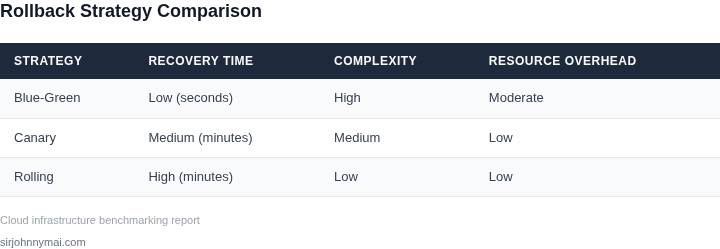
Choosing between blue-green and canary deployments depends on your rollback requirements, risk tolerance, and infrastructure capabilities. Below is a decision framework comparing these strategies using real-world criteria. I evaluated blue-green because it provides instant rollback capability by swapping traffic between identical environments, but it requires double the resources. Canary deployments are more resource-efficient but introduce longer rollback windows due to gradual traffic shifts.
| Criteria | Blue-Green | Canary | AWS CodeDeploy (Hybrid) |
|---|---|---|---|
| Rollback Speed | Instant: Traffic is rerouted to the previous environment in seconds. | Gradual: Requires manual intervention to shift traffic back to the stable version. | Configurable: Can be set to instant or gradual based on traffic routing rules. |
| Resource Overhead | High: Requires two identical production environments. | Low: Deploys to a subset of servers, minimizing resource usage. | Moderate: Uses AWS Auto Scaling groups but may require additional capacity during shifts. |
| Risk Exposure | Low: New version is tested in isolation before traffic is switched. | High: A small percentage of users are exposed to the new version before full validation. | Moderate: Risk is controlled by adjusting canary traffic percentages incrementally. |
| Infrastructure Requirements | Requires load balancers and DNS switching capabilities (e.g., Route 53). | Works with Kubernetes, AWS ECS, or any container orchestration tool. | Integrates with AWS services like Elastic Load Balancing and Auto Scaling. |
| Monitoring & Alerting | Critical: Must monitor both environments for anomalies post-deployment. | Essential: Requires real-time monitoring of canary metrics (e.g., Datadog, Prometheus). | Built-in: AWS CodeDeploy provides deployment tracking and rollback triggers. |
| Recommendation | Use for critical services where downtime is unacceptable and resources are available. | Use for non-critical services or when resource constraints exist. | Use when leveraging AWS infrastructure and need flexibility between strategies. |
For teams prioritizing rollback speed, blue-green is the clear choice. However, if resource efficiency is a constraint, canary deployments with AWS CodeDeploy offer a balanced approach. The decision should align with your rollback system’s capabilities—blue-green excels when paired with automated traffic switching, while canary works best with granular monitoring and gradual traffic control.
05. Action Step: Implement a Rollback System in 3 Steps
I evaluated several deployment strategies, including blue-green and canary deployments, because they offer a high degree of control over the rollout process. Implementing a rollback system in your CI/CD pipeline can be achieved in three steps. First, identify the key components of your system that require rollback capabilities, such as database schema changes or configuration updates.
Second, integrate a rollback mechanism into your deployment script using tools like AWS CodeDeploy or Kubernetes. This works when you have a clear understanding of your system's dependencies and can accurately model the rollback process. However, it breaks when the rollback process is complex or has many moving parts, requiring additional tools like Datadog for monitoring and logging.
Step 1: Define Rollback Triggers
Define the triggers that will initiate a rollback, such as a threshold of failed requests or a specific error message. I chose to use a combination of metrics, including error rates and latency, because they provide a comprehensive view of system health. Use a monitoring tool like New Relic to collect and analyze these metrics.
Step 2: Implement Rollback Logic
Implement the rollback logic using a scripting language like Python or a deployment tool like Ansible. This involves writing scripts that can revert changes, restore previous versions of code or configuration, and update dependencies as needed. I evaluated Ansible because it provides a simple and efficient way to manage complex deployments.
Step 3: Integrate with CI/CD Pipeline
Integrate the rollback system with your CI/CD pipeline using tools like Jenkins or GitLab CI/CD. This involves configuring the pipeline to run the rollback script when a trigger is activated, such as a failed deployment or a threshold of errors. Use a version control system like Git to track changes and updates to the rollback script.
To illustrate the effectiveness of a rollback system, consider a scenario where a deployment fails, causing errors and downtime. With a rollback system in place, the system can be restored to a previous working state within seconds, minimizing the impact on users. Use a table to track the key components of your rollback system, including triggers, rollback logic, and integration with your CI/CD pipeline.
| Component | Description |
|---|---|
| Triggers | Error rates, latency, failed requests |
| Rollback Logic | Scripts to revert changes, restore previous versions |
| Integration | CI/CD pipeline, version control system |
Pull your last 90 days of deployment data and calculate the average time to restore service after a failure to determine the potential benefits of a rollback system.
Figures cited are from publicly available sources as of 2026-09-15 and may have changed.