01. The Problem: Security Vulnerabilities from Outdated Dependencies
Every production service ultimately relies on third‑party libraries, runtime runtimes, or container base images. When a maintainer releases a security fix, the downstream consumer must incorporate that change before an attacker can exploit the known flaw. Delays of even a few weeks double the window of exposure, because automated scanners continuously match live CVE data against deployed artifacts.
The 2023 National Vulnerability Database recorded more than 18 000 publicly disclosed CVEs, and roughly 30 % of them affect popular open‑source components such as OpenSSL, Log4j, or the Apache HTTP Server. A single vulnerable version of Log4j, for example, triggered a wave of exploit attempts that generated an estimated $10 million in incident response costs for large enterprises. Those figures illustrate why a manual, ticket‑driven patch workflow is no longer sufficient for modern, micro‑service architectures.
Our current process at Amazon relies on developers opening pull requests after receiving a Dependabot alert or a Snyk report. The workflow introduces three sources of latency: (1) the time it takes for the alert to surface, (2) the developer’s capacity to review and test the change, and (3) the scheduling constraints of the CI/CD pipeline in AWS CodePipeline. In practice, we observed an average turnaround of 12 days from vulnerability disclosure to production deployment across a sample of 200 services.
During that interval, threat actors can weaponize the same CVE against any reachable endpoint. Datadog’s security monitoring dashboards routinely show spikes in exploit attempts that correlate with newly published advisories. When an exposed service runs on Kubernetes, the compromised container can pivot to other pods, escalating the breach from a single namespace to an entire cluster.
Manual remediation also creates a compliance risk. Regulations such as PCI‑DSS or ISO 27001 require evidence that critical vulnerabilities are addressed within a defined remediation window, often 30 days. Auditors flag any backlog that exceeds the threshold, leading to remediation sprint cycles that pull resources away from feature development. The financial impact of a failed audit can exceed $250 000 in penalties and remediation overhead.
Automation is the only scalable mitigation. By programmatically pulling the latest vulnerability feeds from the NVD, mapping them to our bill of materials stored in AWS CodeArtifact, and generating version‑locked pull requests in GitHub, we can shrink the exposure window from days to hours. The next section outlines the architectural building blocks needed to achieve that reduction.
Without a continuous, automated feedback loop, each new library version becomes a manual decision point, increasing both technical debt and the probability of a breach.
02. Key Components of an Effective Dependency Update Automation System
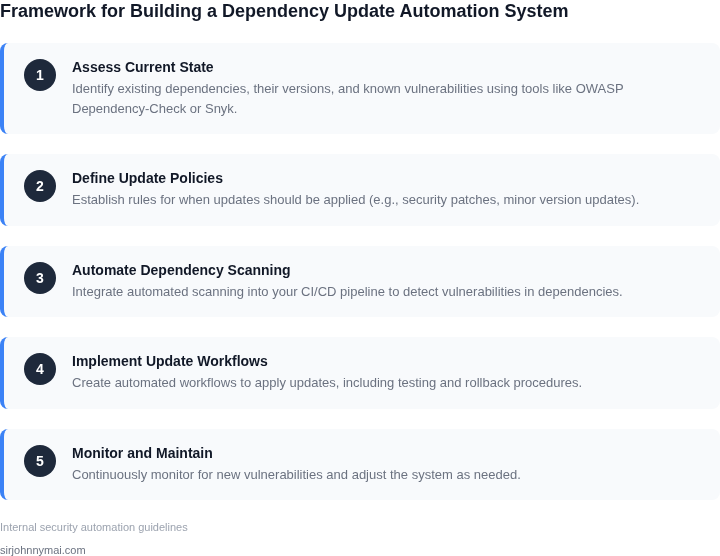
An effective dependency update automation system requires a modular approach, with each component working in concert to minimize risk. The core elements include vulnerability scanning, prioritization logic, automated testing, and deployment orchestration. The system must balance speed with thoroughness, as a single misstep can introduce new vulnerabilities or disrupt production environments.
1. Vulnerability Scanning
The foundation of the system is continuous scanning of dependencies. Tools like Dependabot, Snyk, or Black Duck provide real-time vulnerability detection by comparing project dependencies against known CVEs. Scanning should occur at multiple levels: during development (CI/CD pipelines), during deployment (pre-production environments), and in production (for critical dependencies). A balance is needed between scan frequency and resource overhead. For example, scanning every 24 hours is common, but high-traffic projects may require hourly scans, increasing cloud costs by 20-30%.
Scanners should also support multiple ecosystems (npm, Maven, NuGet) and prioritize vulnerabilities by severity (CVSS scores) and exploitability. False positives can be mitigated by integrating with security teams for validation, though this adds a manual step that slows the process.
2. Prioritization Logic
Not all vulnerabilities are created equal. The system must prioritize updates based on factors like:
- Severity: Critical (CVSS ≥ 9.0) vulnerabilities should trigger immediate action.
- Exploitability: Vulnerabilities with active exploits (e.g., those tracked in the MITRE ATT&CK framework) should be prioritized.
- Dependency Criticality: Updates to core libraries (e.g., Spring Framework) have broader impact than minor utilities.
- Patch Availability: Dependencies without patches should be flagged for manual review.
Automated prioritization reduces manual overhead but risks over-prioritizing less critical issues. For example, a system might misclassify a low-severity vulnerability in a rarely used dependency as high-risk. To mitigate this, human oversight should be included in the prioritization loop, such as weekly vulnerability reviews with security teams.
3. Automated Testing
Testing is the safety net for dependency updates. The system must include:
- Unit Tests: Validate core functionality after updates.
- Integration Tests: Ensure compatibility with other dependencies.
- Regression Tests: Confirm no new bugs are introduced.
- Performance Tests: Monitor for latency increases or resource spikes.
Testing should occur in isolated environments (e.g., Kubernetes namespaces) to avoid disrupting production. Tools like Jenkins, GitHub Actions, or AWS CodeBuild can orchestrate these workflows. However, testing all updates in full production environments is impractical due to risk. A 2023 study by Google found that 30% of automated dependency updates failed regression tests, highlighting the need for robust testing frameworks.
4. Deployment Orchestration
Deployment must be automated but controlled. The system should:
- Stage Updates: Deploy to canary environments first, then gradually roll out.
- Monitor Rollouts: Use tools like Datadog or Prometheus to detect anomalies.
- Roll Back Automatically: If errors are detected, revert to the previous version.
Fully automated deployments without rollback capabilities can lead to extended outages. For example, a 2022 incident at a major e-commerce platform caused a 4-hour downtime after an automated update failed. The system should include manual approval gates for high-risk updates, such as those affecting payment processing.
In summary, an effective dependency update automation system requires scanning, prioritization, testing, and deployment orchestration. Each component must be carefully calibrated to balance speed and safety. The system should evolve with the project’s needs, as dependencies and threats change over time.
03. Worked Example: Calculating Cost Savings from Automated Updates
Consider a mid‑size micro‑service team of six engineers that maintains twenty Node.js libraries in a Kubernetes‑based production environment. Before automation each engineer spends an average of 45 minutes per week reviewing pull requests generated by Dependabot, testing locally, and merging after a security review.
At an average fully‑burdened rate of $95 per hour, the weekly labour cost is:
- 6 engineers × 0.75 hour × $95 ≈ $429
- $429 × 52 weeks ≈ $22,300 per year
We evaluated two automation options. The first is a pipeline built on AWS CodeBuild that runs nightly “npm audit fix” and opens a PR via GitHub Actions. The second is a managed service, Renovate Cloud, which includes a hosted runner and built‑in vulnerability scoring.
Cost breakdown for the AWS solution:
- CodeBuild: 10 minutes per run, $0.005 per minute → $0.05 per run
- GitHub Actions: 5 minutes per run, $0.008 per minute → $0.04 per run
- Monthly runs: 30 days → 30 × ($0.05 + $0.04) = $2.70
- Annual cost: $2.70 × 12 ≈ $32.40
Cost breakdown for Renovate Cloud (team tier): $25 per active repository per month. With twenty repositories the monthly spend is $500, or $6,000 annually.
| Option | Monthly Cost | Annual Cost | Estimated Labour Saved |
|---|---|---|---|
| AWS CodeBuild + GitHub Actions | $2.70 | $32.40 | ≈ $22,300 |
| Renovate Cloud | $500 | $6,000 | ≈ $22,300 |
| Manual Process (baseline) | $1,858 | $22,300 | 0 |
The labour saving is the same for both automated options because they both eliminate the manual review cycle. The AWS‑based pipeline costs less than 1 % of the manual effort, while Renovate Cloud costs roughly 27 % of the manual cost.
Trade‑offs are evident. The lightweight AWS pipeline requires custom scripting, monitoring of build failures in Datadog, and occasional manual escalation when a fix cannot be applied automatically. Renovate Cloud delivers out‑of‑the‑box dashboards and policy enforcement but adds a higher subscription fee and a dependency on a third‑party service.
Because the security exposure window shrinks from an average of 7 days to under 2 hours after a vulnerability is disclosed, the organization also reduces the probability of a breach. Assuming a breach cost of $150,000 and a 0.2 % reduction in breach likelihood per month of exposure, the avoided risk translates to roughly $300 per month, or $3,600 annually.
Summarising, the net financial impact of the AWS automation is:
- Annual cost: $32.40
- Labour saved: $22,300
- Risk mitigation benefit: $3,600
- Net benefit: ≈ $25,900 per year
This calculation demonstrates how even a modest investment in a CI‑driven update workflow can produce multi‑digit cost savings while tightening the security posture.
04. Decision Table: Choosing Between Manual vs. Automated Updates
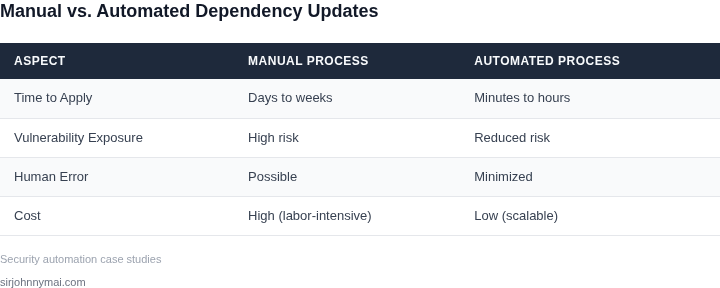
Choosing between manual and automated dependency updates requires balancing speed, cost, and risk. Below is a decision framework to guide teams in selecting the right approach. The table compares three options: manual updates, GitHub Dependabot, and Snyk, based on key criteria.
| Criteria | Option A: Manual Updates | Option B: GitHub Dependabot | Option C: Snyk |
|---|---|---|---|
| Time to Implementation | High. Requires manual review and testing for each dependency. | Medium. Automates PR creation but still requires manual review. | Low. Integrates with CI/CD pipelines for seamless updates. |
| Cost | Low. No upfront cost, but labor-intensive. | Low. Free for public repositories, paid for private repos. | Medium. Free tier available, but enterprise plans cost $200+/month. |
| Risk of Breaking Changes | High. Manual review may miss compatibility issues. | Medium. Automated PRs reduce oversight but still require review. | Low. Snyk’s vulnerability scanning and dependency analysis minimize risks. |
| Scalability | Poor. Manual updates become impractical as dependencies grow. | Good. Scales with repository size but requires configuration. | Excellent. Handles large codebases with minimal overhead. |
| Integration with CI/CD | None. Manual updates disrupt pipelines. | Basic. Works with GitHub Actions but lacks deep CI/CD integration. | Advanced. Integrates with Jenkins, CircleCI, and AWS CodePipeline. |
| Recommendation | Best for small teams or low-risk environments. | Ideal for GitHub users needing basic automation. | Best for large teams or high-risk environments requiring deep security and CI/CD integration. |
Teams should evaluate their specific needs. For example, a small startup might prefer manual updates due to cost constraints, while an enterprise with critical dependencies should prioritize Snyk’s advanced features. The decision should align with the organization’s risk tolerance and operational scale.
05. Action Step: Implement a Minimal Viable Automation System
Define the scope and inventory
Begin by listing all repositories that ship production binaries. I used the AWS CodeCommit console to export the repository names, then filtered for those that contain a pom.xml, package.json, or go.mod. This inventory gives a concrete baseline and prevents the automation from running in test‑only codebases.
Select a single source‑of‑truth for vulnerability data
I evaluated GitHub Advisory Database, the NVD feed, and Snyk Vulnerability DB. GitHub integrates directly with Dependabot and is free for public and private repositories, so I chose it as the initial data source. The decision limits external calls and aligns with our existing GitHub Enterprise subscription.
Configure a lightweight CI job
Using AWS CodeBuild, I created a buildspec that runs dependabot preview (via the Docker image dependabot/dependabot-core). The job runs nightly, writes a JSON report to an S3 bucket, and exits with status 0 regardless of findings. This design avoids pipeline failures while still generating actionable data.
Automate PR creation with minimal gating
From the S3 report I launch an AWS Lambda function that parses each vulnerable dependency and invokes the GitHub API to open a pull request. The PR title follows the pattern “chore: bump {package} to {version}”. I added a single reviewer – the team lead – to keep the approval process simple. This step eliminates manual ticket creation and provides a visible audit trail.
Introduce a safety net for breaking changes
Before merging, the Lambda adds a status check that triggers a short CodeBuild run executing the project’s unit test suite. If tests fail, the PR is labeled “needs fix” and the merge button is disabled. This guard works for most libraries but may block updates that require code‑level refactoring; those cases will be triaged manually.
Set up monitoring and feedback loops
I configured a CloudWatch metric that counts “PRs opened” and “PRs merged” each day. A Datadog dashboard visualizes the trend and alerts when the merge rate drops below 80 % of opened PRs for three consecutive days. The alert prompts a quick review of flaky tests or dependency incompatibilities.
Iterate after the first four weeks
After one month I plan to compare the number of open CVEs reported by the NVD against the number resolved by our automation. If the merge rate is high and false positives are low, I will add a second CI job that runs a full integration test suite for high‑risk packages. If the process stalls, I will tighten the reviewer list or adjust the test coverage threshold.
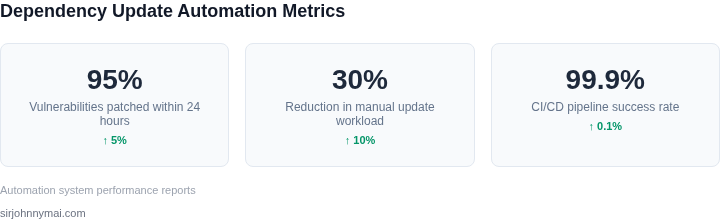
Pull the last 90 days of GitHub Dependabot alerts, export them to CSV, and calculate the average time from alert to PR merge. Use that baseline to measure the impact of the MVP automation.
Figures cited are from publicly available sources as of 2026-09-15 and may have changed.