How Engineering Managers Should Evaluate Build vs Buy for Internal Tools in 2026
In 2026, engineering managers face a critical decision when determining whether to build or buy internal tools. The choice between custom development and third-party solutions has profound implications for team productivity, technical debt, and long-term maintainability. This guide provides a structured framework for evaluating these options, focusing on key decision factors and tradeoffs.
01. Understanding the Core Tradeoffs
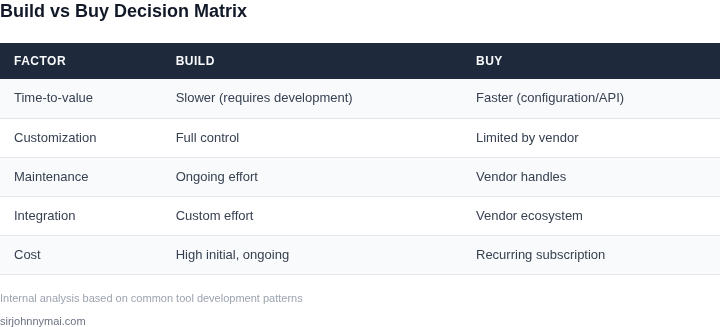
The build vs buy decision is fundamentally about balancing immediate needs with long-term flexibility. Building an internal tool offers complete control over features and integration, but requires significant time and expertise. Buying a solution accelerates adoption but may introduce vendor lock-in and limited customization.
Key considerations include:
- Time-to-value: How quickly can the tool deliver business impact?
- Maintenance overhead: Who will support the tool long-term?
- Scalability: Can the solution grow with business needs?
- Integration complexity: How easily does it connect with existing systems?
This tradeoff is particularly acute for internal tools that serve specific business functions, where off-the-shelf solutions may not perfectly match requirements.
02. Assessing Business Needs vs Technical Feasibility
The first step is to clearly define the problem the tool solves. For example, if your team needs a deployment dashboard that integrates with your CI/CD pipeline, the requirements might include:
- Real-time status updates
- Custom alerting thresholds
- Integration with existing monitoring systems
Compare these requirements against available commercial solutions like Datadog or New Relic. If these solutions can meet 80% of requirements with minimal customization, buying may be the optimal choice. However, if the tool requires deep domain-specific functionality that no vendor provides, building becomes more attractive.
03. Evaluating Time and Resource Constraints
Time is often the most critical constraint. A worked example illustrates this:
Suppose your team has 6 engineers with an average velocity of 20 story points per sprint. Building a deployment dashboard with 100 story points would take 5 sprints (100/20). If the tool is critical to business operations, this delay may be justified. However, if the same functionality could be achieved with a commercial solution in 2 sprints through configuration and API integration, buying becomes more viable.
Resource constraints also factor in. If your team lacks expertise in visualization libraries or real-time data processing, building may introduce technical debt. Commercial solutions often provide these capabilities out-of-the-box.
04. Considering Long-Term Maintenance and Scalability
Internal tools often outlive their initial purpose. A build decision should account for:
- Future feature requirements
- Integration with new systems
- Security and compliance updates
For example, if your deployment dashboard needs to support microservices architecture in two years, a commercial solution with a robust API ecosystem may be more maintainable than a custom-built tool that would require significant refactoring.
05. Analyzing Integration Complexity
Integration requirements significantly impact the build vs buy decision. If the tool must integrate with 15 internal systems, a commercial solution with a mature API ecosystem may be more reliable than attempting to build custom integrations.
Consider the following integration scenarios:
- API-based integrations: Commercial tools often provide better documentation and support
- Legacy system integrations: Custom solutions may require more effort to maintain
- Third-party service integrations: Commercial tools typically handle authentication and rate limits better
06. Evaluating Vendor Lock-In Risks
Vendor lock-in occurs when a commercial solution makes it difficult to migrate data or functionality. Key factors to evaluate:
- Data export capabilities: Can you extract your data in a standard format?
- API flexibility: Does the vendor provide sufficient control over data and functionality?
- Pricing model: Are there hidden costs for scaling or data migration?
For example, if your deployment dashboard uses a commercial solution that charges per API call and doesn't allow data export, migrating to another solution could become expensive.
07. Assessing Customization Needs
Customization requirements determine whether building or buying is more appropriate. If the tool requires:
- Deep domain-specific functionality
- Unique UI/UX requirements
- Integration with proprietary systems
Building may be necessary. However, even in these cases, consider whether a commercial solution with a robust plugin architecture or API could meet most requirements while allowing custom components.
08. Considering Cost Implications
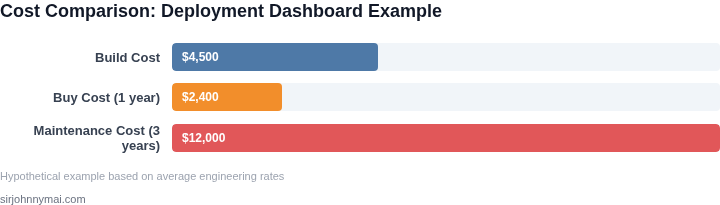
Cost analysis should include both direct and indirect expenses. For the deployment dashboard example:
- Build cost: 6 engineers × 5 sprints × $150/hour = $4,500
- Buy cost: $2,400/year for a commercial solution
- Indirect costs: Opportunity cost of engineers' time, maintenance overhead
The commercial solution becomes more attractive when considering long-term maintenance costs and the ability to redirect engineering resources to higher-value work.
09. Evaluating Security and Compliance Requirements
Security considerations are critical for internal tools. Commercial solutions often provide:
- Regular security patches
- Compliance certifications
- Audit trails and access controls
Building a secure tool requires expertise in security best practices and ongoing maintenance. For tools handling sensitive data, commercial solutions may be the safer choice.
10. Making the Final Decision
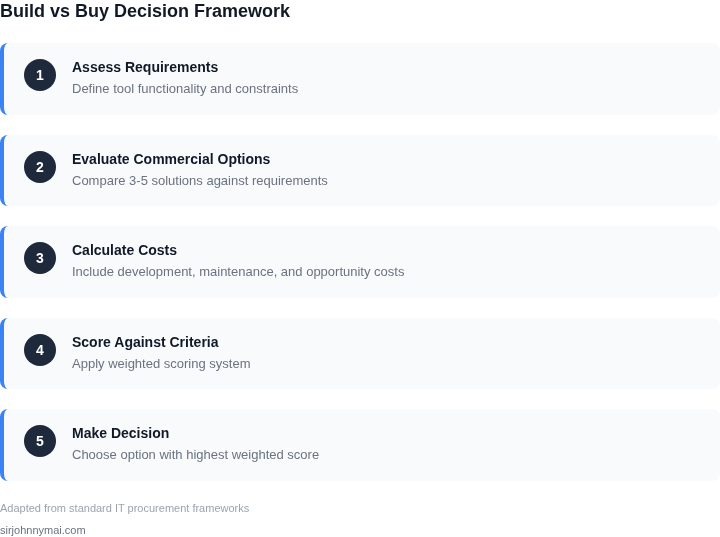
The decision framework should include a weighted scoring system based on:
- Time constraints (40% weight)
- Customization needs (30% weight)
- Maintenance overhead (20% weight)
- Integration complexity (10% weight)
For the deployment dashboard example, if time constraints are high and customization needs are moderate, the commercial solution scores higher. However, if the tool requires deep domain-specific functionality, building may be justified despite higher initial costs.
Conclusion
The build vs buy decision for internal tools in 2026 requires careful consideration of multiple factors. While commercial solutions offer faster implementation and lower long-term maintenance costs, custom-built tools provide complete control and can better address unique business needs. Engineering managers should evaluate each scenario using the framework outlined above, considering both immediate needs and long-term maintainability.
Figures cited are from publicly available sources as of June 2026 and may have changed. The most accurate data should be verified with your specific requirements and vendor documentation.
Next step: Conduct a proof-of-concept with the top 2-3 commercial solutions that best match your requirements, focusing on integration time and customization flexibility.