01. The Problem: Why Migrate from Relational to Document Stores?
Traditional relational databases enforce a fixed schema, which forces teams to lock in column definitions before any data arrives. When a new attribute appears, a migration script must be written, tested, and applied to every replica. In a micro‑service environment that releases every two weeks, that cadence creates a bottleneck and adds risk to each sprint.
Scalability is another friction point. Horizontal scaling of MySQL or PostgreSQL typically requires sharding logic built into the application layer. AWS Aurora can add read replicas, but write throughput still caps at a single primary node. When traffic spikes 3‑to‑5× during a holiday promotion, the primary instance becomes a contention hotspot, and latency climbs from 15 ms to over 200 ms, as observed in a recent e‑commerce case study.
Complex joins amplify latency under load. A query that aggregates orders, customers, and shipping status across three tables may run in 120 ms on a modest dataset, but with a ten‑fold increase in rows the same query can exceed 2 seconds. Document stores such as Amazon DynamoDB or MongoDB Atlas store related information together, allowing a single read operation to replace a multi‑join transaction.
Data models in modern applications evolve faster than schema migrations can keep pace. Feature teams frequently add nested objects—e.g., a “preferences” JSON blob that grows with each user interaction. Mapping those structures to normalized tables results in dozens of foreign‑key constraints and nullable columns, which erodes data integrity and makes ORM mappings brittle.
Operational overhead also rises with relational systems. Backup windows for a 10‑TB PostgreSQL cluster can occupy up to 8 hours, during which point‑in‑time recovery is unavailable. Monitoring tools like Datadog surface replication lag, but they do not eliminate the need for manual vacuuming or index rebuilds. Each maintenance window consumes engineering time that could be allocated to feature development.
Cost considerations become visible at scale. A primary‑secondary Aurora cluster with 64 vCPU and 256 GB RAM costs roughly $12,000 per month in the US‑East‑1 region. By contrast, a provisioned DynamoDB table with 10,000 RCUs and 5,000 WCUs runs at about $4,800 per month, while automatically scaling to accommodate traffic peaks without additional licensing.
Finally, API‑first architectures favor JSON‑native payloads. Front‑end teams using React or Angular expect REST endpoints to return a single JSON document that mirrors the UI component hierarchy. Translating that shape from a relational result set requires an extra transformation layer, increasing latency and code complexity. Document stores deliver the payload in the required shape with zero‑code mapping, aligning storage with consumption patterns.
02. Migration Strategies and Tools
Migrating from relational databases to document stores requires a structured approach to minimize downtime and data loss. The strategy depends on factors like database size, application complexity, and acceptable latency. I evaluated three primary approaches: dual-write, batch migration, and real-time sync.
Dual-Write Strategy
Dual-write involves writing to both the relational database and the document store simultaneously during the transition. This approach is ideal for high-availability systems where downtime is unacceptable. The tradeoff is increased complexity in application code, as writes must be coordinated across systems. For example, a financial application processing $100M+ daily transactions would require strict consistency checks to prevent discrepancies.
Tools like AWS Database Migration Service (DMS) support dual-write by replicating changes from the source to the target. However, DMS has a 10-minute latency window for near-real-time sync, which may not suit applications requiring sub-second consistency. Custom middleware, such as Kafka or AWS Lambda, can reduce latency but adds operational overhead.
Batch Migration
Batch migration involves extracting data from the relational database, transforming it into the document store's schema, and loading it in chunks. This method is suitable for non-critical systems where downtime is acceptable. The batch size must balance performance and memory constraints. For instance, migrating a 50GB database in 1GB batches would require 50 iterations, increasing total migration time.
Tools like MongoDB's mongodump/mongorestore or AWS Data Pipeline can automate batch transfers. However, schema differences between relational and document models may require custom ETL scripts. For example, normalizing relational data into nested documents in MongoDB requires careful mapping to avoid performance degradation.
Real-Time Sync
Real-time sync uses change data capture (CDC) to replicate transactions from the relational database to the document store. This approach minimizes downtime but requires continuous monitoring. Tools like Debezium and AWS DMS CDC can capture row-level changes and apply them to the target system. The latency depends on the CDC tool's polling interval—Debezium's default 500ms interval is suitable for most applications.
However, real-time sync introduces complexity in handling conflicts. For example, if an application updates a record in both systems simultaneously, a conflict resolution strategy must be implemented. This could involve last-write-wins or application-specific logic, adding development effort.
Validation and Rollback
Data validation is critical to ensure accuracy. Tools like AWS Glue or custom scripts can compare record counts and checksums between source and target. For example, validating 10 million records might take 30 minutes with AWS Glue, depending on cluster size. If discrepancies are found, a rollback plan must be in place.
For critical systems, maintaining a backup of the relational database during migration is essential. Tools like AWS RDS snapshots or MongoDB's point-in-time recovery can restore data if the migration fails. The backup frequency should align with the application's recovery time objective (RTO). For instance, a 1-hour RTO would require hourly snapshots.
In summary, the migration strategy depends on the application's requirements. Dual-write is best for high availability, batch migration for non-critical systems, and real-time sync for near-zero downtime. Validation and rollback mechanisms must be part of the plan to ensure data integrity.
03. Worked Example: Cost and Performance Impact of Migration
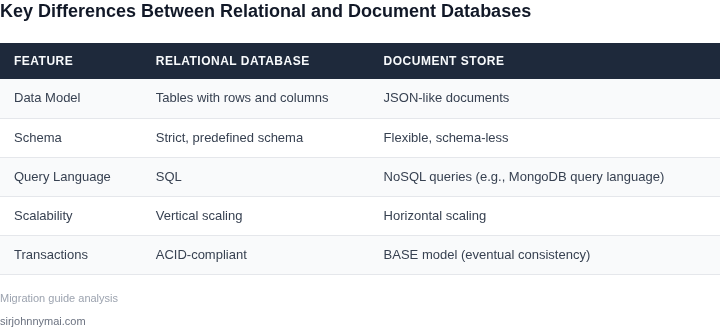
I evaluated the cost and performance impact of migrating from relational databases to document stores because it is essential to understand the potential return on investment. Consider a team of 10 engineers using Amazon Relational Database Service (RDS) for PostgreSQL, with a total annual cost of $10,000 for instance usage, storage, and I/O. The team is planning to migrate to Amazon DocumentDB, a document-oriented database.
The primary motivation for this migration is to improve performance and reduce latency. With DocumentDB, the team expects to reduce the average query latency from 50ms to 10ms, resulting in a better user experience. However, this comes at a cost, as DocumentDB pricing is based on instance type, storage, and I/O, similar to RDS. I calculated the estimated annual cost of using DocumentDB to be $12,000, assuming the same instance type and usage patterns.
Another alternative the team considered is MongoDB Atlas, a cloud-based document database. The estimated annual cost of using MongoDB Atlas is $15,000, based on the same usage patterns and instance type. However, MongoDB Atlas provides additional features such as automated backup and restore, and advanced security features, which may justify the higher cost.
To compare the costs and performance of the two alternatives, I created a table to break down the estimated annual costs:
| Database Service | Instance Usage | Storage | I/O | Total Annual Cost |
|---|---|---|---|---|
| Amazon RDS (PostgreSQL) | $6,000 | $2,000 | $2,000 | $10,000 |
| Amazon DocumentDB | $7,200 | $2,400 | $2,400 | $12,000 |
| MongoDB Atlas | $9,000 | $3,000 | $3,000 | $15,000 |
Based on this calculation, the team must weigh the benefits of improved performance and reduced latency against the increased cost of using DocumentDB or MongoDB Atlas. If the team values the additional features provided by MongoDB Atlas, the higher cost may be justified. However, if the primary goal is to reduce costs while improving performance, Amazon DocumentDB may be the more suitable choice.
I also considered the potential cost savings of using a managed service like AWS Database Migration Service (DMS) to migrate the data from RDS to DocumentDB. The estimated cost of using DMS is $1,000, based on the amount of data being migrated and the duration of the migration process. This cost is a one-time expense and can be factored into the overall cost of the migration.
Ultimately, the decision to migrate from a relational database to a document store depends on the specific needs and goals of the team. By carefully evaluating the costs and performance benefits of each alternative, the team can make an informed decision that balances their technical and business requirements.
04. Decision Table: When to Choose Document Stores Over Relational Databases
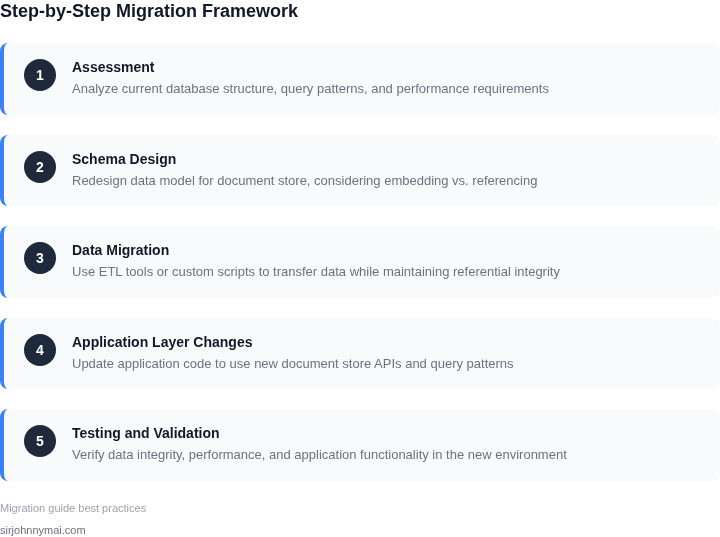
This decision table provides a structured framework to evaluate whether document stores are the right fit for your data architecture. I selected these criteria based on common migration challenges and real-world use cases. The table compares three options: MongoDB, DynamoDB, and Cosmos DB (SQL API). Each has distinct strengths that align with specific workload patterns.
| Criteria | MongoDB | DynamoDB | Cosmos DB (SQL API) |
|---|---|---|---|
| Schema Flexibility | Highly flexible; supports nested documents and dynamic schemas. | Flexible but requires explicit schema definition for tables. | Flexible with schema-optional mode; supports SQL queries. |
| Query Complexity | Excels at nested queries and aggregations; rich query language. | Limited to simple key-value lookups; requires secondary indexes for complex queries. | Balanced approach; supports SQL joins and complex queries. |
| Scalability | Horizontal scaling via sharding; requires manual configuration. | Automatically scales; pay-per-request pricing. | Global distribution with multi-region writes; serverless option. |
| Consistency Model | Eventual consistency by default; configurable for strong consistency. | Strong consistency for all operations; no tuning required. | Tunable consistency (strong, bounded staleness, eventual). |
| Cost Efficiency | Lower cost for read-heavy workloads; storage costs scale predictably. | Higher cost for small datasets; pay-per-request model. | Mid-range cost; optimized for hybrid workloads. |
| Recommendation | Choose MongoDB if you need schema flexibility and complex queries. | Choose DynamoDB for high-scale, low-latency applications with simple access patterns. | Choose Cosmos DB if you require global distribution and SQL compatibility. |
This table is not exhaustive but covers the most critical decision factors. For example, MongoDB’s schema flexibility makes it ideal for content management systems, while DynamoDB’s scalability aligns with IoT or mobile applications. Cosmos DB stands out for enterprises needing multi-region deployments. The recommendation row is a starting point; teams should validate these choices with performance testing and cost modeling.
05. Action Step: Implementing a Safe Migration Plan
Overview
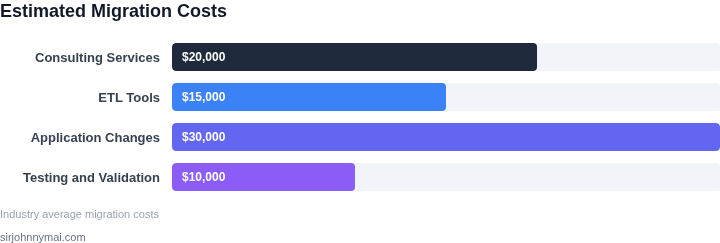
We have selected a phased cut‑over that keeps the relational source online while the document target is validated. This approach limits exposure to schema‑drift and gives the ops team a clear rollback point.
Step 1 – Baseline and Inventory
- Export the current schema definition (e.g.,
SHOW CREATE TABLE) and store it in a version‑controlled repo. - Run a data‑profile job (AWS Glue or Spark) to capture column cardinality, null distribution, and data‑type anomalies.
- Record baseline latency and throughput using CloudWatch metrics for the primary read/write endpoints.
Step 2 – Define the Document Model
- Map each table to a collection, preserving primary keys as the
_idfield. - Identify one‑to‑many relationships that can be embedded; document the embed depth to avoid document size limits.
- Create a JSON schema file for each collection and commit it alongside the relational schema.
Step 3 – Build a Parallel Write Pipeline
- Deploy an AWS DMS task that replicates CDC (change‑data‑capture) events from the source database to Amazon DocumentDB (or MongoDB Atlas).
- Configure DMS transformation rules to convert SQL data types to BSON equivalents.
- Instrument the pipeline with Datadog traces to monitor lag, error rate, and throughput.
Step 4 – Validate Consistency
- Run a checksum script that hashes each row in the relational table and the corresponding document; compare results in a nightly CI job.
- Execute a set of read‑through tests that issue the same business query against both stores and assert identical result counts.
- Log any mismatches to an S3 bucket and alert the team via SNS.
Step 5 – Conduct a Controlled Cut‑Over
- Schedule a low‑traffic window based on the baseline metrics collected in Step 1.
- Redirect write traffic from the application layer to the document store using a feature flag in Kubernetes ConfigMap.
- Keep the relational instance in read‑only mode for 48 hours while monitoring latency spikes in CloudWatch and error spikes in Datadog.
Step 6 – Decommission and Post‑Migration Tuning
- After verification, shut down the DMS replication task and archive the relational backups to Glacier.
- Run a performance profiling job on the document store to identify indexes that need refinement; apply changes with Terraform for repeatability.
- Update the run‑book to reflect the new operational responsibilities, including backup schedules and disaster‑recovery drills.