01. Why zero‑trust now?
Enterprise networks have shifted from perimeter‑centric designs to hybrid clouds, remote work, and edge devices. Each new node expands the attack surface, rendering traditional “castle‑wall” defenses insufficient. Studies show that the average cost of a data breach exceeds $4 million, and the time to detect a breach often exceeds 200 days.
Zero‑trust reframes security as continuous verification of identity, device health, and context, regardless of location. The model aligns with compliance frameworks that demand least‑privilege access and auditability. Implementing it incrementally avoids the risk of a massive, disruptive overhaul.
02. Defining the scope – avoid boiling the ocean
Start by cataloguing high‑value assets: production APIs, privileged admin consoles, and customer data stores. Map the data flows that touch these assets and identify the actors—users, services, and third‑party integrations.
Limit the first wave to a single business unit or a set of micro‑services that share a common trust boundary. This “minimum viable zero‑trust” (MVZT) provides measurable outcomes while keeping change management manageable.
03. Core pillars and minimal viable controls
The NIST Zero Trust Architecture identifies six pillars: identity, device, network, application, data, and visibility. For an MVZT, focus on three controls that deliver the highest risk reduction per effort.
- Identity verification: Enforce multi‑factor authentication (MFA) and adopt adaptive risk‑based policies using Azure AD Conditional Access or AWS IAM Identity Center.
- Device posture: Require endpoint health checks through Microsoft Defender for Endpoint or CrowdStrike, rejecting connections from devices lacking encryption or up‑to‑date patches.
- Least‑privilege network access: Replace flat VPNs with software‑defined perimeters such as Zscaler Private Access or Palo Alto Prisma Access, granting access only to the required service ports.
04. Step‑by‑step migration plan
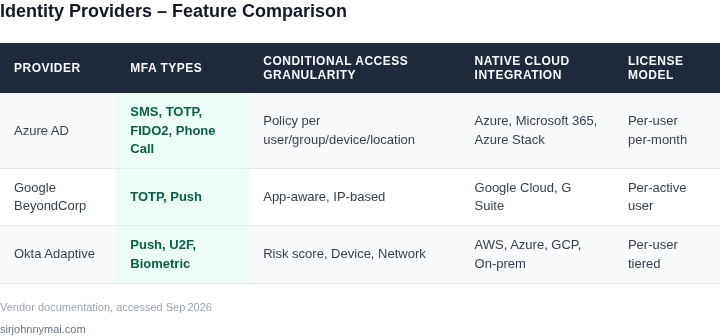
04.1 Assess and inventory
Run automated discovery tools (e.g., AWS Config, Azure Resource Graph) to capture all assets and their inter‑dependencies. Export the data into a CMDB for change tracking.
04.2 Pilot identity controls
Enable MFA for all accounts in the pilot unit, leveraging existing SSO providers. Record the authentication success rate and the number of blocked credential‑stuffing attempts.
04.3 Deploy device posture checks
Integrate the chosen endpoint platform with the identity provider via certificate‑based authentication. Configure a policy that denies access for devices with a compliance score below 80 %.
04.4 Introduce software‑defined perimeters
Map each service in the pilot to a connector in the chosen perimeter solution. Route traffic through the connector and enforce zero‑trust policies at the application layer.
04.5 Validate and iterate
Collect telemetry from CloudTrail, Azure Monitor, and the perimeter solution. Compare the baseline incident count with post‑deployment numbers to confirm risk reduction.
05. Worked example: migrating a web application
The finance team runs a Node.js API on Amazon ECS, fronted by an ALB, and stores data in Amazon RDS for PostgreSQL. The API is accessed by internal analysts via a corporate VPN.
Step 1 – Identify the trust boundary: the API endpoint and the RDS instance. Step 2 – Shift identity to AWS IAM Identity Center with MFA enforced for all IAM users. Step 3 – Add device posture by integrating Amazon GuardDuty findings with the identity provider; any device flagged with “unusual port scanning” is denied access.
Step 4 – Replace the VPN with Zscaler Private Access. Create an app connector for the ALB, configure a rule that permits only GET/POST on /transactions for the finance group. Step 5 – Test access: an analyst on a corporate‑managed laptop receives a token, the device health check passes, and the request is allowed. The same analyst on a personal laptop fails at the posture check.
Cost calculation (Q3 2026 pricing): ZPA connector costs $0.05 per active user per hour; with 30 analysts, monthly cost ≈ $1,080. MFA via AWS IAM Identity Center is free for up to 50,000 monthly active users. GuardDuty adds $1.00 per 1 M events; the API generates roughly 500 k events, adding $0.50 per month. The total incremental cost for the pilot is under $1,200 per month, while the organization eliminates the $12 k annual VPN license and reduces breach exposure.
06. Tooling choices – comparison
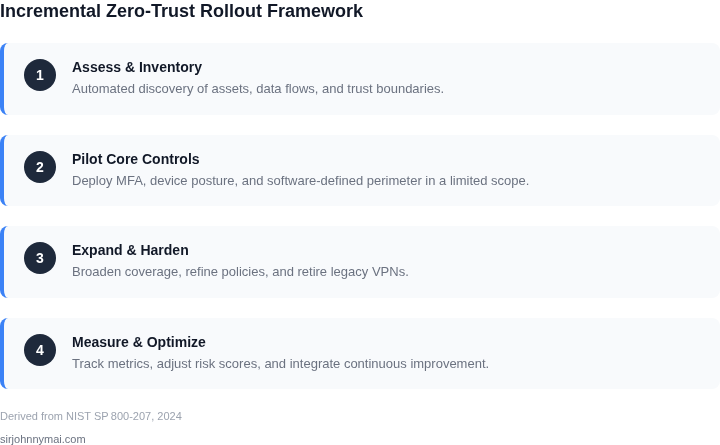
Multiple vendors address the three MVZT controls. Table 1 (see visual) contrasts Azure AD Conditional Access, Google BeyondCorp, and Okta Adaptive MFA across policy granularity, integration depth, and licensing model.
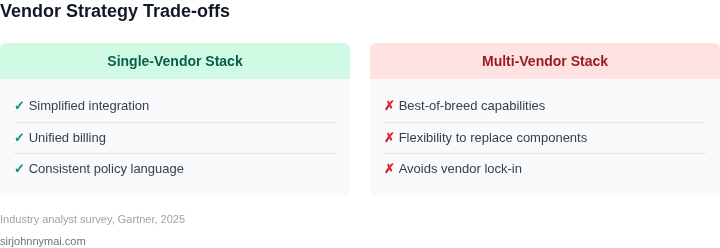
Choosing a single provider for identity reduces integration overhead, but mixing solutions can leverage best‑in‑class features (e.g., Okta’s extensive app catalog combined with Azure’s Conditional Access). Align the decision with existing cloud contracts to avoid duplicate licensing.
07. Measuring success – metrics
Define leading indicators that capture security posture improvement without waiting for breach data. Recommended metrics include:
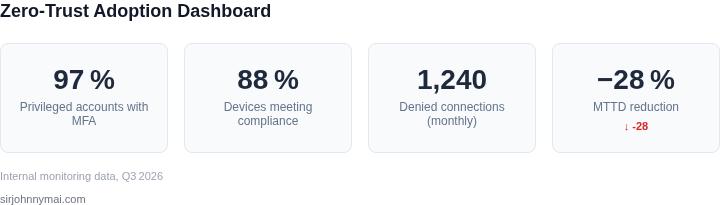
- Percentage of privileged accounts protected by MFA (target > 95 %).
- Average device compliance score (target ≥ 85 %).
- Number of denied connections per month (baseline = 0, aim for progressive increase as policies tighten).
- Mean time to detect (MTTD) for anomalous access attempts (goal: reduce by 30 % within six months).
Track these metrics in a dashboard that aggregates CloudWatch logs, Azure Sentinel alerts, and perimeter solution telemetry. Correlate the trend with the reduction in VPN usage and the cost saved from de‑provisioned legacy infrastructure.
08. Common pitfalls and mitigations
Over‑engineering the policy matrix leads to “policy fatigue,” where legitimate users experience frequent blocks. Mitigate by piloting policies with a small user group and using risk‑based scoring to prioritize high‑impact rules.
Relying solely on identity without device verification creates a “soft token” problem. Pair MFA with continuous device posture checks to maintain trust after the initial login.
Neglecting legacy applications can leave blind spots. Wrap unsupported workloads in a reverse‑proxy that enforces zero‑trust decisions, or gradually refactor them to cloud‑native services.
09. Next step
Schedule a two‑hour workshop with the finance, security, and networking leads to map the pilot assets, agree on the three core controls, and assign owners for each migration task.
Disclaimer: Figures cited are from publicly available sources as of September 13 2026 and may have changed.