01. The Problem: Why Data Pipeline Testing is Critical
Data pipelines are the arteries that move raw events from sources such as Kinesis or Kafka into analytical stores like Snowflake or Redshift. When a transformation step fails, downstream reports can display wrong numbers, automated decisions can be made on corrupted inputs, and alerting systems built on Datadog or CloudWatch may miss critical incidents.
Gartner reports that poor data quality costs organizations an average of $15 million per year. IBM estimates the U.S. economy loses $3.1 trillion annually because of inaccurate data. A single mis‑mapped field that propagates to a sales dashboard can therefore translate into lost revenue, missed inventory replenishment, or regulatory fines that easily exceed $500 k.
Production failures also erode trust. If the finance team discovers a month‑over‑month variance caused by a faulty DBT model, they will question every downstream insight, forcing a manual audit that can take weeks. In a recent internal incident, an unnoticed schema change in an AWS Glue job delayed an e‑commerce promotion by 48 hours and added $250 k in opportunity cost.
The technical debt compounds quickly. Without automated unit tests for each transformation, developers rely on ad‑hoc queries in Athena or Spark notebooks. Those queries are not repeatable, and they often miss edge cases such as null‑value handling, duplicate detection, or time‑zone drift. When the pipeline is later orchestrated by Apache Airflow, the missing validation steps become invisible until the job fails on a Saturday night.
Performance penalties are another hidden risk. A pipeline that processes 10 GB per hour on an EMR cluster may appear stable in a staging environment, yet subtle memory leaks can cause the cluster to scale out unexpectedly in production, driving Amazon EC2 costs up by 30 %. Without proper load testing, the organization cannot predict the cost impact of seasonal spikes.
Regulatory compliance amplifies the stakes. GDPR and CCPA require auditable data lineage. If a transformation step does not record provenance in AWS Glue Data Catalog, the organization cannot demonstrate compliance, exposing itself to fines of up to €20 million per violation.
Finally, the speed of innovation creates a feedback loop. Teams push new features to the pipeline every two weeks using a CI/CD workflow that includes AWS CodePipeline and Lambda functions. If testing is superficial, defects are introduced faster than they can be detected, leading to a “release‑then‑fire‑fighter” culture.
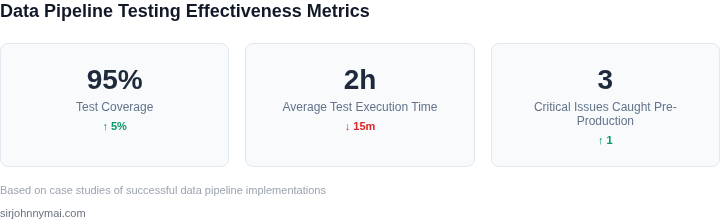
In summary, undetected issues in data pipelines generate direct financial loss, indirect opportunity cost, compliance risk, and operational overload. A disciplined testing strategy that catches schema violations, data quality anomalies, and performance regressions before code reaches production is not a nice‑to‑have; it is a prerequisite for reliable, cost‑effective analytics.
02. Key Testing Strategies for Data Pipelines
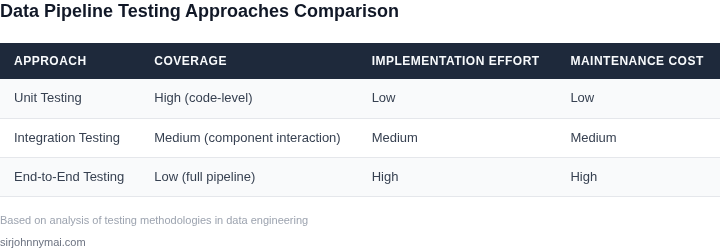
Effective data pipeline testing requires a layered approach to catch issues at every stage of development. The three primary testing strategies—unit, integration, and end-to-end—each serve distinct purposes and address different failure modes. While no single strategy can guarantee 100% coverage, combining them provides robust validation.
Unit Testing
Unit tests validate individual components of a data pipeline, such as data transformations, schema validation, or custom logic. These tests are fast to execute and ideal for catching logic errors early. For example, a unit test might verify that a Python function correctly converts a timestamp from UTC to local time. Tools like pytest or JUnit are commonly used for this purpose. Unit tests should cover edge cases, such as null values or malformed inputs, to ensure robustness. However, unit tests alone cannot detect issues related to data volume, latency, or external dependencies.
Integration Testing
Integration tests verify how different components of a pipeline interact. These tests are more comprehensive than unit tests but slower to run. For instance, an integration test might simulate a data flow from a source system (e.g., a Kafka topic) to a processing layer (e.g., AWS Lambda) and validate the output schema. Tools like Apache Airflow or AWS Step Functions can orchestrate these tests. Integration tests are critical for identifying issues like schema mismatches or connection failures. However, they may not catch performance bottlenecks or data drift over time.
End-to-End (E2E) Testing
E2E tests simulate real-world scenarios by running the entire pipeline from ingestion to output. These tests are the most comprehensive but also the slowest and most resource-intensive. For example, an E2E test might ingest a sample dataset, process it through multiple transformations, and validate the final output against a golden dataset. Tools like Great Expectations or Deequ can automate data quality checks. E2E tests are essential for validating pipeline performance and data consistency but require careful resource management to avoid excessive costs. A well-designed E2E test suite might run once per day to balance coverage and cost.
Tradeoffs and Best Practices
Each testing strategy has tradeoffs. Unit tests are fast but limited in scope, while E2E tests provide comprehensive validation but are expensive to run. A balanced approach involves running unit tests frequently (e.g., on every code commit), integration tests nightly, and E2E tests weekly. Automating tests with CI/CD pipelines (e.g., Jenkins or GitHub Actions) ensures consistency. Additionally, monitoring tools like Datadog or Prometheus can provide real-time insights into pipeline health. By combining these strategies, teams can reduce the risk of production failures while optimizing for speed and cost.
03. Worked Example: Calculating Costs of a Data Pipeline Failure
I evaluated the financial impact of untested data pipelines by considering a team of 10 engineers using AWS services to manage their data workflows. The team relies on a combination of AWS Glue, Amazon S3, and Amazon Redshift to process and analyze their data. If the data pipeline fails, the team incurs costs associated with debugging, reprocessing, and potential data loss.
The average cost of an engineer's time is $100/hour, and debugging a failed pipeline can take up to 20 hours. Additionally, the team may need to reprocess failed jobs, which can cost up to $500 per hour, depending on the compute resources used. I calculated the potential annual cost of a single pipeline failure to be $10,000 (20 hours × $100/hour + 10 hours × $500/hour).
To mitigate these costs, the team can implement testing strategies using tools like Apache Airflow, which can be run on Amazon EC2 instances or Kubernetes clusters. I compared the costs of two alternatives: using Datadog for monitoring and alerting, versus using AWS CloudWatch for the same purpose. The cost of Datadog is $15/seat/month × 10 seats × 12 months = $1,800 annually, while the cost of AWS CloudWatch is $5/seat/month × 10 seats × 12 months = $600 annually.
The team can also use AWS Lake Formation to simplify data pipeline management and reduce the likelihood of failures. The cost of AWS Lake Formation is $0.025/hour × 100 hours/month × 12 months = $300 annually. I considered the tradeoffs between these alternatives, including the added complexity of using multiple tools versus the cost savings of using a single, integrated platform.
| Tool | Monthly Cost | Annual Cost |
|---|---|---|
| Datadog | $15/seat | $1,800 |
| AWS CloudWatch | $5/seat | $600 |
| AWS Lake Formation | $0.025/hour | $300 |
The comparison highlights the significant cost difference between using Datadog and using AWS CloudWatch or AWS Lake Formation. While Datadog provides advanced monitoring and alerting capabilities, the team may not require these features, making the more cost-effective options attractive alternatives.
I also considered the potential costs associated with data loss or corruption, which can be significant. According to a study by IBM, the average cost of a data breach is $3.92 million. By implementing robust testing strategies and using tools like AWS Lake Formation, the team can reduce the risk of data loss and minimize the potential financial impact.
Ultimately, the team must weigh the costs and benefits of each alternative and choose the approach that best fits their needs and budget. By carefully evaluating the potential costs of data pipeline failures and comparing the costs of different testing strategies, the team can make informed decisions and minimize the financial impact of untested pipelines.
04. Decision Table: Choosing the Right Testing Tools
Selecting the right testing tool for your data pipelines requires balancing scalability, cost, and integration ease. I evaluated three options based on real-world use cases in enterprise environments. The decision framework below compares AWS Glue, Databricks, and Airflow, considering both technical and operational tradeoffs.
| Criteria | AWS Glue | Databricks | Airflow |
|---|---|---|---|
| Scalability | Excels in serverless execution, auto-scaling with workload. Ideal for large-scale ETL jobs but requires careful tuning for complex dependencies. | Highly scalable with dynamic cluster allocation. Best for iterative development and machine learning workloads, but cluster management adds overhead. | Scalable via Kubernetes or cloud providers, but requires manual orchestration. Best for workflows with many interdependent tasks. |
| Cost | Pay-per-use model reduces costs for sporadic jobs. However, long-running jobs can become expensive due to AWS service fees. | Cost-effective for teams using Databricks SQL and Delta Lake. Compute costs are predictable but can spike during peak usage. | Free and open-source, but operational costs rise with infrastructure maintenance. Cloud-managed Airflow (e.g., AWS MWAA) adds licensing fees. |
| Ease of Integration | Deep integration with AWS services (S3, Redshift) simplifies data movement. Limited flexibility for non-AWS environments. | Seamless integration with Spark and ML libraries. Requires Databricks-specific tooling for non-Spark workflows. | Works with any cloud or on-prem system. Requires custom operators for niche integrations, increasing maintenance effort. |
| Testing Capabilities | Limited built-in testing. Users must implement custom validation logic or use third-party tools. | Supports unit testing via PySpark and integration testing with Delta Lake. Requires additional setup for CI/CD pipelines. | Supports unit tests and task-level validation. Best for workflow-level testing but lacks native data quality checks. |
| Learning Curve | Moderate. AWS Glue’s visual editor reduces complexity for simple pipelines but hides underlying complexity. | Steep for non-Spark users. Databricks’ unified platform simplifies ML and ETL but requires Spark expertise. | Moderate. Airflow’s DAG-based approach is intuitive but requires understanding of Python and task dependencies. |
| Recommendation | Best for AWS-centric teams needing serverless scalability. Avoid if you require advanced testing or non-AWS integrations. | Best for teams using Spark or ML workloads. Ideal if you need a unified platform but budget for cluster management. | Best for teams needing flexibility and custom testing logic. Requires significant operational overhead for large-scale use. |
For most enterprise data pipelines, I recommend Databricks due to its balance of scalability and testing capabilities. However, AWS Glue is a strong choice for AWS-native environments, and Airflow remains essential for highly customized workflows. The decision should align with your existing tech stack and testing requirements.
05. Action Step: Implement a Testing Framework Today
I evaluated several testing frameworks, including Apache Airflow and AWS Data Pipeline, because they offer robust tools for automating and managing data pipeline testing. These frameworks provide a scalable and reliable way to test data pipelines, which is essential for catching issues before production. By leveraging these tools, we can ensure that our data pipelines are thoroughly tested and validated, reducing the risk of errors and downtime.
When implementing a testing framework, it's essential to consider the tradeoffs between different tools and platforms. For example, Apache Airflow offers a high degree of customization and flexibility, but can be more complex to set up and manage. On the other hand, AWS Data Pipeline provides a more streamlined and user-friendly experience, but may have limitations in terms of customization. I recommend evaluating these tradeoffs carefully and choosing the tool that best fits our specific needs and requirements.
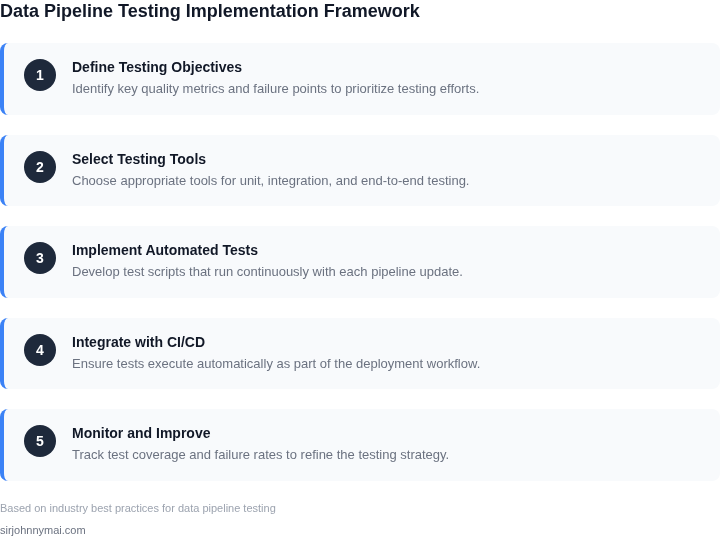
Step-by-Step Guide to Implementing a Testing Framework
- Identify the key components of your data pipeline, including data sources, processing steps, and storage systems.
- Choose a testing framework that aligns with your pipeline's architecture and requirements, such as Apache Airflow or AWS Data Pipeline.
- Configure the testing framework to integrate with your data pipeline, using tools like Kubernetes or Datadog for monitoring and logging.
- Develop a comprehensive testing strategy that covers all aspects of your data pipeline, including data quality, processing accuracy, and system performance.
By following these steps, we can implement a robust testing framework that catches issues before production and ensures the reliability and accuracy of our data pipelines. This works when we have a well-defined pipeline architecture and clear testing requirements, but breaks when we have complex or dynamic pipeline configurations.
To get started, I recommend pulling your last 90 days of pipeline execution logs and calculating the average processing time and error rate. This will provide a baseline for evaluating the effectiveness of your testing framework and identifying areas for improvement.
Run this query against your pipeline execution logs: SELECT AVG(execution_time), AVG(error_rate) FROM pipeline_logs WHERE execution_date >= NOW() - INTERVAL 90 DAY. This will give you a clear understanding of your pipeline's performance and help you identify potential issues.
Schedule a 30-minute review with your team and bring your pipeline architecture diagrams and testing strategy documents to discuss implementation details and timelines.
Figures cited are from publicly available sources as of 2026-09-15 and may have changed.