A practical framework for migrating from on-premise to cloud without breaking your team
Migrating from on-premise to cloud is not just a technical exercise—it’s a cultural transformation. Teams often resist cloud migration because they fear disruption, lack visibility into outcomes, or underestimate the effort required. This framework addresses these concerns by breaking the migration into manageable phases, ensuring minimal disruption while maximizing benefits.
01. Assess your readiness
Before committing to cloud migration, conduct a thorough assessment of your current infrastructure. This includes:
- Inventorying all applications, dependencies, and data flows
- Mapping out network topology and security controls
- Evaluating performance baselines and SLAs
Use tools like AWS Migration Hub or Azure Migrate to automate discovery. The goal is to create a detailed blueprint of your current state, including any legacy systems that may need special handling.
02. Define migration goals
Cloud migration should align with business objectives. Common goals include:
- Cost optimization (reducing CapEx)
- Scalability improvements
- Enhanced security and compliance
For example, if your team is running a monolithic application on-premise, migrating to a serverless architecture in AWS Lambda could reduce costs by 40% while improving scalability. However, this requires refactoring, which may not be feasible for all teams.
03. Choose the right migration strategy
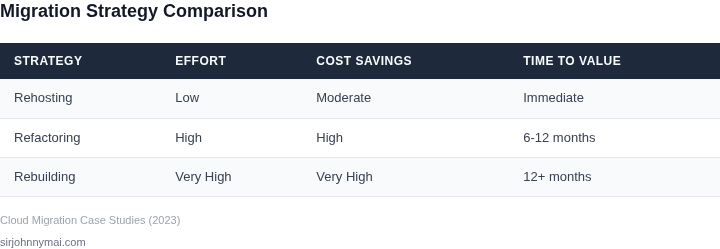
There are three primary migration strategies:
- Rehosting (Lift-and-shift): Move applications as-is to the cloud. Fastest but offers least cloud benefits.
- Refactoring (Re-architecting): Optimize applications for cloud-native features like auto-scaling.
- Rebuilding: Replace legacy systems with cloud-native alternatives.
Rehosting is often the safest choice for teams resistant to change, but it may not fully realize cloud benefits. Refactoring requires more effort but can deliver significant long-term value.
04. Plan for data migration
Data migration is one of the most critical and often overlooked aspects of cloud migration. Key considerations:
- Data volume and transfer speed requirements
- Database compatibility (e.g., SQL Server to Amazon RDS)
- Downtime tolerance
For a 1TB database, AWS Database Migration Service (DMS) can handle the transfer in 24 hours with minimal downtime. However, complex schemas may require additional validation steps.
05. Select the right cloud provider
Choosing the right cloud provider depends on:
- Existing vendor lock-in
- Regulatory requirements
- Team expertise
If your team is already using Microsoft Azure, migrating to AWS may require retraining. Hybrid approaches (using both clouds) can mitigate this risk.
06. Implement a phased approach
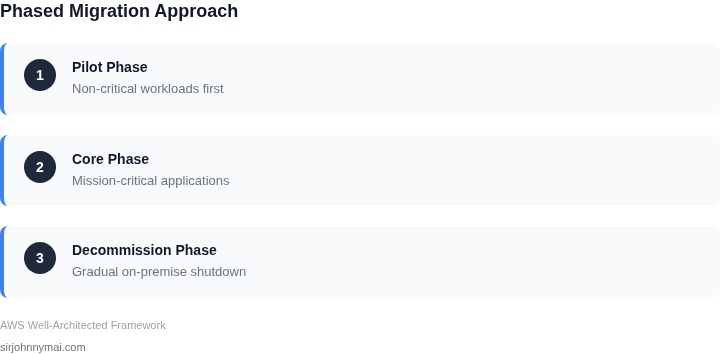
Migrating everything at once is risky. Instead, use a phased approach:
- Start with non-critical workloads
- Migrate core applications in subsequent phases
- Gradually decommission on-premise infrastructure
This reduces risk and allows teams to adapt without major disruptions. For example, a financial services company might migrate reporting tools first, followed by transaction processing systems.
07. Address security and compliance
Cloud migration introduces new security challenges:
- Shared responsibility model (cloud provider handles infrastructure, customer handles data)
- Identity and access management (IAM) configuration
- Compliance certifications (SOC 2, ISO 27001)
Use cloud-native security tools like AWS GuardDuty or Azure Security Center to monitor threats. Ensure compliance requirements are met before migration.
08. Train and upskill your team
Cloud migration requires new skills. Key areas to focus on:
- Cloud architecture best practices
- DevOps and CI/CD pipelines
- Cost optimization techniques
Consider partnering with cloud training providers like A Cloud Guru or Pluralsight. Internal workshops can accelerate adoption.
09. Monitor and optimize
Post-migration, continuously monitor:
- Performance metrics (latency, throughput)
- Cost trends
- Security events
Use tools like AWS Cost Explorer or Azure Cost Management to track spending. Adjust configurations based on real-world usage patterns.
10. Plan for rollback
Even with careful planning, issues may arise. Have a rollback plan in place:
- Backup procedures
- Documented recovery steps
- Communication protocols for stakeholders
Testing the rollback process before migration ensures readiness. For example, a healthcare provider might simulate a data corruption scenario to validate recovery procedures.
Conclusion
Migrating from on-premise to cloud is a strategic decision, not just a technical one. By following this framework—assessing readiness, defining clear goals, and executing in phases—teams can minimize disruption while maximizing benefits. The key is to balance speed with stability, ensuring the migration aligns with business objectives without overpromising.
Next step: Schedule a workshop with your team to identify the highest-priority applications for initial migration. Use the assessment data from Section 01 to prioritize workloads based on risk and business impact.
Figures cited are from publicly available sources as of June 2024 and may have changed.