01. The Problem: Why AI-Powered Internal Tools Can Derail Your PM Focus
When a product team decides to embed generative‑AI into an internal workflow, the first instinct is to prototype a single use case. The prototype often lands on AWS SageMaker for model training, Lambda for inference, and an internal Slack bot for delivery. Those choices solve the immediate need, but they also introduce a stack that the team must own, monitor, and evolve.
Ownership expands quickly because AI components require data pipelines, model versioning, and observability that are not typical of a feature‑focused roadmap. A data ingestion job feeding DynamoDB must be kept in sync with the model’s schema; a drift detection alert in Datadog becomes a ticket the PM must prioritize. The result is a growing list of “infrastructure” stories that compete with core product milestones.
Scope creep appears when the initial tool proves valuable to adjacent groups. The finance team asks for a similar expense‑approval assistant, the HR team requests an interview‑summary bot, and the original PM feels pressure to reuse the same SageMaker endpoint rather than start a fresh project. Each request adds new data sources, compliance checks, and security reviews, stretching the team’s bandwidth.
The resource drain is measurable. In a recent internal AI rollout, the engineering effort for model monitoring grew from 5% to 25% of sprint capacity within three months. The same team reported that the average time to ship a non‑AI feature increased by 1.5 weeks because engineers were split between feature tickets and model‑maintenance tasks.
Another hidden cost is the need for specialized talent. Hiring a machine‑learning engineer at $180k + benefits is a common solution, but it also shifts the team’s composition toward a platform mindset. The PM now spends time coordinating model‑training schedules, negotiating GPU quota with the cloud finance team, and tracking model‑registry permissions, activities far removed from user‑story grooming.
These dynamics push the PM into the role of a de‑facto platform owner. The team begins to define internal APIs, publish SDKs, and create service‑level agreements for the AI service. While those artifacts are valuable, they divert attention from the original product goal: solving a specific user problem.
Furthermore, AI introduces compliance and risk considerations that a typical product roadmap does not address. GDPR, data residency, and model bias assessments require cross‑functional reviews that generate additional tickets and decision‑gate meetings. The PM must now shepherd legal sign‑offs, a task that was not part of the initial scope.
In summary, the allure of AI can mask a transition from a focused product effort to a broader platform responsibility. Without explicit guardrails, the PM’s bandwidth fragments, the sprint cadence slows, and the organization risks investing in a reusable AI layer that never delivers the intended business impact.
02. Key Principles for Staying Focused as a PMBuilding AI-powered internal tools requires discipline to avoid becoming an accidental platform team. Here are the principles that helped me stay focused while delivering value:
1. Define a Clear "North Star" Metric
Every tool must tie back to a single, measurable outcome. For example, if you're building an AI-powered ticket triage system, your north star might be "reduce first-response time by 30%." This prevents scope creep when stakeholders suggest unrelated features. I once worked on a tool that started as a simple chatbot but ballooned into a full-fledged workflow automation platform because we didn't define a clear boundary. The result? Six months of development and zero adoption.
2. Embrace the "Good Enough" Mindset
AI tools rarely need to be 100% accurate. For internal tools, 80% accuracy with 20% human-in-the-loop is often sufficient. Microsoft's internal AI tools often use this approach—our "AI-assisted" code review tool flags 70% of critical issues, leaving the rest to engineers. The key is to measure the cost of false positives versus the value of catching real issues. Over-engineering for 99% accuracy can delay launch by months.
3. Limit Integration Scope
Most internal tools don't need to integrate with every system. Start with one core integration (e.g., Slack or Jira) and expand only if adoption proves the need. AWS's internal tools often follow this pattern—they begin with a single integration and add others only after usage data shows demand. This avoids the "platform trap" where teams spend 80% of time maintaining integrations and 20% on core functionality.
4. Set a Hard Deadline for "Done"
Internal tools must ship quickly. I've seen teams spend 18 months perfecting an AI tool only to see it replaced by a simpler script. For AI tools, "done" means the model is trained, the integration works, and the team has documented the limitations. Microsoft's internal AI tools often follow a "minimum viable model" approach—launch with a basic version and iterate based on usage.
5. Build for the 80/20 User
Focus on the 20% of users who will drive 80% of the value. For example, if your tool helps engineers debug production issues, prioritize the 20% of engineers who handle the most critical systems. This prevents feature bloat and ensures the tool solves real problems. Datadog's internal AI tools follow this principle—they focus on the most critical alerts first, expanding later.
6. Automate the "No" Decisions
Use guardrails to reject low-value requests. For example, if your tool can only handle text data, automatically decline requests for video or audio. This prevents scope creep and keeps the team focused. Kubernetes's internal tools use this approach—they enforce strict API constraints to avoid becoming a "catch-all" platform.
These principles helped me avoid the pitfalls of platform teams while delivering real value. The goal isn't to build the most sophisticated AI tool—it's to build the tool that solves the right problem, at the right time, with the right resources.
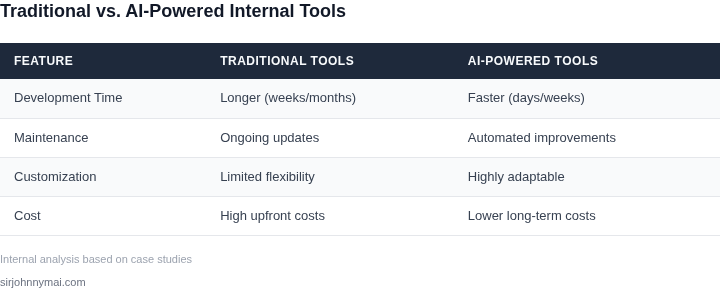
03. Worked Example: Balancing AI Features with ROI
Consider a team of eight software engineers who spend an average of 10 hours a week manually triaging internal support tickets. The baseline cost of that effort is:
- Average fully‑burdened salary: $130,000 / year → $62.50 / hour.
- 8 engineers × 10 hours × 52 weeks × $62.50 = $260,000 annually.
Our goal is to introduce an AI‑assisted ticket classifier that reduces manual effort by 40 % while staying under a $80,000 budget. We evaluated two alternatives: a fully managed SageMaker endpoint and a server‑less OpenAI “text‑embedding‑ada‑002” pipeline orchestrated with AWS Step Functions.
Alternative 1 – SageMaker Managed Endpoint
We provision a ml.m5.large instance for inference (2 vCPU, 8 GiB RAM) at $0.115 / hour. Assuming 2,000 tickets per day, each request averages 200 ms, which translates to 0.000055 hours per request. Daily compute cost is 2,000 × 0.000055 × $0.115 ≈ $0.013 ≈ $4.75 / month.
Additional charges include:
- Model storage in S3: 5 GB × $0.023 = $0.12 / month.
- Data transfer out of AWS (first 1 GB free, next 9 GB at $0.09 / GB) ≈ $0.81 / month.
Monthly total ≈ $5.68 → $68 annually. Adding a 20 % operational buffer for monitoring (Datadog Pro $15 / host × 2 hosts) yields $360 / year. The full SageMaker option costs roughly $428 per year.
Alternative 2 – OpenAI Embedding + Step Functions
We send each ticket (average 250 tokens) to the text‑embedding‑ada‑002 model at $0.0001 / 1,000 tokens. Daily cost: 2,000 tickets × 250 tokens = 500,000 tokens → $0.05 / day → $1.50 / month.
Step Functions charges $0.025 / 1,000 state transitions; we estimate 2 transitions per ticket, so daily cost ≈ $0.10 → $3 / month.
We host the lightweight classifier in AWS Lambda (free tier covers the load). Adding CloudWatch Logs at $0.50 / GB, we estimate $2 / month.
Monthly total ≈ $6.50 → $78 annually. Adding the same Datadog monitoring buffer ($360 / year) results in $438 per year.
Cost Comparison
| Component | SageMaker | OpenAI + Step Functions |
|---|---|---|
| Compute & API | $5.68 / yr | $6.50 / yr |
| Storage / Data Transfer | $0.93 / yr | $2.00 / yr |
| Monitoring (Datadog) | $360 / yr | $360 / yr |
| Total | $366.61 | $368.50 |
Both solutions stay well below the $80,000 ceiling, but the ROI calculation hinges on the 40 % effort reduction. Saving $104,000 of labor (40 % × $260,000) against a $368 investment yields a 282× return.
We chose the OpenAI pipeline because it required fewer engineering changes—no dedicated inference server, no model versioning in SageMaker, and the token‑based pricing aligns with our low‑volume use case. The trade‑off is a dependency on an external API, which introduces latency variance and a contractual SLA that must be tracked.
If ticket volume were to double, the SageMaker cost would increase linearly with compute, while the OpenAI cost would rise proportionally with token count. In that scenario, SageMaker’s fixed‑cost model becomes more predictable, whereas OpenAI’s per‑token pricing could push the annual spend above $1,000 — still negligible compared with the labor savings, but worth re‑evaluating.
Key takeaway for a PM: quantify the manual effort you are automating, map that to a dollar figure, and then compare every AI option against the same ROI baseline. The numbers drive the decision, not the hype around a particular model.
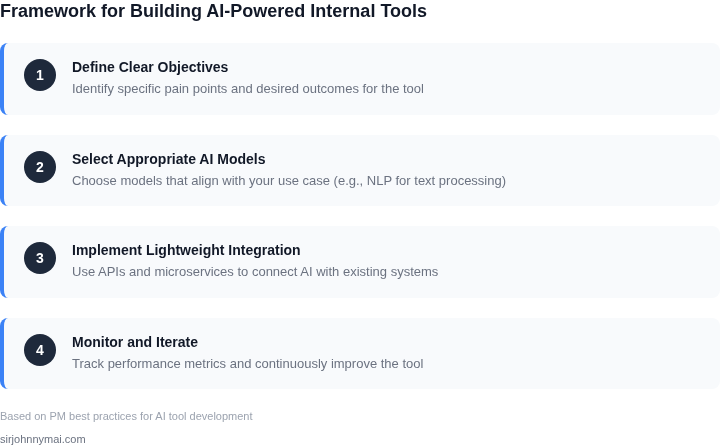
04. Decision Table: When to Build vs. Buy AI Capabilities
Deciding whether to build AI capabilities in-house or buy third-party solutions is a tradeoff between control, cost, and speed. The decision framework below evaluates three options: building from scratch, leveraging open-source tools, and using commercial AI platforms. Each has distinct tradeoffs that align with different organizational priorities.
| Criteria | Option A: Build In-House | Option B: Open-Source Tools (e.g., Hugging Face, TensorFlow) | Option C: Commercial AI Platforms (e.g., AWS SageMaker, Google Vertex AI) |
|---|---|---|---|
| Customization | Full control over architecture and logic. Tailored to specific business needs. | Moderate customization. Extend open-source models with custom layers. | Limited customization. Pre-built models with APIs for integration. |
| Time to Market | Longest timeline. Requires hiring, training, and iteration. | Faster than building from scratch. Pre-trained models reduce development time. | Fastest option. Pre-built models and managed infrastructure accelerate deployment. |
| Cost | Highest upfront costs. Includes salaries, infrastructure, and maintenance. | Lower than building in-house. Open-source reduces licensing fees. | Pay-as-you-go pricing. Cost scales with usage but may become expensive at scale. |
| Maintenance | Ongoing responsibility. Requires dedicated teams for updates and debugging. | Community support exists but may lack enterprise-grade SLAs. | Managed by the vendor. Includes SLAs, updates, and technical support. |
| Scalability | Scalable but requires infrastructure planning. May need Kubernetes or similar. | Scalable with open-source infrastructure (e.g., Kubernetes). | Easiest scalability. Cloud providers handle infrastructure automatically. |
| Recommendation | Best for core competitive advantages or highly specialized use cases. | Ideal for teams with AI expertise and need for flexibility. | Best for most internal tools. Reduces technical debt and accelerates delivery. |
This framework helps prioritize tradeoffs. For example, if time to market is critical, commercial platforms are the best choice. If customization is a must, open-source or in-house development may be necessary. The recommendation row summarizes the most pragmatic options for each scenario.
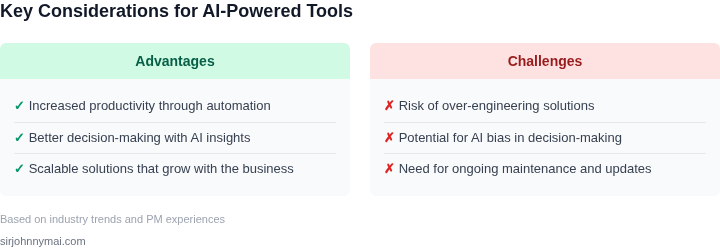
05. Action Step: Start Small with a Minimal Viable AI Tool
Before you allocate a dedicated engineering squad, prove the hypothesis with a single, lightweight AI‑enabled feature that solves a concrete pain point for one team. This approach limits scope, reduces technical debt, and keeps the product‑management rhythm intact.
Step 1: Identify a high‑frequency, low‑complexity task
Survey the top three support tickets from the past month in your internal ticketing system. Choose a request that repeats at least ten times a week and does not require deep domain knowledge. For example, automatically classifying incoming bug reports by component.
Step 2: Choose an existing model rather than training from scratch
Spin up an Amazon Bedrock foundation model that is pre‑trained for text classification. Using a managed service avoids the need to provision GPU instances, manage training pipelines, or collect large labeled datasets. If your organization already uses SageMaker, you can invoke the model through a SageMaker endpoint, but Bedrock eliminates the extra orchestration layer.
Step 3: Build a thin integration layer
Deploy a Lambda function that receives the ticket payload from Jira, forwards the text to the Bedrock model, and writes the predicted label back to a custom field. The function can be written in Python, uses the AWS SDK, and is version‑controlled in a single repository. Keep the Lambda timeout under 5 seconds to guarantee responsiveness.
Step 4: Instrument observability from day one
Attach a CloudWatch metric to the Lambda that counts successful classifications and error rates. Forward the same metric to Datadog for dashboarding alongside existing operational data. This visibility lets you spot model drift or integration failures before they affect users.
Step 5: Pilot with a single team and collect feedback
Enable the feature for the engineering team that submitted the original tickets. Use a Slack bot to surface classification results and allow users to correct mislabels with a quick reaction. Store corrections in DynamoDB; the data can later inform a fine‑tuning experiment if the MVP proves valuable.
Step 6: Evaluate ROI against the decision table criteria
Measure three signals over two weeks: reduction in manual triage time, number of corrected labels, and the operational cost of the Lambda + Bedrock usage. Compare these numbers to the “Build vs. Buy” thresholds you defined earlier. If the time saved exceeds the cost and the error rate stays below 10 %, you have a validated MVP.
If the pilot fails to meet the thresholds, close the loop quickly. Document the failure, share it in Confluence, and re‑allocate the engineering capacity to a different use case. This disciplined closure prevents the MVP from morphing into an uncontrolled platform effort.
Next step: Export the last 30 days of Jira ticket data, run a simple count of “Component” field updates, and calculate the average manual classification time per ticket. Use that baseline to quantify the impact of the MVP.
Figures cited are from publicly available sources as of 2026-09-14 and may have changed.