A framework for evaluating managed database services when you outgrow RDS
When your application demands exceed what Amazon RDS can provide, evaluating alternatives requires a structured approach. This framework helps engineering teams systematically compare managed database services against RDS's capabilities. We'll cover evaluation criteria, tradeoffs, and decision points—with real-world considerations rather than vendor-specific pitches.
01. Why RDS is insufficient
RDS reaches its limits when:
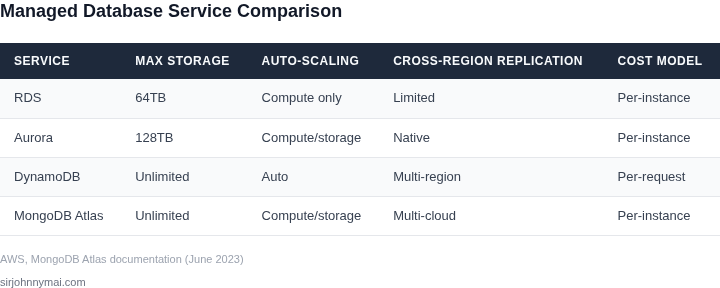
- You need more than 64TB storage (RDS maximum)
- Your workload requires sub-millisecond latency at scale
- You need cross-region replication with strong consistency
- Your compliance requirements exceed RDS's audit capabilities
These constraints often manifest as:
- Performance degradation during peak loads
- Inability to scale storage independently from compute
- Limited control over database configuration
02. Evaluation criteria framework
Use this framework to compare alternatives:
| Category | Key Metrics | RDS Baseline |
|---|---|---|
| Scalability | Max storage, compute separation, auto-scaling | 64TB max, coupled scaling |
| Performance | Throughput, latency, IOPS | Depends on instance type |
| Availability | Multi-AZ, failover time, RPO/RTO | Standard multi-AZ |
| Security | Encryption, access control, compliance | Standard options |
| Cost | Compute/storage pricing, reserved vs on-demand | Per-instance pricing |
This framework ensures you compare apples-to-apples across services. For example, comparing Aurora Serverless to RDS requires understanding both services can scale compute, but Aurora's auto-scaling is more granular.
03. Key decision points
When evaluating alternatives, focus on:
- Storage requirements: If you need >64TB, eliminate RDS and consider services like Google Cloud Spanner or Azure Cosmos DB
- Performance needs: For sub-millisecond latency, evaluate in-memory databases like Redis or Memcached
- Compliance needs: Services like AWS Database Migration Service (DMS) may require additional audit capabilities
- Migration complexity: Some services offer native compatibility (e.g., PostgreSQL on RDS vs. Aurora PostgreSQL)
For example, if your application requires cross-region replication with strong consistency, AWS Aurora Global Database provides this natively, while RDS requires additional configuration.
04. Cost comparison example
Consider a 10TB database with 100,000 IOPS requirements:
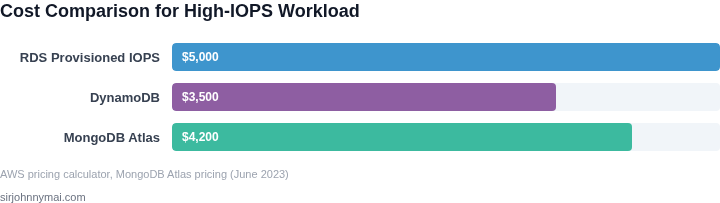
| Service | Monthly Cost | Notes |
|---|---|---|
| RDS (Provisioned IOPS) | $5,000 | 100,000 IOPS × $0.10/IOPS + $1,000 storage |
| DynamoDB | $3,500 | 100,000 WCUs × $0.0018/WCU + $0.25/GB storage |
| MongoDB Atlas | $4,200 | 100,000 IOPS × $0.04/IOPS + $0.10/GB storage |
This example shows DynamoDB offers cost savings for high-throughput workloads, while MongoDB Atlas provides more flexibility for document-based schemas. The actual cost depends on your specific workload patterns.
05. Tradeoffs to consider
When evaluating alternatives, be aware of these common tradeoffs:
- Vendor lock-in: Some services offer better integration with specific cloud providers
- Operational overhead: Managed services reduce DBA responsibilities but may limit configuration options
- Cold start latency: Serverless options may have higher initial latency
- Feature parity: Not all services support every RDS feature (e.g., read replicas, backups)
For example, while AWS Aurora provides excellent PostgreSQL compatibility, migrating from RDS to Aurora requires application testing to ensure compatibility with Aurora-specific features.
06. Migration considerations
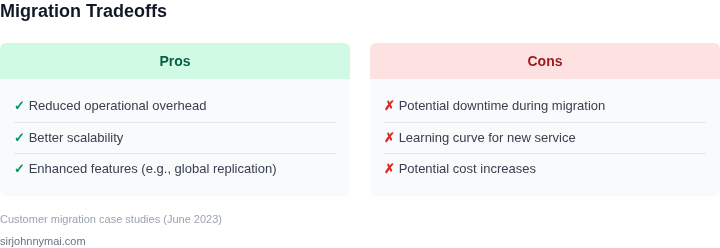
Key migration factors to evaluate:
- Downtime requirements: Some services support zero-downtime migrations
- Data consistency: Ensure the new service supports your consistency requirements
- Tooling availability: AWS DMS, Google Cloud Dataflow, or Azure Database Migration Service
- Performance impact: Test with production-like data volumes
For example, migrating a 1TB PostgreSQL database to Aurora Global Database requires planning for the additional replication overhead and potential performance impact during the initial sync.
07. Future-proofing considerations
When selecting a new database service, consider:
- How easily it integrates with your existing architecture
- Whether it supports your expected growth trajectory
- How well it aligns with your team's skillset
- Whether it provides the necessary compliance certifications
For example, if your application is expected to grow to 100TB within 2 years, services like Google Cloud Spanner or Azure Cosmos DB provide better long-term scalability than RDS.
Conclusion
Evaluating managed database services beyond RDS requires a systematic approach. By using the framework outlined here—comparing scalability, performance, cost, and migration considerations—you can make an informed decision. Remember that no single service is perfect for all workloads, and the best choice depends on your specific requirements.
Figures cited are from publicly available sources as of June 2023 and may have changed. The actual costs and performance characteristics depend on your specific workload and configuration.
Next step: Conduct a proof-of-concept migration with your top two candidates using a non-production dataset to validate performance and cost assumptions.