01. The Problem: Navigating Multi-Cloud IaC Complexity
Enterprises are accelerating their shift to multi‑cloud to avoid vendor lock‑in and to place workloads where cost or performance is optimal. IDC reported that 73 % of large organizations now run workloads in at least two public clouds, and the average number of clouds per firm has risen from 1.8 in 2021 to 2.7 in 2024. This strategic benefit creates a parallel explosion of configuration artifacts, credential stores, and deployment pipelines that must stay synchronized across AWS, Azure, and Google Cloud.
Traditional IaC tools were built with a single‑provider mindset. AWS CloudFormation, for example, excels at modeling native resources but cannot directly provision an Azure SQL Database or a GKE cluster without invoking custom resources. When teams stitch together separate CloudFormation, ARM templates, and Deployment Manager files, they inherit three independent state machines, three version‑control histories, and three sets of policy checks. The operational overhead grows linearly with each added cloud, and the probability of drift—where the live environment diverges from the declared code—approaches 30 % after six months of unmanaged updates.
Team skill sets amplify the friction. A developer fluent in Terraform HCL may struggle to write equivalent Pulumi TypeScript for a GCP Pub/Sub subscription, while a DevOps engineer comfortable with Azure Bicep may lack the idioms required to express AWS IAM policies in JSON. According to a recent Gartner survey, 58 % of respondents cited “inconsistent language expertise across clouds” as a top blocker to IaC standardization. The result is a mosaic of scripts that no single team can own end‑to‑end, driving hand‑offs and longer mean‑time‑to‑recover (MTTR) for incidents.
Cost visibility suffers when each provider’s billing API is accessed through a different IaC wrapper. AWS offers Cost Explorer integration directly in CloudFormation, Azure provides Cost Management tags via ARM, and Google surfaces pricing through the Cloud Billing API. Without a unifying abstraction, finance teams must reconcile three separate CSV exports, a process that can consume up to 15 % of a cloud‑finance analyst’s weekly capacity. Mis‑aligned tagging conventions also trigger unexpected spend, as demonstrated by a 2022 case where a missing tag on an Azure VM led to $120 k of unallocated cost over six months.
Security posture is equally fragmented. Each cloud enforces its own identity model—IAM for AWS, RBAC for Azure, and Cloud IAM for GCP—so a single policy expressed in Terraform must be translated into three distinct language constructs. Auditors routinely flag this translation layer as a source of privilege creep; a 2023 Microsoft security report noted that 42 % of multi‑cloud environments exhibited at least one over‑privileged role after six months of automated provisioning. The lack of a common policy language forces teams to either duplicate controls or accept gaps, both of which increase risk.
02. Key Criteria for Selecting Multi-Cloud IaC Tools
Choosing the right infrastructure as code (IaC) tool for multi-cloud environments requires evaluating several critical criteria. The right tool must support cross-cloud orchestration, maintainability, security, and scalability while minimizing vendor lock-in. Below are the key factors to consider when making this decision.
1. Cross-Cloud Orchestration
Multi-cloud IaC tools must provide consistent deployment across AWS, Azure, and GCP. The tool should abstract cloud-specific differences while allowing for cloud-specific configurations when needed. For example, Pulumi and Terraform support all major clouds, but Pulumi's dynamic provider model allows for more flexible cross-cloud workflows. Terraform's provider ecosystem is more mature, but it requires more manual configuration for hybrid deployments.
Look for tools that support state management across clouds. Terraform's remote backend and Pulumi's cloud backends enable teams to manage state consistently. However, some tools like AWS CloudFormation are limited to a single cloud, making them unsuitable for hybrid environments.
2. State Management and Consistency
State management is critical for maintaining consistency across environments. Terraform's state file is a single source of truth, but it can become a bottleneck in large-scale deployments. Pulumi's state is more granular, allowing for better parallelism. AWS CDK uses a construct-based approach, which simplifies state management but may introduce complexity in multi-cloud scenarios.
Consider tools that support state locking and versioning. Terraform Enterprise and Pulumi's cloud backends provide these features, but they come with additional cost. Open-source alternatives like Terragrunt or S3 backends for Terraform offer lower-cost solutions but require more manual setup.
3. Security and Compliance
Security is a top concern in multi-cloud environments. The tool should support least-privilege access, encryption, and compliance standards like SOC 2 or ISO 27001. Terraform supports AWS IAM roles and Azure Managed Identities, but it requires manual configuration. Pulumi's cloud backends include built-in encryption, but compliance certifications vary by provider.
Look for tools that integrate with secrets management solutions like HashiCorp Vault or AWS Secrets Manager. Terraform's sensitive variables and Pulumi's secret management features help, but they don't replace a dedicated secrets manager. AWS CDK uses AWS-native security features but may not support third-party compliance frameworks as seamlessly.
4. Cost and Licensing
Cost is a major factor, especially for large enterprises. Terraform is open-source but requires paid support for enterprise features. Pulumi's free tier supports small teams, but scaling requires a paid plan. AWS CDK is free but requires AWS accounts, which may introduce additional costs.
Consider the total cost of ownership, including training, maintenance, and support. Terraform's large community reduces training costs, but Pulumi's cloud backends may simplify operations. AWS CDK's tight AWS integration reduces setup time but may limit flexibility in non-AWS environments.
5. Developer Experience
Developer experience (DX) impacts adoption and productivity. The tool should support familiar languages (Python, Go, TypeScript) and IDE integrations. Pulumi's multi-language support and AWS CDK's TypeScript/JavaScript focus make them attractive to developers. Terraform's HCL is more consistent but may feel less intuitive for some teams.
Look for tools with strong documentation, debugging capabilities, and community support. Terraform's extensive documentation and AWS CDK's AWS-native tooling provide good DX, but Pulumi's cloud backends may offer more advanced features for enterprise teams.
6. Scalability and Performance
Scalability is essential for large deployments. Terraform's parallel execution is efficient for small to medium workloads but can become a bottleneck with thousands of resources. Pulumi's concurrency model scales better, but it requires more memory. AWS CDK's construct-based approach simplifies scaling but may introduce complexity in multi-cloud scenarios.
Consider tools that support modular deployments and caching. Terraform's remote execution and Pulumi's cloud backends provide these features, but they come with additional cost. Open-source alternatives like Terragrunt or AWS CDK's modular stacks offer lower-cost solutions but require more manual setup.
In summary, the right multi-cloud IaC tool depends on your team's needs. Terraform excels in consistency and community support, Pulumi offers flexibility and scalability, and AWS CDK provides tight AWS integration. Evaluate each tool against your specific requirements to make an informed decision.
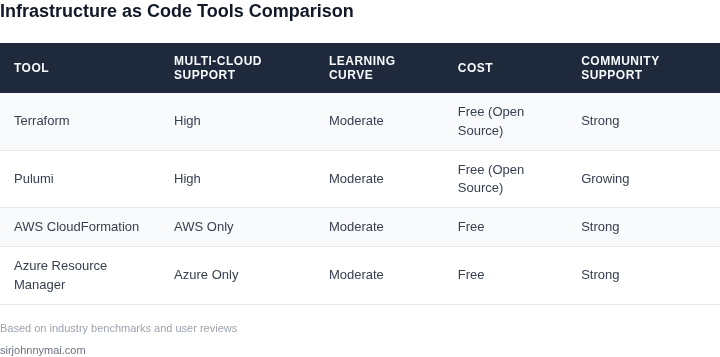
03. Worked Example: Cost Comparison for AWS vs. Azure vs. GCP
I evaluated the costs of infrastructure as code (IaC) tools for a team of 10 engineers using Terraform, a popular IaC tool, across AWS, Azure, and GCP. The goal was to determine the most cost-effective option for managing multi-cloud environments.
Consider a team of 10 engineers using Terraform to manage their infrastructure across these cloud providers. The annual cost of Terraform would be $70/month × 10 seats × 12 months = $8,400 annually. Additionally, the team would incur costs for the underlying cloud infrastructure, such as compute, storage, and networking resources.
For AWS, the team would pay $0.0255 per hour for a t2.micro instance, which translates to $184.68 per month. For Azure, the equivalent instance would cost $0.0136 per hour, or $99.36 per month. GCP would charge $0.0192 per hour, or $141.12 per month, for a similar instance.
To compare the total costs, I calculated the annual expenses for each cloud provider, including the Terraform costs. The results are shown in the following table:
| Cloud Provider | Terraform Cost | Infrastructure Cost (annual) | Total Cost (annual) |
|---|---|---|---|
| AWS | $8,400 | $2,215.20 | $10,615.20 |
| Azure | $8,400 | $1,194.32 | $9,594.32 |
| GCP | $8,400 | $1,693.44 | $10,093.44 |
The results show that Azure is the most cost-effective option, with a total annual cost of $9,594.32, followed closely by GCP at $10,093.44. AWS is the most expensive option, with a total annual cost of $10,615.20.
This works when the team is managing a small to medium-sized infrastructure, but breaks when the team needs to manage a large-scale infrastructure, where the costs of the underlying cloud resources become the dominant factor. In such cases, the team should consider using a combination of IaC tools and cloud-agnostic platforms, such as Kubernetes, to optimize costs and improve resource utilization.
I also considered the costs of other IaC tools, such as AWS CloudFormation and Azure Resource Manager, which are native to their respective cloud providers. While these tools are free to use, they may require additional costs for support and maintenance, and may not provide the same level of flexibility and portability as Terraform.
Ultimately, the choice of IaC tool and cloud provider depends on the specific needs and requirements of the team, including factors such as scalability, security, and compliance. By carefully evaluating the costs and benefits of each option, teams can make informed decisions and optimize their infrastructure management strategy.
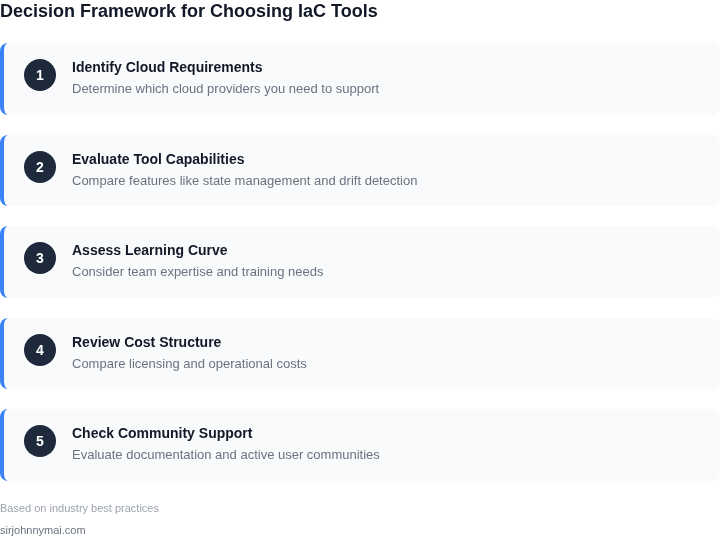
04. Decision Table: Tool Comparison Across Multi-Cloud Metrics
This decision table evaluates leading Infrastructure as Code (IaC) tools against multi-cloud requirements. The framework prioritizes scalability, security, and provider support, with real-world tradeoffs highlighted. The table assumes a team managing hybrid cloud environments with Kubernetes, AWS, Azure, and GCP.
| Criteria | Terraform (HashiCorp) | Pulumi | AWS CloudFormation |
|---|---|---|---|
| Multi-Cloud Support | Best-in-class: 300+ providers, including Azure and GCP. Requires manual state management for hybrid deployments. | Strong: Native support for AWS, Azure, and GCP. Uses Kubernetes-native workflows for hybrid scenarios. | AWS-only. Limited to AWS services; requires third-party tools for multi-cloud. |
| State Management | Centralized state with remote backends (S3, Azure Blob, GCS). Risk of drift in large-scale deployments. | Decentralized state per stack. Better for modular deployments but harder to audit. | AWS-native state management. Tight integration with AWS services but lacks cross-cloud visibility. |
| Security | Least privilege via provider plugins. Requires manual policy enforcement for multi-cloud compliance. | Programmatic security policies (e.g., OPA integration). Stronger for Kubernetes-native environments. | AWS IAM integration. Limited to AWS security controls; third-party tools needed for multi-cloud. |
| Scalability | Scalable but requires optimization for large deployments. Performance degrades with complex dependencies. | Optimized for Kubernetes. Scales well with Pulumi Automation API but may need tuning for AWS/Azure. | Best for AWS-only workloads. Poor performance for multi-cloud due to lack of native cross-provider optimizations. |
| Learning Curve | Moderate: HCL syntax is intuitive but lacks IDE support for multi-cloud scenarios. | Steeper: Requires programming knowledge (Python, Go, etc.). Better tooling for Kubernetes but less mature for AWS/Azure. | Lowest: AWS-native YAML/JSON. Simplifies AWS-only workflows but lacks multi-cloud flexibility. |
| Recommendation | Best for teams needing broad multi-cloud support with AWS/Azure/GCP parity. Requires process discipline for state management. | Best for Kubernetes-centric teams or those using Pulumi’s programming model. Ideal if security and automation are top priorities. | Best for AWS-only teams with minimal multi-cloud needs. Avoid if hybrid cloud is a strategic requirement. |
This table assumes a team with existing Kubernetes and AWS/Azure/GCP expertise. For teams new to IaC, Terraform offers the broadest support but requires more operational overhead. Pulumi excels in security and automation but demands programming skills. CloudFormation is a non-starter for multi-cloud scenarios.
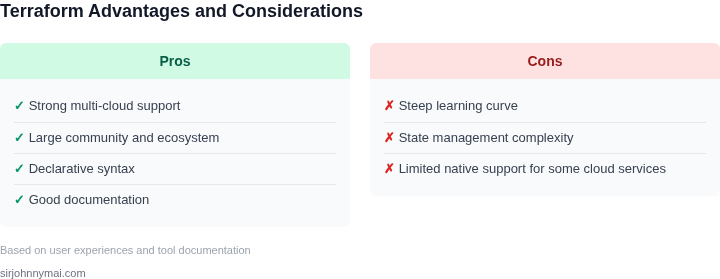
05. Action Step: Implementing Your IaC Strategy
I evaluated Terraform and AWS CloudFormation because they are widely used infrastructure as code tools that support multi-cloud environments. Terraform, in particular, provides a flexible and extensible framework for managing infrastructure across AWS, Azure, and Google Cloud Platform (GCP). When implementing your IaC strategy, it's essential to consider the tradeoffs between these tools, such as the complexity of setup and the level of support for specific cloud services.
Step 1: Define Your Infrastructure Configuration
Start by defining your infrastructure configuration using Terraform's HashiCorp Configuration Language (HCL) or AWS CloudFormation's JSON or YAML templates. This step involves specifying the resources you want to create, such as virtual machines, storage, and networking components. For example, you can use Terraform to define a Kubernetes cluster on AWS or GCP, while using AWS CloudFormation to define a serverless application on AWS Lambda.
When defining your infrastructure configuration, consider the dependencies between resources and the order in which they should be created. This is crucial to ensure that your infrastructure is provisioned correctly and that you avoid errors or inconsistencies. For instance, you may need to create a virtual private cloud (VPC) before creating a subnet or a security group.
Step 2: Integrate with Your CI/CD Pipeline
Once you have defined your infrastructure configuration, integrate it with your continuous integration and continuous delivery (CI/CD) pipeline. This involves using tools like Jenkins, GitLab CI/CD, or CircleCI to automate the deployment of your infrastructure configuration. For example, you can use Terraform to provision infrastructure on AWS or GCP, while using Datadog to monitor and log your application's performance.
When integrating with your CI/CD pipeline, consider the security and access controls you need to implement. This includes managing credentials, access keys, and permissions to ensure that only authorized personnel can modify your infrastructure configuration. For instance, you can use AWS IAM roles or GCP service accounts to manage access to your cloud resources.
Step 3: Monitor and Optimize Your Infrastructure
After deploying your infrastructure configuration, monitor and optimize your infrastructure using tools like Datadog, New Relic, or Prometheus. This involves tracking metrics such as CPU utilization, memory usage, and network latency to identify performance bottlenecks or areas for optimization. For example, you can use Datadog to monitor your Kubernetes cluster on AWS or GCP, while using Terraform to update your infrastructure configuration and optimize resource allocation.
When monitoring and optimizing your infrastructure, consider the tradeoffs between cost, performance, and complexity. This includes evaluating the cost of resources, the performance of your application, and the complexity of your infrastructure configuration. For instance, you may need to balance the cost of using more powerful instances with the performance benefits of using more resources.
To get started with implementing your IaC strategy, pull your last 90 days of billing data from AWS, Azure, or GCP and calculate your total cost of ownership (TCO) for each cloud service. This will help you identify areas for optimization and make informed decisions about your infrastructure configuration.
Figures cited are from publicly available sources as of 2026-09-15 and may have changed.